Python Operators Explained: Arithmetic, Comparison and Logical
By Dr. Zubair Khalid, DVM, MS, PhD ·
Python operators are the symbols that tell the interpreter what to do with your values: add them, compare them, combine conditions, or test membership. This guide covers the arithmetic, comparison, logical and membership operators you will use most, with a worked example on a small product table. Every operator in Python is also available as a function in the operator module, so operator.add(x, y) is equivalent to x + y [1].
Quick Answer
- Arithmetic operators (
+,-,,/,//,%,*) compute new numeric values. Division with/always returns a float, and//performs floor division [2]. - Comparison operators (
==,!=,<,<=,>,>=) returnTrueorFalsefor built-in values.==and!=work on any objects, but ordering comparisons such as<raise aTypeErrorbetween unrelated types like a string and a number [1]. - Logical operators (
and,or,not) combine boolean expressions and return one of their operands, not necessarily a boolean. - Membership operators (
in,not in) test whether a value appears in a sequence, set, or dictionary. - Operator precedence matters.
*binds tighter than+, and comparisons bind tighter thanand, which binds tighter thanor.
What a Python Operator Means
An operator is a symbol or keyword that performs an operation on one or more values, called operands. In the expression 40 3, the is the operator and 40 and 3 are the operands. The result is a new value, 120.
The precise definition from the language reference is that operators are part of expression syntax, and each operator has defined semantics for the built-in types it supports [3]. When an arithmetic operator receives numeric arguments, Python converts them to a common real type before applying the operation [3]. That is why 40 3 gives 120 but 40.0 3 gives 120.0: when a float is involved, the integer is converted to a float first.
Operators fall into a few families. Arithmetic operators produce numbers. Comparison operators produce booleans. Logical operators combine booleans. Membership operators test containment. The operator module groups its functions into object comparisons, logical operations, mathematical operations and sequence operations [1].
How It Works
Each operator maps to a method on the objects involved. For built-in numbers, the arithmetic operators follow standard math rules with a few Python-specific behaviors.
| Operator | Name | Example | Result |
|---|---|---|---|
+ | Addition | 40 + 3 | 43 |
- | Subtraction | 40 - 3 | 37 |
* | Multiplication | 40 * 3 | 120 |
/ | Division | 17 / 3 | 5.666666666666667 |
// | Floor division | 17 // 3 | 5 |
% | Modulo | 17 % 3 | 2 |
** | Power | 2 ** 3 | 8 |
Division always returns a float, even when both operands are integers [2]. Floor division discards the fractional part, and the modulo operator returns the remainder, so the identity (17 // 3) * 3 + (17 % 3) reconstructs 17 [2].
Comparison operators return a boolean. The expression 40 > 30 evaluates to True, and 25 > 30 evaluates to False. Python supports chained comparisons such as 15 < price < 70, which is equivalent to 15 < price and price < 70.
Logical operators work on truth values. The and operator returns the first operand if it is falsy, otherwise the second. The or operator returns the first operand if it is truthy, otherwise the second. The not operator returns the opposite boolean. This short-circuit behavior means the right side of an and is never evaluated when the left side is false.
Membership operators test containment. "Widget" in products is True when the list products contains that string. The in operator also works on strings, sets, and dictionary keys. For a deeper look at how sets handle membership, see Python Sets: What They Are and How to Use Them.
Worked Example
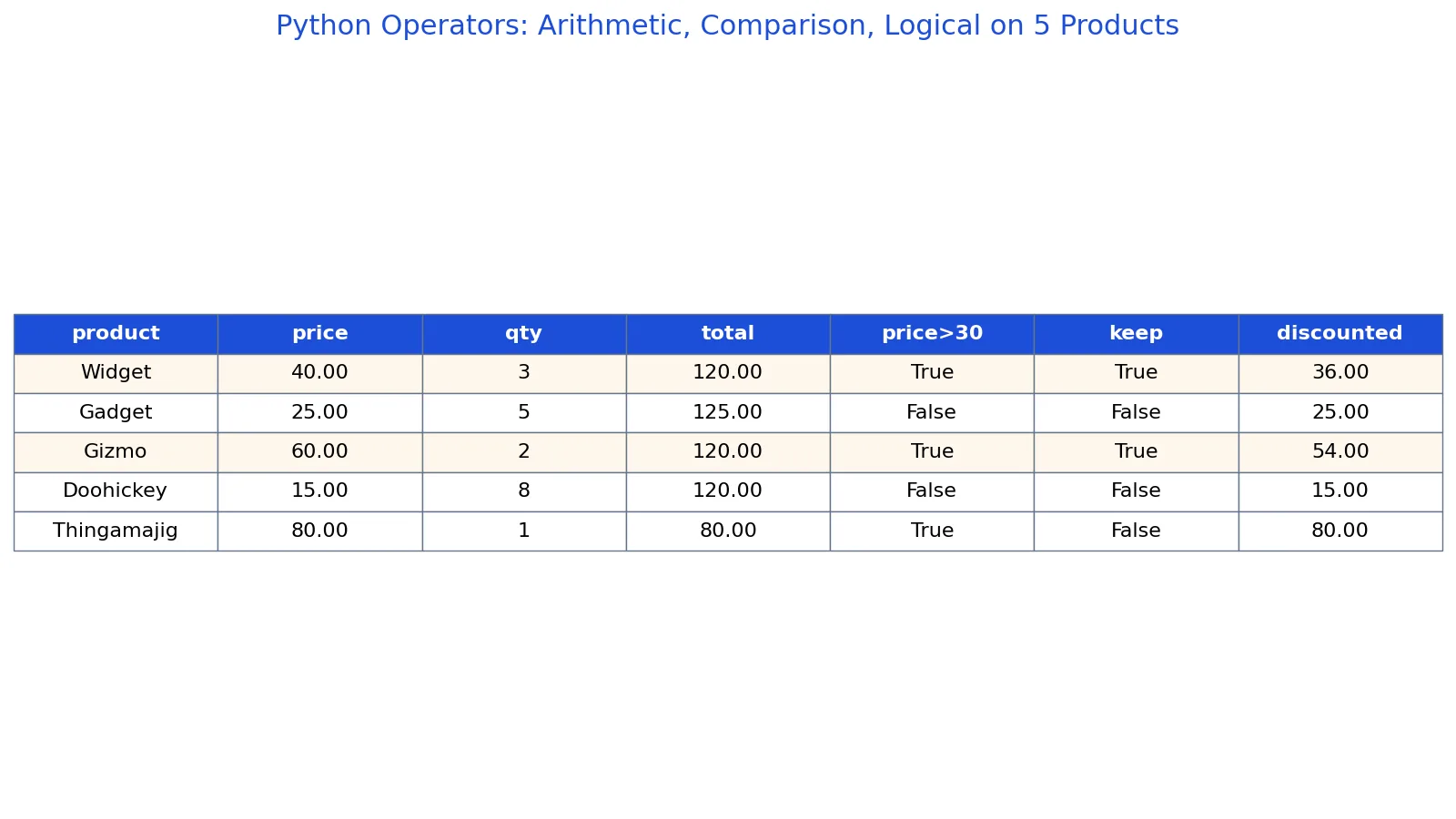
The dataset below has five products with a price and a quantity. We apply arithmetic, comparison, and logical operators to compute totals, flag expensive items, and apply a discount.
| product | price | qty |
|---|---|---|
| Widget | 40 | 3 |
| Gadget | 25 | 5 |
| Gizmo | 60 | 2 |
| Doohickey | 15 | 8 |
| Thingamajig | 80 | 1 |
Step 1: Arithmetic. Multiply price by quantity for each row.
- Widget: 40.0 * 3 = 120.0
- Gadget: 25.0 * 5 = 125.0
- Gizmo: 60.0 * 2 = 120.0
- Doohickey: 15.0 * 8 = 120.0
- Thingamajig: 80.0 * 1 = 80.0
Step 2: Comparison. Test whether price is greater than 30.
- Widget: 40.0 > 30 -> True
- Gadget: 25.0 > 30 -> False
- Gizmo: 60.0 > 30 -> True
- Doohickey: 15.0 > 30 -> False
- Thingamajig: 80.0 > 30 -> True
Step 3: Logical AND. Combine the price test with a quantity test.
- Widget: (40.0 > 30) and (3 >= 2) -> True
- Gadget: (25.0 > 30) and (5 >= 2) -> False
- Gizmo: (60.0 > 30) and (2 >= 2) -> True
- Doohickey: (15.0 > 30) and (8 >= 2) -> False
- Thingamajig: (80.0 > 30) and (1 >= 2) -> False
Step 4: Conditional discount. Apply a 10 percent discount when the keep flag is True.
- Widget: 40.0 * 0.9 = 36.0
- Gadget: keep is False, so the price stays 25.0
- Gizmo: 60.0 * 0.9 = 54.0
- Doohickey: keep is False, so the price stays 15.0
- Thingamajig: keep is False, so the price stays 80.0
Two rows pass the filter, Widget and Gizmo, with discounted prices of 36 and 54. The sum of the discounted filtered prices is 90.
import pandas as pd

df = pd.DataFrame({
    "product": ["Widget", "Gadget", "Gizmo", "Doohickey", "Thingamajig"],
    "price":   [40.0, 25.0, 60.0, 15.0, 80.0],
    "qty":     [3, 5, 2, 8, 1],
})

df["total"] = df["price"] * df["qty"]
df["price_gt_30"] = df["price"] > 30
df["keep"] = (df["price"] > 30) & (df["qty"] >= 2)
df["discounted"] = df["price"].where(~df["keep"], df["price"] * 0.9)

filtered = df[df["keep"]]
print(filtered[["product", "price", "discounted"]])
Output:
  product  price  discounted
0  Widget   40.0        36.0
2   Gizmo   60.0        54.0
Note that pandas uses & for element-wise logical AND and ~ for element-wise NOT, because the Python keywords and, or and not do not work on whole columns. The comparison and arithmetic operators behave the same way they do on scalars.
How to Interpret It
Read each operator result by its type. Arithmetic operators return numbers, so total is a numeric column you can sum or average. Comparison operators return booleans, so price_gt_30 is a True or False flag you can count or filter on. Logical operators combine booleans, so keep is True only when both conditions hold.
The keep column is the gate for the discount. When keep is True, the discounted price is 90 percent of the original. When keep is False, the discounted price equals the original price. That is why Gadget, Doohickey and Thingamajig show no discount in the full table even though the code computes a value for every row.
If you are building conditional logic like this in plain Python, the same pattern appears in Python If Else: Syntax and Examples. If you need to loop over rows, see Python For Loop: Syntax, Examples and Common Patterns.
When to Use It (and when not to)
Use arithmetic operators whenever you need to derive a new numeric value from existing columns, such as revenue, ratios, or differences. Use comparison operators to build boolean flags for filtering and counting. Use logical operators to combine multiple conditions into a single filter.
Avoid logical operators on pandas columns. Use &, | and ~ with parentheses around each condition instead. Avoid == when you mean identity. The is operator tests whether two names point to the same object, and CPython may emit a SyntaxWarning when you compare literals with is [3]. Use == for value equality.
Do not use arithmetic operators on strings expecting numeric results. "40" + "3" concatenates to "403", not 43. Convert with int() or float() first. For a refresher on types, see Python Data Types: Definition, Examples and How to Check Them.
Python Operators vs Functions
Every operator has a function equivalent in the operator module. The functions are useful when you need to pass an operation as an argument, such as to map or reduce. The table below shows the mapping.
| Operator | Function | Example |
|---|---|---|
+ | operator.add | operator.add(40, 3) -> 43 |
* | operator.mul | operator.mul(40, 3) -> 120 |
== | operator.eq | operator.eq(40, 40) -> True |
> | operator.gt | operator.gt(40, 30) -> True |
in | operator.contains | operator.contains([1, 2], 2) -> True |
The function names match the special methods without the double underscores, and the variants without underscores are preferred for clarity [1]. Use operators in normal expressions and the functions when you need a callable.
Common Mistakes
- Using
andon pandas columns. The keyword raises an error on a Series. Fix: use&with parentheses, as in(df["price"] > 30) & (df["qty"] >= 2). - Forgetting parentheses around combined conditions.
df["price"] > 30 & df["qty"] >= 2parses in an unexpected order. Fix: wrap each comparison in parentheses. - Expecting
/to return an integer. Division always returns a float [2]. Fix: use//when you want a floored integer result. - Confusing
=with==.=assigns a value,==compares two values [2]. Fix: read the line aloud as "assign" or "equals" to catch the error. - Using
isfor value comparison.istests identity, not equality [3]. Fix: use==unless you specifically need to check object identity. - Assuming
andreturns a boolean. It returns one of its operands. Fix: wrap the expression inbool()if you need a strict True or False.
Limitations
Operators follow fixed precedence rules, so a long expression without parentheses can be hard to read and easy to get wrong. Python evaluates * before +, comparisons before and, and and before or. When in doubt, add parentheses. They cost nothing and remove ambiguity.
Floating point arithmetic has precision limits. Values like 0.1 + 0.2 do not equal 0.3 exactly in binary floating point. For money, consider rounding explicitly or working in integer cents. Comparison operators on floats inherit the same issue, so test with a tolerance when exact equality is unrealistic.
Frequently Asked Questions
What is the difference between == and is in Python?
== tests whether two objects have equal values. is tests whether two names refer to the same object in memory. For most data work you want ==. The is operator is mainly for comparing against None, as in value is None.
Does and always return True or False?
No. and returns the first falsy operand or the last operand if all are truthy. 3 and 5 returns 5. 0 and 5 returns 0. If you need a strict boolean, wrap the expression in bool().
Why does 17 / 3 give a decimal instead of 5?
Division with / always returns a float in Python 3, so 17 / 3 gives 5.666666666666667 [2]. Use // for floor division, which gives 5, and % for the remainder, which gives 2 [2].
What does the in operator do?
in tests membership. It returns True if the left operand appears in the right operand, which can be a list, tuple, string, set, or dictionary. For dictionaries, in checks keys, not values.
Can I use Python operators on a whole DataFrame column?
Yes for arithmetic and comparison operators. df["price"] * df["qty"] and df["price"] > 30 both work element-wise. Logical operators are the exception. Use &, | and ~ instead of and, or and not on columns.
References
- operator, Standard operators as functions, Python 3.14.8 documentation
- 3. An Informal Introduction to Python, Python 3.14.8 documentation
- 6. Expressions, Python 3.14.8 documentation
Further Reading
- Harris CR, Millman KJ, van der Walt SJ et al. (2020). Array programming with NumPy. Nature
- McKinney W (2010). Data Structures for Statistical Computing in Python. Proceedings of the Python in Science Conference
- The Python Tutorial