SQL NOT IN Operator: Syntax and Examples
By Dr. Zubair Khalid, DVM, MS, PhD ·
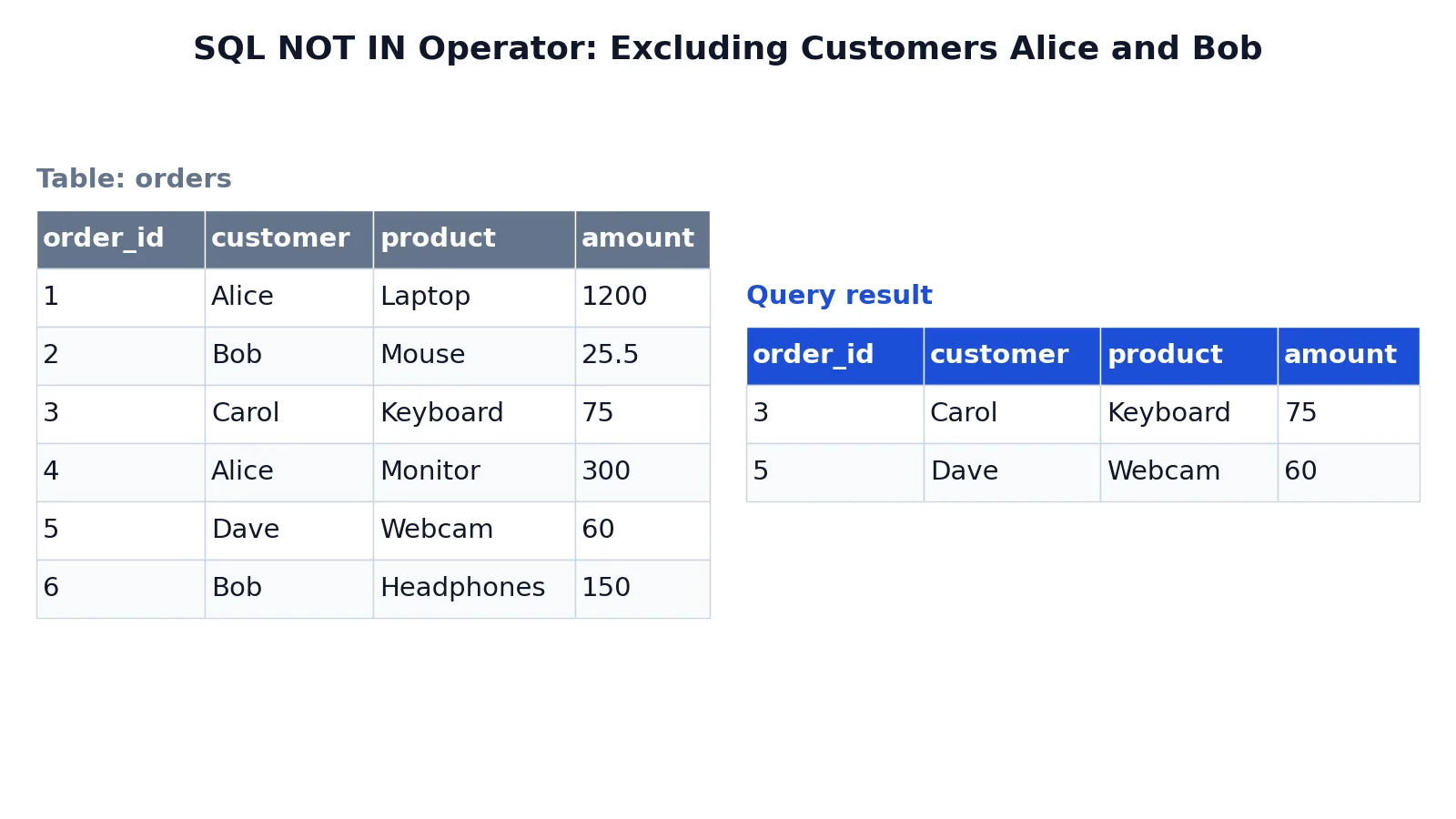
The SQL NOT IN operator filters a result set by removing rows whose column value matches any value in a list. You write it as column NOT IN (value1, value2, ...), and the database keeps only the rows where the comparison is false for every value in that list. It is the direct opposite of the SQL IN operator, which keeps matching rows instead of removing them.
Quick Answer
NOT INreturns rows where a column value does not equal any value in a parenthesized list.- Syntax:
WHERE column NOT IN (value1, value2, value3). - The list can hold literals, expressions, or the output of a subquery.
NOT INis shorthand for a chain ofANDcomparisons joined with<>.- If the list or subquery contains a
NULL,NOT INcan return no rows at all, so handleNULLcarefully.
Syntax
The general form is:
SELECT column_list
FROM table_name
WHERE column_name NOT IN (value1, value2, ...);| Argument | Required? | Meaning |
|---|---|---|
column_name | Yes | The column whose values you test against the list. |
NOT IN | Yes | The operator that excludes matches. |
(value1, value2, ...) | Yes | A parenthesized list of values, expressions, or a subquery that returns one column. |
value1, value2, ... | Yes | The values to exclude. They must be comparable to the column's data type. |
The list must be wrapped in parentheses. A single value is allowed, as in NOT IN ('Alice'), though <> is clearer for one value. The values can be numbers, quoted strings, dates, or a subquery such as (SELECT customer FROM blocked_customers).
How It Works
NOT IN compares the column value against each item in the list. A row is kept only when the value differs from every item. Logically, this is the same as writing each comparison out and joining them with AND:
WHERE customer <> 'Alice' AND customer <> 'Bob'The two forms above and the NOT IN form return the same rows when no NULL is involved. The operator is a compact way to express a set of exclusions.
The behavior around NULL is the part that trips people up. In SQL, comparing any value to NULL yields an unknown result, not true or false. When a NOT IN list contains a NULL, every row's comparison against that NULL is unknown, so the whole condition cannot be true and the query returns zero rows. This applies to literal NULL values in the list and to subqueries that return a NULL in their result column.
The order of values in the list does not matter. NOT IN ('Alice', 'Bob') and NOT IN ('Bob', 'Alice') behave identically. Duplicate values in the list are harmless.
Worked Example
The orders table below holds six orders with a customer, product, and amount. Suppose you want every order that was not placed by Alice or Bob.
Input table orders:
| order_id | customer | product | amount |
|---|---|---|---|
| 1 | Alice | Laptop | 1200.0 |
| 2 | Bob | Mouse | 25.5 |
| 3 | Carol | Keyboard | 75.0 |
| 4 | Alice | Monitor | 300.0 |
| 5 | Dave | Webcam | 60.0 |
| 6 | Bob | Headphones | 150.0 |
Query:
SELECT * FROM orders WHERE customer NOT IN ('Alice', 'Bob');How the query runs:
SELECT *chooses all columns from theorderstable.FROM ordersreads rows from theorderstable.WHERE customer NOT IN ('Alice', 'Bob')keeps only rows whose customer value is not equal to any value in the list. Rows with customerAliceorBobare excluded.
Result:
| order_id | customer | product | amount |
|---|---|---|---|
| 3 | Carol | Keyboard | 75.0 |
| 5 | Dave | Webcam | 60.0 |
The result was checked with an equivalent SQLite query. Only Carol's and Dave's orders survive, because the four orders from Alice and Bob are filtered out.
More Examples
Exclude a list of product names. To drop specific products from a report:
SELECT order_id, product, amount
FROM orders
WHERE product NOT IN ('Mouse', 'Webcam');
This keeps the Laptop, Keyboard, Monitor, and Headphones rows.
Exclude values from a subquery. You can drive the exclusion list from another table:
SELECT *
FROM orders
WHERE customer NOT IN (SELECT customer FROM blocked_customers);
Any customer listed in blocked_customers is removed from the result. This is a common pattern for filtering against a reference table. When you combine it with other filters, the SQL SELECT statement clauses run in a fixed order, so WHERE is applied before grouping and sorting.
Combine with other conditions. NOT IN works alongside other predicates:
SELECT *
FROM orders
WHERE customer NOT IN ('Alice', 'Bob')
  AND amount > 50;
This keeps only the excluded-customer rows whose amount is above 50, which leaves Carol's Keyboard row and Dave's Webcam row.
Use NOT IN with a CASE expression. You can branch on membership inside a CASE expression:
SELECT order_id,
       CASE WHEN customer NOT IN ('Alice', 'Bob') THEN 'Other' ELSE 'Core' END AS segment
FROM orders;
This labels each order as Other or Core based on the same list.
Exclude dates or numbers. The list is not limited to text. To exclude specific order IDs:
SELECT * FROM orders WHERE order_id NOT IN (1, 2, 4, 6);This returns orders 3 and 5.
Errors and How to Fix Them
Missing parentheses. WHERE customer NOT IN 'Alice', 'Bob' is a syntax error. The list must be wrapped: NOT IN ('Alice', 'Bob').
Type mismatch. Comparing a text column to unquoted values, as in NOT IN (Alice, Bob), makes the database treat the names as column references and fail. Quote string literals.
Subquery returns more than one column. NOT IN (SELECT customer, product FROM ...) raises an error because the subquery must return exactly one column. Select only the column you compare against.
Unexpected empty result. If a NOT IN query returns nothing when you expect rows, check for NULL in the list or subquery. Filter it out with WHERE column IS NOT NULL inside the subquery, or switch to NOT EXISTS.
Wrong operator direction. Using IN when you meant to exclude values keeps the rows you wanted to remove. Double-check the operator against your intent.
Common Mistakes
- Assuming NOT IN handles NULL like other values. A
NULLanywhere in the list makes the whole condition unknown, so no rows return. Fix it by removingNULLfrom the list or subquery, or by usingNOT EXISTS. - Forgetting quotes around text values.
NOT IN (Alice)is read as a column name. Fix it withNOT IN ('Alice'). - Using NOT IN for a single value.
NOT IN ('Alice')works, but<> 'Alice'is clearer and avoids list syntax. Fix it by switching to the comparison operator. - Mixing data types in the list. Comparing a numeric column to
'5'can behave differently across databases. Fix it by matching the literal type to the column type. - Expecting NOT IN to ignore case. String comparison is case sensitive by default in SQLite and PostgreSQL, so
'alice'does not match'Alice'there, while the default collations in MySQL and SQL Server usually ignore case. Fix it by normalizing case with a function such asLOWERon both sides. - Building the list from untrusted input. Concatenating user text into a
NOT INlist invites SQL injection. Fix it with parameterized queries or bound values.
Limitations
NOT IN cannot express ranges or patterns. It only tests equality against a fixed set, so conditions like "amount between 50 and 200" or "product starts with M" need BETWEEN or LIKE instead. For large lists, the operator can also be slower than a join against a reference table, because the database must compare each row against every value.
The NULL behavior is the biggest practical trap. A NOT IN subquery that returns even one NULL silently produces an empty result, which looks like a data problem rather than a query problem. When the source column can contain NULL, prefer NOT EXISTS or add an explicit IS NOT NULL filter. Also remember that SQL Server's NOT IN compares single values only, so excluding combinations of columns there needs NOT EXISTS. PostgreSQL, MySQL and SQLite accept row values, as in (customer, product) NOT IN (SELECT customer, product FROM ...).
Frequently Asked Questions
What is the difference between NOT IN and NOT EXISTS?
NOT IN compares a column against a list of values and returns rows with no match. NOT EXISTS tests whether a correlated subquery returns any row. NOT EXISTS handles NULL more predictably, so it is often the safer choice when the subquery column can be NULL.
Does NOT IN work with NULL values?
It works, but the result is usually not what you want. If the list or subquery contains a NULL, the comparison against that NULL is unknown, so the condition is never true and the query returns no rows. Remove NULL values or use NOT EXISTS to avoid this.
Can I use NOT IN with a subquery?
Yes. Write WHERE column NOT IN (SELECT column FROM other_table). The subquery must return exactly one column. If that column can contain NULL, filter it with IS NOT NULL inside the subquery.
Is NOT IN the same as <>?
For a single value they are equivalent. NOT IN ('Alice') returns the same rows as <> 'Alice'. NOT IN is designed for lists of two or more values, where it replaces a chain of <> comparisons joined with AND.
How do I exclude multiple values in SQL?
Put all the values in one parenthesized list: WHERE customer NOT IN ('Alice', 'Bob', 'Carol'). The database removes any row whose customer matches one of those values and keeps the rest. You can also drive the list from a subquery when the values live in another table.
References
This article draws on the standard references listed under Further Reading.
Further Reading
- Codd EF (1970). A relational model of data for large shared data banks. Communications of the ACM
- PostgreSQL Documentation: SELECT
- SQLite: SQL As Understood By SQLite
- Wilson G, Bryan J, Cranston K et al. (2017). Good enough practices in scientific computing. PLOS Computational Biology
- PostgreSQL Tutorial: The SQL Language
- SQLite: Built-In Scalar SQL Functions