Python Data Types: Definition, Examples and How to Check Them
By Dr. Zubair Khalid, DVM, MS, PhD ·
Python data types are the categories Python assigns to every value, such as str for text, int for whole numbers, float for decimals and bool for True or False. Each type decides which operations are valid, so knowing the type of a value tells you what you can safely do with it. This article covers the built-in types, how to check them, and how those types appear inside a pandas DataFrame.
Quick Answer
- Python has built-in types for text (
str), whole numbers (int), decimals (float), complex numbers (complex), truth values (bool), and the special valueNone. - Container types group other values:
list,tuple,range,dict,setandfrozenset[1]. - Use
type(x)to get the exact type of a value andisinstance(x, int)to test membership in a type. - Types control behavior.
17 / 3returns a float, while17 // 3returns an integer [2]. - In pandas,
df.dtypesreports a dtype per column, andtype(df["col"].iloc[0])reports the Python type of a single value.
What Python Data Types Mean
A data type is a label Python attaches to a value that describes what kind of value it is and what operations it supports. When you write count = 12, Python creates an integer object and binds the name count to it. When you write name = "S-101", it creates a string object instead. The type travels with the value, not with the variable name, so the same name can hold an integer now and a string later.
The precise definition is that a type is a class, and every value is an instance of exactly one class. type(x) returns that class object, and isinstance(x, C) returns True when x is an instance of class C or of a subclass of C. Types determine which operations are permitted, which is why "3" + "4" gives "34" while 3 + 4 gives 7. The Python documentation groups the built-in types alongside specialized modules for dates, times, fixed-type arrays and other structures [1].
The core built-in types you will meet most often are:
| Type | Holds | Example |
|---|---|---|
str | Text, a sequence of characters | "S-101" |
int | Whole numbers, positive, negative or zero | 12 |
float | Numbers with a decimal point | 3.42 |
complex | A real part and an imaginary part | 2+3j |
bool | True or False | True |
NoneType | The single value None | None |
list | An ordered, changeable sequence | [12, 7, 15] |
tuple | An ordered, unchangeable sequence | (12, 7, 15) |
dict | Key to value mappings | {"count": 12} |
set | Unordered collection of unique values | {12, 7, 15} |
Strings are sequence types, so they support indexing and slicing like other sequences [2]. Lists are the most versatile compound type and can hold items of different types, though in practice the items usually share a type [2]. Integers cover counting and indexing, floats cover measurements and percentages where more precision is needed, and booleans cover conditions and comparisons [3]. Booleans also have numeric meaning, since True equals 1 and False equals 0, and both must be capitalized in Python [3].
How It Works
Type checking rests on two functions and one attribute.
type(x) returns the class of x. The comparison type(x) is int is True only when the type matches exactly.
isinstance(x, C) returns True when x is an instance of C or any subclass of C. This is the safer test when you care about behavior instead of exact identity.
df.dtypes returns a Series indexed by column name, giving the dtype pandas assigned to each column. The relationship between a pandas dtype and the underlying Python type is:
$$ \text{dtype} \rightarrow \text{Python type of one element} $$
For a column of dtype object, the elements are usually str, but object can hold mixed types. For int64, float64 and bool, single elements come back as the NumPy scalar types numpy.int64, numpy.float64 and numpy.bool, which behave like int, float and bool. Numeric dtypes also carry a width, so int64 means a 64-bit integer, which is why the dtype name and the Python type name do not always match.
Worked Example
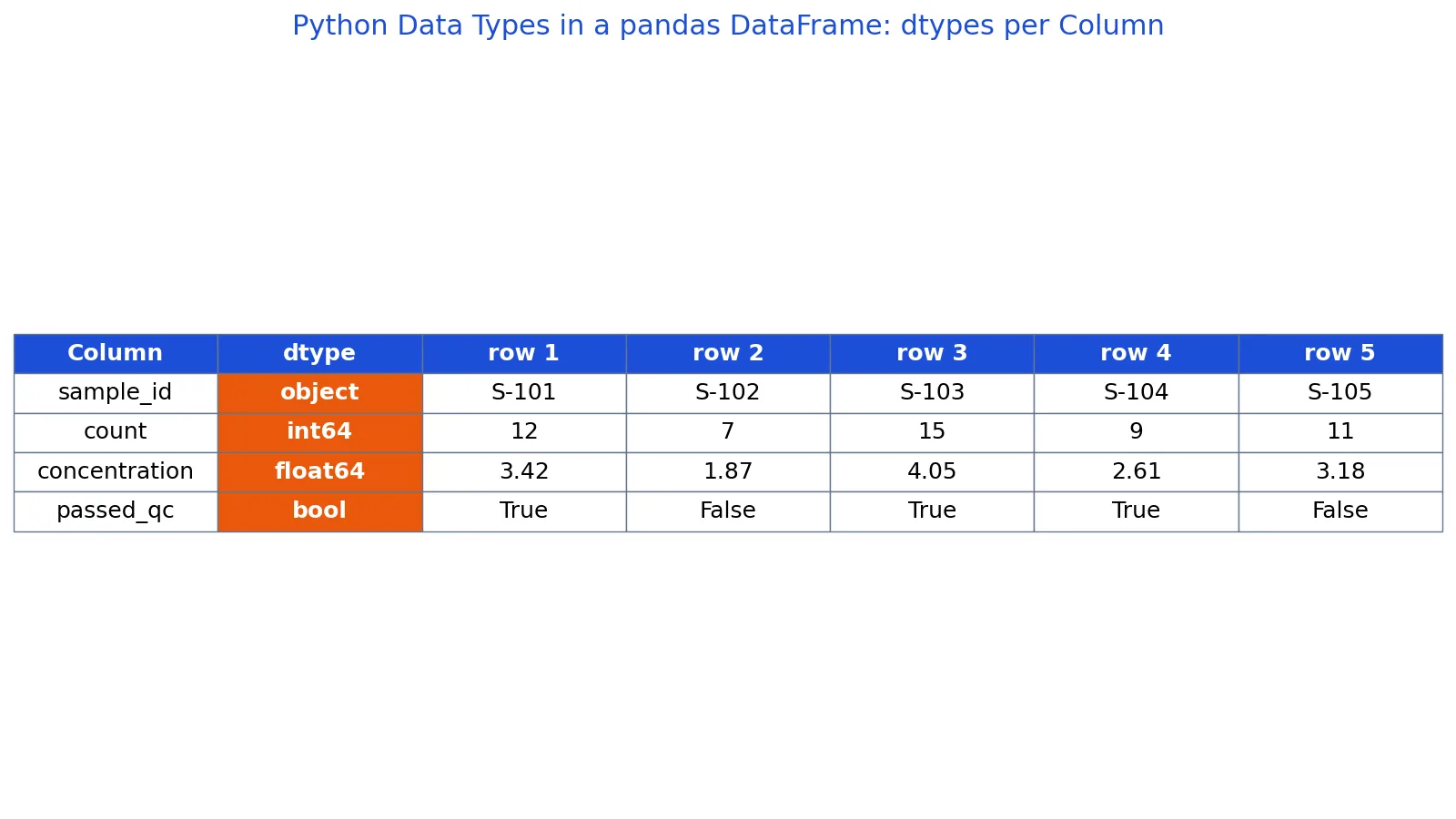
The dataset below holds five lab measurements with a sample ID, a count, a concentration and a QC status.
| sample_id | count | concentration | passed_qc |
|---|---|---|---|
| S-101 | 12 | 3.42 | True |
| S-102 | 7 | 1.87 | False |
| S-103 | 15 | 4.05 | True |
| S-104 | 9 | 2.61 | True |
| S-105 | 11 | 3.18 | False |
Building the DataFrame gives df.shape = (5, 4), so there are 5 rows and 4 columns.
import pandas as pd

df = pd.DataFrame({
    "sample_id": ["S-101", "S-102", "S-103", "S-104", "S-105"],
    "count": [12, 7, 15, 9, 11],
    "concentration": [3.42, 1.87, 4.05, 2.61, 3.18],
    "passed_qc": [True, False, True, True, False],
})

print(df.dtypes)
print(type(df["sample_id"].iloc[0]))
print(type(df["count"].iloc[0]))
print(type(df["concentration"].iloc[0]))
print(type(df["passed_qc"].iloc[0]))
Output:
sample_id         object
count              int64
concentration    float64
passed_qc           bool
dtype: object
<class 'str'>
<class 'numpy.int64'>
<class 'numpy.float64'>
<class 'numpy.bool'>
This is the output in pandas 2.x with NumPy 2.x. With NumPy 1.x the last line reads <class 'numpy.bool_'>.
Walking through the steps:
df.dtypes['sample_id']isobject, because pandas stores text columns as object arrays.df.dtypes['count']isint64, a 64-bit integer column.df.dtypes['concentration']isfloat64, a 64-bit floating point column.df.dtypes['passed_qc']isbool, a boolean column.type(df['sample_id'].iloc[0])isstr, so the first element is a Python string.type(df['count'].iloc[0])isnumpy.int64,type(df['concentration'].iloc[0])isnumpy.float64, andtype(df['passed_qc'].iloc[0])isnumpy.bool. These are NumPy scalar types, not the built-inint,floatandbool, although they behave like them in arithmetic and comparisons.
The column-level dtypes and the element-level types line up here: numeric and boolean columns return NumPy scalars of the same dtype, and the text column returns str. That is not guaranteed in general, because an object column can hold a mix of strings, numbers and other objects.
Once the types are known, the aggregations behave predictably. The mean concentration is 3.026, the total count is 54, and the QC pass rate is 0.6. The pass rate works because passed_qc is boolean, and the mean of a boolean column is the proportion of True values.
How to Interpret It
Read a dtype as a promise about what operations are safe. An int64 column supports arithmetic and comparison without surprises. A float64 column supports the same operations but carries the usual floating point rounding behavior. A bool column supports logical operations and converts to 0 and 1 in numeric contexts [3].
Read object as a warning. It means pandas could not assign a more specific dtype, usually because the column holds text. Text columns support equality checks and string methods, but arithmetic on them either fails or produces unexpected results. If a numeric column shows up as object, the usual cause is a stray character, a blank string or a mixed unit inside the values.
Read the Python type of a single element when you are writing logic that operates row by row. type(df["count"].iloc[0]) returning numpy.int64 tells you that comparisons and arithmetic on that value behave like normal Python integers, although isinstance(value, int) returns False for a NumPy integer.
When to Use It (and when not to)
Use type checking when you are validating input, debugging unexpected results, or writing functions that must handle several input shapes. isinstance is the right tool inside a function that should accept both an int and a float, since both are numbers. Use df.dtypes at the start of any analysis to confirm that columns arrived with the types you expect, especially after reading a file.
Do not use type checks as a substitute for validation of values. Knowing a column is int64 says nothing about whether the numbers are in range or whether missing values were encoded as a sentinel like -1. Do not branch on type(x) is int when a subclass would also be acceptable, because that check fails for subclasses while isinstance succeeds. Do not assume that a column labeled object is text without inspecting a few values.
Python Data Types vs pandas dtypes
These two ideas overlap but are not the same thing. Python types describe individual values. Pandas dtypes describe whole columns and add width and null-handling information.
| Aspect | Python type | pandas dtype |
|---|---|---|
| Applies to | A single value | A whole column |
| Checked with | type(x), isinstance(x, C) | df.dtypes, df["col"].dtype |
| Text | str | object |
| Whole numbers | int | int64 |
| Decimals | float | float64 |
| Truth values | bool | bool |
| Mixed content | Not applicable | object |
The practical consequence is that type(df["sample_id"].iloc[0]) returns str while df.dtypes["sample_id"] returns object. Both are correct, and they answer different questions.
Common Mistakes
- Assuming a variable keeps one type forever. Python names are rebound freely, so
x = 1followed byx = "one"changes the type. Check the type at the point of use instead of assuming. - Using
type(x) == intwhen a float would also be valid. Useisinstance(x, (int, float))when you want to accept any number. - Confusing
objectdtype with "not text". Anobjectcolumn can hold strings, lists, dates or a mix. Inspect the values before treating them as strings. - Expecting
17 / 3to return an integer. Division with/always returns a float, and//is the operator that discards the fractional part [2]. - Writing
trueorfalsein lowercase. Python booleans must be capitalized asTrueandFalse[3]. - Comparing a boolean column to the string
"True". The comparison returns allFalsebecause the types differ, even when the printed values look identical.
Limitations
Type checking tells you the category of a value, not whether the value is correct, complete or meaningful. A column can be perfectly typed as float64 and still be full of measurement errors, duplicated records or values recorded in the wrong unit. Type information also says nothing about distribution, so it cannot tell you whether a mean is representative.
Pandas dtypes have their own limits. An object column gives almost no information about its contents, and a numeric column that contains missing values may be stored as a float even when every observed value is a whole number. Type inference during file reading can also differ from what you expect, so the dtype you see after loading a file is worth checking before you build anything on top of it.
Frequently Asked Questions
How do I check the data type of a variable in Python?
Call type(x) and read the returned class, or call isinstance(x, C) when you want a yes or no answer. For a pandas column, use df.dtypes to see every column at once, or df["col"].dtype for one column. For a single element inside a column, use type(df["col"].iloc[0]).
What is the difference between int and float in Python?
An int holds a whole number with no decimal point, and a float holds a number with a decimal point. Division with / always produces a float, while // produces an integer by discarding the fractional part [2]. Mixed arithmetic between the two converts the integer operand to floating point [2].
Is a string a data type in Python?
Yes. str is the built-in text type, and strings are sequence types, so they support indexing, slicing and a large set of string methods [2]. A string is written with single or double quotes, and it can contain letters, digits, spaces and symbols [4].
Why does pandas show object instead of str for my text column?
Pandas uses object as the dtype for columns that hold Python string objects, so object is the normal dtype for text. The individual values are still str, which you can confirm with type(df["col"].iloc[0]). If you need stricter typing, pandas offers dedicated string dtypes. In pandas 2.x the default dtype for text is object, while pandas 3.0 infers a dedicated str dtype by default.
What are the main container data types in Python?
The main containers are list, tuple, range, dict, set and frozenset [1]. Lists and tuples hold ordered sequences, dictionaries hold key to value mappings, and sets hold unique unordered values. Lists are the most versatile compound type and can hold items of different types [2].
References
- Data Types, Python 3.14.8 documentation
- 3. An Informal Introduction to Python, Python 3.14.8 documentation
- Data Types - Python & Data Analysis - GSU Library Research Guides at Georgia State University
- PythonDataTypes
Further Reading
- Harris CR, Millman KJ, van der Walt SJ et al. (2020). Array programming with NumPy. Nature
- McKinney W (2010). Data Structures for Statistical Computing in Python. Proceedings of the Python in Science Conference
Related Articles
- What Is a Dataset? Definition, Types and Examples
- What Is a Database? Definition, Types and Examples
- Python Dictionaries: What They Are and How to Use Them
- Python Operators Explained: Arithmetic, Comparison and Logical
- Types of Data: Nominal, Ordinal, Interval, Ratio
- Understanding Biological Data Types
- Genomic Data Types: A Primer for Bioinformatics Beginners