SQL IN Operator: Syntax and Examples
By Dr. Zubair Khalid, DVM, MS, PhD ·
The SQL IN statement tests whether a value matches any item in a list or the result of a subquery. It replaces a long chain of OR comparisons with one compact condition, so WHERE category IN ('tools', 'garden') reads more clearly than two separate equality tests. You will see the same pattern in any sql query with in conditions, from simple filters to nested lookups.
Quick Answer
INreturns TRUE when the tested value equals at least one item in the list or subquery.- The list goes inside parentheses and items are separated by commas, for example
IN ('tools', 'garden'). NOT INreverses the test and keeps rows that match none of the listed values.- Every value in the list must have the same data type as the column being tested [1].
- A subquery used with
INmust return exactly one column [1].
Syntax
The basic form is:
test_expression IN (value1, value2, ...)The subquery form is:
test_expression IN (SELECT column FROM other_table WHERE condition)| Argument | Required? | Meaning |
|---|---|---|
test_expression | Yes | The value or column being tested for a match [1] |
value1, value2, ... | Yes, for the list form | A comma-separated list of expressions to test against. All must share the data type of test_expression [1] |
subquery | Yes, for the subquery form | A subquery with a result set of one column. That column must have the same data type as test_expression [1] |
NOT | No | Negates the test, keeping rows that match none of the values [1] |
The result is TRUE if the tested value equals any value in the list or subquery, and FALSE otherwise [1].
How It Works
The database evaluates the left side once, then compares it against each item in the list. If any comparison is true, the whole condition is true and the row is kept. If none match, the row is dropped.
This is logically the same as writing the comparisons joined by OR:
$$x \in \{a, b, c\} \iff (x = a) \lor (x = b) \lor (x = c)$$
The IN version is shorter and easier to maintain. Adding a fourth value means editing one list instead of adding another OR clause.
The subquery form works the same way, except the list of values is produced by another query at run time. That is useful when the values you want are already stored in a table. The subquery must return one column, and that column must match the data type of the tested expression [1].
NOT IN applies the same comparison and negates the outcome. It keeps rows where the tested value matches none of the listed values [1].
Worked Example
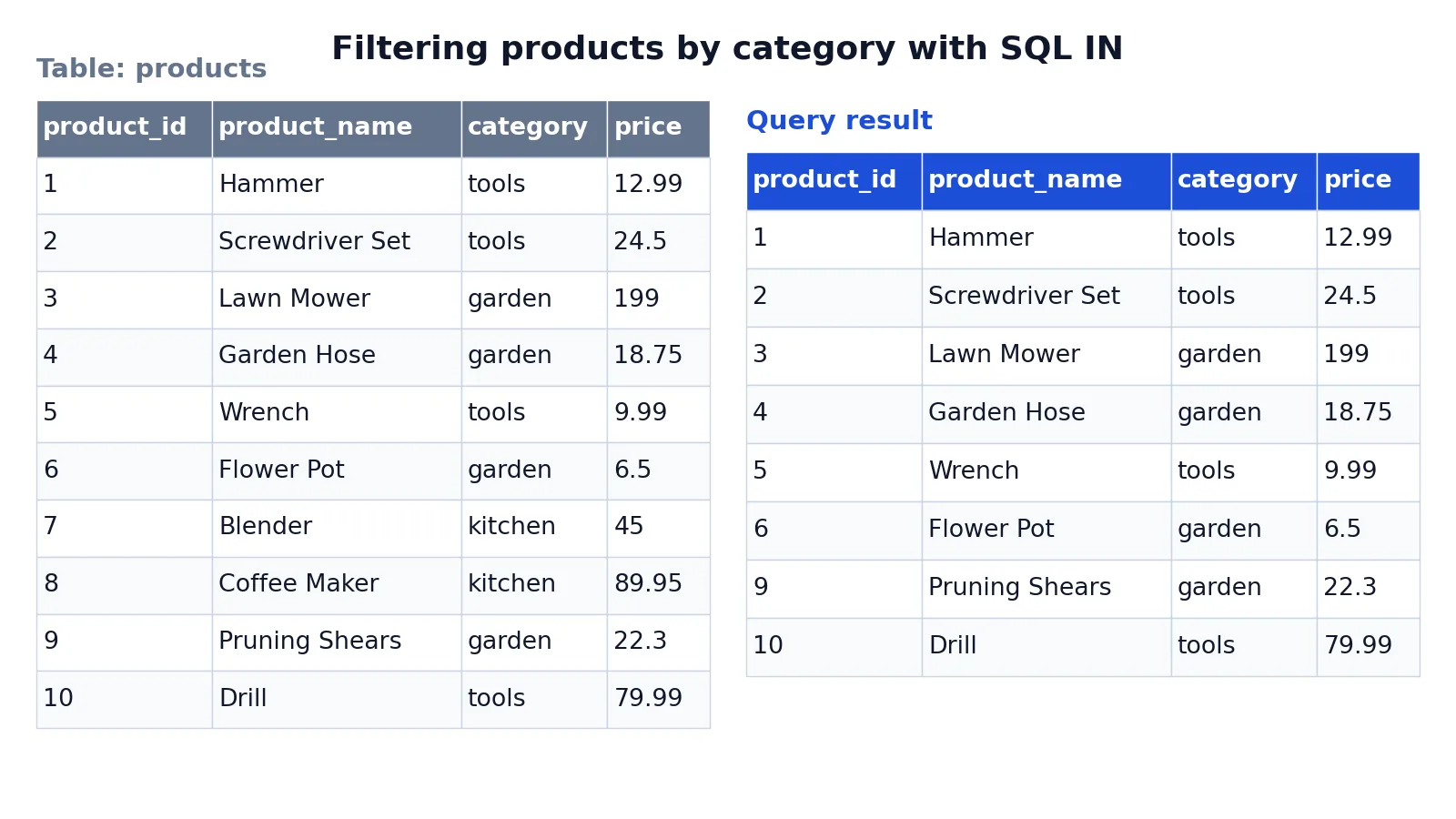
The dataset is a small products table with ten rows across three categories. Here is the input table:
| product_id | product_name | category | price |
|---|---|---|---|
| 1 | Hammer | tools | 12.99 |
| 2 | Screwdriver Set | tools | 24.50 |
| 3 | Lawn Mower | garden | 199.00 |
| 4 | Garden Hose | garden | 18.75 |
| 5 | Wrench | tools | 9.99 |
| 6 | Flower Pot | garden | 6.50 |
| 7 | Blender | kitchen | 45.00 |
| 8 | Coffee Maker | kitchen | 89.95 |
| 9 | Pruning Shears | garden | 22.30 |
| 10 | Drill | tools | 79.99 |
The goal is to return only the products in the tools and garden categories:
SELECT product_id, product_name, category, price
FROM products
WHERE category IN ('tools', 'garden')
ORDER BY product_id;
Step by step:
SELECT product_id, product_name, category, pricechooses the columns to display.FROM productsreads rows from the products table.WHERE category IN ('tools', 'garden')keeps only rows whose category is exactly'tools'or'garden'.ORDER BY product_idsorts the matching rows byproduct_idfor a stable result.
The result was checked with an equivalent SQLite query. It returns eight rows. The two kitchen products, Blender and Coffee Maker, are excluded.
| product_id | product_name | category | price |
|---|---|---|---|
| 1 | Hammer | tools | 12.99 |
| 2 | Screwdriver Set | tools | 24.50 |
| 3 | Lawn Mower | garden | 199.00 |
| 4 | Garden Hose | garden | 18.75 |
| 5 | Wrench | tools | 9.99 |
| 6 | Flower Pot | garden | 6.50 |
| 9 | Pruning Shears | garden | 22.30 |
| 10 | Drill | tools | 79.99 |
Notice that the output keeps the original column order and the original row values. IN only decides which rows survive, it does not change or reorder anything by itself. The ORDER BY clause is what produces the sorted output.
More Examples
Filter on numbers. The list can hold numeric values just as easily as text:
SELECT product_id, product_name, price
FROM products
WHERE product_id IN (1, 5, 10);
This returns Hammer, Wrench and Drill, the three rows whose product_id appears in the list.
Combine with other conditions. IN is a normal predicate, so you can join it with AND and OR:
SELECT product_name, category, price
FROM products
WHERE category IN ('tools', 'garden')
  AND price < 25;
This narrows the earlier result to the cheaper items in those two categories.
Use a subquery. When the values live in another table, a subquery supplies them:
SELECT product_name, category
FROM products
WHERE category IN (SELECT category FROM featured_categories);
The subquery must return one column whose data type matches category [1]. If you need to exclude values instead, the SQL NOT IN operator covers the negated form and its null behavior.
Filter on a computed value. The tested expression does not have to be a plain column. You can test the output of a function or a CASE expression, as long as the types line up.
Pair with sorting and limits. IN only filters. To control which rows appear first, add an ORDER BY clause, which is part of the broader SQL SELECT statement.
Errors and How to Fix Them
Error 8623 or 8632. Explicitly listing many thousands of comma-separated values inside the parentheses can consume resources and return these errors [1]. The documented workaround is to store the items in a table and use a SELECT subquery inside the IN clause instead of a literal list [1].
Data type mismatch. If the list contains values of a different type than the tested expression, the comparison may fail or behave unexpectedly. Make sure every item in the list matches the type of test_expression [1].
Subquery returns more than one column. The subquery form requires a result set of exactly one column [1]. Select a single column inside the subquery.
Unexpected results with nulls. Any null values returned by a subquery or expression that are compared using IN or NOT IN return UNKNOWN, and using nulls with IN or NOT IN can produce unexpected results [1]. Filter nulls out of the subquery or handle them explicitly.
Common Mistakes
- Assuming
NOT INis the exact opposite ofINwhen nulls are present. A null in the list or subquery makes comparisons return UNKNOWN, so rows can disappear from aNOT INresult. Fix it by excluding nulls in the subquery or testing for null separately. - Mixing data types in the list. Putting
'5'next to5invites silent conversion or an error. Fix it by quoting text and leaving numbers unquoted, matching the column type [1]. - Building a huge literal list. Thousands of comma-separated values can exhaust resources and trigger errors 8623 or 8632 [1]. Fix it by loading the values into a table and using a subquery [1].
- Forgetting that
INdoes not sort. The output order is not guaranteed without anORDER BY. Fix it by adding an explicit sort when order matters. - Using
INfor ranges.INmatches exact values only, soIN (10, 20)will not catch 15. Fix it by usingBETWEENfor ranges. - Expecting pattern matching.
IN ('tool%')does not act as a wildcard. Fix it by usingLIKEwhen you need partial matches.
Limitations
IN matches exact values only. It cannot express ranges, partial matches or numeric thresholds, so conditions like "price between 10 and 50" or "name starts with A" need BETWEEN or LIKE instead. It also gives you no control over ordering or row counts, which belong to ORDER BY and LIMIT.
Null handling is the sharpest edge. Because comparisons involving nulls return UNKNOWN, NOT IN can quietly drop rows you expected to keep [1]. Very large literal lists are another practical limit, since they can consume resources and return errors 8623 or 8632 [1]. Moving those values into a table and using a subquery is the documented workaround [1].
Frequently Asked Questions
What does IN do in SQL?
IN determines whether a specified value matches any value in a subquery or a list [1]. If the tested value equals any listed value, the condition is TRUE and the row is kept. Otherwise the condition is FALSE and the row is filtered out.
What is the difference between IN and NOT IN?
NOT IN negates the test. Where IN keeps rows that match at least one listed value, NOT IN keeps rows that match none of them [1]. The main practical difference appears with nulls, since a null in the list can make NOT IN return UNKNOWN and drop rows unexpectedly [1].
Can IN use a subquery instead of a list?
Yes. The subquery form takes a subquery with a result set of one column, and that column must have the same data type as the tested expression [1]. This is the recommended approach when the values are already stored in a table.
Why does my IN query return unexpected results with nulls?
Any null values returned by a subquery or expression that are compared using IN or NOT IN return UNKNOWN, and combining nulls with IN or NOT IN can produce unexpected results [1]. Check whether the tested column or the subquery output contains nulls and handle them explicitly.
How many values can I put in an IN list?
There is no fixed number, but explicitly including an extremely large number of values, many thousands separated by commas, can consume resources and return errors 8623 or 8632 [1]. For large sets, store the items in a table and use a SELECT subquery within the IN clause [1].
References
Further Reading
- Codd EF (1970). A relational model of data for large shared data banks. Communications of the ACM
- PostgreSQL Documentation: SELECT
- SQLite: SQL As Understood By SQLite
- Wilson G, Bryan J, Cranston K et al. (2017). Good enough practices in scientific computing. PLOS Computational Biology
- PostgreSQL Tutorial: The SQL Language