Python For Loop: Syntax, Examples and Common Patterns
By Dr. Zubair Khalid, DVM, MS, PhD ·
A python for loop repeats a block of code once for each item in a sequence, such as a list, a string or the numbers produced by range(). You write for followed by a variable name, the keyword in, the sequence, and a colon, then indent the body. The loop ends when the sequence runs out of items, so the number of repetitions is decided before the loop starts [1].
Quick Answer
- Syntax:
for item in sequence:then an indented body. The colon and the indentation are both required [2]. - The loop variable takes each element of the sequence in turn. You do not need an index to read values [2].
- Use
range(n)to repeat codentimes.range(5)produces 0, 1, 2, 3, 4, so it stops one before the end value [3]. breakexits the loop early,continueskips to the next iteration, and both are optional [2].- The body runs once per item, and any code back at the original indentation runs only after the loop finishes [3].
Before You Start
You need Python 3 installed and a way to run a script or a REPL session. No packages are required for the basic loop, though the worked example below uses the standard library statistics module.
Two ideas matter before you write your first loop. The first is that a for loop in Python is a "foreach" loop. It looks at each element in a collection once, and the collection can be any collection-like structure, not only a list [2]. The second is indentation. Python groups statements by indentation, so the lines you indent under the for line are the lines that repeat [4]. If the indentation is wrong, either the loop body is wrong or Python raises an error.
A for loop is a definite loop. It has a predefined beginning and end, bounded by the sequence you give it [1]. That is the main difference from a while loop, which keeps running while a condition stays true and is better when you do not know the number of iterations in advance [5].
Step by Step
- Write the
forline. Start with the keywordfor, then a variable name, thenin, then the sequence, then a colon. The variable name is your choice, butiis common when you only need a counter [3].
- Indent the body. Every line that should repeat goes one level deeper than the
forline. This indented block is what runs on each pass [3].
- Choose your sequence. A list gives you its elements.
range(n)gives you the integers from 0 up ton - 1[3]. A string gives you its characters one at a time.
- Use the loop variable inside the body. The variable holds the current element, so you can print it, test it with an
ifstatement, or feed it into a calculation. If you need both the position and the value, see the Python enumerate() function.
- Add
breakorcontinueonly if you need them.breakleaves the loop immediately, andcontinuejumps back to the top for the next item [2]. Most loops need neither.
- Put post-loop code back at the original indentation. Anything you write after the loop at the outer level runs once, after the last iteration [3].
A minimal loop over a list looks like this.
for s in ['aa', 'bb', 'cc', 'dd']:
    print(s)
The loop begins with for, uses s as the loop variable, and takes the list as the collection. The colon ends the line and the indented print is the body [2].
Worked Example
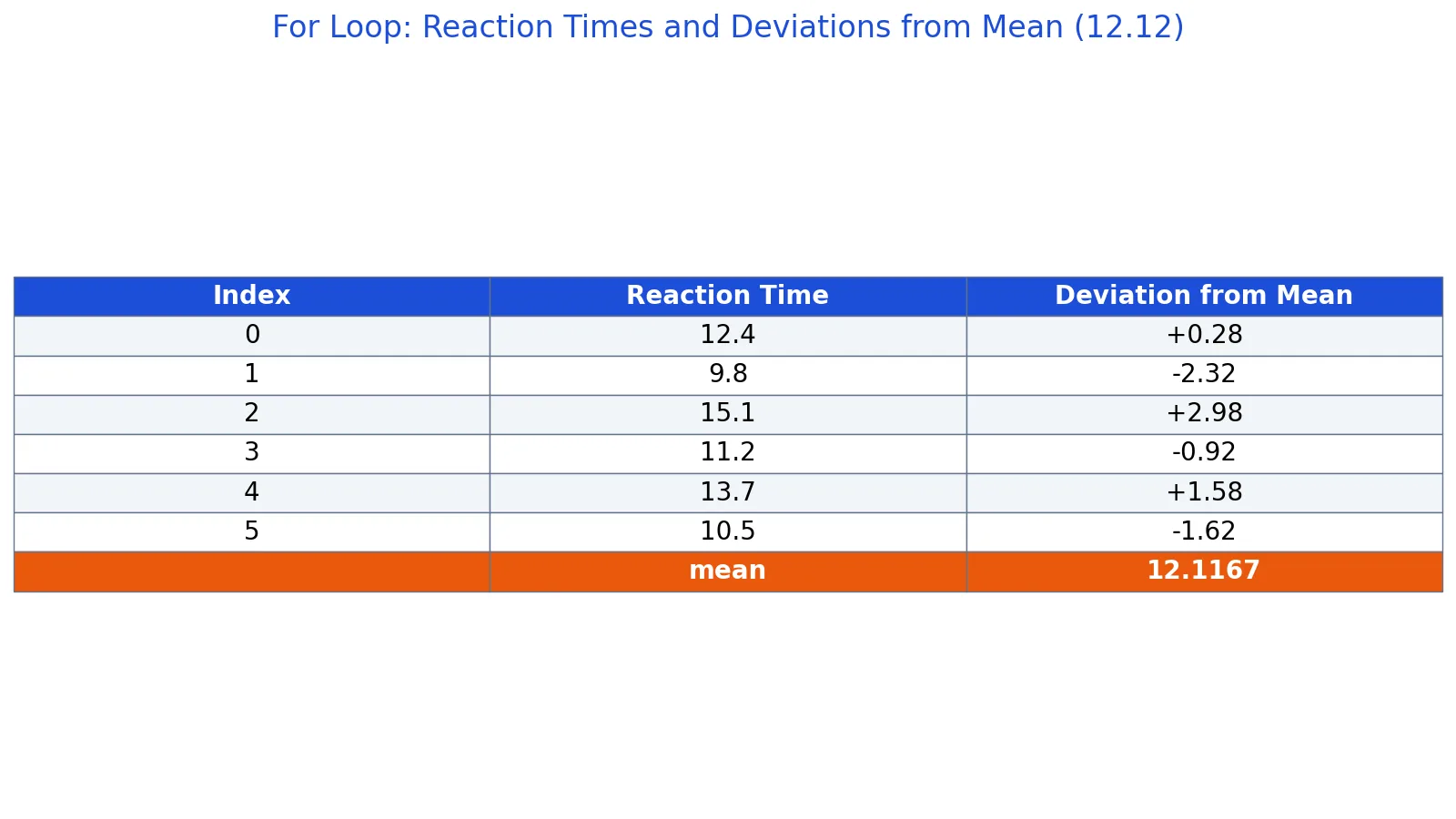
The dataset is six lab reaction times in seconds measured in a single trial. We want each value's deviation from the mean, which is the raw value minus the mean.
| reaction_time_s |
|---|
| 12.4 |
| 9.8 |
| 15.1 |
| 11.2 |
| 13.7 |
| 10.5 |
The steps are:
- Dataset size: $n = 6$
- Sum of reaction times: $72.7$
- Mean: $72.7 / 6 = 12.1167$
- Deviation for 12.4: $12.4 - 12.1167 = +0.2833$
- Deviation for 9.8: $9.8 - 12.1167 = -2.3167$
- Deviation for 15.1: $15.1 - 12.1167 = +2.9833$
- Deviation for 11.2: $11.2 - 12.1167 = -0.9167$
- Deviation for 13.7: $13.7 - 12.1167 = +1.5833$
- Deviation for 10.5: $10.5 - 12.1167 = -1.6167$
In formula form, each deviation is:
$$d_i = x_i - \bar{x}$$
The deviations sum to 0, which is the expected check for deviations from the arithmetic mean.
import statistics

times = [12.4, 9.8, 15.1, 11.2, 13.7, 10.5]
mean = statistics.mean(times)

for t in times:
    print(f"time={t:.1f}  deviation={t - mean:+.2f}")

print(f"mean = {mean:.4f}")  # mean = 12.1167
Output:
time=12.4  deviation=+0.28
time=9.8  deviation=-2.32
time=15.1  deviation=+2.98
time=11.2  deviation=-0.92
time=13.7  deviation=+1.58
time=10.5  deviation=-1.62
mean = 12.1167
The loop reads each reaction time once, subtracts the mean, and prints the result. The mean is computed before the loop starts, so it does not change while the loop runs.
Other Ways to Do It
Loop over a range of numbers. When you need a fixed number of repetitions, range() is the standard tool. range(17) is shorthand for the sequence 0 through 16, and the loop runs 17 times [3]. This pattern is common for repeating a simulation.
for i in range(17):
    print(i)
Loop with an index. If you need positions, enumerate() gives you the index and the value together. That avoids manual counter variables and keeps the loop readable.
Loop over a computed sequence. For evenly spaced numeric sequences, NumPy linspace builds the array first and the loop walks it.
Transform every element. If your goal is to produce a new list from an old one, Python map() expresses that in one call instead of a loop with an append.
Nested loops. For-loops can be nested just like if-statements [1]. The inner loop completes fully for each single pass of the outer loop, which is how you walk a two-dimensional structure.
Conditional logic inside the loop. Combining a for loop with comparisons is common. The Python operators guide covers the comparison and logical operators you will use, and Python if else covers the branching.
Troubleshooting
| Symptom | Likely cause | Fix |
|---|---|---|
IndentationError | The body is not indented, or indentation is inconsistent | Indent every body line by the same amount [4] |
SyntaxError on the for line | Missing colon at the end | Add : after the sequence [3] |
| Loop runs one time too few or too many | Off-by-one on the range() end value | Remember range(n) stops at n - 1 [3] |
NameError for the loop variable after the loop | The variable was never assigned because the sequence was empty | Initialize the variable before the loop if you use it afterward |
| Loop never seems to end | You are mutating the sequence while iterating, or using a while loop with a condition that never turns false | Iterate over a copy, or check the condition logic [5] |
Common Mistakes
- Forgetting the colon. The
forline must end with:. Without it you get a syntax error before the loop ever runs [3]. - Indenting the wrong lines. Only the indented block repeats. Code at the original indentation runs once, after the loop [3]. If a line runs too often or too rarely, check its indentation first.
- Expecting
range(5)to include 5. It produces 0, 1, 2, 3, 4. The end value is excluded [3]. - Modifying a list while looping over it. Adding or removing items during iteration changes what the loop sees next. Build a new list instead, or iterate over a copy.
- Using
breakwhen a filter would do.breakexits the whole loop, not one iteration. If you only want to skip the current item, usecontinue[2]. - Reaching for a
whileloop when the count is known. If you know how many times to iterate, a for loop is the clearer choice [5].
Limitations
A for loop processes items one at a time in Python, so it is slower than vectorized operations on large numeric arrays. For millions of rows, array-based tools will usually beat a hand-written loop by a wide margin. The loop is still the right tool for control flow, side effects such as printing or writing files, and logic that is hard to express as an array operation.
A for loop also cannot change the sequence it is walking in a safe, predictable way. If the collection shrinks or grows mid-iteration, the loop may skip items or raise an error. Treat the sequence as read-only inside the loop and collect results into a separate structure.
Frequently Asked Questions
What is the difference between a for loop and a while loop in Python?
A for loop iterates over a sequence and has a predefined beginning and end, which is why it is called a definite loop [1]. A while loop keeps running as long as a condition stays true, so it suits cases where the number of iterations is not known in advance [5]. Use a for loop when you know what you are iterating over, and a while loop when you are waiting for a condition to change.
How do I loop over a list with an index?
Use enumerate(), which yields the index and the value on each pass. That is cleaner than maintaining a counter variable by hand. If you only need the values, loop over the list directly, since the for loop already sees each element once [2].
Does range(5) include the number 5?
No. range(5) produces 0, 1, 2, 3 and 4, so the loop runs five times and the final value is 4 [3]. To include 5, use range(6). This off-by-one behavior is the source of many counting errors.
Can I stop a for loop early?
Yes. The break statement exits the loop immediately, and it is an option when you want to stop as soon as a condition is met [2]. The continue statement does something different. It skips the rest of the current iteration and moves to the next item [2].
Can for loops be nested in Python?
Yes. Just like if-statements, for-loops can be nested [1]. The inner loop runs to completion for every single iteration of the outer loop. This is the standard way to process a two-dimensional structure such as a matrix or a table of rows and columns.
References
- For-Loops, Python Numerical Methods
- [](https://cs.stanford.edu/people/nick/py/python-for.html)
- For-Loops in Python - Data Science Discovery
- 3. An Informal Introduction to Python, Python 3.14.8 documentation
- What is a for loop in python? | IBM
Further Reading
- Harris CR, Millman KJ, van der Walt SJ et al. (2020). Array programming with NumPy. Nature
- McKinney W (2010). Data Structures for Statistical Computing in Python. Proceedings of the Python in Science Conference