SQL Query Examples: 10 Practical SELECT Statements
By Dr. Zubair Khalid, DVM, MS, PhD ·
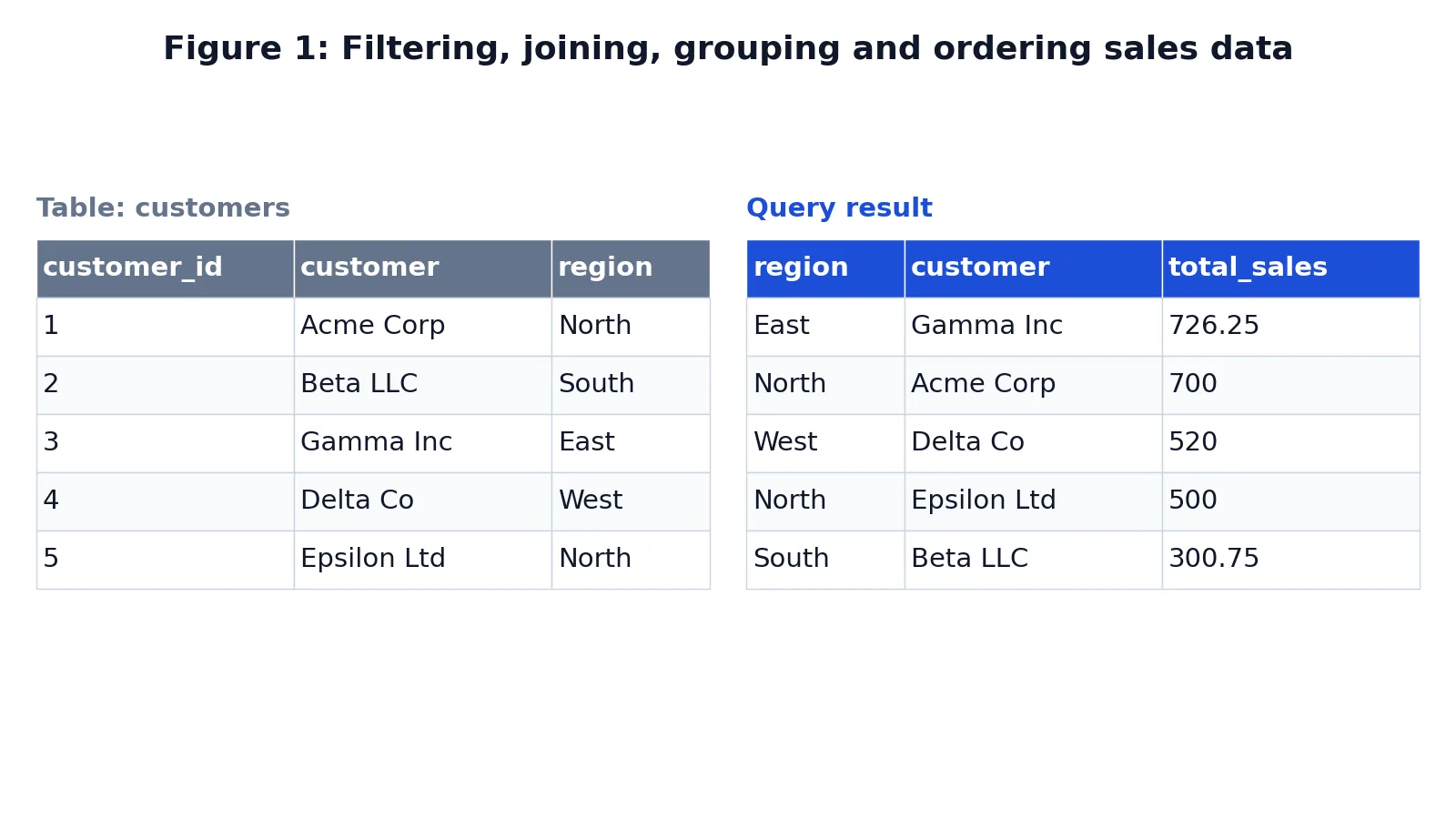
These SQL examples walk through ten practical SELECT statements you can run today, covering filtering, grouping, joins and aggregation. Each one is written in standard SQL that works in SQLite, PostgreSQL, MySQL and SQL Server with little or no change. Read the query, then read the result table, and the clause order will start to feel obvious.
Quick Answer
- Every query follows the same logical order:
FROM,JOIN,WHERE,GROUP BY,HAVING,SELECT,ORDER BY,LIMIT. WHEREfilters individual rows before grouping.HAVINGfilters groups after aggregation.JOINcombines tables on a matching key, usually a foreign key pointing at a primary key.- Aggregate functions (
COUNT,SUM,AVG,MIN,MAX) collapse many rows into one row per group. ORDER BYsorts the final result and is the only clause that guarantees row order.
Before You Start
You need two things: a database client and a table with data in it. Any client works, including the sqlite3 command line, DBeaver, pgAdmin or a notebook. The examples below use two small tables, customers and sales, so you can copy the setup and run everything yourself.
The customers table holds one row per customer:
| customer_id | customer | region |
|---|---|---|
| 1 | Acme Corp | North |
| 2 | Beta LLC | South |
| 3 | Gamma Inc | East |
| 4 | Delta Co | West |
| 5 | Epsilon Ltd | North |
The sales table holds one row per order, with customer_id as a foreign key into customers. Ten orders are spread across January 2024, with amounts from 120.50 to 500.00.
Two conventions matter throughout. First, table aliases (s for sales, c for customers) keep joins readable. Second, column names should always be qualified with the alias when more than one table is in play, so s.amount instead of a bare amount. If you want a slower walk through clause order first, the SELECT statement syntax guide covers each clause in isolation.
Step by Step
- Pick your columns. Start with
SELECT *while exploring, then list the columns you actually need. Explicit column lists are faster to read and less fragile when a table changes. - Name the source table. Write
FROM sales AS s. The alias saves typing and prevents ambiguity later. - Add joins. Use
JOIN customers AS c ON s.customer_id = c.customer_idto attach the customer details to each order. - Filter rows with WHERE. Conditions like
s.amount > 100ors.order_date >= '2024-01-15'remove rows before any grouping happens. - Group when you need one row per category.
GROUP BY c.regioncollapses all orders in a region into a single row. - Aggregate inside the SELECT list.
SUM(s.amount),COUNT(*),AVG(s.amount)each produce one value per group. - Filter groups with HAVING.
HAVING SUM(s.amount) > 500keeps only groups that pass the test. - Sort and limit.
ORDER BY total_sales DESCputs the biggest values first, andLIMIT 5caps the output.
Worked Example
The dataset is a five-customer table joined to ten sales orders, and the query below answers a realistic question: which customers generated the most revenue, grouped by region, ignoring small orders?
SELECT c.region, c.customer, SUM(s.amount) AS total_sales
FROM sales AS s
JOIN customers AS c ON s.customer_id = c.customer_id
WHERE s.amount > 100
GROUP BY c.region, c.customer
ORDER BY total_sales DESC;
Walking through the clauses in execution order:
FROM sales AS sstarts with the sales table and aliases it ass.JOIN customers AS c ON s.customer_id = c.customer_idmatches each sale to its customer using the foreign key.WHERE s.amount > 100keeps only sales with an amount greater than 100.GROUP BY c.region, c.customergroups the remaining rows by region and customer.SUM(s.amount) AS total_salesadds up the sale amounts for each group.ORDER BY total_sales DESCsorts from highest to lowest total sales.
The result has five rows, one per customer, because every order in this dataset is above 100:
| region | customer | total_sales |
|---|---|---|
| East | Gamma Inc | 726.25 |
| North | Acme Corp | 700 |
| West | Delta Co | 520 |
| North | Epsilon Ltd | 500 |
| South | Beta LLC | 300.75 |
The result was checked with an equivalent SQLite query. Notice that region appears in the output but is not aggregated. That is legal only because it is listed in GROUP BY. If you drop c.region from the GROUP BY clause while leaving it in the SELECT list, most databases raise an error, and SQLite returns an arbitrary value from the group.
Other Ways to Do It
The same question can be written several ways, and the right choice depends on readability and on how your database optimizes.
Filter inside a subquery. Move the WHERE into a derived table so the join only sees qualifying rows. This is useful when the filter is expensive and you want it applied early. The subqueries guide covers the types and when each helps.
Use a common table expression. A CTE names each step, which makes long queries easier to debug. The CTE syntax article shows the pattern.
Replace the join with a correlated subquery. For a single aggregate per customer, a scalar subquery in the SELECT list works, though it usually runs slower on large tables.
Count instead of sum. If you want order volume rather than revenue, swap SUM(s.amount) for COUNT(). The COUNT function guide explains how COUNT(), COUNT(column) and COUNT(DISTINCT column) differ.
Bucket values with CASE. To group orders into size bands before aggregating, wrap the amount in a CASE expression. See using CASE in SQL for the syntax.
Filter a list of values. If you only want specific regions, WHERE c.region IN ('North', 'East') is cleaner than a chain of OR conditions. The IN operator article covers the details.
Here are the other nine statements in short form, all runnable against the same two tables.
1. Select every column from one table.
SELECT * FROM customers;2. Filter rows with a numeric condition.
SELECT order_id, amount FROM sales WHERE amount >= 300;3. Filter on text and sort.
SELECT customer_id, customer FROM customers WHERE region = 'North' ORDER BY customer;4. Filter on a date range.
SELECT order_id, order_date, amount FROM sales
WHERE order_date BETWEEN '2024-01-10' AND '2024-01-20';
5. Count rows per group.
SELECT customer_id, COUNT(*) AS order_count FROM sales GROUP BY customer_id;6. Average per group with a HAVING filter.
SELECT customer_id, AVG(amount) AS avg_amount FROM sales
GROUP BY customer_id HAVING AVG(amount) > 200;
7. Join two tables and list detail rows.
SELECT c.customer, s.order_id, s.amount
FROM sales AS s JOIN customers AS c ON s.customer_id = c.customer_id
ORDER BY s.order_id;
8. Find rows with no match using a left join.
SELECT c.customer, s.order_id
FROM customers AS c LEFT JOIN sales AS s ON c.customer_id = s.customer_id
WHERE s.order_id IS NULL;
9. Limit the output to the top rows.
SELECT order_id, amount FROM sales ORDER BY amount DESC LIMIT 3;Statement 8 returns no rows here because every customer has at least one order. That is the correct answer, and it is exactly how you would detect customers who never bought anything.
Troubleshooting
"Column is ambiguous." Two tables in the join share a column name. Qualify it, as in s.customer_id instead of customer_id.
"Column must appear in the GROUP BY clause." You selected a non-aggregated column that is not grouped. Add it to GROUP BY or wrap it in an aggregate.
"No such column." Check spelling and case sensitivity. Some databases fold unquoted identifiers to lowercase, others preserve case.
Empty result when you expected rows. Test the WHERE clause on its own first. A date comparison against a text column can fail silently if the stored format does not match the literal.
Duplicate rows after a join. The join key is not unique on one side. Check whether the right-hand table has more than one row per key.
Aggregate looks too large. You joined a one-to-many relationship and then summed, so rows were multiplied. Aggregate before the join, or use COUNT(DISTINCT ...).
Common Mistakes
- Using WHERE to filter aggregates.
WHERE SUM(amount) > 500is invalid. UseHAVING SUM(amount) > 500instead, becauseWHEREruns before grouping. - Forgetting GROUP BY for non-aggregated columns. Every column in the
SELECTlist that is not inside an aggregate must appear inGROUP BY. Some databases allow the shortcut, but the result is not portable. - Assuming ORDER BY is automatic. Without
ORDER BY, row order is undefined and can change between runs. Never rely on insertion order. - Using an inner join when you need unmatched rows.
JOINdrops rows with no match. UseLEFT JOINwhen you want to keep them, then test forNULLon the right side. - Comparing dates as strings in the wrong format. Store dates as
YYYY-MM-DDso lexicographic and chronological order agree. Other formats break range filters. - Counting the wrong thing.
COUNT(*)counts rows,COUNT(column)skipsNULLvalues in that column, andCOUNT(DISTINCT column)counts unique non-null values. Pick deliberately.
Limitations
A single SELECT statement cannot modify data, and it cannot return a different number of columns per row. Everything you write must produce a fixed shape. Aggregation also loses detail by design: once you group by region, you can no longer see individual orders in that result, so you often need a second query at a finer grain.
Performance is the other boundary. A join across large tables without an index on the join key can be slow, and SELECT * pulls columns you may not need. Aggregates over millions of rows can also exceed memory on some engines. These are practical limits, not syntax errors, and they show up as slow queries rather than wrong answers.
Frequently Asked Questions
What is the difference between WHERE and HAVING?
WHERE filters individual rows before grouping happens. HAVING filters groups after aggregation. If your condition mentions an aggregate function such as SUM or COUNT, it belongs in HAVING. If it mentions a plain column value, it belongs in WHERE.
Can I use a column alias in the WHERE clause?
Usually no. The WHERE clause is evaluated before the SELECT list, so the alias does not exist yet. Aliases are generally available in ORDER BY, and support in GROUP BY and HAVING varies by database. When in doubt, repeat the full expression.
How do I join more than two tables?
Chain the joins. Each JOIN clause adds one table and one ON condition, and each condition should link the new table to something already in the query. Keep the join order consistent so the query reads top to bottom.
Why does my SUM return a much bigger number than expected?
You almost certainly joined a one-to-many relationship and summed after the join, so each parent row was counted once per child row. Aggregate in a subquery first, then join the aggregated result to the parent table.
Does the order of clauses in the query match the order they run?
No. You write SELECT first, but the database evaluates FROM and JOIN first, then WHERE, then GROUP BY, then HAVING, then SELECT, then ORDER BY, and finally LIMIT. Knowing this order explains most confusing error messages.
References
This article draws on the standard references listed under Further Reading.
Further Reading
- Codd EF (1970). A relational model of data for large shared data banks. Communications of the ACM
- PostgreSQL Documentation: SELECT
- SQLite: SQL As Understood By SQLite
- Wilson G, Bryan J, Cranston K et al. (2017). Good enough practices in scientific computing. PLOS Computational Biology
- PostgreSQL Tutorial: The SQL Language
- SQLite: Built-In Scalar SQL Functions