SQL COUNT Function: Syntax, Examples and GROUP BY
By Dr. Zubair Khalid, DVM, MS, PhD ·
A count SQL query returns the number of rows that match a condition or belong to a group. The COUNT function is one of the most used aggregate functions in SQL, and it comes in three common forms: COUNT(*), COUNT(column), and COUNT(DISTINCT column). Each answers a different question, and mixing them up is the most frequent source of wrong totals.
Quick Answer
COUNT(*)counts every row in the result set or group, including rows that contain NULL values in some columns [1].COUNT(column)counts only rows where that column is not NULL [1].COUNT(DISTINCT column)counts unique non-NULL values, because duplicates are filtered before the aggregate runs [1].GROUP BYsplits the rows into groups first, thenCOUNTreturns one number per group.COUNTignores NULLs in its argument, soCOUNT(*)andCOUNT(column)can differ on the same table.
Syntax
The general form is:
COUNT(*) | COUNT(expression) | COUNT(DISTINCT expression)| Argument | Required? | Meaning |
|---|---|---|
* | Yes, if you want all rows | Counts every row in the group, with no NULL filtering |
expression | Yes, if not using * | Counts rows where the expression is not NULL |
DISTINCT | No | Removes duplicate values before counting [1] |
FILTER (WHERE ...) | No | Restricts which rows feed the aggregate [1] |
OVER (...) | No | Turns COUNT into a window function instead of a grouped aggregate |
COUNT is an aggregate function, so it collapses many rows into one value unless you add GROUP BY or an OVER clause. The DISTINCT keyword can precede the argument in any single-argument aggregate, and duplicates are filtered before the values reach the function [1].
How It Works
Think of the query in two stages. First, SQL decides which rows qualify, based on FROM, JOIN, and WHERE. Second, the aggregate runs over those rows.
Without GROUP BY, the whole result set is one group. COUNT(*) returns a single number for the entire table. With GROUP BY customer_id, SQL builds one group per distinct customer_id value and runs COUNT once per group.
The NULL rule is what separates the forms. COUNT(*) has no argument, so there is nothing to test for NULL, and it returns the total number of rows in the group [1]. COUNT(amount) tests each amount value and skips the NULLs. If a column is fully populated, the two return the same number. If it has gaps, they diverge.
COUNT(DISTINCT customer_id) applies the distinct filter first, so repeated customer IDs collapse to one before counting [1]. This is how you move from "how many orders" to "how many customers placed orders."
Order of operations matters for filtering. WHERE removes rows before grouping, so a filtered count excludes them entirely. HAVING filters after grouping, so it can test the count itself, for example keeping only customers with more than two orders.
Worked Example
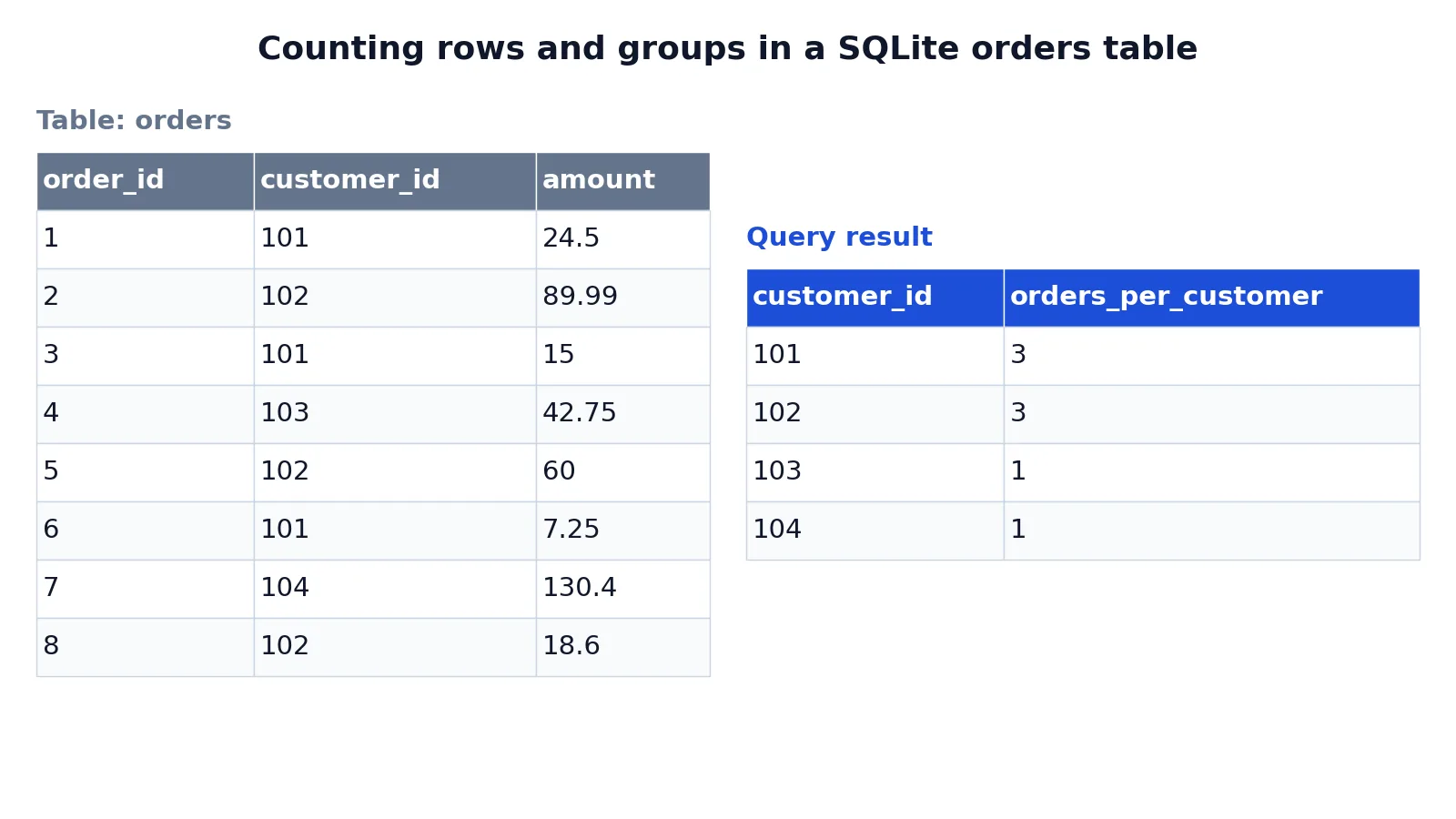
The dataset is a small orders table with eight rows, four customers, and one row per order.
| order_id | customer_id | amount |
|---|---|---|
| 1 | 101 | 24.50 |
| 2 | 102 | 89.99 |
| 3 | 101 | 15.00 |
| 4 | 103 | 42.75 |
| 5 | 102 | 60.00 |
| 6 | 101 | 7.25 |
| 7 | 104 | 130.40 |
| 8 | 102 | 18.60 |
The first query counts all rows and all unique customers. The second groups by customer.
SELECT COUNT(*) AS total_orders,
       COUNT(DISTINCT customer_id) AS distinct_customers
FROM orders;

SELECT customer_id,
       COUNT(*) AS orders_per_customer
FROM orders
GROUP BY customer_id
ORDER BY orders_per_customer DESC, customer_id;
The first statement returns total_orders = 8 and distinct_customers = 4. The second returns one row per customer:
| customer_id | orders_per_customer |
|---|---|
| 101 | 3 |
| 102 | 3 |
| 103 | 1 |
| 104 | 1 |
The result was checked with an equivalent SQLite query. COUNT() counts every row, so it returns 8. COUNT(DISTINCT customer_id) collapses the repeated IDs 101 and 102 down to single values, so it returns 4. Inside the grouped query, COUNT() runs once per customer group, giving 3, 3, 1, and 1. The ORDER BY sorts the largest groups first, and customer_id breaks the tie between the two customers with three orders each.
More Examples
Count rows matching a condition. Filter before counting so the aggregate only sees qualifying rows.
SELECT COUNT(*) AS big_orders
FROM orders
WHERE amount >= 50;
Count non-NULL values in one column. If some rows had a missing amount, this would return fewer rows than COUNT(*).
SELECT COUNT(amount) AS orders_with_amount
FROM orders;
Filter groups after counting. HAVING tests the aggregate, which WHERE cannot do.
SELECT customer_id, COUNT(*) AS orders_per_customer
FROM orders
GROUP BY customer_id
HAVING COUNT(*) > 1;
Count with a FILTER clause. This restricts the rows feeding the aggregate without changing the grouping [1].
SELECT customer_id,
       COUNT(*) FILTER (WHERE amount >= 50) AS big_orders
FROM orders
GROUP BY customer_id;
Count distinct values across a group. Useful when a group can contain repeated values.
SELECT COUNT(DISTINCT customer_id) AS customers_with_orders
FROM orders;
If you work in spreadsheets as well, the same counting logic appears in the COUNT function in Excel, where COUNTA and COUNTIF play roles similar to COUNT(*) and COUNT with a filter.
Errors and How to Fix Them
Column not in GROUP BY. Selecting a column that is neither grouped nor aggregated raises an error in strict databases. Add the column to GROUP BY or wrap it in an aggregate.
Aggregate in WHERE. WHERE COUNT(*) > 1 fails because WHERE runs before grouping. Move the condition to HAVING.
Unexpectedly low count. If COUNT(column) returns less than COUNT(), the column contains NULLs. Switch to COUNT() if you want every row.
Wrong distinct count. COUNT(DISTINCT a, b) is not supported in every database. Count a single expression, or concatenate the columns first.
Nested aggregates. COUNT(COUNT(*)) is invalid. Use a subquery or a window function instead. The subqueries in SQL guide covers how to wrap one aggregate inside another query.
Common Mistakes
- **Using
COUNT(column)when you meanCOUNT().* The column form skips NULLs, so totals come out low. UseCOUNT(*)when you want the row count. - Forgetting
GROUP BY. Without it, the query returns one row for the whole table instead of one row per group. - Putting the aggregate in
WHERE.WHEREcannot see aggregates. Move the test toHAVING. - Assuming
COUNT(DISTINCT)counts NULLs. It does not. NULL values are excluded before the distinct filter runs [1]. - Counting after a join that multiplies rows. A one-to-many join inflates the row count. Count distinct IDs or aggregate in a subquery first.
- Expecting a stable row order. Aggregates return values, not ordered rows. Add
ORDER BYif the order matters.
Limitations
COUNT tells you how many, never which. It cannot show the rows behind a number, so a count of 3 does not reveal whether those three orders were large or small. Pair it with SUM, AVG, or MIN to describe the group. The SQL AVG function and SQL MAX function pages show how those aggregates combine with the same GROUP BY structure.
COUNT also hides NULL problems. A column that is 90 percent empty still produces a clean-looking number from COUNT(), and nothing in the output warns you. Check COUNT() against COUNT(column) for the same column to expose gaps. Finally, COUNT(DISTINCT ...) costs more than a plain count on large tables, because the database must track unique values. On very large datasets, that extra work is measurable.
Frequently Asked Questions
What is the difference between COUNT(*) and COUNT(1)?
They behave the same in practice. COUNT(1) counts a constant expression that is never NULL, so it returns the same number as COUNT(). COUNT() is the clearer choice because it states the intent directly.
Does COUNT(*) include NULL values?
Yes. COUNT(*) has no argument to test, so it counts every row in the group, including rows with NULLs in other columns [1]. Only the argument form, such as COUNT(amount), filters out NULLs.
Can I use COUNT with GROUP BY and ORDER BY together?
Yes. GROUP BY builds the groups, COUNT returns one value per group, and ORDER BY sorts the output. You can order by the count itself, as in ORDER BY COUNT(*) DESC, or by an alias you defined in the select list.
Why does my COUNT return fewer rows than expected?
The most common causes are a WHERE clause that filters more than you intended, a join that drops unmatched rows, or COUNT(column) skipping NULLs. Run the same query with COUNT(*) and without the filter to isolate which one is responsible.
How do I count unique values in SQL?
Use COUNT(DISTINCT column). The distinct filter removes duplicate values before the count runs, so you get the number of unique non-NULL values [1]. For counts within groups, combine it with GROUP BY, and for ranked output alongside those counts, see the SQL RANK function and SQL ROW_NUMBER function guides.
References
Further Reading
- Codd EF (1970). A relational model of data for large shared data banks. Communications of the ACM
- PostgreSQL Documentation: SELECT
- SQLite: SQL As Understood By SQLite
- Wilson G, Bryan J, Cranston K et al. (2017). Good enough practices in scientific computing. PLOS Computational Biology
- PostgreSQL Tutorial: The SQL Language