SQL RIGHT Function: Syntax, Examples and Use Cases
By Dr. Zubair Khalid, DVM, MS, PhD ·
RIGHT in SQL returns the last n characters of a string, counting from the end. You give it a character expression and a positive integer, and it hands back that many trailing characters. It is the mirror image of LEFT, and it is usually clearer than SUBSTRING when you only care about the tail of a value.
Quick Answer
RIGHT(string, n)returns the rightmostncharacters ofstring[1].- The length argument must be a positive integer. A negative value raises an error in SQL Server [1].
- If
nis larger than the string length, the whole string comes back unchanged [2]. - RIGHT is not part of the ISO SQL standard, but SQL Server, MySQL and PostgreSQL all provide it. SQLite has no RIGHT and uses
substr(string, -n)instead. - Reach for RIGHT when you want a suffix. Reach for SUBSTRING when you need characters from the middle or a position you compute.
Syntax
The general form is:
RIGHT(character_expression, integer_expression)| Argument | Required? | Meaning |
|---|---|---|
character_expression | Yes | The string, column or expression to read from. It can be a constant, variable or column [1]. |
integer_expression | Yes | A positive integer giving how many characters to return from the end [1]. |
The return type follows the input. A non-Unicode input returns varchar, and a Unicode input returns nvarchar [1]. In Azure Stream Analytics the length argument is a positive bigint and a negative value terminates the statement with an error [2].
How It Works
RIGHT walks to the end of the string and counts backward. If the string has length $L$ and you ask for $n$ characters, the function returns the substring that starts at position $L - n + 1$ and runs to position $L$. In formula form:
$$RIGHT(s, n) = SUBSTRING(s, LEN(s) - n + 1, n)$$
That equivalence is the key to portability. Any database that has SUBSTRING and a length function can imitate RIGHT, even when RIGHT itself is missing. SQLite is the common case. It has no RIGHT function, so you write substr(order_code, -3), where the negative start position counts from the end of the string.
Two behaviors matter in practice. First, when $n$ is greater than $L$, the result is the entire string, not an error and not padded output [2]. Second, when the length argument is zero, you get an empty string. Both behaviors are worth testing on your own data before you rely on them.
Collation affects character counting. Under SQL Server supplementary character (SC) collations, RIGHT counts a UTF-16 surrogate pair as a single character [1]. Without that collation setting, a character outside the basic multilingual plane can be split, and you get a broken half of a pair. If your data contains emoji or rare scripts, check the collation before you slice.
Worked Example
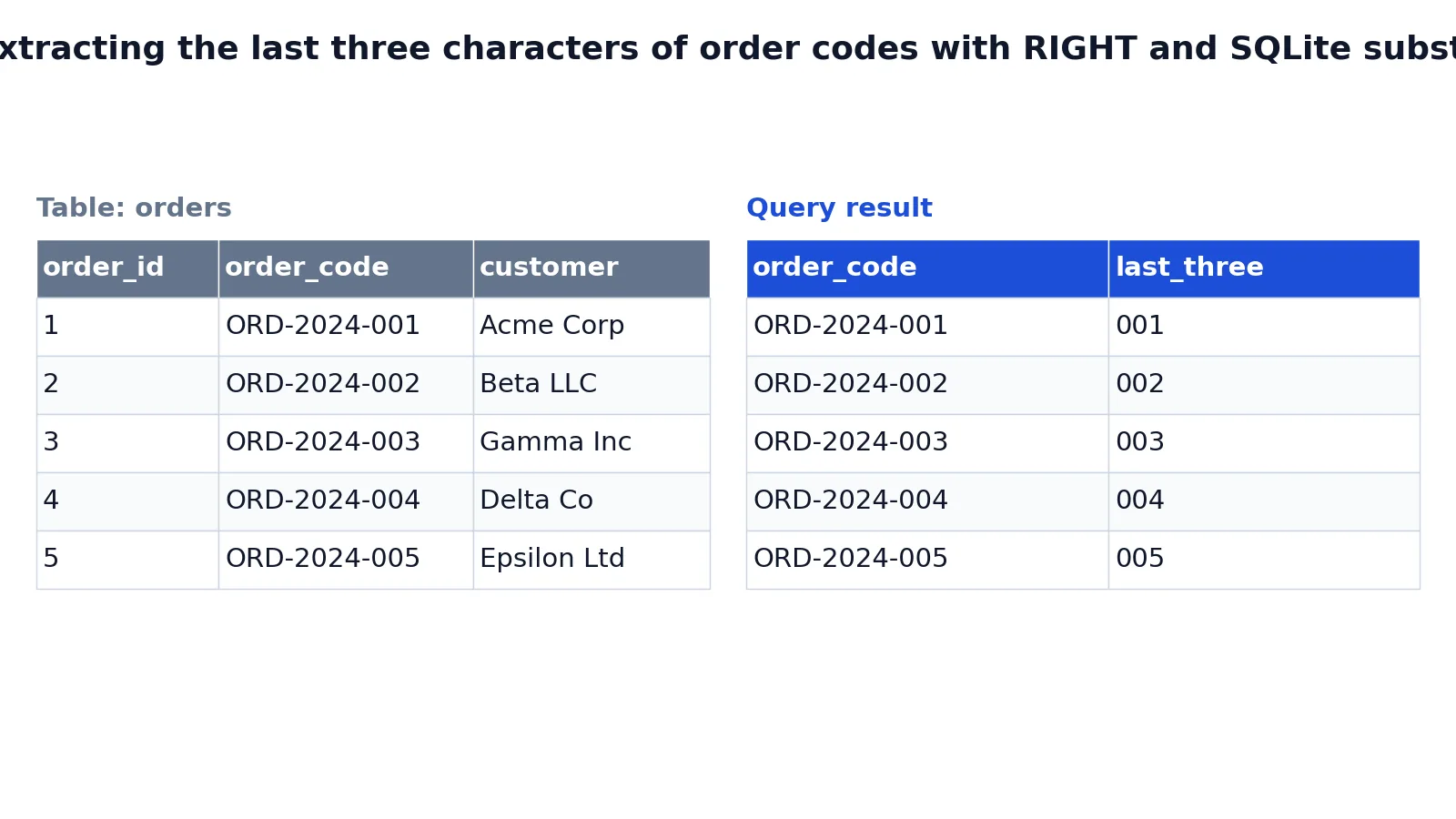
The orders table below holds five order codes in a fixed ORD-YYYY-NNN format. The goal is to pull the three-digit sequence number from the end of each code.
| order_id | order_code | customer |
|---|---|---|
| 1 | ORD-2024-001 | Acme Corp |
| 2 | ORD-2024-002 | Beta LLC |
| 3 | ORD-2024-003 | Gamma Inc |
| 4 | ORD-2024-004 | Delta Co |
| 5 | ORD-2024-005 | Epsilon Ltd |
SELECT
  order_code,
  RIGHT(order_code, 3) AS last_three
FROM orders;| order_code | last_three |
|---|---|
| ORD-2024-001 | 001 |
| ORD-2024-002 | 002 |
| ORD-2024-003 | 003 |
| ORD-2024-004 | 004 |
| ORD-2024-005 | 005 |
The result was checked with an equivalent SQLite query, substr(order_code, -3), which produced the same last-three-characters output. The AS last_three clause names the computed column, the same aliasing pattern you would use in any SQL SELECT statement.
More Examples
Extract a file extension. Given a filename column, the extension is everything after the final dot. RIGHT alone cannot find the dot, so combine it with a position function:
SELECT filename, RIGHT(filename, 3) AS ext
FROM uploads;
This works only when every extension is three characters. For variable-length extensions, compute the length from the dot position and pass that to RIGHT.
Pad a numeric suffix. RIGHT is often paired with a formatting function to build fixed-width codes. In SQL Server you can concatenate a prefix with a zero-padded number:
SELECT 'INV-' + RIGHT('000000' + CAST(invoice_no AS varchar(10)), 6) AS invoice_code
FROM invoices;
The inner RIGHT keeps the last six characters of the padded number, so 42 becomes 000042.
Filter rows by suffix. RIGHT works in a WHERE clause like any other expression:
SELECT order_code
FROM orders
WHERE RIGHT(order_code, 3) = '003';
Be aware that this prevents index use on order_code in most engines, because the function is applied to the column. A LIKE '%003' pattern has the same problem, so neither is a free win.
Group by a suffix. You can aggregate on the extracted value, which is handy for reporting on code families:
SELECT RIGHT(order_code, 3) AS seq, COUNT(*) AS n
FROM orders
GROUP BY RIGHT(order_code, 3);
When the logic gets long, a common table expression keeps the extraction in one place and the aggregation readable.
Conditional logic on the suffix. Combine RIGHT with a CASE expression to label records by their trailing characters:
SELECT order_code,
       CASE WHEN RIGHT(order_code, 1) = '0' THEN 'batch A' ELSE 'batch B' END AS batch
FROM orders;
Modular arithmetic alternative. When the suffix is purely numeric, the MOD function can extract it without any string handling:
SELECT order_code, MOD(CAST(RIGHT(order_code, 3) AS INTEGER), 10) AS last_digit
FROM orders;
Errors and How to Fix Them
Negative length. SQL Server returns an error when integer_expression is negative [1], and Azure Stream Analytics terminates the statement [2]. Fix it by using ABS(n) if the sign is not guaranteed, or by validating the value before the call.
Function does not exist. SQLite, and some other engines, do not implement RIGHT. The fix is the SUBSTRING form: substr(column, -n) in SQLite, or SUBSTRING(column, LENGTH(column) - n + 1, n) where negative start positions are unsupported.
Wrong data type. In SQL Server, character_expression can be any type that converts implicitly to varchar or nvarchar, except text and ntext [1]. If you hit a conversion error, wrap the column in CAST(column AS varchar(max)).
Binary input loses its type. If the input is binary or varbinary, RIGHT converts it to varchar implicitly and does not preserve the binary value [1]. Use a binary-aware function instead.
Large length values. If integer_expression is bigint and holds a large value, the character expression must be a large type such as varchar(max) [1]. Otherwise you get a truncation or conversion error.
Common Mistakes
- Assuming RIGHT exists everywhere. It is widely supported but not part of the SQL standard, and not universal. Check your engine, and fall back to SUBSTRING or
substrwith a negative start when it is missing. - Passing a negative number by accident. A computed length can go negative when the string is shorter than expected. Guard it with
ABSor aCASEcheck. - Expecting an error when n exceeds the length. You get the whole string back instead [2]. If you need to detect short values, compare
LENGTH(column)tonexplicitly. - Forgetting collation with Unicode data. Surrogate pairs count as one character only under SC collations in SQL Server [1]. Test with real data if you handle emoji or non-Latin scripts.
- Using RIGHT in a WHERE clause on an indexed column. The function blocks index seeks in most engines. Store the extracted suffix in its own column if you filter on it often.
- Confusing RIGHT with a join or set operation. RIGHT is a string function. The word also appears in
RIGHT JOIN, which is unrelated and does the opposite kind of work.
Limitations
RIGHT only reads from the end. It cannot find a delimiter, skip characters in the middle or return a variable-length suffix on its own. For those tasks you need position and length functions such as CHARINDEX, INSTR or POSITION, combined with SUBSTRING. RIGHT is a building block, not a parser.
Portability is the other limit. The function name, the negative-length behavior and the Unicode counting rules all differ between engines. PostgreSQL even defines right(str, -len) as right(str, length(str) - len), which is the opposite of the SQL Server error [3]. If your query must run on more than one database, write the SUBSTRING equivalent and test it on each target.
Frequently Asked Questions
What does RIGHT do in SQL?
RIGHT returns the last n characters of a string [1]. You pass the string and a positive integer, and it counts backward from the end. It is the counterpart to LEFT, which counts forward from the start.
Is RIGHT the same as SUBSTRING?
No, but they overlap. RIGHT(s, n) is equivalent to SUBSTRING(s, LEN(s) - n + 1, n). RIGHT is shorter and clearer when you want a fixed number of trailing characters. SUBSTRING is more flexible because it takes a start position and a length you can compute.
Does SQLite support RIGHT?
No. SQLite has no RIGHT function. Use substr(column, -3) to get the last three characters, since a negative start position counts from the end of the string. The result matches what RIGHT returns in engines that support it.
What happens if the length is bigger than the string?
You get the entire string back [2]. No error is raised and no padding is added. If you need to know whether the string was shorter than requested, compare its length to your argument separately.
Can I use RIGHT in a WHERE clause?
Yes, syntactically. The catch is performance. Applying a function to a column usually stops the optimizer from using an index on that column, so the query scans. If suffix filtering is common, store the suffix in a dedicated column and index that instead.
How do I get the last character of a string?
Pass 1 as the length: RIGHT(column, 1). This returns a single-character string. To compare it to a number, cast the result first, or use a numeric function such as MOD when the value is already numeric.
Does RIGHT work with Unicode text?
It depends on the engine and collation. In SQL Server, RIGHT counts a UTF-16 surrogate pair as one character when you use SC collations [1]. Under other collations, a pair can be split. Test with your actual data before trusting the output.
References
- RIGHT (Transact-SQL) - SQL Server | Microsoft Learn
- RIGHT - Stream Analytics Query | Microsoft Learn
- String Functions and Operators Compatibility - PostgreSQL wiki
Further Reading
- Codd EF (1970). A relational model of data for large shared data banks. Communications of the ACM
- PostgreSQL Documentation: SELECT
- SQLite: SQL As Understood By SQLite
- Wilson G, Bryan J, Cranston K et al. (2017). Good enough practices in scientific computing. PLOS Computational Biology