Using CASE in SQL: Syntax and Examples
By Dr. Zubair Khalid, DVM, MS, PhD ·
Using CASE in SQL lets you add if-then logic directly inside a query, so a single statement can label rows, bucket values, or replace codes with readable text. It works in SELECT lists, WHERE clauses, ORDER BY, and inside aggregate functions. This guide covers both syntax forms, a worked example, and the mistakes that trip people up.
Quick Answer
- CASE is an expression, not a statement. It returns a value, so you can place it anywhere an expression is valid [1].
- Searched form:
CASE WHEN condition THEN result ... ELSE result END. Each condition must return a boolean [1]. - Simple form:
CASE expression WHEN value THEN result ... ELSE result END. The expression is compared to each value until one matches [1]. - Conditions are evaluated in order and evaluation stops at the first true condition. If nothing matches and there is no ELSE, the result is null [1].
- All result expressions must be convertible to a single output data type [1].
Before You Start
You need a working SQL connection and permission to run SELECT queries against at least one table. Any dialect works here. PostgreSQL, SQL Server, MySQL, SQLite, and Oracle all support CASE, and the core syntax is the same across them [1][2][3].
Know the difference between the two forms before you write anything. The searched form tests a full condition, so it can compare different columns, use ranges, and combine tests with AND and OR. The simple form compares one expression against a list of values, which is closer to a switch statement in C [1]. If you need ranges like amount > 100, use the searched form.
You also need to know your column types. CASE returns one value per row, and every branch must produce a compatible type. Mixing a number in one branch and text in another will fail or force an unwanted conversion [1].
If you are new to query structure, review the SQL SELECT statement first, since CASE usually appears in the SELECT list. A refresher on the SQL alias syntax also helps, because CASE output almost always needs a column name.
Step by Step
- Pick the form. Use the searched form when conditions involve ranges, multiple columns, or boolean logic. Use the simple form when you are mapping one column's values to labels.
- Write the WHEN branches in priority order. The engine checks conditions sequentially and stops at the first true one [1][2]. Put the most specific condition first. If you test
amount >= 50beforeamount > 100, the high-value rows will never reach the second branch.
- Add an ELSE branch. Without ELSE, unmatched rows return null [1]. That is sometimes what you want, but in reports it usually creates blank cells that look like missing data.
- Close with END. Every CASE expression ends with the keyword END. Forgetting it is the most common syntax error.
- Alias the result. Give the expression a column name with AS so downstream tools and readers can reference it.
- Test the branches separately. Run a query that selects the raw column next to the CASE output. Check that the boundary values land in the category you expect.
- Use it in GROUP BY or ORDER BY when needed. You can group or sort by the computed label, which is how you turn row-level logic into a summary.
Worked Example
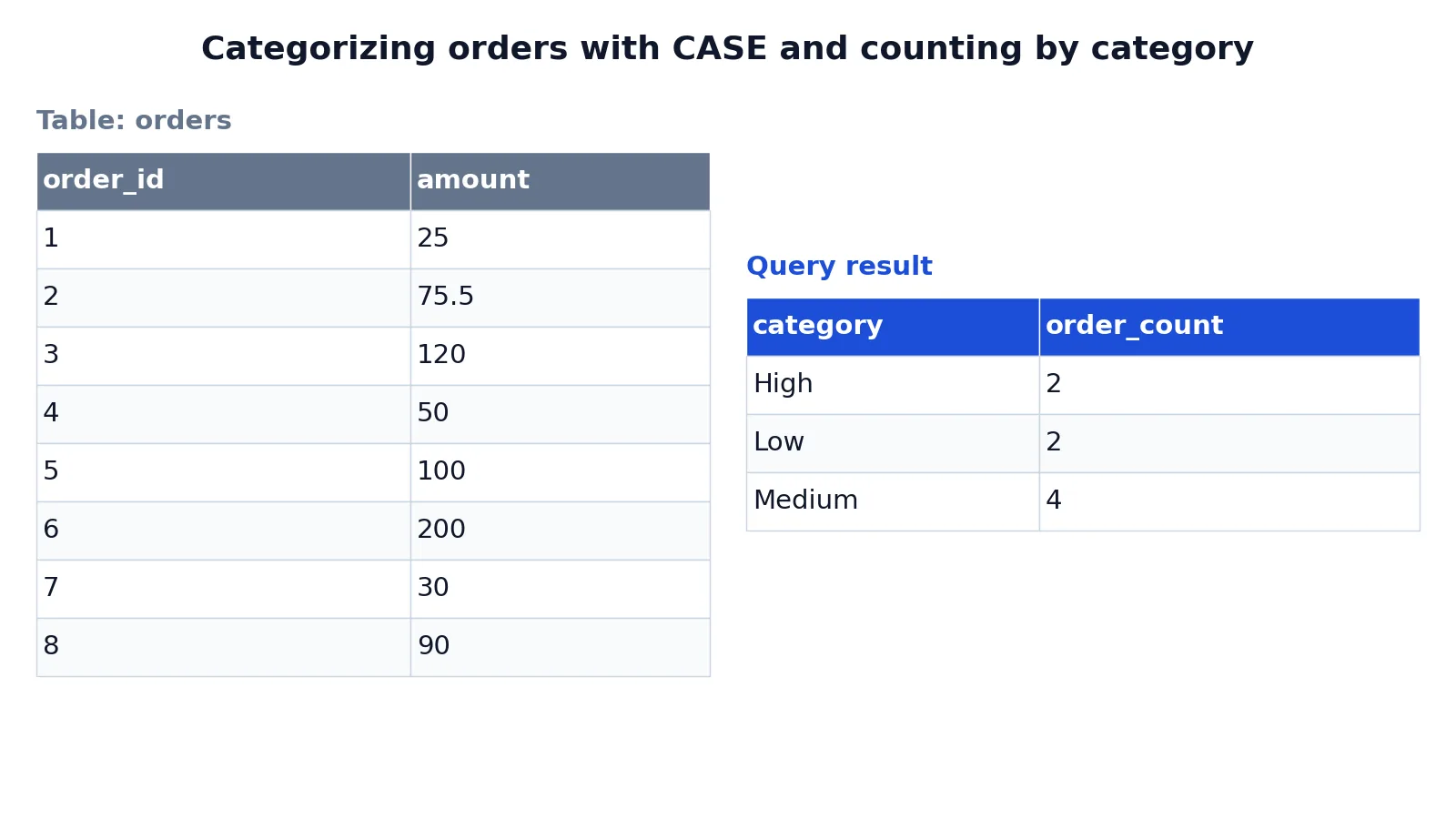
The table below holds eight orders with an amount column. The goal is to label each order as High, Medium, or Low and count how many orders fall in each category.
| order_id | amount |
|---|---|
| 1 | 25.00 |
| 2 | 75.50 |
| 3 | 120.00 |
| 4 | 50.00 |
| 5 | 100.00 |
| 6 | 200.00 |
| 7 | 30.00 |
| 8 | 90.00 |
The query uses the searched form of CASE, aliases the result as category, then groups and counts.
SELECT CASE WHEN amount > 100 THEN 'High' WHEN amount >= 50 THEN 'Medium' ELSE 'Low' END AS category, COUNT(*) AS order_count FROM orders GROUP BY category ORDER BY category;The result was checked with an equivalent SQLite query.
| category | order_count |
|---|---|
| High | 2 |
| Low | 2 |
| Medium | 4 |
Here is what happens at each stage. The CASE expression evaluates each row's amount. Values above 100 get the label High. Values of 50 or more that did not already match get Medium. Everything else gets Low. The result is aliased as category. GROUP BY category groups rows by that computed label, COUNT(*) counts the orders in each group, and ORDER BY category sorts the output alphabetically.
Two orders exceed 100, so High has a count of 2. Four orders fall in the 50 to 100 range, so Medium has 4. The remaining two orders are below 50, so Low has 2. The total is 8, which matches the row count of the input table.
Notice the branch order. The first condition is amount > 100, and the second is amount >= 50. If you swapped them, the order with amount 120 would match >= 50 first and be labeled Medium. Order matters because evaluation stops at the first true condition [1][2].
Other Ways to Do It
Simple CASE. When you are mapping exact values, the simple form is shorter. The expression is computed once and compared to each WHEN value until one is equal [1].
SELECT CASE status WHEN 'A' THEN 'Active' WHEN 'C' THEN 'Closed' ELSE 'Unknown' END AS status_label FROM accounts;The simple form cannot test ranges or combine conditions. It also cannot test for equality with null, because null comparisons do not return true [3]. Use the searched form with IS NULL for that.
CASE inside an aggregate. You can put CASE inside SUM or COUNT to build conditional totals. This is a common way to pivot data without a pivot function.
SELECT SUM(CASE WHEN amount > 100 THEN 1 ELSE 0 END) AS high_count FROM orders;CASE in ORDER BY. You can sort by a custom priority instead of alphabetically. This is useful when you want High first, then Medium, then Low.
CASE in WHERE. CASE can appear in a WHERE clause, but a plain boolean condition is usually clearer. One legitimate use is guarding against a division by zero, since CASE does not evaluate subexpressions it does not need [1].
SELECT order_id FROM orders WHERE CASE WHEN amount <> 0 THEN 100 / amount > 1.5 ELSE false END;Alternatives. For simple two-way logic, many dialects offer functions like COALESCE, NULLIF, or IF. For multi-branch mapping, a lookup table joined to your query is often easier to maintain than a long CASE chain. If you are building a larger query, a common table expression can hold the CASE logic so the main query stays readable. You can also nest CASE inside a subquery when the label depends on an aggregated value.
Troubleshooting
Syntax error near END. You are missing END, or you have an extra WHEN after ELSE. ELSE must be the last branch before END.
All results are null. No condition matched and there is no ELSE branch [1]. Add an ELSE or fix the conditions.
A category is missing from the output. The branch order is wrong, or the boundary value falls into an earlier branch. Check the comparison operators at the boundaries.
Type mismatch error. The branches return incompatible types. Make every THEN and ELSE return the same type, or cast explicitly [1].
Unexpected results with nulls. A condition involving null returns unknown, not true, so the row falls through to the next branch or to ELSE [3]. Test nulls explicitly with IS NULL.
Divide by zero error. In some engines, expressions in WHEN arguments are evaluated before CASE receives them, so a guard inside CASE may not prevent the error [2]. Restructure the query or filter the rows first.
Common Mistakes
- Putting the broad condition first.
WHEN amount >= 50beforeWHEN amount > 100sends high values into the Medium bucket. Order branches from most specific to least specific. - Omitting ELSE. Unmatched rows return null, which shows up as blank cells in reports [1]. Add an explicit ELSE unless null is genuinely meaningful.
- Mixing return types. Returning a number in one branch and a string in another forces a conversion or throws an error [1]. Keep all branches the same type.
- Using the simple form for ranges.
CASE amount WHEN > 100 THEN ...is invalid. The simple form only tests equality against listed values [1]. Switch to the searched form. - Testing for null with the simple form.
CASE col WHEN NULL THEN ...never matches, because null equality is not true [3]. UseCASE WHEN col IS NULL THEN .... - Assuming CASE controls execution flow. CASE is an expression and cannot branch statement execution in a stored procedure or script [2]. Use your dialect's control-of-flow statements for that.
Limitations
CASE returns one value per row and one data type across all branches, so it cannot return different structures or column sets depending on the condition [1]. It also cannot replace procedural control flow. In SQL Server, for example, CASE cannot control the execution of statements, statement blocks, or stored procedures [2].
Performance and evaluation order have traps. CASE stops at the first true condition, which is efficient, but in some engines expressions feeding the CASE are evaluated before CASE runs, so errors can surface even in branches that would not be selected [2]. Long CASE chains also become hard to read and maintain. When the mapping grows past a handful of branches, a lookup table is usually the better design.
Frequently Asked Questions
What is the difference between simple CASE and searched CASE?
The simple form compares one expression against a list of values for equality, similar to a switch statement [1]. The searched form evaluates a full boolean condition in each WHEN clause, so it supports ranges, multiple columns, and combined logic [1]. Use the searched form whenever you need anything beyond exact matching.
Does CASE evaluate all branches?
No. It evaluates conditions sequentially and stops at the first one that is true, and the remaining branches are not processed [1][2]. This matters for both correctness and performance, since expensive expressions in later branches are skipped once a match is found.
Can I use CASE in a WHERE clause?
Yes, CASE can appear wherever an expression is valid, including WHERE [1]. That said, a plain boolean condition is usually clearer and easier for the optimizer to handle. Reserve CASE in WHERE for cases like guarding a division by zero.
What happens if no WHEN condition matches?
If no condition is true and there is no ELSE clause, the CASE expression returns null [1]. If you want a specific fallback value, add an ELSE branch. This is the single most common cause of unexpected blank values in reports.
Can I group by a CASE expression?
Yes. You can group by the computed label, which is how the worked example turns row-level categories into counts. Some dialects let you reference the column alias in GROUP BY, while others require you to repeat the full CASE expression. If your dialect rejects the alias, repeat the expression or wrap the query in a common table expression.
How do I count rows that meet a condition?
Put CASE inside an aggregate. SUM(CASE WHEN condition THEN 1 ELSE 0 END) counts matching rows, and COUNT(CASE WHEN condition THEN 1 END) does the same because COUNT ignores nulls. This pattern is useful for building conditional totals in a single pass. For more patterns like this, see these SQL query examples.
References
- PostgreSQL: Documentation: 18: 9.18. Conditional Expressions
- CASE (Transact-SQL) - SQL Server | Microsoft Learn
- MySQL :: MySQL 9.7 Reference Manual :: 15.6.5.1 CASE Statement
Further Reading
- Codd EF (1970). A relational model of data for large shared data banks. Communications of the ACM
- PostgreSQL Documentation: SELECT
- SQLite: SQL As Understood By SQLite
- Wilson G, Bryan J, Cranston K et al. (2017). Good enough practices in scientific computing. PLOS Computational Biology