SQL Query Format: How to Write and Format SQL Queries
By Dr. Zubair Khalid, DVM, MS, PhD ·
A readable SQL query format puts each major clause on its own line, indents the items inside a clause, and writes keywords in a consistent case. The goal is that a reader can scan the query and see its structure without reading every word. This article shows the conventions, a full worked example, and the mistakes that make queries hard to maintain.
Quick Answer
- Write each clause (
SELECT,FROM,WHERE,GROUP BY,ORDER BY) starting on a new line. - Put one column or expression per line inside
SELECT,GROUP BY, andORDER BY. - Indent continuation lines by two or four spaces so nesting is visible.
- Pick one keyword case, usually uppercase, and apply it everywhere.
- Keep the logical clause order:
SELECT,FROM,WHERE,GROUP BY,HAVING,ORDER BY,LIMIT.
Before You Start
Formatting does not change what a query returns. Whitespace between tokens is ignored by the parser, so a single-line query and a multi-line query with the same tokens produce the same result set. That means you can format freely for readability without worrying about correctness.
You need a working SQL client or command-line tool and a table to query. The conventions below apply to every major dialect, including PostgreSQL, MySQL, SQL Server, Oracle, and SQLite. A few dialect-specific details exist, such as the LIMIT clause in SQLite and MySQL versus TOP in SQL Server, but the layout rules are the same.
Decide on three things before you write your first query in a project:
- Keyword case. Uppercase keywords and lowercase identifiers is the most common convention.
- Indent width. Two or four spaces. Pick one and stay with it.
- Comma placement. Leading commas (at the start of the next line) or trailing commas (at the end of the current line). Trailing commas are more common.
If you are new to the clause structure itself, the SQL SELECT statement syntax and examples walkthrough is a good companion to this article.
Step by Step
- Start with
SELECTon its own line. List each output column on a separate line, indented. Give computed columns an alias withASso the output header is readable. Aliases are covered in more detail in SQL alias syntax and examples.
- Put
FROMon the next line at the left margin. The table name goes on the same line. If you join several tables, put eachJOINon its own line and indent theONcondition under it.
- Add
WHEREon its own line. Keep the filter condition on the same line if it is short. If it has severalANDorORparts, break each condition onto its own indented line and put the operator at the start of the line.
- Add
GROUP BYon its own line. List each grouping column on its own indented line, matching the order inSELECTwhere possible.
- Add
HAVINGafterGROUP BYif you need to filter aggregated rows. Keep it visually separate fromWHERE, because they run at different stages.
- Add
ORDER BYon its own line. List each sort key on its own indented line withASCorDESCwritten explicitly. Explicit direction is easier to read than relying on the default.
- End with
LIMITor the dialect equivalent on its own line if you only need part of the result. Pagination patterns are covered in SQL OFFSET clause examples.
- Run the query and check the output. Formatting is only correct if the query still executes and returns the rows you expect.
Worked Example
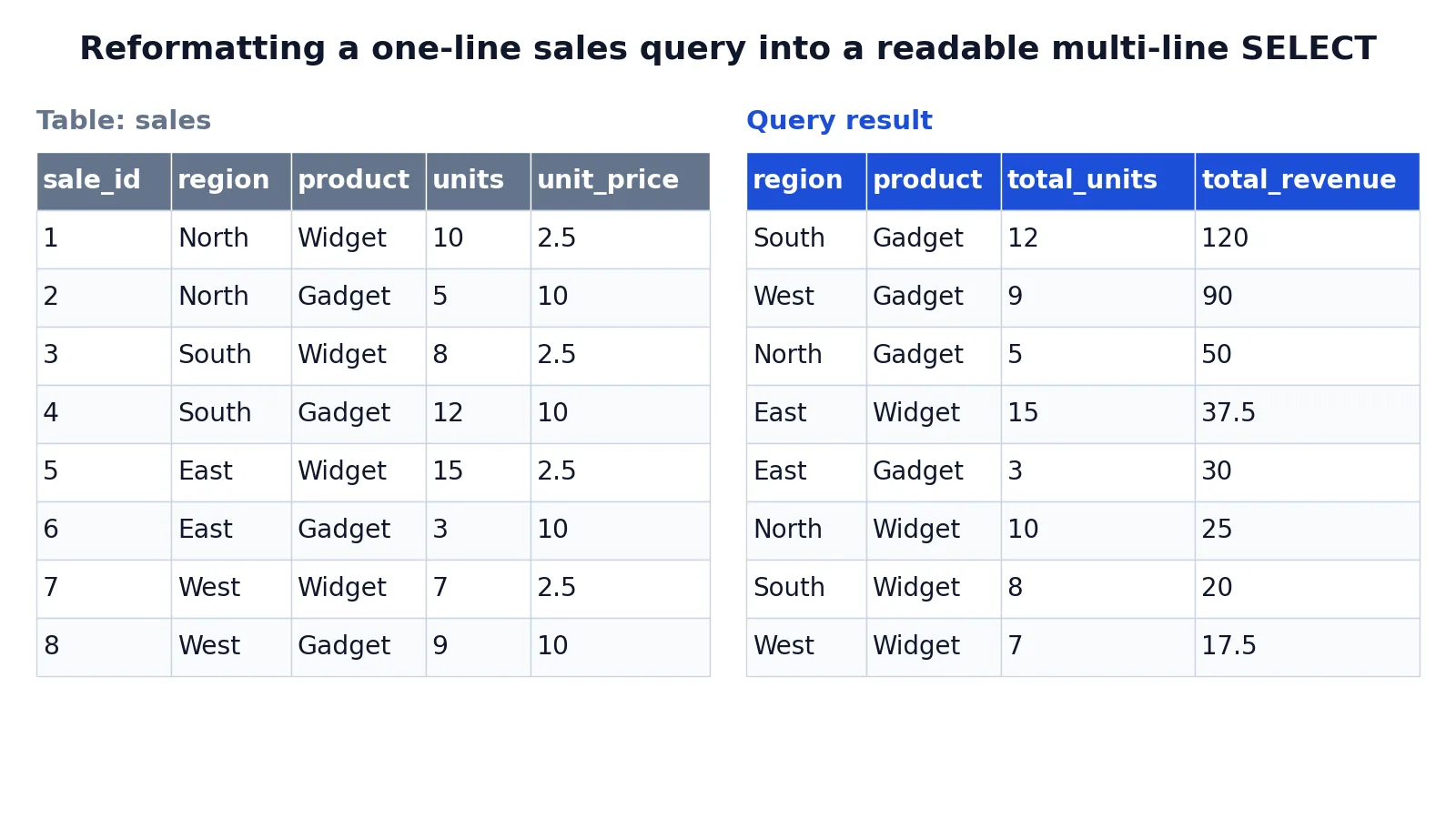
The example uses a small sales table with one row per sale, recording region, product, units, and unit price.
| sale_id | region | product | units | unit_price |
|---|---|---|---|---|
| 1 | North | Widget | 10 | 2.50 |
| 2 | North | Gadget | 5 | 10.00 |
| 3 | South | Widget | 8 | 2.50 |
| 4 | South | Gadget | 12 | 10.00 |
| 5 | East | Widget | 15 | 2.50 |
| 6 | East | Gadget | 3 | 10.00 |
| 7 | West | Widget | 7 | 2.50 |
| 8 | West | Gadget | 9 | 10.00 |
Here is the query in a formatted layout. Every clause starts on a new line and every list item is indented.
SELECT
  region,
  product,
  SUM(units) AS total_units,
  SUM(units * unit_price) AS total_revenue
FROM sales
WHERE units > 0
GROUP BY
  region,
  product
ORDER BY
  total_revenue DESC,
  region ASC;
The steps the query performs, in order:
SELECTclause: choose the columns to return, including aggregate expressions with aliases.FROMclause: name the source table (sales).WHEREclause: filter rows before grouping (units > 0).GROUP BYclause: collapse rows into one row per region and product.ORDER BYclause: sort the result bytotal_revenuedescending, thenregionascending.
The result was checked with an equivalent SQLite query.
| region | product | total_units | total_revenue |
|---|---|---|---|
| South | Gadget | 12 | 120 |
| West | Gadget | 9 | 90 |
| North | Gadget | 5 | 50 |
| East | Widget | 15 | 37.5 |
| East | Gadget | 3 | 30 |
| North | Widget | 10 | 25 |
| South | Widget | 8 | 20 |
| West | Widget | 7 | 17.5 |
The revenue column comes from multiplying units by unit price and summing within each group. For the South Gadget row that is $12 \times 10.00 = 120$. For the East Widget row it is $15 \times 2.50 = 37.5$. The display formula is:
$$ \text{total\_revenue} = \sum (\text{units} \times \text{unit\_price}) $$
The same query written as one long line returns exactly the same rows. The formatted version is simply easier to read and to edit.
Other Ways to Do It
Single-line queries. Fine for quick interactive checks in a console. They become unreadable once a query has more than two or three clauses, so avoid them in saved scripts.
Leading commas. Some teams put the comma at the start of each line after the first item. This makes it easy to comment out a column without breaking the previous line. Both styles are valid, and consistency within a codebase matters more than which one you choose.
River style. A layout where keywords are right-aligned and column lists form a vertical column. It is compact and popular in some reporting teams. It is harder to read for people who are new to SQL.
Automatic formatters. Most SQL editors and IDE extensions can reformat a query on demand. They apply a fixed set of rules, which is useful for enforcing one style across a team. Check the formatter's output before committing it, because some formatters wrap long expressions in ways that hurt readability.
Lowercase keywords. Some developers write select, from, and where in lowercase. This is valid SQL and common in code that embeds queries in a host language. The important thing is that keywords and identifiers are visually distinguishable, which usually means one case for keywords and another for names.
Troubleshooting
The query runs but the output columns are unlabeled. Add AS aliases to computed columns. Without an alias, many tools show the raw expression as the header.
A column in SELECT is not in GROUP BY. Standard SQL requires every non-aggregated column in the select list to appear in the GROUP BY clause. Add it or wrap it in an aggregate function.
WHERE filters on an aggregate and fails. Aggregate functions cannot be used in WHERE, because WHERE runs before grouping. Move the condition to HAVING.
Sorting looks wrong. Check the data type of the sort column. Text columns sort alphabetically, so '10' sorts before '9'. Cast to a numeric type if needed.
The formatter changes the meaning. It should not, but verify by running the query before and after. Compare row counts and a few values.
Comments break the query. Line comments (--) run only to the end of the line, so they cannot hide the next line. The usual problem is commenting out the last item of a list with trailing commas, which leaves a dangling comma before FROM. Leading commas avoid this.
Common Mistakes
- Mixing keyword cases. Writing
SELECTin one place andselectin another makes the query look careless. Fix: choose uppercase keywords and apply it throughout the file. - Putting the whole query on one line. This hides the clause structure. Fix: break each clause onto its own line.
- Indenting inconsistently. Two spaces in one clause and a tab in the next makes nesting unreadable. Fix: set your editor to insert spaces and use one indent width.
- Omitting sort direction. Relying on the default
ASCmakes intent unclear. Fix: writeASCorDESCon every sort key. - Aliasing with reserved words. Naming a column
orderorgroupcauses syntax errors. Fix: use a descriptive name such asorder_total. - Leaving the
ONcondition on theJOINline. Long join conditions become hard to scan. Fix: indent theONcondition under itsJOIN.
Limitations
Formatting conventions are not enforced by the SQL standard. Every dialect accepts the same whitespace, so a query formatted for PostgreSQL runs unchanged in SQLite as long as the clauses themselves are supported. This means there is no single correct style, and two teams can both be right while looking different.
Automatic formatters have limits too. They cannot tell whether a long expression should be wrapped or left alone, and they may reformat embedded strings or comments in ways you did not intend. Treat formatter output as a draft and review it. Formatting also does nothing for performance. A well-formatted query that scans a large table without an index is still slow, and the layout gives no hint about that.
Frequently Asked Questions
Does SQL query format affect performance?
No. The database parser ignores extra whitespace, so a formatted query and a single-line query produce the same execution plan. Performance depends on indexes, table size, and the operations in the query, not on how it is laid out.
Should SQL keywords be uppercase or lowercase?
Both are valid. Uppercase keywords are the most common convention because they stand out from lowercase table and column names. Pick one style and use it consistently across your project.
How many spaces should I indent?
Two or four spaces are both common. The exact number matters less than using the same width everywhere. Avoid tabs, because tab width varies between editors and can make a query look misaligned on another machine.
Can I format a query automatically?
Yes. Most SQL editors and IDE extensions include a formatter that applies a fixed style. Run it on a copy first and compare the output, because some formatters wrap long expressions in ways that reduce readability.
Where does the semicolon go?
At the very end of the statement, after the last clause. Some tools require it and others do not, but including it is safe and makes it clear where one statement ends and the next begins. If you write several statements in one script, each one needs its own semicolon.
References
This article draws on the standard references listed under Further Reading.
Further Reading
- Codd EF (1970). A relational model of data for large shared data banks. Communications of the ACM
- PostgreSQL Documentation: SELECT
- SQLite: SQL As Understood By SQLite
- Wilson G, Bryan J, Cranston K et al. (2017). Good enough practices in scientific computing. PLOS Computational Biology
- PostgreSQL Tutorial: The SQL Language
- SQLite: Built-In Scalar SQL Functions