Python map() Function: Syntax and Examples
By Dr. Zubair Khalid, DVM, MS, PhD ·
The map() function in Python applies a function to every item of one or more iterables and returns an iterator of the results. It is a compact alternative to a for loop when you want to transform each element of a list, tuple or other sequence. This article covers the syntax, how the map in python works, and practical examples you can run today.
Quick Answer
map(function, iterable)callsfunctionon each item ofiterableand yields the results one at a time.- It returns a map object, which is an iterator. Wrap it in
list(),tuple()orset()to see the values. - You can pass more than one iterable. The function then receives one argument from each iterable per call.
- The function argument can be a built-in, a
lambda, or any callable that accepts the right number of arguments. map()stops when the shortest iterable is exhausted, so extra items in longer iterables are ignored.
Syntax
The signature is map(function, iterable, ...).
| Argument | Required? | Meaning |
|---|---|---|
function | Yes | A callable applied to each item. It must accept as many arguments as there are iterables. |
iterable | Yes | One or more iterable objects, such as a list, tuple, string, set or range. |
... | No | Additional iterables. Each extra iterable adds one argument to the function call. |
The return value is a map object, which is a lazy iterator. It does not compute all results at once. Each item is produced only when you ask for it, which is why you usually convert it to a list before printing or reusing it.
How It Works
When you call map(), Python stores a reference to the function and to each iterable. Nothing is computed yet. When you iterate over the map object, Python pulls the next item from each iterable, passes those items to the function, and yields the return value. This repeats until an iterable runs out of items.
Because the map object is an iterator, it is single use. Once you consume it, it is empty. If you need the results more than once, store them in a list.
A simple mental model is a pipeline. The input iterable feeds values in, the function transforms each value, and the output iterator hands the transformed values out one by one. This is the same idea behind a Python for loop, but the loop is written for you.
For a single iterable, map(f, xs) is equivalent to this list comprehension:
[f(x) for x in xs]For two iterables, map(f, xs, ys) is equivalent to:
[f(x, y) for x, y in zip(xs, ys)]The zip behavior explains the shortest-iterable rule. When one input ends, the pairing stops.
Worked Example
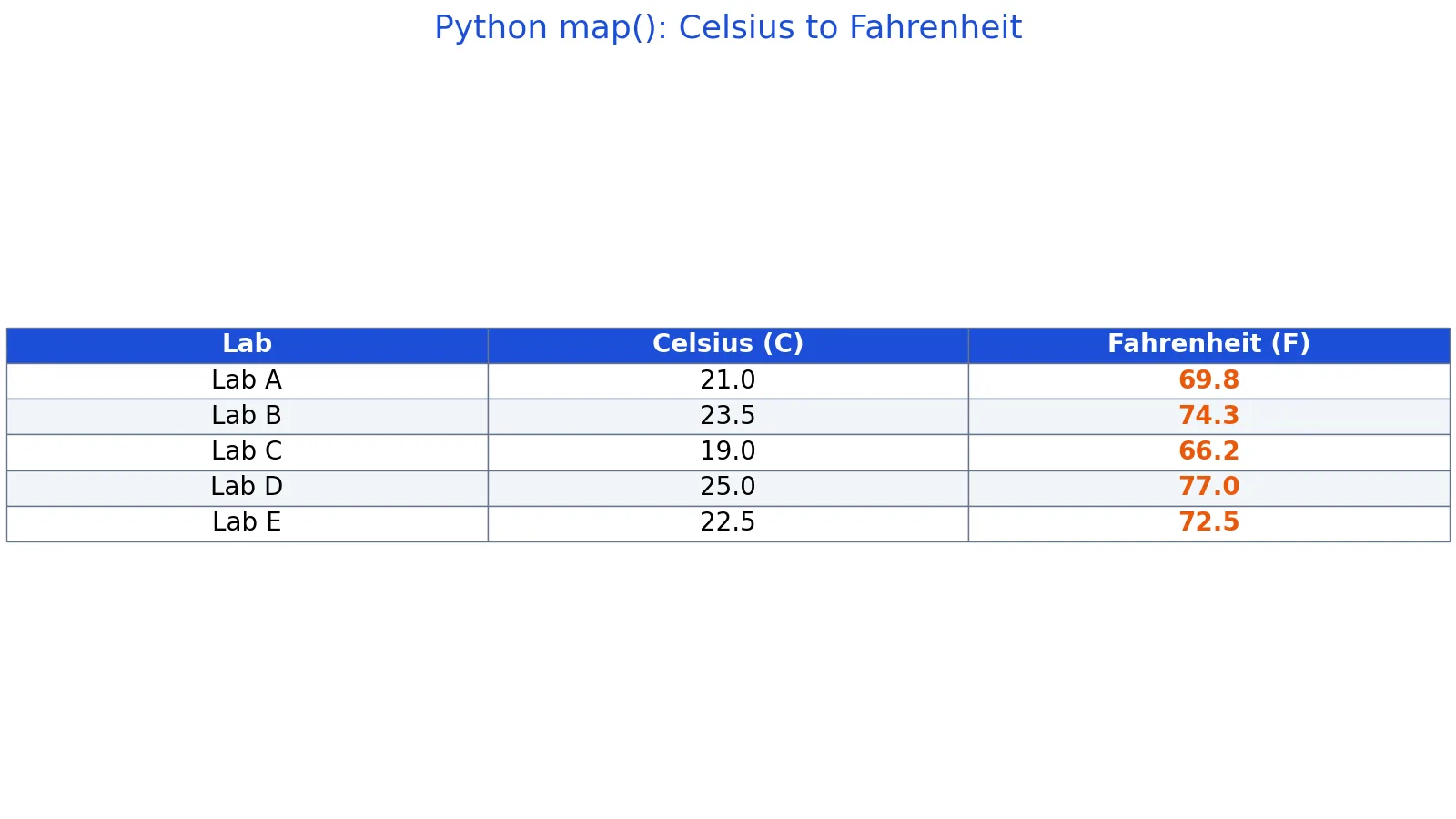
The dataset below holds five lab temperature readings in Celsius. You want to convert each reading to Fahrenheit.
| lab | celsius |
|---|---|
| Lab A | 21 |
| Lab B | 23.5 |
| Lab C | 19 |
| Lab D | 25 |
| Lab E | 22.5 |
The conversion formula is:
$$F = C \times \frac{9}{5} + 32$$
Applying it to each reading gives these values.
- Lab A: 21.0 C -> F: 21.0 9/5 + 32 = 21.0 1.8 + 32 = 37.8 + 32 = 69.8
- Lab B: 23.5 C -> F: 23.5 9/5 + 32 = 23.5 1.8 + 32 = 42.3 + 32 = 74.3
- Lab C: 19.0 C -> F: 19.0 9/5 + 32 = 19.0 1.8 + 32 = 34.2 + 32 = 66.2
- Lab D: 25.0 C -> F: 25.0 9/5 + 32 = 25.0 1.8 + 32 = 45.0 + 32 = 77.0
- Lab E: 22.5 C -> F: 22.5 9/5 + 32 = 22.5 1.8 + 32 = 40.5 + 32 = 72.5
Here is the code that produces those values.
celsius = [21.0, 23.5, 19.0, 25.0, 22.5]
to_f = lambda c: c * 9 / 5 + 32
fahrenheit = list(map(to_f, celsius))
print(fahrenheit)
Output:
[69.8, 74.3, 66.2, 77.0, 72.5]The map result matches the equivalent list comprehension exactly. Comparing the two lists returns True, and the mean of the Fahrenheit values is 71.96.
| lab | celsius | fahrenheit |
|---|---|---|
| Lab A | 21.0 | 69.8 |
| Lab B | 23.5 | 74.3 |
| Lab C | 19.0 | 66.2 |
| Lab D | 25.0 | 77.0 |
| Lab E | 22.5 | 72.5 |
More Examples
Using a named function instead of a lambda. Named functions are easier to test and reuse.
def to_fahrenheit(c):
    return c * 9 / 5 + 32

readings = [21.0, 23.5, 19.0]
print(list(map(to_fahrenheit, readings)))
Output:
[69.8, 74.3, 66.2]Mapping over two iterables. The function takes one argument per iterable.
labs = ["Lab A", "Lab B", "Lab C"]
temps = [69.8, 74.3, 66.2]
pairs = list(map(lambda name, t: f"{name}: {t} F", labs, temps))
print(pairs)
Output:
['Lab A: 69.8 F', 'Lab B: 74.3 F', 'Lab C: 66.2 F']Using a built-in function. Built-ins are often the fastest option because the loop runs in C.
raw = ["21", "23.5", "19"]
print(list(map(float, raw)))
Output:
[21.0, 23.5, 19.0]Combining map with filter. filter() keeps items, map() transforms them. Chaining the two is a common pattern.
values = [21.0, 23.5, 19.0, 25.0, 22.5]
warm = filter(lambda c: c >= 22, values)
print(list(map(lambda c: c * 9 / 5 + 32, warm)))
Output:
[74.3, 77.0, 72.5]If you need the index along with each value, pair map() with Python enumerate() instead of tracking a counter yourself.
Errors and How to Fix Them
TypeError: 'map' object is not subscriptable. You tried to index the map object, for example result[0]. Convert it first with list(result).
TypeError: <lambda>() takes 1 positional argument but 2 were given. You passed two iterables but the function accepts one argument. Either add a parameter to the function or pass a single iterable.
TypeError: 'int' object is not callable. The first argument is not a function. Check that you passed a callable and not a value.
Empty output on the second use. The map object was already consumed. Rebuild it or store the results in a list.
ValueError: invalid literal for int(). The iterable contains a value the function cannot convert, such as an empty string or text. Clean the data before mapping.
Common Mistakes
- Forgetting that
map()is lazy. Printing the map object shows something like<map object at 0x...>, not the values. Fix: wrap it inlist(). - Reusing a consumed map object. The second loop over it produces nothing. Fix: assign
list(map(...))to a variable and reuse that list. - Assuming unequal iterables raise an error. They do not.
map()stops at the shortest one, which can silently drop data. Fix: check lengths first if the inputs should match. - Using
map()for side effects. Callingprintinsidemap()is confusing and lazy evaluation means nothing prints until you consume the iterator. Fix: use a plain loop for side effects. - Passing a lambda where a built-in works.
map(lambda x: float(x), raw)is slower and noisier thanmap(float, raw). Fix: use the built-in directly. - Expecting a list back. In Python 3,
map()returns an iterator, not a list. Fix: convert explicitly when you need a sequence.
Limitations
map() only transforms values. It cannot filter, sort, group or aggregate. If you need to drop items, use filter() or a comprehension with a condition. If you need a single summary value such as a sum or mean, use sum() or a statistics function instead.
The lazy return value is a common source of confusion. Because nothing runs until you iterate, errors inside the function surface later than you might expect, and debugging a map object is harder than debugging a list. For anything beyond a simple one-line transformation, a list comprehension or an explicit loop is usually easier to read. When your data grows into arrays, a library such as NumPy handles element-wise operations more directly, and the same transformation idea appears in other tools, for example when you use CASE in SQL to map categories to labels.
Frequently Asked Questions
What does map() return in Python?
It returns a map object, which is a lazy iterator. The function is not applied until you iterate over it. Wrap the result in list(), tuple() or set() to materialize the values. Once consumed, the iterator is empty.
Is map() faster than a list comprehension?
For a built-in function such as float or str, map() is often faster because the loop runs in C. For a lambda, the difference is usually small and a list comprehension is often easier to read. Measure with your own data before choosing.
Can map() take more than one iterable?
Yes. Pass extra iterables after the first one, and the function receives one argument from each per call. map() stops as soon as the shortest iterable is exhausted, so longer inputs are truncated without warning.
How do I use map() with a dictionary?
Iterating a dictionary yields its keys, so map(f, my_dict) applies f to each key. To transform values, use my_dict.values(). To transform key-value pairs, use my_dict.items() and a function that accepts a tuple or two arguments.
What is the difference between map() and filter()?
map() transforms every item and keeps the same number of results. filter() keeps only the items for which the function returns true, so the output can be shorter. They are often chained, with filter() first and map() second.
References
This article draws on the standard references listed under Further Reading.
Further Reading
- 2. Built-in Functions, Python 2.7.18 documentation
- Harris CR, Millman KJ, van der Walt SJ et al. (2020). Array programming with NumPy. Nature
- McKinney W (2010). Data Structures for Statistical Computing in Python. Proceedings of the Python in Science Conference
- The Python Tutorial
- Wilson G, Bryan J, Cranston K et al. (2017). Good enough practices in scientific computing. PLOS Computational Biology
- Virtanen P, Gommers R, Oliphant TE et al. (2020). SciPy 1.0: fundamental algorithms for scientific computing in Python. Nature Methods