NumPy linspace: Syntax and Examples
By Dr. Zubair Khalid, DVM, MS, PhD ·
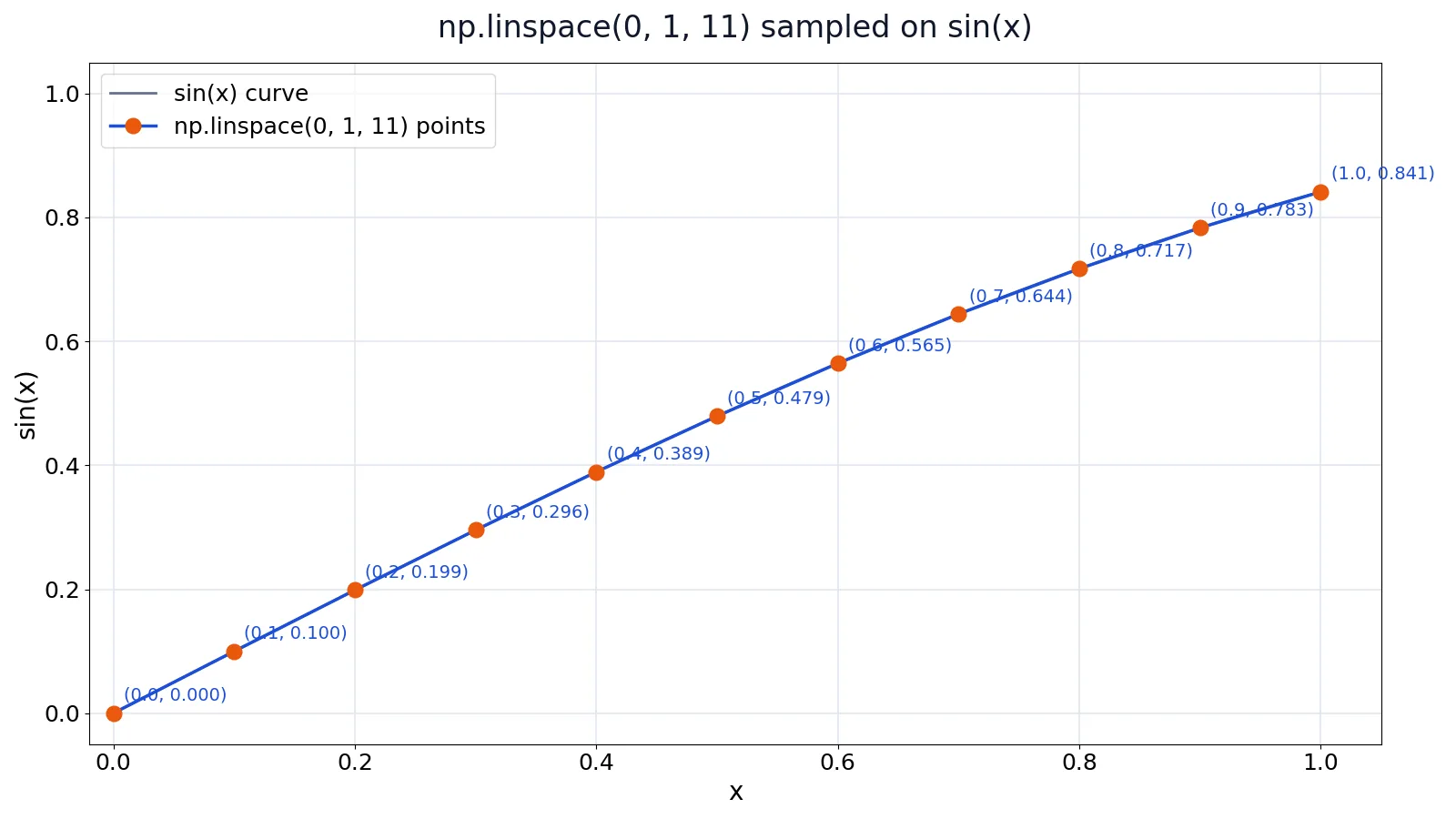
numpy linspace returns a fixed number of evenly spaced values over a closed interval. You give it a start, a stop and how many points you want, and it computes the spacing for you. That makes it the natural choice when you need a specific sample count, a floating-point step, or a guaranteed endpoint.
Quick Answer
numpy.linspace(start, stop, num=50, endpoint=True, retstep=False, dtype=None, axis=0)returnsnumevenly spaced samples over the interval [1].- The step size is derived from
num, not supplied by you: $\text{step} = (\text{stop} - \text{start}) / (\text{num} - 1)$ whenendpoint=True. endpoint=Trueis the default, sostopis the last sample. Setendpoint=Falseto exclude it [1].- Use
numpy.linspacewhen you want the endpoint included or a non-integer step. Usenumpy.arangefor integer steps [2]. retstep=Truereturns a tuple of the samples and the spacing, which is handy for checking the step [1].
Syntax
| Argument | Required? | Meaning |
|---|---|---|
start | Yes | The starting value of the sequence. |
stop | Yes | The end value of the sequence, unless endpoint=False [1]. |
num | No | Number of samples to generate. Default is 50. Must be non-negative [1]. |
endpoint | No | If True, stop is the last sample. Otherwise it is excluded. Default is True [1]. |
retstep | No | If True, return (samples, step), where step is the spacing [1]. |
dtype | No | The type of the output array. If omitted, it is inferred from the other inputs [1]. |
axis | No | The axis in the result to store the samples. Default is 0 [1]. |
device | No | The device on which to place the created array [1]. |
How It Works
numpy.linspace divides an interval into equal-length subintervals. You control the number of samples, and NumPy works out the spacing from that count [2]. The samples sit in the closed interval [start, stop] when endpoint is True, or the half-open interval [start, stop) when it is False [3].
The step is:
$$\text{step} = \frac{\text{stop} - \text{start}}{\text{num} - 1}$$
That denominator is num - 1 because the two endpoints are both included. With endpoint=False, the sequence consists of all but the last of num + 1 evenly spaced samples, so stop is excluded and the step changes [1].
This is the key difference from numpy.arange. arange relies on a step size to decide how many elements come back, and it excludes the endpoint [2]. Floating-point inaccuracies can make arange results with floating-point numbers confusing, so the NumPy docs recommend numpy.linspace in that case [2].
Worked Example
Suppose you are plotting a smooth curve for a class of 10 students whose quiz scores range from 63 to 95. You want 11 sample points from 0 to 1 to evaluate a function cleanly.
The dataset:
| student | score |
|---|---|
| Ana | 72 |
| Ben | 85 |
| Cara | 91 |
| Dan | 68 |
| Eve | 77 |
| Finn | 88 |
| Gus | 95 |
| Hana | 63 |
| Ivy | 80 |
| Jo | 74 |
The steps:
| Step | Value |
|---|---|
start | 0 |
stop | 1 |
num | 11 |
step = (stop - start) / (num - 1) | (1 - 0) / (11 - 1) = 0.1000 |
| x values | 0.0000, 0.1000, 0.2000, 0.3000, 0.4000, 0.5000, 0.6000, 0.7000, 0.8000, 0.9000, 1.0000 |
| sin(x) values | 0.0000, 0.0998, 0.1987, 0.2955, 0.3894, 0.4794, 0.5646, 0.6442, 0.7174, 0.7833, 0.8415 |
x[0], x[-1] | 0.0000, 1.0000 |
len(x) | 11 |
max(sin(x)) | 0.8415 |
min(sin(x)) | 0.0000 |
import numpy as np
x = np.linspace(0, 1, 11)
y = np.sin(x)
Output:
x = [0.0, 0.1, 0.2, 0.3, 0.4, 0.5, 0.6, 0.7, 0.8, 0.9, 1.0]
y = [0.0000, 0.0998, 0.1987, 0.2955, 0.3894, 0.4794, 0.5646, 0.6442, 0.7174, 0.7833, 0.8415]
The result has exactly 11 points, the first is 0.0, the last is 1.0, and the spacing is 0.1 throughout. The value at the midpoint, y[5], is 0.4794, which matches $\sin(0.5)$.
More Examples
Exclude the endpoint:
import numpy as np
np.linspace(2.0, 3.0, num=5, endpoint=False)
Return the step alongside the samples:
import numpy as np
np.linspace(2.0, 3.0, num=5, retstep=True)
Both of these match the documented behavior in the NumPy manual [1].
If you are looping over the resulting array, the patterns in Python For Loop: Syntax, Examples and Common Patterns apply directly. If you want to transform every element at once, Python map() Function: Syntax and Examples shows the functional approach, and Python Operators Explained: Arithmetic, Comparison and Logical covers the arithmetic you will use on the values.
Errors and How to Fix Them
TypeError from a missing argument. numpy.linspace needs both start and stop. Calling np.linspace(10) raises an error because stop is required. Pass both values.
ValueError: Number of samples, -1, must be non-negative. This appears when num is negative. num must be non-negative [1]. Check that your count is not coming from a calculation that went below zero.
Unexpected integer truncation. When you pass an integer dtype, values are rounded towards negative infinity instead of toward zero [1]. If you need the older behavior, convert after the fact with np.linspace(start, stop, num).astype(np.int_) [1].
A step that does not match your mental math. If you expect a step of 0.25 but get something else, check whether endpoint is False. Setting endpoint=False changes the step size computation [2].
Confusing num with a step size. num is a count, not a distance. Passing num=0.1 will not give you a 0.1 step. Use retstep=True to see the actual spacing.
Common Mistakes
- Using
numpy.arangewith a float step. Floating-point inaccuracies make the results confusing, and the endpoint is excluded. Usenumpy.linspaceinstead [2]. - Assuming
stopis always included. It is included only whenendpoint=True, which is the default. If you setendpoint=False, the last value is one step short ofstop[1]. - Passing a step size as the third argument. The third positional argument is
num, the sample count. A step size belongs innumpy.arange, not here [2]. - Forgetting that
numdefaults to 50. If you omitnum, you get 50 samples, which may be far more or fewer than you wanted [1]. - Expecting
retstepto return only the step. Withretstep=Trueyou get a tuple of(samples, step), so unpack it or index into it [1]. - Mixing up
linspaceandgeomspace.geomspacespaces points evenly on a log scale, whilelinspacespaces them evenly on a linear scale [1].
Limitations
numpy.linspace only produces linear spacing. If your data spans several orders of magnitude and you need even spacing in log space, linspace will crowd the small values and stretch the large ones. NumPy provides geomspace and logspace for that case [1].
The function also assumes you know how many points you want. When the natural input is a step size, such as sampling every 0.5 units, numpy.arange expresses that intent more directly [2]. And because linspace computes the step from num, changing num changes every value in the array, which can silently shift results in downstream calculations.
Frequently Asked Questions
What is the difference between numpy linspace and numpy arange?
numpy.linspace takes a sample count and derives the step, and it includes the endpoint by default. numpy.arange takes a step and derives the count, and it excludes the endpoint [2]. Use linspace for non-integer steps or when you need the endpoint, and arange for integer steps [2].
Does numpy linspace include the endpoint?
Yes, by default. The endpoint argument defaults to True, so stop is the last sample [1]. Set endpoint=False to exclude it, which also changes the step size computation [2].
How do I get the step size from numpy linspace?
Pass retstep=True. The function then returns a tuple of (samples, step), where step is the spacing between samples [1]. For np.linspace(2.0, 3.0, num=5, retstep=True), the step is 0.25 [1].
Can numpy linspace handle complex numbers?
Yes. numpy.linspace can be used with complex arguments, and you can set the dtype explicitly, for example np.linspace(1 + 1.j, 4, 5, dtype=np.complex64) [2].
What happens if I set num to 1?
You get a single sample. With num=1 and endpoint=True, the step formula divides by zero, so the returned step is not meaningful. If you need a single value, index the array directly instead of relying on the spacing.
For related array-building patterns, Excel INDIRECT Function: Syntax and Examples shows how a spreadsheet handles a comparable reference-building task.
References
- numpy.linspace, NumPy v2.5 Manual
- How to create arrays with regularly-spaced values, NumPy v2.0 Manual
- numpy.linspace, NumPy v1.3 Manual (DRAFT)
Further Reading
- Harris CR, Millman KJ, van der Walt SJ et al. (2020). Array programming with NumPy. Nature
- McKinney W (2010). Data Structures for Statistical Computing in Python. Proceedings of the Python in Science Conference
- The Python Tutorial