SQL REPLACE Function: Syntax and Examples
By Dr. Zubair Khalid, DVM, MS, PhD ·
The SQL REPLACE function swaps every occurrence of one substring with another inside a string. If you need to strip dashes from phone numbers, swap a product code prefix, or clean stray characters out of a text column, REPLACE does it in a single expression. This article covers the syntax, a worked example, and the errors you are most likely to hit.
Quick Answer
REPLACE(string_expression, string_pattern, string_replacement)takes three arguments: the text to search, the substring to find, and the text to substitute [1].- It replaces all occurrences, not the first one. There is no "replace first only" option in the standard function.
- If
string_patternis an empty string (''), the original expression is returned unchanged [1]. - If any argument is
NULL, the result isNULL[1]. - In SQL Server, the return value is truncated at 8,000 bytes unless the input is cast to
varchar(max)ornvarchar(max)[1].
Syntax
REPLACE ( string_expression , string_pattern , string_replacement )| Argument | Required? | Meaning |
|---|---|---|
string_expression | Yes | The string to be searched. Can be a character or binary data type [1]. |
string_pattern | Yes | The substring to find. Must not exceed the maximum number of bytes that fits on a page. An empty string returns string_expression unchanged [1]. |
string_replacement | Yes | The replacement string. Can be a character or binary data type [1]. |
In Azure Databricks, the third argument is optional and defaults to an empty string, so replace(str, search) removes the matched text entirely [2]. Check your dialect before relying on a two-argument call.
How It Works
The function scans string_expression from left to right and substitutes every match of string_pattern with string_replacement. The substitution is literal, not pattern-based. REPLACE('a.b', '.', '-') returns a-b, and the dot is treated as a plain character, not a wildcard.
The return type follows the inputs. SQL Server returns nvarchar if any argument is nvarchar, otherwise varchar [1]. Comparisons use the collation of the input, so case sensitivity depends on the column or literal collation. To force a specific comparison, apply COLLATE to the input [1]. In Databricks you can do the same, for example replace('ABCabc' COLLATE UTF8_LCASE, 'abc', 'DEF') [2].
Because matching is literal, REPLACE cannot match a pattern like "any digit" or "one or more spaces." For that you need a regular-expression function. SQL Server 2025 and Azure SQL Database provide REGEXP_REPLACE, which matches a pattern and supports backreferences such as \1 in the replacement string [3]. A common use is reformatting a phone number:
REGEXP_REPLACE('123-456-7890', '(\d{3})-(\d{3})-(\d{4})', '(\1) \2-\3')That returns (123) 456-7890 [3]. If your task is a fixed literal swap, plain REPLACE is simpler and faster.
Worked Example
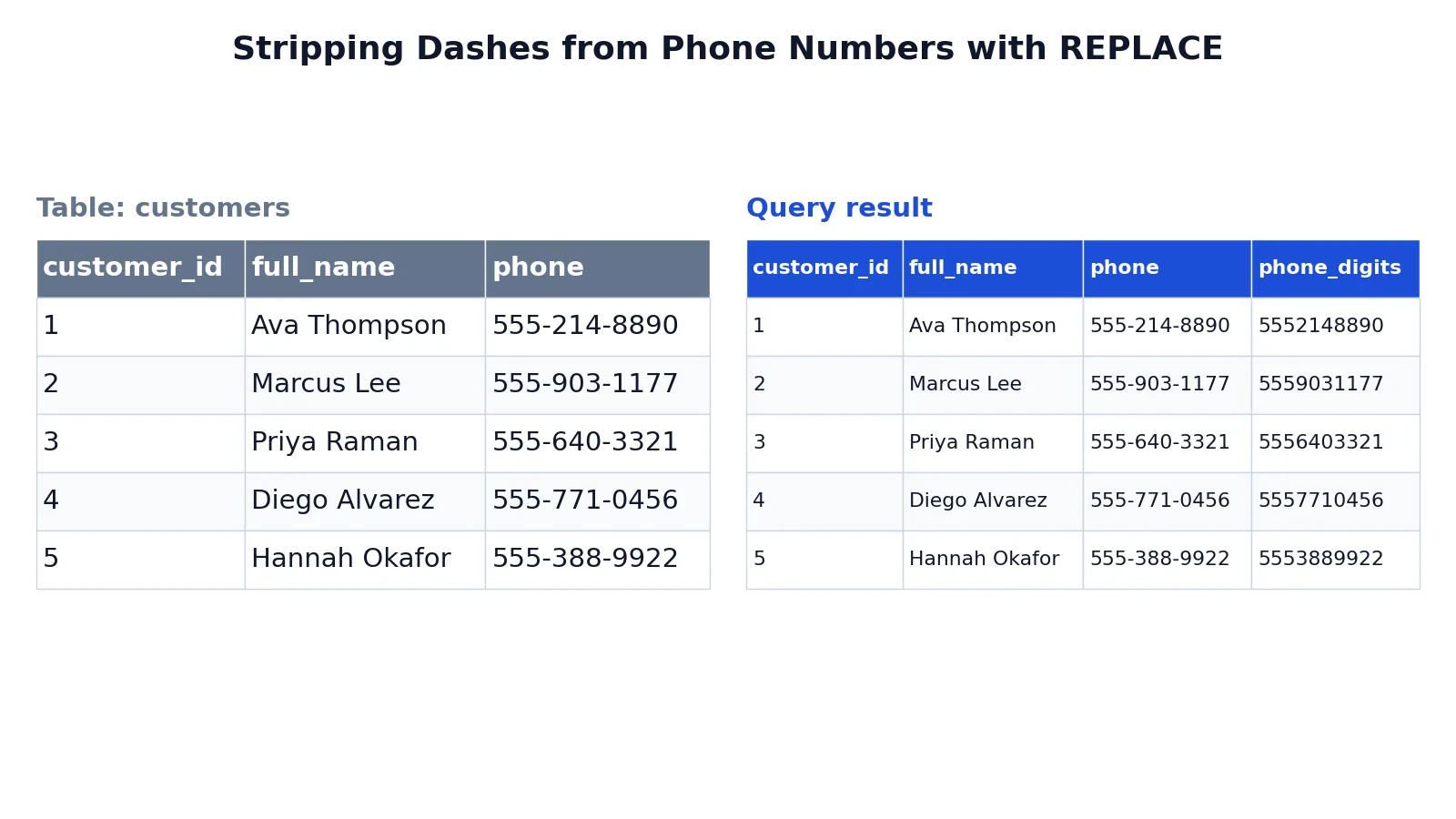
The dataset is a small customers table with five rows, each holding a name and a phone number formatted with hyphens. The goal is a digits-only phone value.
Input table:
| customer_id | full_name | phone |
|---|---|---|
| 1 | Ava Thompson | 555-214-8890 |
| 2 | Marcus Lee | 555-903-1177 |
| 3 | Priya Raman | 555-640-3321 |
| 4 | Diego Alvarez | 555-771-0456 |
| 5 | Hannah Okafor | 555-388-9922 |
Query:
SELECT customer_id, full_name, phone, REPLACE(phone, '-', '') AS phone_digits FROM customers;Result:
| customer_id | full_name | phone | phone_digits |
|---|---|---|---|
| 1 | Ava Thompson | 555-214-8890 | 5552148890 |
| 2 | Marcus Lee | 555-903-1177 | 5559031177 |
| 3 | Priya Raman | 555-640-3321 | 5556403321 |
| 4 | Diego Alvarez | 555-771-0456 | 5557710456 |
| 5 | Hannah Okafor | 555-388-9922 | 5553889922 |
How the query is built:
SELECT customer_id, full_name, phonereturns the identifying columns plus the original phone value so the before-and-after difference is visible.REPLACE(phone, '-', '')scans each phone string and substitutes every hyphen with an empty string, removing all dashes.AS phone_digitsnames the computed column so the cleaned value is easy to reference in the result set.FROM customersapplies the expression to every row of the customers table.
The result was checked with an equivalent SQLite query. The output is the same five rows with the hyphens gone.
More Examples
Remove a currency symbol before casting to a number. If a price column stores values like $1,299.00, strip the symbol and the comma, then cast:
SELECT CAST(REPLACE(REPLACE(price_text, '$', ''), ',', '') AS DECIMAL(10,2)) AS price
FROM products;
The inner call removes the dollar sign, the outer call removes the thousands separator, and the cast converts the clean string to a number.
Normalize a code prefix. To move records from an old prefix to a new one:
UPDATE orders
SET order_code = REPLACE(order_code, 'OLD-', 'NEW-')
WHERE order_code LIKE 'OLD-%';
The WHERE clause limits the update to rows that actually contain the prefix. Without it, you rewrite every row in the table.
Replace a word inside free text. To standardize a label in a notes column:
SELECT REPLACE(notes, 'N/A', 'Not provided') AS notes_clean
FROM support_tickets;
Every occurrence in each row is replaced, so a note containing N/A twice comes back with both replaced.
Chain replacements for multi-character cleanup. When you need to remove several different characters, nest the calls. Each call handles one literal. For a broader cleanup pattern, see the SQL COALESCE function for handling NULL values that survive the cleanup, and the SQL alias guide for naming the computed columns clearly.
Errors and How to Fix Them
Wrong number of arguments. Calling REPLACE(phone, '-') in SQL Server raises an error because all three arguments are required [1]. Add the replacement string, using '' if you want to delete the match.
Unexpected NULL output. If any argument is NULL, the whole result is NULL [1]. A NULL phone value produces a NULL phone_digits. Wrap the input in COALESCE(phone, '') if you want a non-null result.
Truncated output in SQL Server. If string_expression is not varchar(max) or nvarchar(max), the return value is truncated at 8,000 bytes [1]. Cast the input to a large-value type when you expect long strings.
No change when you expected one. An empty string_pattern returns the input unchanged [1]. A pattern that does not appear also returns the input unchanged. Check the actual stored value, including hidden whitespace, before assuming the function failed.
Case mismatch. If the column collation is case sensitive, REPLACE(name, 'lee', 'Lee') will not touch LEE. Apply COLLATE to force the comparison you want [1].
Limitations
REPLACE matches literal text only. It cannot express "any digit," "one or more spaces," or "a word boundary." Those tasks belong to REGEXP_REPLACE, which matches a pattern and lets you insert captured groups with \1 through \9 or the whole match with & [3]. Reach for the regex version when the thing you want to remove varies in shape.
The function also has no notion of position. It replaces every match, so you cannot target the second occurrence only. If you need that, you have to combine substring functions with position logic. In SQL Server, 0x0000 (that is, char(0)) is an undefined character in Windows collations and cannot be included in REPLACE [1]. For very large text, watch the 8,000-byte truncation rule and cast to a large-value type when needed [1].
Frequently Asked Questions
Does REPLACE change the original data?
No. REPLACE returns a new value. It does not modify the stored column unless you use the result in an UPDATE statement. In a plain SELECT, the original column keeps its value and the cleaned string appears only in the result set.
How do I replace only the first occurrence in SQL?
The standard REPLACE function has no option for that. It substitutes every match. To change only the first occurrence, you need to locate the position of the substring, split the string around it, and concatenate the parts. That is more code than a single call and is usually worth doing only when the position genuinely matters.
Can REPLACE remove characters instead of swapping them?
Yes. Pass an empty string as the replacement. REPLACE(phone, '-', '') deletes every hyphen because the replacement contributes no characters. The same trick removes spaces, brackets, or any other literal you specify.
What is the difference between REPLACE and REGEXP_REPLACE?
REPLACE matches a fixed literal string. REGEXP_REPLACE matches a regular-expression pattern and supports backreferences in the replacement, so it can reformat variable text such as phone numbers or dates [3]. Use REPLACE for simple literal swaps and REGEXP_REPLACE when the target varies in shape.
Does REPLACE work on numbers?
The arguments are character or binary data types [1]. If you pass a numeric column, the database converts it to a string before the search. The result comes back as a string, so you need a CAST or CONVERT to use it as a number again. For numeric work, look at functions like SQL MOD and SQL MAX instead.
How do I replace text across multiple columns at once?
Call REPLACE once per column. Each call is independent, so a single SELECT can clean several fields side by side. If the same cleanup applies to many columns, consider doing it in a view or a staging step so the logic lives in one place.
References
- REPLACE (Transact-SQL) - SQL Server | Microsoft Learn
- replace function - Azure Databricks - Databricks SQL | Microsoft Learn
- REGEXP_REPLACE (Transact-SQL) - SQL Server | Microsoft Learn
Further Reading
- Codd EF (1970). A relational model of data for large shared data banks. Communications of the ACM
- PostgreSQL Documentation: SELECT
- SQLite: SQL As Understood By SQLite
- Wilson G, Bryan J, Cranston K et al. (2017). Good enough practices in scientific computing. PLOS Computational Biology