How to Drop a Column in SQL (ALTER TABLE Examples)
By Dr. Zubair Khalid, DVM, MS, PhD ·
To drop a column in SQL, you run ALTER TABLE table_name DROP COLUMN column_name;. The statement removes the column definition and every value stored in it, and it cannot be undone. The exact syntax is the same across most databases, though SQL Server and MySQL add their own restrictions on columns that carry constraints.
Quick Answer
- The core syntax is
ALTER TABLE table_name DROP COLUMN column_name;and it works in MySQL, PostgreSQL, SQLite 3.35.0+, and SQL Server [1][2]. - Dropping a column deletes the column and all the data it contains. There is no rollback unless you wrap the statement in a transaction or restore from a backup [2].
- In SQL Server, you cannot drop a column that has a CHECK constraint. Remove the constraint first [2].
- You cannot drop a column with PRIMARY KEY or FOREIGN KEY constraints or other dependencies unless you use the Table Designer in SQL Server Management Studio. In Object Explorer or Transact-SQL, remove the dependencies first [2].
- If a table contains only one column, that column cannot be dropped [1].
Before You Start
Dropping a column is a schema change, not a data edit. Once it runs, the column definition and its values are gone. Before you type the statement, do three things.
First, confirm the column is not used anywhere else. Views, stored procedures, application queries, and reports may reference it by name. A column that looks unused in the table can still break a dashboard the next morning.
Second, check for constraints and indexes. In MySQL, if columns are dropped from a table, they are also removed from any index they belong to, and if all columns that make up an index are dropped, the index is dropped as well [1]. That behavior is convenient, but it means an index you rely on can disappear silently.
Third, take a backup or work inside a transaction. SQL Server, PostgreSQL, and SQLite support transactional DDL, so an uncommitted DROP COLUMN can be rolled back. MySQL commits DDL statements implicitly, so a rollback is not possible there.
If you only want to remove rows and keep the column, you want a different statement. See SQL TRUNCATE TABLE: Syntax, Examples and When to Use It for that case.
Step by Step
- Identify the table and column. Run a
SELECTagainst the table to confirm the column name and see what you are about to lose.
- Check dependencies. Look for constraints, indexes, views, and foreign keys that reference the column. In SQL Server, a column with a CHECK constraint cannot be deleted until the constraint is removed [2].
- Write the statement. Use
ALTER TABLEfollowed by the table name, thenDROP COLUMNand the column name.
- Run it. The database rewrites the table definition and removes the stored values.
- Verify. Query the table again and confirm the column is gone and the remaining columns are intact.
- Update dependent code. Fix any query, view, or application code that referenced the dropped column.
If you need to add a column back later, the syntax is different. See SQL ALTER TABLE ADD COLUMN: Syntax and Examples.
Worked Example
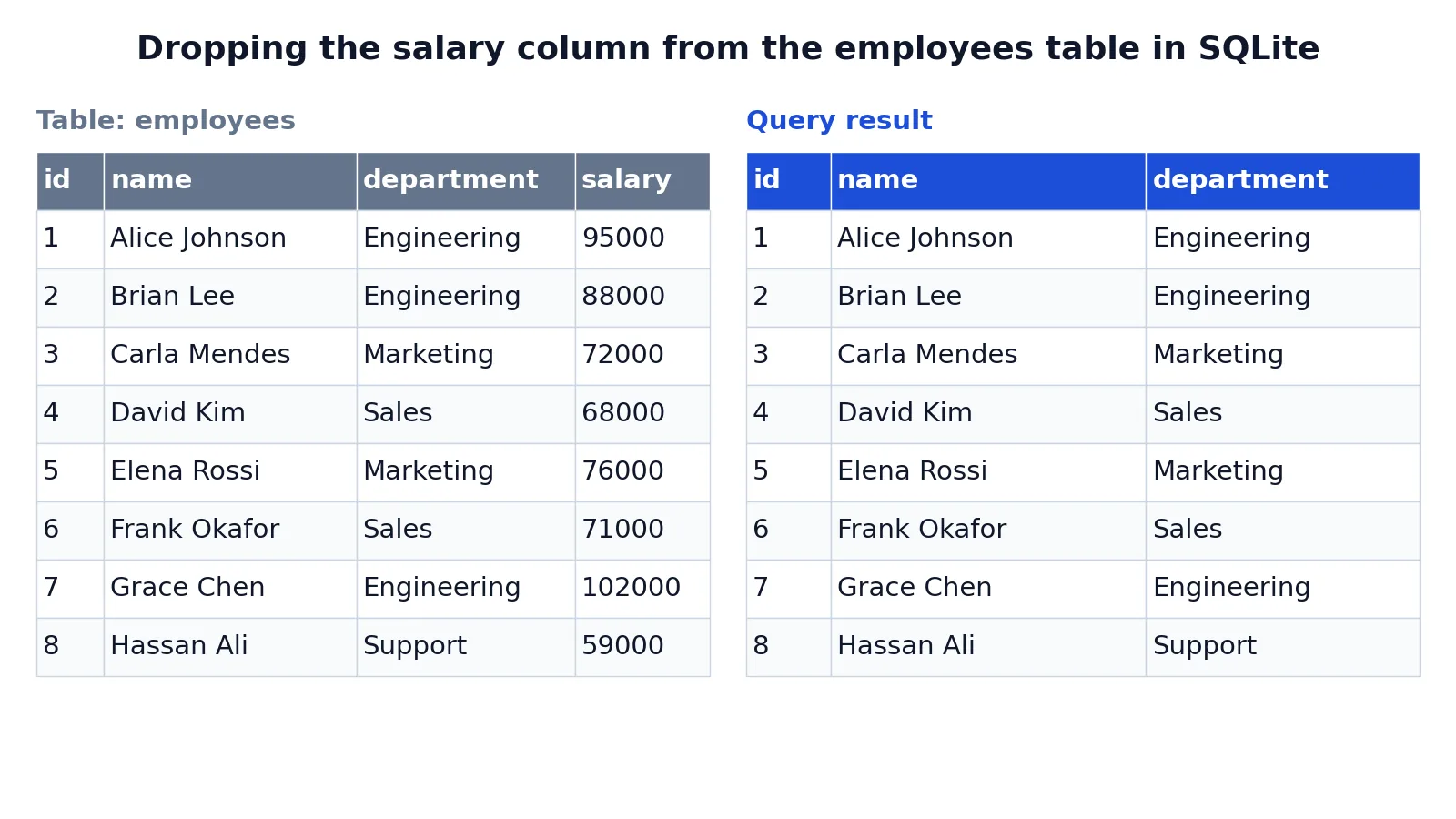
The employees table below holds eight rows with an id, name, department, and salary. The goal is to remove the salary column while keeping everything else.
| id | name | department | salary |
|---|---|---|---|
| 1 | Alice Johnson | Engineering | 95000 |
| 2 | Brian Lee | Engineering | 88000 |
| 3 | Carla Mendes | Marketing | 72000 |
| 4 | David Kim | Sales | 68000 |
| 5 | Elena Rossi | Marketing | 76000 |
| 6 | Frank Okafor | Sales | 71000 |
| 7 | Grace Chen | Engineering | 102000 |
| 8 | Hassan Ali | Support | 59000 |
The statement is a single line.
ALTER TABLE employees DROP COLUMN salary;Here is what each part does. ALTER TABLE employees names the table to modify. DROP COLUMN salary removes the salary column and all data stored in it. The statement is not reversible, so the column definition and its values are gone permanently. SQLite 3.35.0 and later supports DROP COLUMN directly, while older versions require rebuilding the table.
The result was checked with an equivalent SQLite query, SELECT id, name, department FROM employees;, run in sqlite3 3.37.2.
| id | name | department |
|---|---|---|
| 1 | Alice Johnson | Engineering |
| 2 | Brian Lee | Engineering |
| 3 | Carla Mendes | Marketing |
| 4 | David Kim | Sales |
| 5 | Elena Rossi | Marketing |
| 6 | Frank Okafor | Sales |
| 7 | Grace Chen | Engineering |
| 8 | Hassan Ali | Support |
All eight rows survive. Only the salary column is gone.
Other Ways to Do It
Drop several columns at once. MySQL lets you drop multiple columns in a single ALTER TABLE statement, separated by commas [1].
ALTER TABLE t2 DROP COLUMN c, DROP COLUMN d;Use the SQL Server GUI. In SQL Server Management Studio, connect to the Database Engine, locate the table in Object Explorer, and expand it to expose the column names. Right-click the column and choose Delete, then select OK in the Delete Object dialog box. If the column has constraints or other dependencies, an error message appears and you resolve it by deleting the referenced constraints [2].
Use Table Designer. In Object Explorer, right-click the table and choose Design. Right-click the column and choose Delete Column from the shortcut menu [2]. Table Designer is the one path in SQL Server that can handle PRIMARY KEY and FOREIGN KEY dependencies without you removing them first [2].
Rebuild the table in old SQLite. Before version 3.35.0, SQLite had no DROP COLUMN. The workaround was to create a new table with the columns you want, copy the data across, drop the old table, and rename the new one. See How to Drop a Table in SQL (With Syntax and Examples) for the drop step.
Troubleshooting
| Error or symptom | Likely cause | Fix |
|---|---|---|
| Error about a constraint | The column has a CHECK constraint | Drop the constraint, then drop the column [2] |
| Error about a dependency | PRIMARY KEY or FOREIGN KEY references the column | Remove the dependency, or use Table Designer in SSMS [2] |
| "Cannot drop column" on a one-column table | A table must keep at least one column | Drop the table instead [1] |
| Column still appears in queries | A view or cached query plan references it | Refresh or redefine the view |
| Syntax error near DROP | Wrong dialect or an old SQLite version | Check your version, or rebuild the table |
If the column you are removing is part of a string you are cleaning up, a function like the one covered in SQL REPLACE Function: Syntax and Examples may be what you actually need.
Common Mistakes
- Running it without a backup. The operation is permanent. Take a backup or use a transaction so you have a way back.
- Forgetting dependent views and procedures. The statement succeeds, then an unrelated report fails. Search your schema for the column name before you drop it.
- Assuming indexes survive. In MySQL, dropping a column removes it from any index it belongs to, and an index made up entirely of dropped columns is dropped too [1]. Check your indexes afterward.
- Trying to drop a constrained column directly. SQL Server blocks this for CHECK, PRIMARY KEY, and FOREIGN KEY constraints. Remove the constraint first, or use Table Designer [2].
- Dropping the last column. A table with one column cannot lose it [1]. Drop the table instead.
- Confusing DROP COLUMN with setting values to NULL.
DROP COLUMNremoves the column. AnUPDATEthat sets values to NULL keeps the column and its structure.
Limitations
DROP COLUMN changes the table structure, so it is a schema migration. On large tables this can take time and lock the table while the engine rewrites it. Plan the change for a maintenance window if the table is busy.
The statement also cannot express intent. It removes the column whether or not anything still reads it, and it gives you no warning about downstream breakage. Some engines let you mark a column unused first and drop it later, which buys you a safety window, but that is a vendor-specific feature and not part of the standard syntax. Finally, dropping a column does not shrink the physical file on every engine, so disk space may not be reclaimed immediately.
Frequently Asked Questions
How do I drop a column in SQL Server?
Use ALTER TABLE table_name DROP COLUMN column_name; in Transact-SQL. If the column has a CHECK constraint, you must delete the constraint first. If it has PRIMARY KEY or FOREIGN KEY constraints or other dependencies, you must remove those first unless you use Table Designer in SQL Server Management Studio [2].
Can I undo a DROP COLUMN?
Not with a simple command. The column and its data are removed permanently [2]. Your options are to roll back the transaction if your database supports transactional DDL and you have not committed, or to restore the table from a backup. Always confirm you have a recovery path before running the statement.
How do I drop multiple columns at once?
In MySQL you can list several DROP COLUMN clauses in one ALTER TABLE statement separated by commas, for example ALTER TABLE t2 DROP COLUMN c, DROP COLUMN d; [1]. Other engines generally accept the same comma-separated form, but check your vendor's documentation because support varies.
What happens to indexes when I drop a column?
In MySQL, dropped columns are also removed from any index they are part of. If every column in an index is dropped, the index itself is dropped [1]. Review your index definitions after the change so you do not lose query performance you were relying on.
Why does my DROP COLUMN statement fail?
The most common reasons are a CHECK constraint on the column, a PRIMARY KEY or FOREIGN KEY dependency, or an attempt to drop the only column in the table [1][2]. Read the error message, remove the blocking object, then run the statement again. If you are on SQLite older than 3.35.0, the command is not supported at all and you must rebuild the table.
References
- MySQL :: MySQL 26.7 Reference Manual :: 15.1.11 ALTER TABLE Statement
- Delete columns from a table - SQL Server | Microsoft Learn
Further Reading
- MySQL :: MySQL 9.7 Reference Manual :: 15.1.11.3 ALTER TABLE Examples
- Codd EF (1970). A relational model of data for large shared data banks. Communications of the ACM
- PostgreSQL Documentation: SELECT
- SQLite: SQL As Understood By SQLite
- Wilson G, Bryan J, Cranston K et al. (2017). Good enough practices in scientific computing. PLOS Computational Biology