SQL PARTITION BY: Syntax, Examples and When to Use It
By Dr. Zubair Khalid, DVM, MS, PhD ·
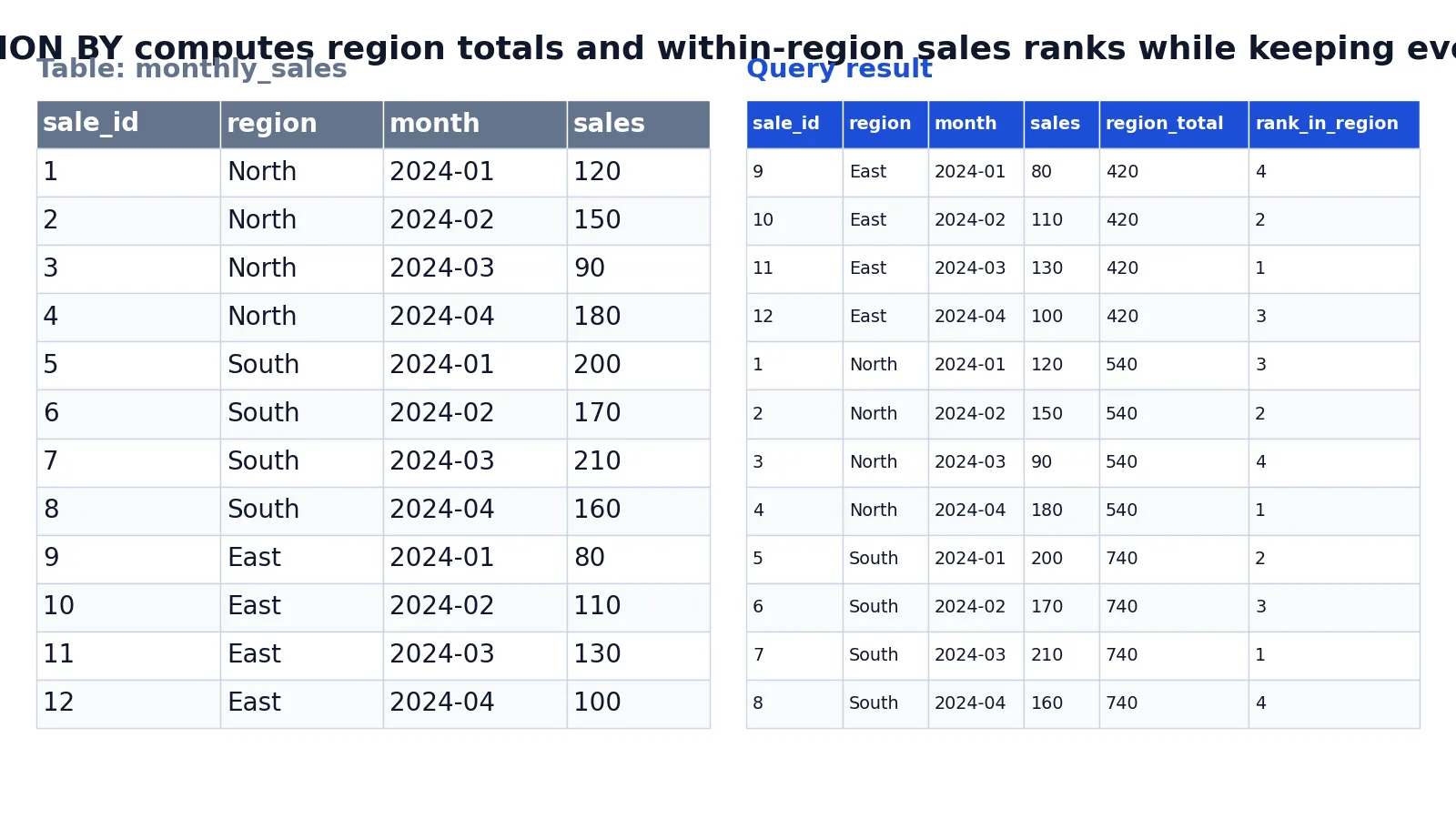
A partition in SQL is a group of rows that a window function treats as its own separate unit. PARTITION BY goes inside the OVER() clause and tells the database to restart the calculation for each group, while every original row stays in the result [1]. This is the key difference from GROUP BY, which collapses rows into one row per group.
Quick Answer
PARTITION BYdivides the result set into partitions, and the window function applies to each partition separately with the computation restarting for each one [1].- It sits inside
OVER(), as inSUM(sales) OVER (PARTITION BY region). - If you omit
PARTITION BY, the function treats all rows of the result set as a single partition [1]. PARTITION BYdoes not reduce the number of rows.GROUP BYdoes.- You can combine it with
ORDER BYinsideOVER()to rank or accumulate within each partition [1].
Syntax
The general shape is:
function_name(...) OVER (
  PARTITION BY column_expression
  ORDER BY column_expression
)| Argument | Required? | Meaning |
|---|---|---|
function_name(...) | Yes | The window function, such as SUM, AVG, ROW_NUMBER, RANK, or LAG. |
PARTITION BY | No | Divides the result set into partitions. The function applies to each partition separately [1]. |
ORDER BY | Depends on the function | Defines the logical order of rows within each partition [1]. Required for ROW_NUMBER [2]. |
ROWS or RANGE | No | Limits rows within the partition by start and end points. Requires ORDER BY [1]. |
The PARTITION BY expression can only refer to columns made available by the FROM clause. It cannot refer to expressions or aliases in the select list [1].
How It Works
Think of the query as two passes. First the database reads the rows from the FROM clause. Then, for each window function, it splits those rows into partitions based on the PARTITION BY expression. The function runs once per partition, and the result is attached to every row in that partition.
Because the rows are never merged, a single query can show a detail value and a group value side by side. That is what makes window functions useful for share-of-total, running totals, and ranking. If you want a refresher on the surrounding statement, see the SQL SELECT statement guide.
The ORDER BY inside OVER() is separate from the ORDER BY at the end of the query. The one inside OVER() controls the order in which the window function is calculated. The one at the end controls how the final result is displayed [1]. If you leave out ORDER BY inside OVER(), the function applies to all rows in the partition [1].
Worked Example
The dataset is a small monthly_sales table with 12 rows covering three regions and four months. Here is the input:
| sale_id | region | month | sales |
|---|---|---|---|
| 1 | North | 2024-01 | 120 |
| 2 | North | 2024-02 | 150 |
| 3 | North | 2024-03 | 90 |
| 4 | North | 2024-04 | 180 |
| 5 | South | 2024-01 | 200 |
| 6 | South | 2024-02 | 170 |
| 7 | South | 2024-03 | 210 |
| 8 | South | 2024-04 | 160 |
| 9 | East | 2024-01 | 80 |
| 10 | East | 2024-02 | 110 |
| 11 | East | 2024-03 | 130 |
| 12 | East | 2024-04 | 100 |
The query adds a region total and a rank within each region:
SELECT
  sale_id,
  region,
  month,
  sales,
  SUM(sales) OVER (PARTITION BY region) AS region_total,
  ROW_NUMBER() OVER (PARTITION BY region ORDER BY sales DESC) AS rank_in_region
FROM monthly_sales
ORDER BY region, month;
The result was checked with an equivalent SQLite query (sqlite3 3.37.2):
| sale_id | region | month | sales | region_total | rank_in_region |
|---|---|---|---|---|---|
| 9 | East | 2024-01 | 80 | 420 | 4 |
| 10 | East | 2024-02 | 110 | 420 | 2 |
| 11 | East | 2024-03 | 130 | 420 | 1 |
| 12 | East | 2024-04 | 100 | 420 | 3 |
| 1 | North | 2024-01 | 120 | 540 | 3 |
| 2 | North | 2024-02 | 150 | 540 | 2 |
| 3 | North | 2024-03 | 90 | 540 | 4 |
| 4 | North | 2024-04 | 180 | 540 | 1 |
| 5 | South | 2024-01 | 200 | 740 | 2 |
| 6 | South | 2024-02 | 170 | 740 | 3 |
| 7 | South | 2024-03 | 210 | 740 | 1 |
| 8 | South | 2024-04 | 160 | 740 | 4 |
Four things happen in order:
FROM monthly_salesstarts with the 12 monthly sales rows.SUM(sales) OVER (PARTITION BY region)computes the total sales for each region and attaches it to every row in that region without collapsing rows.ROW_NUMBER() OVER (PARTITION BY region ORDER BY sales DESC)numbers rows within each region from highest to lowest sales.ORDER BY region, monthpresents the final result grouped by region and ordered by month.
Notice that East, North, and South each get their own total, and the rank restarts at 1 for each region. The row count stays at 12. A GROUP BY region query would have returned 3 rows and lost the monthly detail.
More Examples
Share of region total. Divide each row by its partition total to get a percentage:
SELECT
  region,
  month,
  sales,
  ROUND(100.0 * sales / SUM(sales) OVER (PARTITION BY region), 1) AS pct_of_region
FROM monthly_sales
ORDER BY region, month;
The formula is:
$$ \text{pct\_of\_region} = 100 \times \frac{\text{sales}}{\text{region total}} $$
Running total within a region. Adding ORDER BY inside OVER() turns SUM into a cumulative sum:
SELECT
  region,
  month,
  sales,
  SUM(sales) OVER (PARTITION BY region ORDER BY month) AS running_total
FROM monthly_sales
ORDER BY region, month;
Comparing rows within a partition. LAG reads a value from the previous row in the same partition, which is handy for month-over-month change. The window functions guide on PARTITION BY and LEAD covers that pattern in more depth.
Ranking with ties. ROW_NUMBER always gives distinct numbers. If two rows tie, use RANK or DENSE_RANK instead. The SQL RANK function article explains how ties are handled.
Filtering on a window result. You cannot filter a window function in WHERE because WHERE runs before the window is computed. Wrap the query in a subquery or a common table expression and filter outside it.
Errors and How to Fix Them
"Window functions are not allowed in WHERE." The database evaluates WHERE before window functions. Move the window expression into a subquery or CTE, then filter the outer query.
"Invalid column name" in PARTITION BY. You referenced a select-list alias. PARTITION BY can only use columns from the FROM clause [1]. Repeat the underlying expression or wrap the query.
"ORDER BY is required" for ROW_NUMBER. ROW_NUMBER needs an ORDER BY inside OVER() to decide the sequence [2]. Add one, even if it is just the primary key.
Wrong totals after adding ORDER BY. Once you add ORDER BY inside OVER(), SUM becomes cumulative instead of a full-partition total. Remove the ORDER BY if you want the whole partition summed.
Unstable row numbers between runs. ROW_NUMBER output is not guaranteed to be identical on every execution unless the partition column values are unique and the ORDER BY column values are unique [2]. Add a tiebreaker such as the primary key.
Common Mistakes
- Confusing
PARTITION BYwithGROUP BY.GROUP BYcollapses rows,PARTITION BYkeeps them. If your row count dropped, you used the wrong one. - Putting
PARTITION BYin theWHEREclause. It belongs insideOVER(). There is no standalonePARTITION BYclause in aSELECTstatement. - Forgetting that omitting
PARTITION BYmeans one big partition. Without it, the function treats all rows as a single partition, so your "per-region" total becomes a grand total [1]. - Assuming
ORDER BYinsideOVER()sorts the output. It does not. Add a normalORDER BYat the end of the query to control display order [1]. - Using
ROW_NUMBERwhen ties matter. It assigns distinct numbers even to tied values. UseRANKorDENSE_RANKwhen equal values should share a rank. - Aliasing a window column and reusing it in the same
SELECT. Most databases will not resolve that alias in the same select list. Repeat the expression or use a CTE.
Limitations
PARTITION BY cannot reduce rows, so it is the wrong tool when you genuinely want one row per group. It also cannot be used in WHERE or HAVING, which forces you into a subquery or CTE whenever you need to filter on a window result.
Performance is another constraint. Partitioning a large table by a high-cardinality column means the database has to sort and process many small groups, and the work grows with the number of partitions. Window functions also cannot reference select-list aliases in PARTITION BY, which sometimes forces you to duplicate a long expression [1]. Finally, results from ROW_NUMBER are not guaranteed to be stable across executions unless the partition and ordering columns are unique [2], so do not treat row numbers as permanent identifiers.
Frequently Asked Questions
What is the difference between PARTITION BY and GROUP BY?
GROUP BY collapses each group into a single output row, so you lose the individual rows. PARTITION BY keeps every row and attaches the group-level result to each one. Use GROUP BY for summaries, and PARTITION BY when you need detail and group context in the same result.
Can I use PARTITION BY without a window function?
No. PARTITION BY is an argument of the OVER() clause, and OVER() only makes sense with a window function. Writing PARTITION BY on its own in a SELECT statement is a syntax error.
Does PARTITION BY change the number of rows returned?
No. The row count stays the same as the input to the window function. Only GROUP BY, DISTINCT, and similar constructs reduce rows.
Can I partition by more than one column?
Yes. List the columns separated by commas, as in OVER (PARTITION BY region, month). The database then forms one partition for each unique combination of those column values.
Why does my SUM return a running total instead of a group total?
Because you added ORDER BY inside OVER(). With an ORDER BY, the default frame runs from the start of the partition to the current row [1]. Remove the ORDER BY to get the full-partition sum, or add an explicit ROWS BETWEEN UNBOUNDED PRECEDING AND UNBOUNDED FOLLOWING frame.
Is PARTITION BY available in all databases?
It is part of the SQL standard for window functions and is supported by SQL Server, PostgreSQL, MySQL 8.0 and later, SQLite 3.25 and later, Oracle, and others. Older versions of MySQL and SQLite do not support window functions at all, so check your version first.
References
- OVER Clause (Transact-SQL) - SQL Server | Microsoft Learn
- ROW_NUMBER (Transact-SQL) - SQL Server | Microsoft Learn
Further Reading
- Codd EF (1970). A relational model of data for large shared data banks. Communications of the ACM
- PostgreSQL Documentation: SELECT
- SQLite: SQL As Understood By SQLite
- Wilson G, Bryan J, Cranston K et al. (2017). Good enough practices in scientific computing. PLOS Computational Biology