SQL INNER JOIN: Syntax, Examples and When to Use It
By Dr. Zubair Khalid, DVM, MS, PhD ·
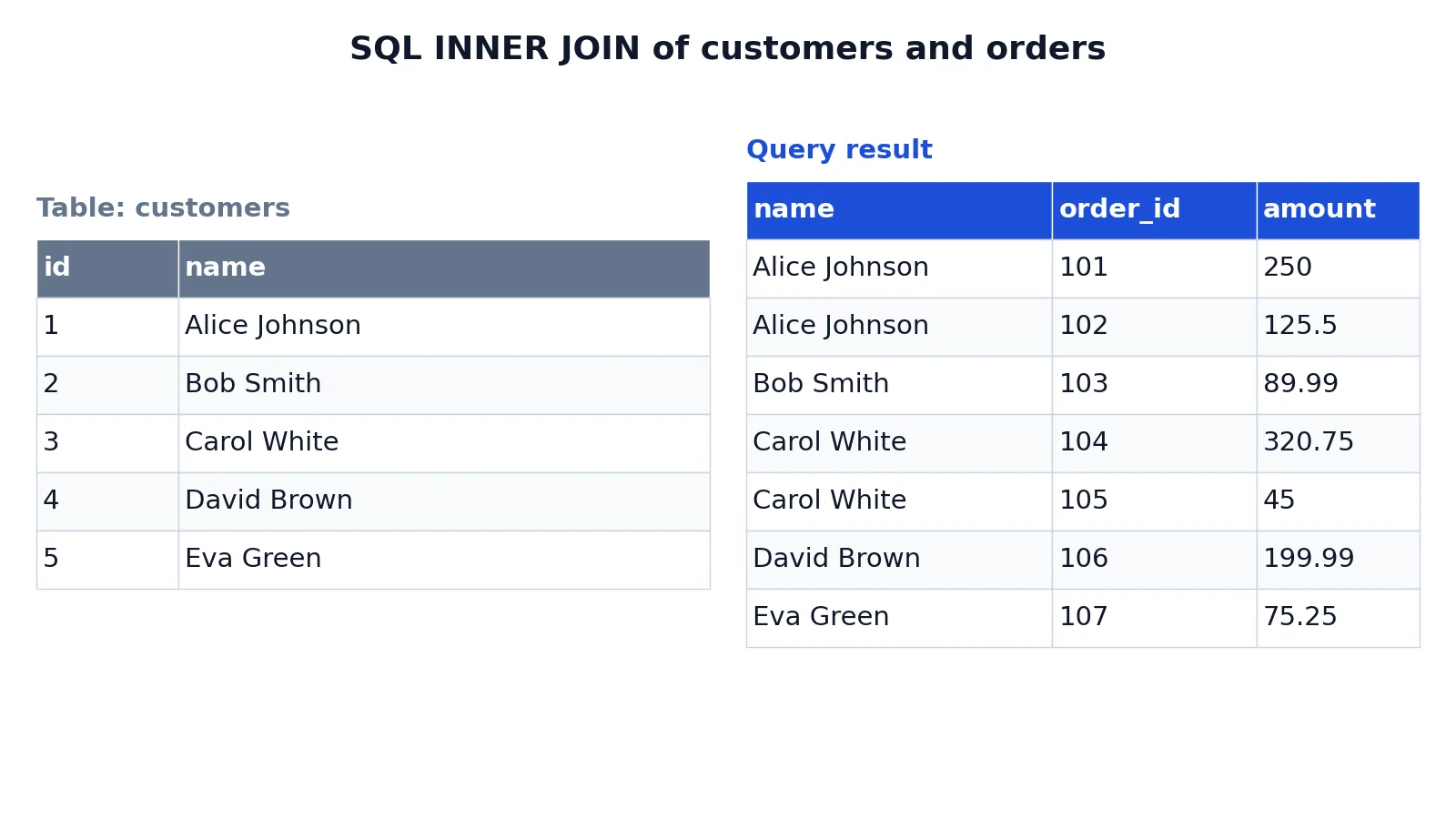
An SQL INNER JOIN returns only the rows where the join condition matches in both tables. Rows with no match on either side are dropped from the result. You write it as FROM table_a INNER JOIN table_b ON table_a.key = table_b.key.
Quick Answer
- An SQL INNER JOIN keeps only rows where the
ONcondition is true for both tables. - Syntax:
SELECT ... FROM left_table INNER JOIN right_table ON left_table.column = right_table.column. JOINon its own meansINNER JOINin every major dialect, so the keywordINNERis optional.- Unmatched rows from either table do not appear in the output.
- If a customer has three orders, that customer appears three times, once per matching order.
Before You Start
You need two tables that share a logical key. In the classic pattern, one table holds entities such as customers and the other holds events such as orders. The orders table stores a customer_id column that points back to the id column in customers. That column is a foreign key, and it is what the ON clause compares.
Both columns should hold the same kind of value. Joining an integer ID to a text code will either fail or return nothing useful, depending on the database. Check the data types before you write the query.
You also need to decide which columns to select. SELECT * on a join returns every column from both tables, which often produces duplicate-looking names such as two id columns. Naming the columns you want keeps the output readable. If you want shorter column names in the result, an SQL alias lets you rename tables and columns in the SELECT list.
Finally, know your dialect. The INNER JOIN ... ON ... form works in SQLite, PostgreSQL, MySQL, SQL Server, and Oracle. The examples here use SQLite syntax.
Step by Step
- Identify the two tables and the column that links them. One side is usually a primary key, the other a foreign key.
- Write the
FROMclause with the left table. - Add
INNER JOINfollowed by the right table. - Add the
ONclause with the equality condition between the two key columns. - List the columns you want in the
SELECTclause, qualifying each with its table name. - Add
ORDER BYif you want a predictable row order. - Run the query and check the row count against what you expect from the matching keys.
The general shape is:
SELECT a.column1, b.column2
FROM table_a AS a
INNER JOIN table_b AS b ON a.key = b.key;
The ON condition does not have to be a single equality. You can add more conditions with AND, for example matching on both a customer ID and a date range. Keep the condition on the join itself when it decides which rows match, and put filters that apply after matching in the WHERE clause.
Worked Example
The dataset is a small customer list and an orders table, with five customers and seven orders. Two customers have two orders each, and every order belongs to a customer who exists in the customers table.
The customers table:
| id | name |
|---|---|
| 1 | Alice Johnson |
| 2 | Bob Smith |
| 3 | Carol White |
| 4 | David Brown |
| 5 | Eva Green |
The query joins customers to their orders on customers.id = orders.customer_id:
SELECT customers.name, orders.order_id, orders.amount
FROM customers
INNER JOIN orders ON customers.id = orders.customer_id
ORDER BY customers.name, orders.order_id;
The result was checked with an equivalent SQLite query. It returns seven rows, one per order, with the customer name repeated for customers who ordered more than once:
| name | order_id | amount |
|---|---|---|
| Alice Johnson | 101 | 250 |
| Alice Johnson | 102 | 125.5 |
| Bob Smith | 103 | 89.99 |
| Carol White | 104 | 320.75 |
| Carol White | 105 | 45 |
| David Brown | 106 | 199.99 |
| Eva Green | 107 | 75.25 |
Every customer in this dataset has at least one order, so no customer is dropped. If a sixth customer existed with no orders, that customer would not appear in the output at all. That is the defining behavior of an inner join.
The row count is not the number of customers. It is the number of matching pairs. Alice Johnson contributes two rows because she has two orders, and Carol White does the same.
Other Ways to Do It
JOIN alone is identical to INNER JOIN. These two lines produce the same result:
FROM customers INNER JOIN orders ON customers.id = orders.customer_id
FROM customers JOIN orders ON customers.id = orders.customer_id
The USING clause is a shorthand when both tables have a column with the same name. If the customers key were named customer_id instead of id, you could write:
SELECT name, order_id, amount
FROM customers
INNER JOIN orders USING (customer_id);
That form only works when the shared column name is genuinely the join key, so it is less common than ON.
If you need rows from the left table even when there is no match, use a LEFT JOIN. If you need rows from both sides regardless of matching, use a SQL FULL OUTER JOIN. To see every combination of rows rather than matches, use a SQL CROSS JOIN, which has no ON clause at all. The difference between the two is covered in CROSS JOIN vs LEFT JOIN in SQL.
You can also join more than two tables by chaining INNER JOIN clauses, and you can join a subquery or a common table expression instead of a base table. When you only need rows that exist in both of two separate result sets, the SQL INTERSECT operator is an alternative to joining.
Troubleshooting
The query returns zero rows. The ON condition never evaluates to true. Check for type mismatches, trailing spaces in text keys, or a swapped column pair.
The query returns far more rows than expected. One side of the join has duplicate values in the key column. A join against a non-unique key multiplies rows.
The query is slow. The join columns may lack indexes. An index on the foreign key column usually helps.
Column names are ambiguous. Two tables both have a column called id, so the database cannot tell which one you mean. Qualify the column with its table name.
The result has repeated values. That is normal. A one-to-many join repeats the "one" side for every matching row on the "many" side.
Common Mistakes
- Using
WHEREinstead ofONfor the join condition.FROM a, b WHERE a.id = b.idis an old-style join that works but is harder to read and easy to break when you add more tables. Use explicitINNER JOIN ... ON .... - Forgetting that inner joins drop unmatched rows. If you expect all customers in the output, an inner join will silently omit those without orders. Use a left join when you need them.
- Joining on the wrong column. Joining
orders.customer_idtocustomers.namereturns nothing or nonsense. Match keys to keys. - Assuming one row per customer. A customer with three orders produces three rows. Aggregate with
GROUP BYandSUMif you want one row per customer. - Filtering the right table in the
WHEREclause when you meant to filter before joining. AWHEREcondition on the right table can turn a left join into an inner join by removing the null rows. - **Selecting
on wide tables.* You get every column from both sides, including duplicates. List the columns you need.
Limitations
An inner join cannot show you what is missing. Because it discards unmatched rows, it hides customers with no orders, products never sold, and employees with no assigned project. If absence is part of the question, you need an outer join.
Inner joins also multiply rows when keys are not unique. Joining two tables that both have several rows per key produces a result whose size is the product of the matching counts, which can inflate sums and averages if you aggregate carelessly. Always check whether the join key is unique on at least one side before you trust an aggregate built on top of it.
Frequently Asked Questions
What is the difference between JOIN and INNER JOIN?
They are the same operation. JOIN is shorthand for INNER JOIN, and every major database treats them identically. Writing INNER makes the intent explicit, which helps when a query mixes inner and outer joins.
Does INNER JOIN remove duplicate rows?
No. It removes rows that have no match, but it does not deduplicate. If a customer has two orders, that customer appears twice. Use DISTINCT or GROUP BY if you want one row per customer.
Can I use INNER JOIN without an ON clause?
Not in the usual sense. Without ON, most databases either reject the query or treat it as a cross join, returning every combination of rows. Always supply the matching condition.
Can I join more than two tables with INNER JOIN?
Yes. Chain the joins, adding one INNER JOIN ... ON ... clause per table. Each new table must connect to something already in the query, usually through a shared key.
When should I use INNER JOIN instead of LEFT JOIN?
Use an inner join when you only care about rows that exist on both sides, such as orders that belong to a known customer. Use a left join when the left table is the complete list you want to report on and the right table is optional detail.
References
This article draws on the standard references listed under Further Reading.
Further Reading
- Codd EF (1970). A relational model of data for large shared data banks. Communications of the ACM
- PostgreSQL Documentation: SELECT
- SQLite: SQL As Understood By SQLite
- Wilson G, Bryan J, Cranston K et al. (2017). Good enough practices in scientific computing. PLOS Computational Biology
- PostgreSQL Tutorial: The SQL Language
- SQLite: Built-In Scalar SQL Functions