SQL Window Functions: PARTITION BY, LEAD, and PERCENT_RANK
By Dr. Zubair Khalid, DVM, MS, PhD ·
Window functions calculate a value for each row while still seeing the other rows in the same group. The PARTITION BY clause defines those groups, LEAD reads a value from a later row, and PERCENT_RANK returns a relative standing between 0 and 1. This article walks through all three with a small sales table you can run yourself.
Quick Answer
- A window function uses
OVER (...)and returns one value per input row, unlikeGROUP BY, which collapses rows. PARTITION BYdivides the result set into independent groups. If you omit it, the whole result set is one partition [1][2].LEAD(value, offset, default)returns the value fromoffsetrows after the current row inside the partition. The offset defaults to 1 and the default toNULL[3].PERCENT_RANK()returns(rank - 1) / (total partition rows - 1), a value from 0 to 1 inclusive [3].- Window functions are evaluated after
WHERE, so filters change the rows that participate in the window.
Syntax
All three features live inside the OVER clause. The table below covers the arguments you will actually type.
| Name | Required? | Meaning |
|---|---|---|
PARTITION BY expr | No | Splits the result set into groups. Each group is processed separately and the calculation restarts for each one [2]. |
ORDER BY expr | No for aggregates, yes for ranking | Defines the logical row order inside each partition [2]. |
ROWS or RANGE frame | No | Limits which rows inside the partition are visible to the function. Requires ORDER BY [2]. |
LEAD(value) | Yes, for LEAD | The column or expression to read from a later row [3]. |
LEAD(value, offset) | No | How many rows ahead to look. Defaults to 1 [3]. |
LEAD(value, offset, default) | No | The value returned when no such row exists. Defaults to NULL [3]. |
PERCENT_RANK() | No arguments | Takes no parameters. It uses the partition and order you supply in OVER [3]. |
The general shape is:
function_name(args) OVER (
  PARTITION BY group_column
  ORDER BY sort_column
)
How It Works
Think of the query in stages. First the database builds the full result set from FROM and WHERE. Then PARTITION BY slices that set into groups. Then, inside each group, ORDER BY arranges the rows. Finally the window function reads across those ordered rows and writes one output value back onto each row.
Because partitions are independent, a calculation never crosses a boundary. In a table with regions, a PARTITION BY region clause means the last row of the North group has no "next" row from South to borrow. That is why LEAD returns NULL at the end of each partition unless you supply a default.
PERCENT_RANK answers a different question. It tells you where a row sits relative to the rest of its partition. The formula is:
$$ \text{percent\_rank} = \frac{\text{rank} - 1}{\text{total partition rows} - 1} $$
The lowest value in a partition always scores 0 and the highest always scores 1, no matter how many rows there are. With four rows per partition, the possible values are 0, 0.333, 0.667, and 1. Ties share the same rank, so tied rows share the same percent rank.
If you have used SQL RANK, you already know the rank - 1 part. PERCENT_RANK just normalizes that rank onto a 0 to 1 scale. If you want a plain sequential counter instead, SQL ROW_NUMBER is the simpler tool.
Worked Example
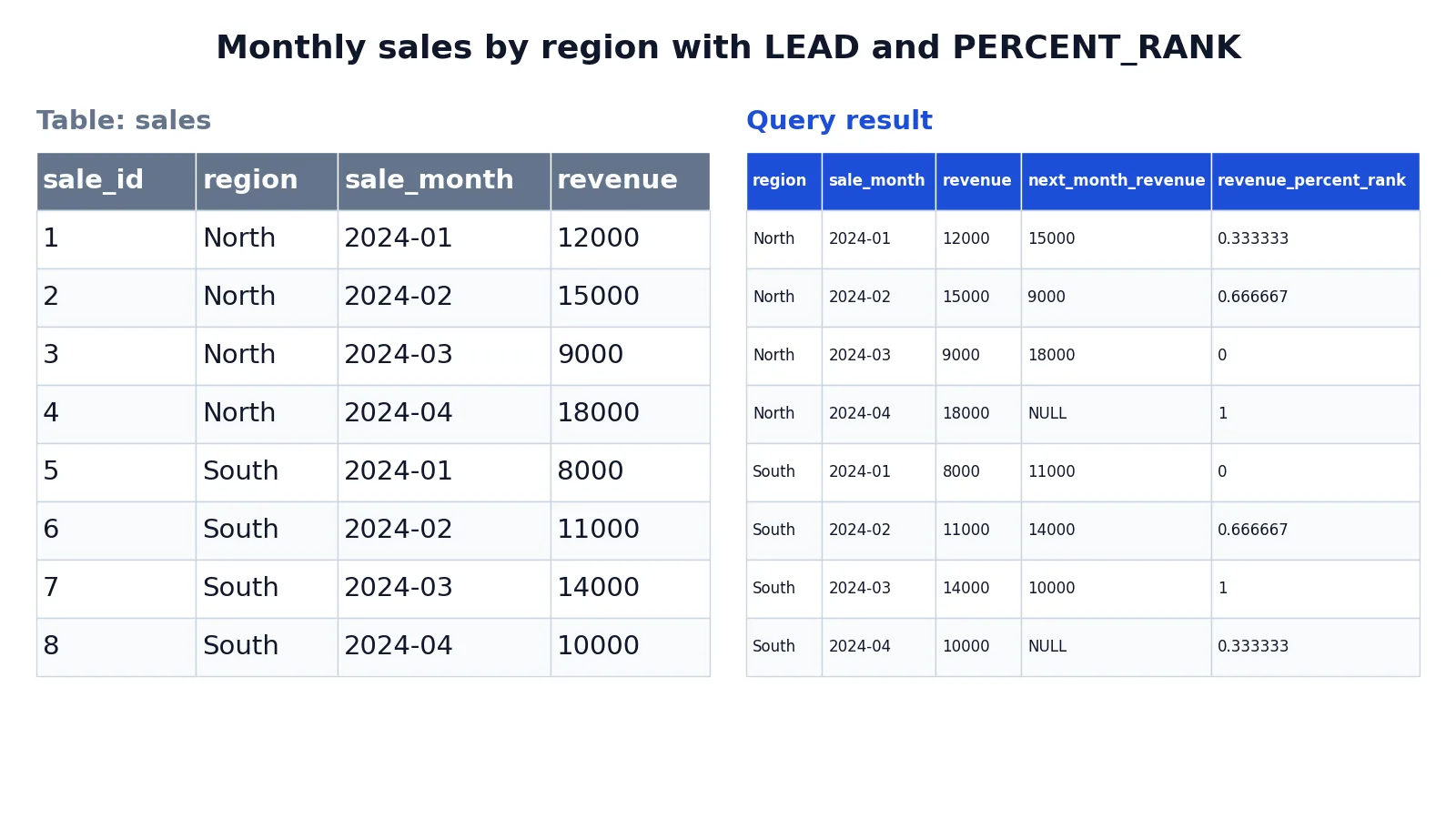
The dataset is a small sales table with two regions and four months of revenue per region.
| sale_id | region | sale_month | revenue |
|---|---|---|---|
| 1 | North | 2024-01 | 12000 |
| 2 | North | 2024-02 | 15000 |
| 3 | North | 2024-03 | 9000 |
| 4 | North | 2024-04 | 18000 |
| 5 | South | 2024-01 | 8000 |
| 6 | South | 2024-02 | 11000 |
| 7 | South | 2024-03 | 14000 |
| 8 | South | 2024-04 | 10000 |
The query uses PARTITION BY region twice, once to look ahead by month and once to rank revenue within the region.
SELECT
  region,
  sale_month,
  revenue,
  LEAD(revenue) OVER (
    PARTITION BY region
    ORDER BY sale_month
  ) AS next_month_revenue,
  PERCENT_RANK() OVER (
    PARTITION BY region
    ORDER BY revenue
  ) AS revenue_percent_rank
FROM sales
ORDER BY region, sale_month;
The result was checked with an equivalent SQLite query.
| region | sale_month | revenue | next_month_revenue | revenue_percent_rank |
|---|---|---|---|---|
| North | 2024-01 | 12000 | 15000 | 0.3333333333333333 |
| North | 2024-02 | 15000 | 9000 | 0.6666666666666666 |
| North | 2024-03 | 9000 | 18000 | 0 |
| North | 2024-04 | 18000 | NULL | 1 |
| South | 2024-01 | 8000 | 11000 | 0 |
| South | 2024-02 | 11000 | 14000 | 0.6666666666666666 |
| South | 2024-03 | 14000 | 10000 | 1 |
| South | 2024-04 | 10000 | NULL | 0.3333333333333333 |
Read the North rows first. January's next_month_revenue is 15000, which is February's revenue. April has no following month inside the North partition, so it returns NULL. The South partition behaves the same way, and its April row also returns NULL.
Now look at revenue_percent_rank. The two orderings are different on purpose. LEAD is ordered by sale_month, so it walks forward in time. PERCENT_RANK is ordered by revenue, so it ranks by size. North's lowest month, March at 9000, scores 0. Its highest month, April at 18000, scores 1. The middle two months score 0.333 and 0.667.
More Examples
A default value instead of NULL. Supply a third argument to LEAD so the last row in each partition shows something meaningful.
LEAD(revenue, 1, 0) OVER (
  PARTITION BY region
  ORDER BY sale_month
) AS next_month_revenue
With this change, the April rows return 0 instead of NULL. This is handy when a downstream calculation would break on a null. If you want to keep the null but replace it later, SQL COALESCE handles that in the outer query.
Looking two rows ahead. The offset is just a number, so LEAD(revenue, 2) returns the revenue from two months later. The last two rows of each partition return the default.
Comparing a row to its partition average. Window aggregates use the same OVER clause. This adds each region's average revenue to every row in that region.
AVG(revenue) OVER (PARTITION BY region) AS region_avgThe SQL AVG function page covers the aggregate form in more detail. The window form does not collapse rows, so you can compare each month against the regional average on the same line.
Ranking without partitioning. Drop PARTITION BY and the whole result set becomes one partition [1][2]. PERCENT_RANK() OVER (ORDER BY revenue) would then rank all eight rows together, mixing North and South.
Counting rows per partition. COUNT(*) OVER (PARTITION BY region) returns 4 on every row, because each region has four months. That is a quick way to spot partitions of different sizes.
Errors and How to Fix Them
"PERCENT_RANK requires an ORDER BY clause." Ranking functions need a defined order to rank against. Add ORDER BY inside the OVER clause.
"LEAD is not a recognized built-in function name." You are likely on an older database version. Window functions are widely supported in current releases of PostgreSQL, SQL Server, SQLite, MySQL, and Oracle, but very old versions may not have them.
"Window function is not allowed in WHERE." Window functions are evaluated after WHERE, so you cannot filter on them directly. Wrap the query in a subquery or a common table expression and filter in the outer query.
"Column must appear in the GROUP BY clause." The query has a GROUP BY, and a column used in the SELECT list or inside OVER is neither grouped nor aggregated. Window functions may be combined with aggregates, as in LEAD(SUM(revenue)) OVER (ORDER BY sale_month), but they can only see grouped columns and aggregates. Either aggregate the column or move the window calculation into an outer query.
"No such column" inside OVER. The PARTITION BY and ORDER BY expressions must reference columns available to the query at that point. Check spelling and check that the column is not hidden behind an alias defined in the same SELECT.
Common Mistakes
- Forgetting that
PARTITION BYresets everything. Each partition starts fresh, soLEADreturnsNULLat the end of every group, not only at the end of the table. Fix it by supplying a default value or by handling the null downstream. - Ordering
LEADandPERCENT_RANKby the same column out of habit. They usually need different orders.LEADfollows time or sequence, whilePERCENT_RANKfollows the value you are ranking. Use two separateOVERclauses. - Assuming
PERCENT_RANKreturns a percentage. It returns a fraction from 0 to 1. Multiply by 100 if you want a percentage, and round it for display. - Confusing
PERCENT_RANKwithCUME_DIST.PERCENT_RANKuses(rank - 1) / (rows - 1), whileCUME_DISTuses the count of rows at or before the current row divided by total rows [3]. They give different numbers on the same data. - Filtering before you think about the window. A
WHEREclause removes rows before the window runs, so it changes partition sizes and therefore changesPERCENT_RANKvalues. Filter in an outer query when the ranking must reflect the full set. - Expecting
LEADto wrap around. It does not loop back to the first row. The last row in a partition always returns the default.
Limitations
Window functions cannot filter rows on their own. You cannot write WHERE PERCENT_RANK() > 0.5 in the same query level, because the window is computed after WHERE. You need a subquery or a common table expression, which adds a layer of nesting and can make a query harder to read.
PERCENT_RANK is sensitive to partition size. With two rows, the values are only 0 and 1, which says very little about relative standing. With ties, several rows share the same value, so the output is not a strict ordering. LEAD depends entirely on the ORDER BY you give it. If two rows share the same sort value, the database picks an arbitrary order between them, and the "next" row becomes unpredictable. Add a tiebreaker column such as an ID to the ORDER BY when the sort key is not unique.
Frequently Asked Questions
What does PARTITION BY do in a window function?
PARTITION BY divides the query result set into groups, and the window function is applied to each group separately [2]. The calculation restarts for every partition. If you leave it out, the entire result set is treated as a single partition [1][2]. This is the key difference from GROUP BY, which merges rows into one output row per group.
What is the percent rank formula?
PERCENT_RANK returns (rank - 1) / (total partition rows - 1), giving a value from 0 to 1 inclusive [3]. The lowest row in the partition scores 0 and the highest scores 1. Tied rows share the same rank and therefore the same percent rank. The SQL PARTITION BY clause page explains how the partition size feeds into this formula.
How does LEAD work in SQL?
LEAD(value, offset, default) returns the value from offset rows after the current row within the partition [3]. The offset defaults to 1 and the default to NULL, so LEAD(revenue) alone gives you the next row's revenue or NULL if there is none [3]. It is the mirror image of LAG, which looks backward. The SQL LEAD function page has more patterns.
Can I use LEAD and PERCENT_RANK in the same query?
Yes. Each function gets its own OVER clause, and the clauses can differ. In the worked example, LEAD is ordered by sale_month while PERCENT_RANK is ordered by revenue. Both still use PARTITION BY region, so neither calculation crosses a regional boundary.
Does PERCENT_RANK return a percentage?
No. It returns a fraction between 0 and 1. To display a percentage, multiply the result by 100 and round it. Some databases return a floating-point value with many decimal places, so rounding is usually the last step before you present the number.
References
- Window Functions
- OVER Clause (Transact-SQL) - SQL Server | Microsoft Learn
- PostgreSQL: Documentation: 18: 9.22. Window Functions
Further Reading
- Codd EF (1970). A relational model of data for large shared data banks. Communications of the ACM
- PostgreSQL Documentation: SELECT
- SQLite: SQL As Understood By SQLite
- Wilson G, Bryan J, Cranston K et al. (2017). Good enough practices in scientific computing. PLOS Computational Biology