SQL OFFSET Clause: Syntax, Examples and Pagination
By Dr. Zubair Khalid, DVM, MS, PhD ·
OFFSET in SQL tells the database to skip a set number of rows before it starts returning results. You almost always pair it with ORDER BY, so the skipped rows are predictable, and with LIMIT, so each page has a fixed size. The pattern LIMIT n OFFSET m is the classic way to page through a result set.
Quick Answer
- OFFSET skips rows.
OFFSET 20discards the first 20 rows of the result and returns the rest [1]. - LIMIT caps how many rows come back. When both appear, OFFSET runs first, then LIMIT counts the rows that remain [1].
- Without ORDER BY, the row order is undefined, so the rows you skip can change between runs [1][2].
- OFFSET 0 is the same as leaving OFFSET out, and a NULL offset behaves the same way [1].
- Skipped rows are still computed by the server, so a large OFFSET can be slow [1][3].
Syntax
The clause sits near the end of a SELECT statement, after ORDER BY.
SELECT column_list
FROM table_name
ORDER BY sort_column
LIMIT row_count OFFSET skip_count;| Argument | Required? | Meaning |
|---|---|---|
row_count (LIMIT) | No | Maximum number of rows to return. LIMIT ALL or a NULL argument means no limit [1]. |
skip_count (OFFSET) | No | Number of leading rows to skip before returning results. OFFSET 0 or NULL means skip nothing [1]. |
sort_column (ORDER BY) | No, but strongly advised | Defines the row order that OFFSET counts against. Without it, results are not guaranteed in any order [1]. |
The offset value must be a non-negative integer. It can be a literal, a variable, or a constant expression. Azure Databricks, for example, accepts OFFSET length('SPARK') but rejects a non-constant expression like OFFSET length(name) with an INVALID_LIMIT_LIKE_EXPRESSION error [3]. Oracle's NoSQL OFFSET clause follows the same rule: a single non-negative integer from a literal, an external variable, or an expression built from those [2].
SQL Server spells this differently. It uses OFFSET n ROWS together with FETCH NEXT m ROWS ONLY, and both must follow an ORDER BY [4].
How It Works
Think of the query as producing an ordered list, then slicing it. The database evaluates the FROM and WHERE parts, sorts the surviving rows by your ORDER BY columns, throws away the first skip_count rows, and finally returns up to row_count of what is left [1].
That order of operations explains the arithmetic behind pagination. For a page size of $p$ and a 1-based page number $k$:
$$ \text{OFFSET} = (k - 1) \times p $$
Page 1 uses OFFSET 0, page 2 uses OFFSET p, page 3 uses OFFSET 2p, and so on. Each page is a separate query, and each one re-runs the sort from scratch.
The ORDER BY is what makes this safe. SQL does not promise any particular row order unless you ask for one, and the optimizer may pick different plans for different LIMIT and OFFSET values. The PostgreSQL documentation is explicit that using different LIMIT and OFFSET values to select subsets of a result gives inconsistent results unless you enforce a predictable order with ORDER BY [1]. Oracle's documentation makes the same point: offset without order-by returns rows in a random order, so the skipped subset differs on each run [2].
Worked Example
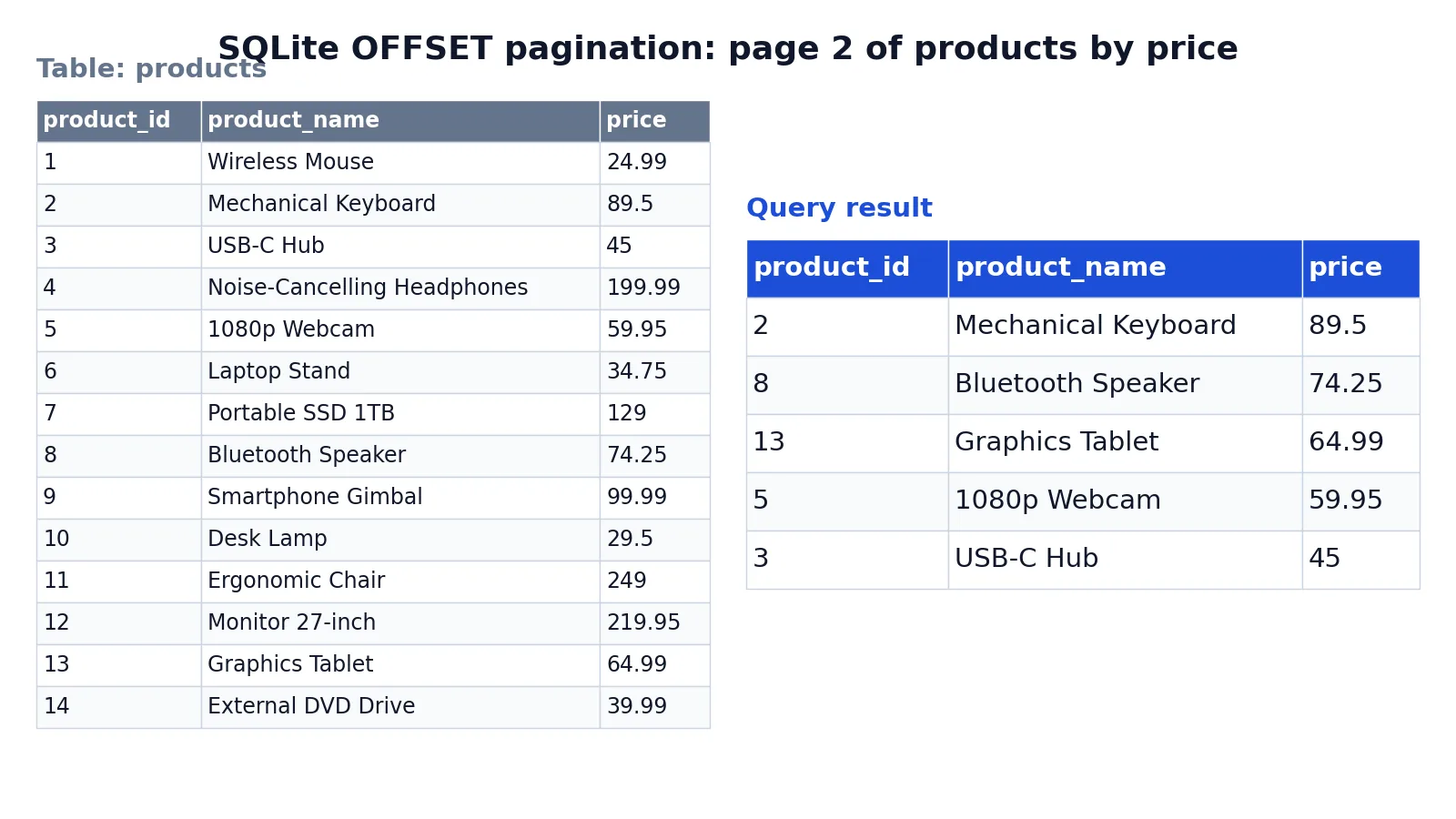
The dataset is a products table with 15 rows holding a product name and a price. The goal is page 2 of the most expensive products, five per page.
Input table (products):
| product_id | product_name | price |
|---|---|---|
| 1 | Wireless Mouse | 24.99 |
| 2 | Mechanical Keyboard | 89.50 |
| 3 | USB-C Hub | 45.00 |
| 4 | Noise-Cancelling Headphones | 199.99 |
| 5 | 1080p Webcam | 59.95 |
| 6 | Laptop Stand | 34.75 |
| 7 | Portable SSD 1TB | 129.00 |
| 8 | Bluetooth Speaker | 74.25 |
| 9 | Smartphone Gimbal | 99.99 |
| 10 | Desk Lamp | 29.50 |
| 11 | Ergonomic Chair | 249.00 |
| 12 | Monitor 27-inch | 219.95 |
| 13 | Graphics Tablet | 64.99 |
| 14 | External DVD Drive | 39.99 |
| 15 | Surge Protector | 19.99 |
Query:
SELECT * FROM products ORDER BY price DESC LIMIT 5 OFFSET 5;Result:
| product_id | product_name | price |
|---|---|---|
| 2 | Mechanical Keyboard | 89.50 |
| 8 | Bluetooth Speaker | 74.25 |
| 13 | Graphics Tablet | 64.99 |
| 5 | 1080p Webcam | 59.95 |
| 3 | USB-C Hub | 45.00 |
Step by step:
SELECT * FROM productschooses all columns from the products table.ORDER BY price DESCsorts rows from highest price to lowest so pagination is deterministic.LIMIT 5returns at most 5 rows per page.OFFSET 5skips the first 5 rows (page 1) and returns the next 5 rows (page 2).
The result was checked with an equivalent SQLite query in sqlite3 3.37.2. Page 1 would have been the Ergonomic Chair, Monitor 27-inch, Noise-Cancelling Headphones, Portable SSD 1TB, and Smartphone Gimbal. OFFSET 5 discards exactly those five rows, so the page starts at the Mechanical Keyboard at 89.50.
More Examples
Page 3 with a page size of 5. The offset is $(3-1) \times 5 = 10$.
SELECT product_name, price
FROM products
ORDER BY price DESC
LIMIT 5 OFFSET 10;
Skip the first row only. Useful when you want everything except the top result. PostgreSQL accepts OFFSET without LIMIT, as in this example and the next one, but SQLite and MySQL require a LIMIT before OFFSET, so in SQLite you would write LIMIT -1 OFFSET 1.
SELECT product_name, price
FROM products
ORDER BY price DESC
OFFSET 1;
Offset with no limit. This returns all rows after the first 10, which is a quick way to eyeball the tail of a sorted list.
SELECT product_name, price
FROM products
ORDER BY price DESC
OFFSET 10;
SQL Server syntax. The same idea with different keywords, and ORDER BY is mandatory [4].
SELECT product_name, price
FROM products
ORDER BY price DESC
OFFSET 10 ROWS FETCH NEXT 5 ROWS ONLY;
If you are still getting comfortable with the surrounding clauses, the SQL SELECT statement guide covers the full structure, and SQL Alias shows how to shorten the column lists you project.
Errors and How to Fix Them
"OFFSET must not be negative." The offset value evaluated to a negative number. Clamp it in your application before it reaches the query, or guard it with a CASE expression.
"Invalid limit-like expression." Azure Databricks raises INVALID_LIMIT_LIKE_EXPRESSION when the offset expression is not foldable, is not an integer, evaluates to NULL, or is negative [3]. Use a literal or a constant expression.
"Incorrect syntax near 'OFFSET'." In SQL Server, OFFSET requires an ORDER BY clause and must be written as OFFSET n ROWS [4]. Adding ORDER BY usually clears the error.
OFFSET combined with TOP. SQL Server does not allow TOP and OFFSET/FETCH in the same query scope [4]. Pick one style.
OFFSET inside a UNION. Only the final query that sets the result order can carry OFFSET and FETCH [4]. Move the clause to the outer statement.
OFFSET in a view or indexed view. SQL Server does not support OFFSET and FETCH in indexed views or in views defined with CHECK OPTION [4].
Common Mistakes
- Omitting ORDER BY. The skipped rows are then arbitrary, and page 2 can repeat or miss rows from page 1 [1][2]. Fix: always sort by a column or set of columns before paging.
- Sorting by a non-unique column. If many rows share the same price, ties can be ordered differently across queries. Fix: add a tiebreaker such as the primary key, for example
ORDER BY price DESC, product_id. - Assuming OFFSET makes the query cheaper. Skipped rows are still computed and sorted by the server, so a large OFFSET can be inefficient [1][3]. Fix: filter with WHERE when you can, or switch to keyset pagination.
- Using OFFSET for deep pages. Page 10,000 means skipping hundreds of thousands of rows on every request. Fix: paginate on a key, for example
WHERE product_id > :last_seen_id ORDER BY product_id LIMIT 20. - Forgetting that OFFSET counts after filtering. OFFSET applies to the rows that survive WHERE and the joins, not to the raw table. Fix: reason about the final result set, not the base table.
- Mixing pagination styles. Combining TOP with OFFSET and FETCH in one query scope fails in SQL Server [4]. Fix: standardize on one approach per query.
Limitations
OFFSET pagination is simple but it does not scale well. The database must generate and sort every row up to the offset plus the limit, then discard the skipped ones, so cost grows with the offset value [1][3]. Databricks documentation advises against this technique for resource-intensive queries [3]. For deep pages on large tables, keyset pagination, which filters on the last value seen, avoids the growing skip cost.
OFFSET also gives unstable pages when the underlying data changes between requests. If a row is inserted or deleted while a user pages forward, items can shift across page boundaries and appear twice or not at all. A unique ORDER BY key reduces the risk but does not remove it. OFFSET is best for small, mostly static result sets and for admin screens where a few hundred rows are involved.
Frequently Asked Questions
What is the difference between OFFSET and LIMIT?
LIMIT sets the maximum number of rows returned, and OFFSET sets how many leading rows to skip first. When both appear, OFFSET is applied before LIMIT starts counting [1]. LIMIT 10 OFFSET 20 skips 20 rows and returns up to 10 of the rest.
Does OFFSET work without ORDER BY?
It runs, but the result is not meaningful. Without ORDER BY, the database returns rows in an unspecified order, so the skipped subset changes from run to run [1][2]. Always add ORDER BY when you use OFFSET.
How do I calculate the OFFSET for page N?
Use $(N - 1) \times \text{page size}$. For a page size of 20, page 1 uses OFFSET 0, page 2 uses OFFSET 20, and page 5 uses OFFSET 80. Keep the page size fixed across requests so the arithmetic stays consistent.
Why is my OFFSET query slow on large tables?
The server still computes and sorts the skipped rows before discarding them [1][3]. At OFFSET 500000, that is half a million rows of work for one page. Keyset pagination, which filters on the last key returned, avoids this cost.
Is OFFSET the same as FETCH?
They are complementary. OFFSET says where to start, and FETCH says how many rows to return. SQL Server uses OFFSET n ROWS FETCH NEXT m ROWS ONLY as its equivalent of LIMIT m OFFSET n [4]. PostgreSQL and SQLite use LIMIT and OFFSET directly [1].
If you also work in spreadsheets, the Excel OFFSET function uses the same word for a different job: returning a reference shifted by a given number of rows and columns. For counting rows before you paginate, see SQL COUNT.
References
- PostgreSQL: Documentation: 18: 7.6. LIMIT and OFFSET
- OFFSET Clause
- OFFSET clause - Azure Databricks - Databricks SQL | Microsoft Learn
- ORDER BY Clause (Transact-SQL) - SQL Server | Microsoft Learn
Further Reading
- Codd EF (1970). A relational model of data for large shared data banks. Communications of the ACM
- PostgreSQL Documentation: SELECT
- SQLite: SQL As Understood By SQLite
- Wilson G, Bryan J, Cranston K et al. (2017). Good enough practices in scientific computing. PLOS Computational Biology