SQL Alias: Syntax and Examples for Tables and Columns
By Dr. Zubair Khalid, DVM, MS, PhD ·
An alias in SQL is a temporary name you give a table or column for the duration of a single query. It changes only the label used in that statement, never the underlying object. You write it with the optional AS keyword, and it is most useful when names are long, when you join a table to itself, or when you want a readable column header in the result.
Quick Answer
- An alias renames a table or column inside one query only. It does not rename the stored object [1].
- Syntax for a column:
SELECT column_name AS alias_name FROM table_name. - Syntax for a table:
SELECT * FROM table_name AS alias_name. - The
ASkeyword is optional.SELECT region area FROM salesworks, butASis clearer [1]. - Aliases are required for self joins, where the same table appears twice and each copy needs its own name [1].
What an Alias Means
In plain terms, an alias is a nickname. You point at a table or column and say "for this query, call it this instead." The database resolves the nickname back to the real object when it runs the statement.
The precise definition from the SQL standard is narrower than the everyday usage. A table alias is formally called a correlation name [1]. A column alias is a name assigned to an output column of the result set. Both are scoped to the current SELECT query, and assigning an alias does not actually rename the column or table [1].
That scope matters. If you alias sales as s, the name s exists only inside that statement. The next query you run has no idea what s means, and the table is still called sales in the catalog.
How It Works
The mechanism is simple substitution. The parser reads your alias and uses it as the reference name for the rest of the query.
For a column alias:
$$ \text{SELECT } expr \text{ AS } alias\_name \text{ FROM } table\_name $$
For a table alias:
$$ \text{SELECT } col \text{ FROM } table\_name \text{ AS } alias\_name $$
Each symbol means the following.
expris any expression, such as a column, a function call likeSUM(amount), or a calculation.alias_nameis the new label. It can be almost anything, but short names are conventional [1].table_nameis the real table in the database.ASis optional and kept mainly for readability [1].
Once a table has an alias, you must use that alias to qualify its columns. If you write FROM sales AS s, then s.amount is valid and sales.amount is not. This is exactly why aliasing is required for self joins: two copies of the same table need two distinct correlation names so the engine can tell them apart [1].
Column aliases behave differently depending on the clause. Most databases let you reference a column alias in ORDER BY. Support for referencing it in GROUP BY and WHERE varies by engine, so check your dialect before relying on it.
Worked Example
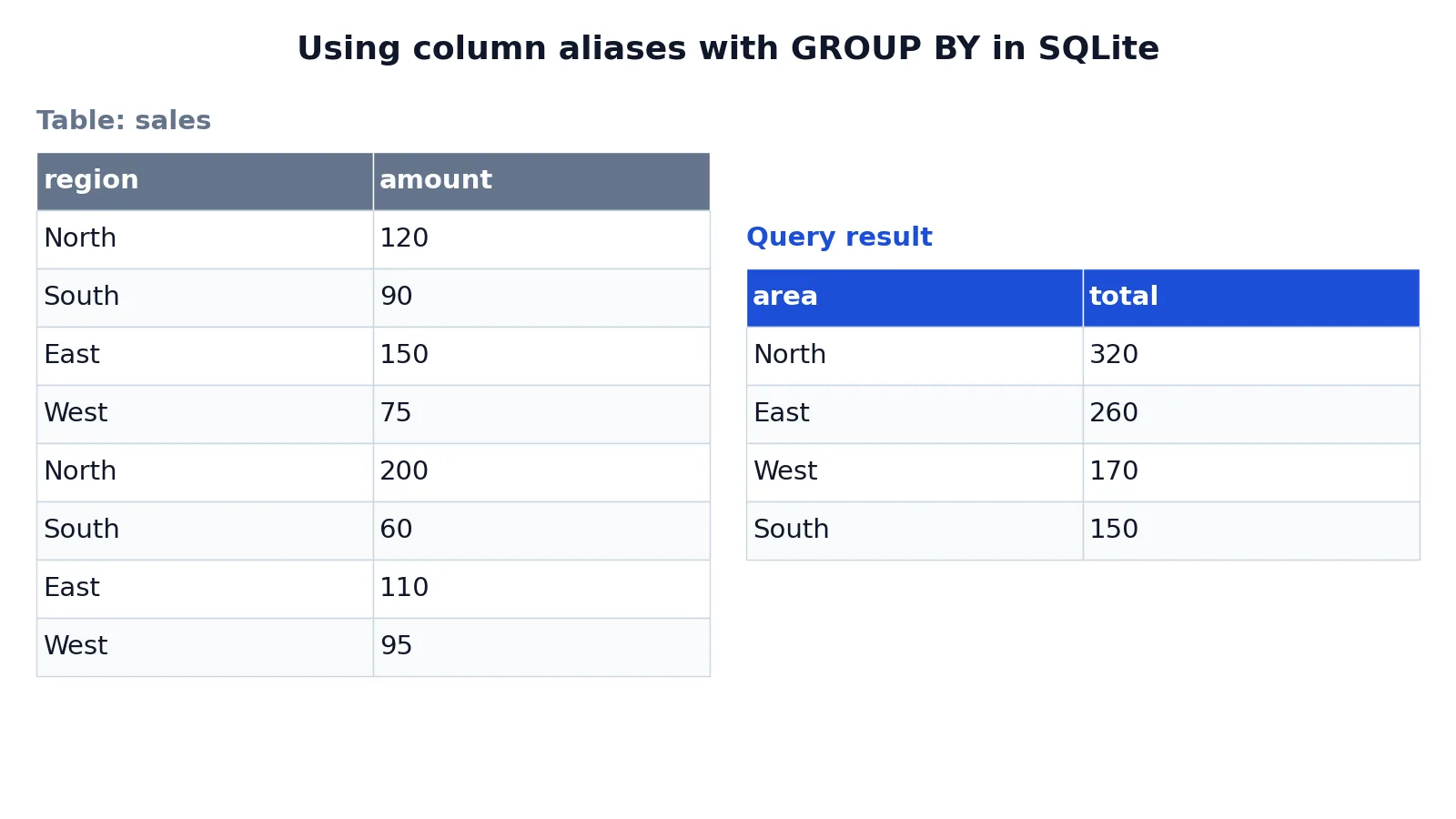
The dataset is a small sales table with a region name and an integer amount for each row.
| region | amount |
|---|---|
| North | 120 |
| South | 90 |
| East | 150 |
| West | 75 |
| North | 200 |
| South | 60 |
| East | 110 |
| West | 95 |
The query aliases the grouping column and the aggregate, then reuses both aliases later in the statement.
SELECT region AS area, SUM(amount) AS total
FROM sales
GROUP BY area
ORDER BY total DESC;
The steps are:
SELECT region AS arearenames theregioncolumn toareain the result set.SUM(amount) AS totalaggregates each region's sales into a column namedtotal.FROM salesreads the source table.GROUP BY areagroups rows by the column alias, which SQLite allows.ORDER BY total DESCsorts the grouped results by the alias from highest to lowest.
The result was checked with an equivalent SQLite query (sqlite3 3.37.2):
| area | total |
|---|---|
| North | 320 |
| East | 260 |
| West | 170 |
| South | 150 |
Aliases rename region to area and the SUM result to total, then GROUP BY and ORDER BY reference those aliases.
How to Interpret It
Read the output column headers first. In the example, area and total are the names the query produced, not names stored anywhere. If you ran the same query without aliases, the headers would be region and SUM(amount), and the values would be identical.
The numbers themselves are unchanged by aliasing. North totals 320 because 120 plus 200 equals 320. Aliasing only affects labels and how you reference things inside the query.
One practical consequence: an alias can hide what a column really is. A header called total tells you nothing about whether it came from SUM, COUNT or a subtraction. Choose alias names that describe the calculation, not just the output.
When to Use It (and when not to)
Use a table alias when:
- A table name is long or complex, so a short name keeps the query readable [1].
- You join a table to itself, where aliases are required [1].
- You join several tables and need to qualify columns unambiguously, as in a SQL INNER JOIN or a SQL FULL OUTER JOIN.
Use a column alias when:
- An expression produces an unhelpful header, such as
SUM(amount)orCOALESCE(a, b). - You want a stable output name for a report or a downstream tool.
- You need a readable label for a computed column, for example inside a CASE expression.
Skip aliases when the query is short and the names are already clear. Adding AS x to a single-table query with obvious column names adds noise without adding meaning.
Alias vs Rename
These two ideas are often confused because both change a name. They differ in scope and permanence.
| Aspect | Alias | Rename |
|---|---|---|
| Scope | One query | The stored object |
| Persistence | Ends when the query finishes | Persists until changed again |
| Syntax | AS alias_name in the query | ALTER TABLE ... RENAME TO ... |
| Affects other users | No | Yes |
| Required for self joins | Yes | No |
An alias is a query-level label [1]. A rename is a schema change that affects every future query against that object. If you only need a better header, alias it. If the name itself is wrong, rename it.
Common Mistakes
- Using the real table name after aliasing it. Once you write
FROM sales AS s, you must qualify columns ass.amount. Fix: replace everysales.reference withs.. - Assuming
ASis required. It is optional for both tables and columns [1]. Fix: keepASfor readability, but do not treat its absence as an error. - Referencing a column alias in
WHERE. Many engines evaluateWHEREbefore the select list, so the alias is not yet defined. Fix: repeat the expression inWHERE, or wrap the query in a subquery or a common table expression. - Reusing one alias for two tables. In a self join, both copies need distinct names. Fix: use
eandmfor employee and manager, for example. - Quoting aliases inconsistently. An unquoted alias is folded to a case convention that differs by engine. Fix: quote the alias if you need exact case, and use the same quoting everywhere.
- Naming an alias after a reserved word.
AS orderorAS selectwill fail or need quoting. Fix: pick a name that is not a keyword.
Limitations
An alias cannot change the data, the sort order or the aggregation. It only changes labels and reference names. Two queries that differ only in aliases return the same rows in the same order.
Alias support is not fully uniform across engines. Referencing a column alias in GROUP BY works in SQLite, as the worked example shows, but other systems restrict it. Referencing one in WHERE is generally not allowed because of clause evaluation order. When you move a query between databases, test the alias references rather than assuming they carry over.
There is also a naming trap. A table alias and a column alias can collide with real object names, and the engine resolves them by its own precedence rules. If a query behaves unexpectedly, rename the alias to something that appears nowhere else in the statement.
Frequently Asked Questions
What is an alias in SQL?
An alias is a temporary alternate name for a table or column that applies only to the current query [1]. You create it with the AS keyword, which is optional. It makes queries shorter and easier to read, and it is required when you join a table to itself [1].
Is the AS keyword mandatory for aliases?
No. The general syntax is SELECT * FROM table_name [ AS ] alias_name, where the brackets mean AS can be omitted [1]. Most people keep it because it separates the real name from the alias at a glance.
Can I use a column alias in the WHERE clause?
Usually not. WHERE is evaluated before the select list in most engines, so the alias does not exist yet. Repeat the expression in WHERE, or compute the alias in a subquery and filter the outer query. Support varies, so test it in your database.
Do aliases work in GROUP BY and ORDER BY?
ORDER BY accepts column aliases in the major databases. GROUP BY is less consistent. SQLite allows it, as the worked example shows, but other systems may reject it. If a query fails, use the original expression instead of the alias.
Does an alias rename the table permanently?
No. Assigning an alias does not actually rename the column or table [1]. The change lasts only for the duration of the current SELECT query. To change a name permanently, use a schema statement such as ALTER TABLE ... RENAME TO ....
If you are still building up your query skills, start with the SQL SELECT statement to see where aliases fit, then look at functions like COALESCE and MOD that often need a readable output name.
References
Further Reading
- Aliases (SQL Server Configuration Manager) - SQL Server | Microsoft Learn
- Codd EF (1970). A relational model of data for large shared data banks. Communications of the ACM
- PostgreSQL Documentation: SELECT
- SQLite: SQL As Understood By SQLite
- Wilson G, Bryan J, Cranston K et al. (2017). Good enough practices in scientific computing. PLOS Computational Biology