SQL INTERSECT Operator: Syntax, Examples and When to Use It
By Dr. Zubair Khalid, DVM, MS, PhD ·
SQL INTERSECT returns only the rows that appear in both of two query results. It is a set operator, so it compares whole rows rather than matching keys column by column. This article covers the syntax, a worked example, and when a SQL intersection beats a join or an IN clause.
Quick Answer
- INTERSECT combines two SELECT statements and keeps rows that appear in both results [1].
- Duplicate rows are removed unless you write INTERSECT ALL [1].
- Both queries must return the same number of columns, and corresponding columns must have compatible data types [1].
- INTERSECT binds more tightly than UNION and EXCEPT, so it is evaluated first unless you add parentheses [1].
- Use it when you want "rows in set A that are also in set B" and you do not need columns from both sides.
What SQL Intersection Means
In plain terms, a SQL intersection is the overlap between two result sets. If query A returns customers who bought in 2023 and query B returns customers who bought in 2024, the intersection is the customers who did both.
The precise definition comes from set theory. Given two sets $A$ and $B$, the intersection is the set of elements that belong to both:
$$A \cap B = \{x \mid x \in A \text{ and } x \in B\}$$
In SQL, the elements are rows, and two rows count as the same element when every corresponding column value matches. The PostgreSQL documentation states it directly: "INTERSECT returns all rows that are both in the result of query1 and in the result of query2. Duplicate rows are eliminated unless INTERSECT ALL is used" [1].
That last clause matters. A set has no duplicates by definition, so plain INTERSECT behaves like DISTINCT applied to the overlap. INTERSECT ALL keeps the smaller count of each duplicated row, which is closer to multiset intersection.
How It Works
The syntax is short:
SELECT column_list FROM table_a
INTERSECT
SELECT column_list FROM table_b;
Each part is worth naming:
- query1 and query2 are any two queries that can use the features discussed in the SQL documentation, including WHERE, GROUP BY and ORDER BY [1].
- column_list must have the same length in both queries. The names do not have to match, only the positions and types.
- INTERSECT is the operator keyword placed between the two queries.
- ALL is optional and changes duplicate handling from "remove" to "keep the minimum count."
The mechanism is a two-step comparison. The database evaluates each query independently, then compares rows positionally. Column one of query1 is compared with column one of query2, column two with column two, and so on. A row survives only if every position matches.
Order of evaluation follows a fixed rule. Without parentheses, UNION and EXCEPT associate left to right, but INTERSECT binds more tightly than those two operators [1]. So in a chain like A UNION B INTERSECT C, the intersection runs first in PostgreSQL, SQL Server and MySQL. SQLite and Oracle give all set operators equal precedence and evaluate them left to right. Add parentheses when you want a specific grouping.
Worked Example
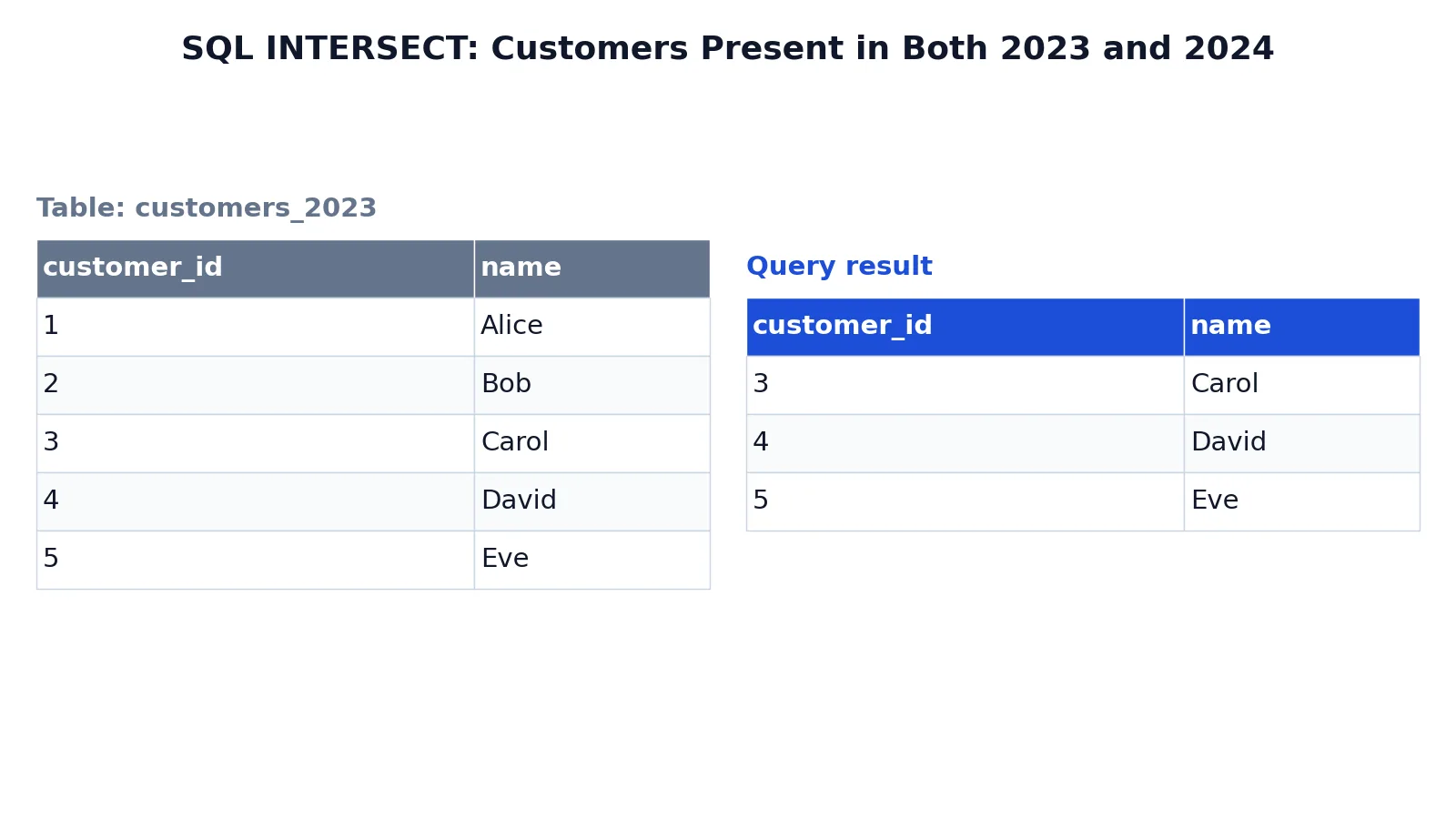
The dataset is two small customer tables, one for each year, with a shared customer_id and name.
customers_2023
| customer_id | name |
|---|---|
| 1 | Alice |
| 2 | Bob |
| 3 | Carol |
| 4 | David |
| 5 | Eve |
customers_2024
| customer_id | name |
|---|---|
| 3 | Carol |
| 4 | David |
| 5 | Eve |
| 6 | Frank |
| 7 | Grace |
The query asks which customers appear in both years:
SELECT customer_id, name FROM customers_2023
INTERSECT
SELECT customer_id, name FROM customers_2024;
Result
| customer_id | name |
|---|---|
| 3 | Carol |
| 4 | David |
| 5 | Eve |
The result was checked with an equivalent SQLite query in sqlite3 3.37.2. Three rows come back, matching customer IDs 3, 4 and 5. Alice and Bob appear only in 2023, and Frank and Grace appear only in 2024, so they are dropped. Both queries select the same two columns in the same order, which is what makes them union compatible [1].
How to Interpret It
Read the output as a list of rows that satisfy both conditions at once. It is not a count, a ranking or a score. It is a filtered set.
Three things follow from that. First, the row count tells you the size of the overlap, so 3 out of 5 means 60 percent of the 2023 customers returned in 2024. Second, the result contains no information about rows that failed the test. If you need to know who was in 2023 but not 2024, that is EXCEPT, not INTERSECT [1]. Third, because duplicates are removed, a row that appears five times in each input still appears once in the output.
If you want to see the overlap alongside the non-overlapping rows, run the intersection and the two differences separately, or use a full outer join with a null check. The set operator gives you a clean answer to one question only.
When to Use It (and when not to)
Use INTERSECT when all of these hold:
- You need rows present in two result sets.
- Both queries return the same columns in the same order.
- You do not need extra columns from either side.
- Duplicate removal is acceptable or desired.
Typical cases include finding customers active in two periods, products sold in two regions, or IDs present in two staging tables before a merge.
Avoid it when the two queries return different column lists. A join is the right tool there, because a join can carry columns from both tables into one row. Avoid it when you need to know which side a row came from, since the output has no source column. Avoid it when performance matters and the tables are large, because the database must deduplicate both sides before comparing them.
For a broader look at combining result sets, see the guide to the SQL UNION operator, which appends results instead of intersecting them.
INTERSECT vs JOIN vs IN
These three tools answer different questions, and mixing them up is the most common source of wrong results.
| Aspect | INTERSECT | INNER JOIN | IN |
|---|---|---|---|
| What it compares | Whole rows, position by position | A join condition you write | One column against a list or subquery |
| Columns in output | Only the shared column list | Columns from both tables | Columns from the outer query only |
| Duplicates | Removed unless INTERSECT ALL | Multiplied by matches | Kept as in the outer query |
| Multiple columns | Compared together as a row | Compared per condition | One value at a time |
| Best for | Set overlap | Combining related data | Filtering by a list |
The practical difference is what you get back. An inner join on customer_id returns one row per matching pair and lets you select columns from both tables. INTERSECT returns one row per distinct matching row and nothing else. IN returns the outer table's rows, filtered.
A join can also produce duplicates when the right table has several matches for one key. INTERSECT cannot, because it collapses duplicates. If you want join behavior with deduplication, use SELECT DISTINCT with the join. If you want to filter one table by another, the SQL IN operator is usually simpler and often faster.
For a deeper comparison of join mechanics, see SQL INNER JOIN.
Common Mistakes
- Mismatched column counts.
SELECT id, nameagainstSELECT idfails because the queries are not union compatible [1]. Fix: select the same number of columns in the same order. - Assuming column names must match. They do not. Only position and type matter. Fix: rely on order, and alias the first query's columns for readable output.
- Expecting duplicates. Plain INTERSECT removes them [1]. Fix: use INTERSECT ALL if you need the minimum count of each duplicated row.
- Forgetting operator precedence. INTERSECT binds more tightly than UNION and EXCEPT [1]. Fix: add parentheses when chaining three or more queries.
- Using INTERSECT where a join is needed. If you need columns from both tables, INTERSECT cannot supply them. Fix: switch to an inner join.
- Ignoring NULL behavior. NULLs compare as equal to each other in set operations, which differs from
=in a WHERE clause. Fix: test with NULLs present before trusting the result.
Limitations
INTERSECT compares rows, not keys. If the two queries return different column lists, or the same columns in a different order, the comparison either fails or produces meaningless results. It also gives you no way to tell which input a row came from, and no way to attach extra attributes to the output.
Performance is the other constraint. The database must evaluate both queries and then deduplicate before comparing, which costs more than a simple filter on large tables. Many engines can use indexes and hash-based strategies, but the deduplication step remains. On very large datasets, an EXISTS subquery or a join with DISTINCT often runs faster and gives you more control over the output columns.
Frequently Asked Questions
Does SQL INTERSECT remove duplicates?
Yes. Plain INTERSECT eliminates duplicate rows from its result, in the same way as DISTINCT [1]. If you write INTERSECT ALL, duplicates are kept and each row appears as many times as the smaller of its two counts.
What is the difference between INTERSECT and INNER JOIN?
INTERSECT returns distinct rows that appear in both result sets and only the columns both queries share. An inner join returns rows built from both tables, with all selected columns, and can produce duplicate rows when the join key matches more than once.
Can INTERSECT compare more than one column?
Yes. It compares every column positionally, so a row matches only when all corresponding values match. This is how the worked example above matches on both customer_id and name at once.
Does INTERSECT work in MySQL?
MySQL supports INTERSECT from version 8.0.31. In older MySQL versions, you can get the same result with an inner join on all shared columns plus DISTINCT, or with an IN subquery when only one column matters. PostgreSQL, SQLite, SQL Server and Oracle support the operator [1].
Which runs first, INTERSECT or UNION?
In PostgreSQL, INTERSECT binds more tightly than UNION and EXCEPT, so it is evaluated first when no parentheses are present [1]. SQLite and Oracle evaluate all set operators left to right instead, so add parentheses to make the order explicit.
References
Further Reading
- Codd EF (1970). A relational model of data for large shared data banks. Communications of the ACM
- PostgreSQL Documentation: SELECT
- SQLite: SQL As Understood By SQLite
- Wilson G, Bryan J, Cranston K et al. (2017). Good enough practices in scientific computing. PLOS Computational Biology
- PostgreSQL Tutorial: The SQL Language