NumPy arange: How to Create Arrays of Numbers in Python
By Dr. Zubair Khalid, DVM, MS, PhD ·
numpy.arange returns an array of evenly spaced values inside a half-open interval. You give it a start, a stop and a step, and it generates numbers from start up to but not including stop. It is the array-building workhorse behind loops, plotting grids, index ranges and time-like sequences in data analysis code.
Quick Answer
np.arange(stop)counts from 0 up to stop, excluding stop, with a step of 1.np.arange(start, stop)counts from start up to stop, excluding stop, with a step of 1.np.arange(start, stop, step)spaces values by step and still excludes stop [1].- The length of the result follows $\lceil (stop - start) / step \rceil$ [1].
- For non-integer steps, floating-point rounding can make the last element unpredictable, so
numpy.linspaceis usually the safer choice [1][2].
Syntax
The signature is numpy.arange([start, ] stop, [step, ] dtype=None, *, device=None, like=None) [1]. The square brackets mean those arguments are optional, not that you pass a list.
| Argument | Required? | Meaning |
|---|---|---|
start | No | First value in the interval. Defaults to 0. The interval includes this value [1]. |
stop | Yes | End of the interval. The interval excludes this value [1]. |
step | No | Spacing between values. Defaults to 1. |
dtype | No | Output data type. If omitted, NumPy infers it from the inputs. |
device | No | Device on which to place the array. |
like | No | Array-like reference for creating the result. |
You can call it with one, two or three positional arguments. arange(stop) generates values in the half-open interval [0, stop). arange(start, stop) generates values in [start, stop). arange(start, stop, step) generates values in [start, stop) with spacing given by step [1].
How It Works
The number of elements is decided by the step, not by a count you supply. NumPy computes the length as $\lceil (stop - start) / step \rceil$ [1]. That ceiling is what makes the endpoint exclusion work. If the interval divides evenly, you get exactly the number of steps that fit. If it does not, the ceiling rounds up and the final value lands short of stop.
For integer arguments, numpy.arange is roughly equivalent to Python's built-in range, but it returns an ndarray instead of a range object [1]. That difference matters. A Python range produces built-in integers with arbitrary size, while numpy.arange produces numpy.int32 or numpy.int64 numbers [1]. Very large values can overflow the fixed-width NumPy integer types where a Python range would keep going.
There is a second subtlety with floating-point steps. The actual step used to fill the array is dtype(start + step) - dtype(start), not the step you passed [1]. Casting and floating-point representation can shift that value slightly, so the last element may be larger than you expect or the length may be unstable [1]. When you need a non-integer step, the NumPy documentation recommends numpy.linspace instead [1][2].
numpy.linspace works differently. It takes a num argument for the number of elements and derives the step from it, and it includes the endpoint by default [2]. That gives you control over the count instead of the spacing.
Worked Example
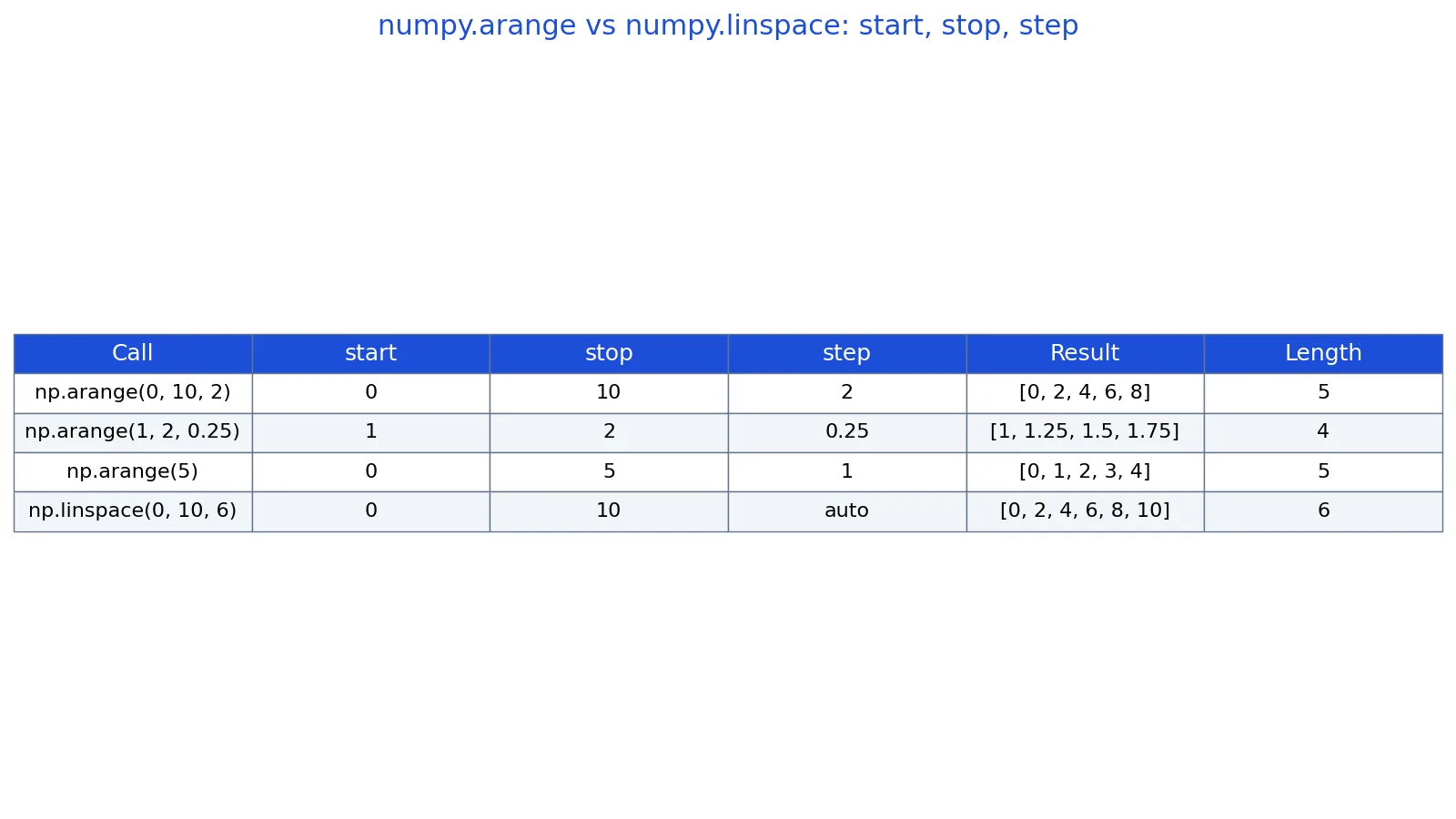
The table below comes from running four array-construction calls in NumPy, covering integer steps, a fractional step, the single-argument form and a linspace comparison.
| call | start | stop | step | result | length |
|---|---|---|---|---|---|
np.arange(0, 10, 2) | 0 | 10 | 2 | [0, 2, 4, 6, 8] | 5 |
np.arange(1, 2, 0.25) | 1 | 2 | 0.25 | [1, 1.25, 1.5, 1.75] | 4 |
np.arange(5) | 0 | 5 | 1 | [0, 1, 2, 3, 4] | 5 |
np.linspace(0, 10, 6) | 0 | 10 | auto | [0, 2, 4, 6, 8, 10] | 6 |
Walking through the steps:
np.arange(0, 10, 2)sets start to 0, stop to 10 and step to 2. The values are 0, 2, 4, 6 and 8. The value 10 is excluded because the interval is half-open, so the result is[0, 2, 4, 6, 8].np.arange(1, 2, 0.25)sets start to 1, stop to 2 and step to 0.25. The values are 1, 1.25, 1.5 and 1.75. The last element is 1.75, and 2 is excluded, so the result is[1, 1.25, 1.5, 1.75].np.arange(5)uses only the stop argument. Start defaults to 0 and step defaults to 1, so the result is[0, 1, 2, 3, 4].np.linspace(0, 10, 6)asks for 6 elements between 0 and 10 with the endpoint included. The step is computed automatically, and the result is[0, 2, 4, 6, 8, 10].
The length formula confirms the counts. For the first call, $\lceil (10 - 0) / 2 \rceil = 5$. For the second, $\lceil (2 - 1) / 0.25 \rceil = 4$.
import numpy as np
a = np.arange(0, 10, 2)
b = np.arange(1, 2, 0.25)
c = np.arange(5)
d = np.linspace(0, 10, 6)
print(a)  # [0 2 4 6 8]
print(b)  # [1.   1.25 1.5  1.75]
print(c)  # [0 1 2 3 4]
print(d)  # [ 0.  2.  4.  6.  8. 10.]
Output:
[0 2 4 6 8]
[1.   1.25 1.5  1.75]
[0 1 2 3 4]
[ 0.  2.  4.  6.  8. 10.]
More Examples
Descending sequences use a negative step. np.arange(5, 0, -1) gives [5, 4, 3, 2, 1]. The stop value of 0 is excluded, so the array ends at 1.
Counting by tens is a common pattern for bin edges and axis ticks. np.arange(0, 100, 10) gives ten values from 0 to 90.
You can force an integer output type even with a fractional step. The manual shows np.arange(0, 5, 0.5, dtype=np.int_), which returns ten zeros because the internal step int(0 + 0.5) - int(0) is 0 [1]. This is rarely what you want, because the casting silently changes the spacing.
Indexing a DataFrame or array by position often uses np.arange(len(df)) to build a positional index. That is equivalent to np.arange(0, len(df), 1).
Errors and How to Fix Them
Passing a step of zero raises a ZeroDivisionError because the length formula divides by step. Use a nonzero step, or switch to numpy.linspace if you want a fixed number of points.
Passing complex numbers for start or stop is not supported. The arguments should be integer or real, not complex, and complex inputs give meaningless results such as a one-element or empty array rather than a clear error [2]. If you need complex values, numpy.linspace supports complex arguments [2].
Passing a float step and expecting an exact endpoint is not an error, but it produces surprising results. The last element may be greater than stop, or the length may differ from what you calculated by hand [1]. Switch to numpy.linspace when the endpoint matters.
Passing a step with the wrong sign gives an empty array. np.arange(0, 10, -1) returns an empty array because the sequence moves away from stop. Match the sign of the step to the direction you want.
Common Mistakes
- Assuming stop is included. The interval is half-open, so
np.arange(0, 10, 2)stops at 8. Usenumpy.linspacewith the endpoint included if you need the final value [2]. - Using a float step for exact arithmetic. Floating-point representation can shift the last element or the length [1]. Prefer integer steps, or use
numpy.linspacefor fractional spacing [2]. - Forgetting that the length comes from the step. There is no
numargument innumpy.arange. If you want to control the count, usenumpy.linspace[2]. - Expecting Python integer behavior.
numpy.arangereturns fixed-widthnumpy.int32ornumpy.int64values, which can overflow where a Pythonrangewould not [1]. - Passing a zero step. This raises a
ZeroDivisionErrorbecause the length formula divides by step. - Passing complex arguments.
numpy.arangedoes not support complex start and stop values [2].
Limitations
numpy.arange cannot guarantee a stable length or a predictable final element when you use a non-integer step. The manual states that the length of the output might not be numerically stable, and that the actual step used internally is dtype(start + step) - dtype(start) rather than the step you passed [1]. Precision loss from casting, or from a start value much larger than the step, can produce unexpected results [1]. When any of those conditions apply, numpy.linspace is the better tool because it derives the step from a count you control [2].
The function also cannot include its endpoint, and it cannot produce complex sequences. Those are design choices, not bugs. If your analysis needs an inclusive endpoint or complex values, numpy.linspace covers both cases [2].
Frequently Asked Questions
What is the difference between numpy arange and Python range?
Both generate evenly spaced integers, and numpy.arange is roughly equivalent to range for integer arguments [1]. The difference is the return type. range returns a lazy range object of arbitrary-precision Python integers, while numpy.arange returns an ndarray of fixed-width numpy.int32 or numpy.int64 values [1]. Use numpy.arange when you need array operations, and range when you just need to iterate.
Does numpy arange include the stop value?
No. The interval is half-open, so the stop value is excluded [1]. np.arange(0, 10, 2) returns [0, 2, 4, 6, 8], not [0, 2, 4, 6, 8, 10]. If you need the endpoint included, use numpy.linspace, which includes it by default [2].
Why does np.arange with a float step give unexpected results?
Floating-point representation and type casting can shift the effective step. The manual notes that the actual step used to populate the array is dtype(start + step) - dtype(start), not the step you passed, and that precision loss can occur when start is much larger than step [1]. The result can be a different length or a final element beyond stop. Use numpy.linspace for non-integer steps [1][2].
How do I calculate the length of a numpy arange result?
Use the formula $\lceil (stop - start) / step \rceil$ [1]. For np.arange(0, 10, 2), that is $\lceil 10 / 2 \rceil = 5$. For np.arange(1, 2, 0.25), that is $\lceil 1 / 0.25 \rceil = 4$. The ceiling is what handles intervals that do not divide evenly.
When should I use numpy linspace instead of numpy arange?
Use numpy.linspace when you want the endpoint included, when you need a non-integer step, or when you want to specify the number of elements directly [2]. numpy.linspace takes a num argument and derives the step from it, and its endpoint argument defaults to True [2]. Use numpy.arange when you want integer steps and the endpoint does not matter [2].
References
Further Reading
- Harris CR, Millman KJ, van der Walt SJ et al. (2020). Array programming with NumPy. Nature
- McKinney W (2010). Data Structures for Statistical Computing in Python. Proceedings of the Python in Science Conference
- The Python Tutorial
- Wilson G, Bryan J, Cranston K et al. (2017). Good enough practices in scientific computing. PLOS Computational Biology