How to Drop a Table in SQL (With Syntax and Examples)
By Dr. Zubair Khalid, DVM, MS, PhD ·
To drop table in SQL, you run the DROP TABLE statement with the name of the table you want to remove. The statement deletes the table definition along with all its rows, indexes, triggers and constraints, and the action cannot be undone with a simple undo. This article covers the syntax, the safety options, a worked example and the mistakes that cause people to lose data.
Quick Answer
DROP TABLE table_name;removes the table and everything in it permanently.- Add
IF EXISTSto avoid an error when the table may not be there:DROP TABLE IF EXISTS table_name; - Use
CASCADEwhen other objects, such as views or foreign keys, depend on the table [1]. - Use
RESTRICT(often the default) to refuse the drop if anything depends on the table [1]. - To remove only the rows and keep the table structure, use
DELETEorTRUNCATEinstead [1].
Before You Start
DROP TABLE is a data definition language (DDL) statement, not a data manipulation statement. It does not filter rows or remove a subset of records. It removes the table object itself. Once it runs, the table is gone from the schema and any query that references it fails until you recreate it.
Because the operation is destructive, check three things first. Confirm you are connected to the correct database, because the same table name can exist in several databases. Confirm you have the right permissions, since only the table owner, the schema owner or a superuser can drop a table in PostgreSQL [1]. Confirm nothing else depends on the table, such as a view or a foreign key from another table [1].
If your goal is to clear the data but keep the table for future inserts, DROP TABLE is the wrong tool. Use DELETE to remove selected rows or TRUNCATE to empty the table quickly. The article on SQL TRUNCATE TABLE syntax and examples explains when each is appropriate.
Step by Step
- Identify the exact table name. Names are case sensitive in some systems and not in others, so match the name as it appears in the catalog. Qualify it with a schema if needed, for example
sales.orders.
- Check for dependencies. Look for views, foreign keys, stored procedures or triggers that reference the table. In SQL Server you can report dependencies with
sys.dm_sql_referencing_entities[2].
- Decide on the safety options. Add
IF EXISTSif the table might not exist, so the statement does not fail [1][2]. ChooseCASCADEorRESTRICTbased on whether dependent objects should be removed or should block the drop [1].
- Run the statement. The basic form is:
DROP TABLE sales;- Verify the table is gone. Query the system catalog for the table name. If the drop succeeded, the query returns no rows.
- Recreate if needed. If you dropped the table by mistake, you must recreate it with
CREATE TABLEand reload the data from a backup or another source.
The syntax across major systems looks like this:
| System | Basic syntax | Notes | ||
|---|---|---|---|---|
| PostgreSQL | `DROP TABLE [ IF EXISTS ] name [, ...] [ CASCADE \ | RESTRICT ]` | Multiple tables allowed, IF EXISTS is a PostgreSQL extension [1] | |
| SQL Server | `DROP TABLE [ IF EXISTS ] { database.schema.table \ | schema.table \ | table } [ ,...n ]` | Multiple tables allowed, three-part names supported [2] |
| Oracle NoSQL | DROP TABLE [IF EXISTS] table-name | Child tables must be dropped before the parent [3] |
Worked Example
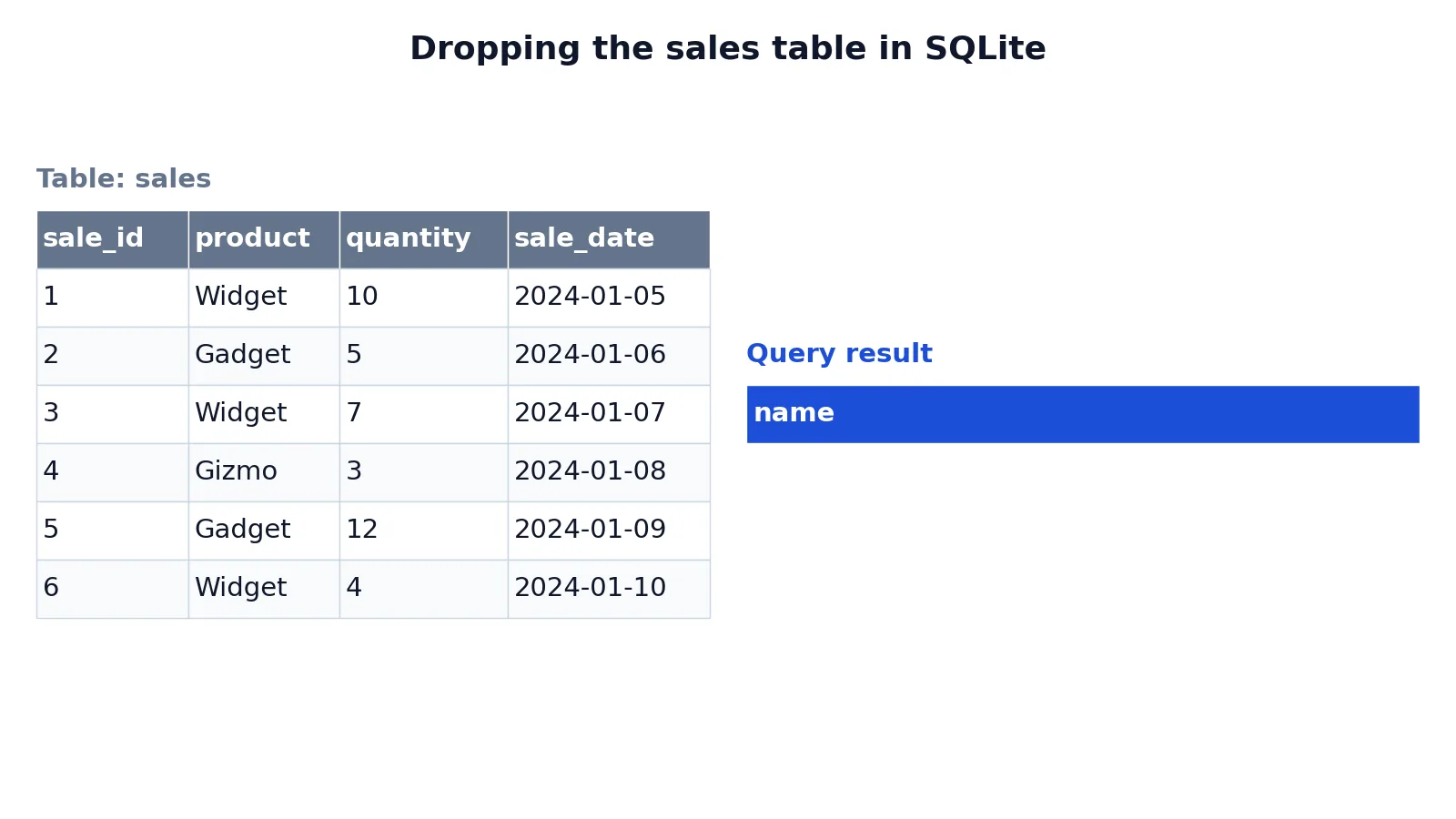
The dataset is a small sales table with six rows of product sales, created and dropped in SQLite.
The starting table looks like this:
| sale_id | product | quantity | sale_date |
|---|---|---|---|
| 1 | Widget | 10 | 2024-01-05 |
| 2 | Gadget | 5 | 2024-01-06 |
| 3 | Widget | 7 | 2024-01-07 |
| 4 | Gizmo | 3 | 2024-01-08 |
| 5 | Gadget | 12 | 2024-01-09 |
| 6 | Widget | 4 | 2024-01-10 |
The drop statement is a single line:
DROP TABLE sales;After running it, the table and all six rows are removed. To confirm, query SQLite's system catalog:
SELECT name FROM sqlite_master WHERE type = 'table' AND name = 'sales';The result is empty, which means no table named sales exists:
| name |
|---|
The result was checked with an equivalent SQLite query against sqlite_master. An empty result confirms the drop succeeded. If the query had returned a row, the table would still exist.
Other Ways to Do It
Most database tools give you a graphical path in addition to the SQL statement. In a typical client you right-click the table in the object explorer and choose a delete or drop option, then confirm. The tool generates the same DROP TABLE statement behind the scenes, so the effect is identical.
You can also drop several tables in one statement in systems that support it. PostgreSQL and SQL Server both allow a comma-separated list [1][2]. In SQL Server, if a referencing table and the table it points to are dropped together, list the referencing table first [2].
If you only need to remove a column and keep the table, use ALTER TABLE ... DROP COLUMN instead. The guide on how to drop a column in SQL walks through that syntax.
Troubleshooting
Error: table does not exist. The name is misspelled, the table is in another schema, or it was already dropped. Add IF EXISTS to suppress the error, or check the catalog for the correct name [1][2].
Error: cannot drop because other objects depend on it. A view or foreign key references the table. Either drop the dependent objects first or use CASCADE to remove them automatically [1]. In SQL Server, DROP TABLE cannot drop a table referenced by a foreign key, so you must drop the referencing constraint or table first [2].
Error: permission denied. You are not the table owner, the schema owner or a superuser. Ask an administrator with the right privileges to run the statement [1].
The drop seems to hang. In some systems, such as Oracle NoSQL, the table data is deleted asynchronously in the background after the statement returns [3]. The table is inaccessible immediately, but physical cleanup continues afterward.
Child tables block the parent. If the table has child tables, drop those first. Trying to drop the parent returns an error [3].
Common Mistakes
- Forgetting the
WHEREclause mindset. People used toDELETEsometimes expectDROP TABLEto accept a filter. It does not. It removes the whole table. If you need to remove specific rows, useDELETE FROM table WHERE .... - Running
DROP TABLEinstead ofTRUNCATE. If you want to keep the table structure and only clear rows,TRUNCATEorDELETEis correct [1]. Dropping forces you to recreate the table and reload data. - Skipping
IF EXISTSin scripts. A migration or setup script that drops a table withoutIF EXISTSfails on the first run against a fresh database. Add the option to make the script repeatable [1][2]. - Using
CASCADEwithout checking dependencies.CASCADEremoves dependent views and constraints automatically [1]. That can delete objects you did not intend to touch. Review dependencies before using it. - Assuming the drop is reversible. There is no
UNDOforDROP TABLEin standard SQL. Recovery depends on backups or point-in-time restore. Take a backup first when the data matters. - Dropping the wrong table in the wrong database. Confirm the connection and schema before running the statement. Qualifying the name, such as
sales.orders, reduces the risk.
Limitations
DROP TABLE cannot remove a table that other objects depend on unless you use CASCADE or drop the dependents first [1][2]. It also cannot selectively remove rows, so it is not a substitute for DELETE when you need to keep part of the data. The statement is not reversible through SQL itself, which means a mistaken drop can only be fixed from a backup.
Behavior varies by system. PostgreSQL allows multiple tables per statement and treats IF EXISTS as an extension, while the SQL standard allows only one table per command [1]. SQL Server supports three-part names but not four-part names in Azure SQL Database [2]. Oracle NoSQL requires child tables to be dropped before their parent [3]. Always check your specific database's documentation before relying on a particular option.
Frequently Asked Questions
What is the difference between DROP TABLE and DELETE?
DROP TABLE removes the entire table, including its structure, indexes and constraints. DELETE removes rows from a table but keeps the table and its structure intact. Use DELETE when you want to keep the table for future data, and DROP TABLE when the table is no longer needed [1].
Can I undo a DROP TABLE?
Not with a standard SQL command. Once the statement commits, the table is gone. Recovery requires restoring from a backup or using a database feature such as point-in-time recovery. Always confirm the table name and take a backup before dropping a table that holds important data.
What does IF EXISTS do in DROP TABLE?
IF EXISTS tells the database to skip the drop and issue a notice instead of an error when the table does not exist [1]. It is useful in scripts that run repeatedly, because the script does not fail on the second run when the table is already gone [2].
What does CASCADE do when dropping a table?
CASCADE automatically drops objects that depend on the table, such as views, and removes foreign-key constraints that reference it [1]. Without CASCADE, the default behavior is RESTRICT, which refuses the drop if any object depends on the table [1].
Can I drop more than one table at once?
Yes, in systems that support it. PostgreSQL and SQL Server both allow a comma-separated list of tables in a single DROP TABLE statement [1][2]. The SQL standard allows only one table per command, so support depends on your database [1].
References
- PostgreSQL: Documentation: 18: DROP TABLE
- DROP TABLE (Transact-SQL) - SQL Server | Microsoft Learn
- DROP TABLE
Further Reading
- Codd EF (1970). A relational model of data for large shared data banks. Communications of the ACM
- PostgreSQL Documentation: SELECT
- SQLite: SQL As Understood By SQLite
- Wilson G, Bryan J, Cranston K et al. (2017). Good enough practices in scientific computing. PLOS Computational Biology