Day of the Week Formula in Excel: TEXT, WEEKDAY and CHOOSE
By Dr. Zubair Khalid, DVM, MS, PhD ·
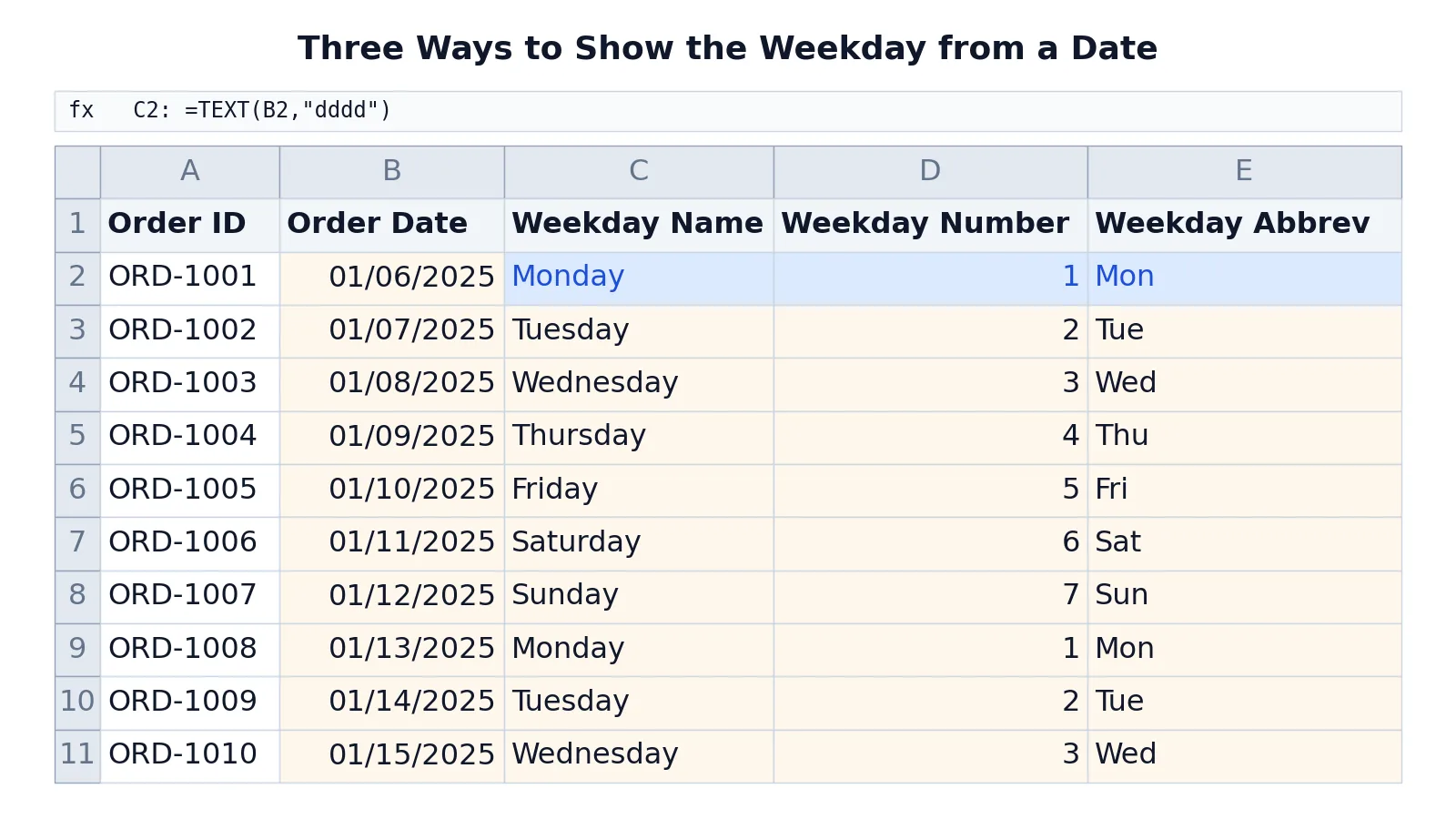
The day of the week formula in Excel comes down to three functions. Use TEXT when you want the name, WEEKDAY when you want a number, and CHOOSE when you want your own labels. All three read the same date value and return a different view of it.
Quick Answer
=TEXT(A2,"dddd")returns the full weekday name, such as Monday. Use"ddd"for the short form, such as Mon [1].=WEEKDAY(A2,2)returns 1 for Monday through 7 for Sunday. This is the return type most business reports use [2].=WEEKDAY(A2)with no second argument returns 1 for Sunday through 7 for Saturday [2].=CHOOSE(WEEKDAY(A2),"Sun","Mon","Tue","Wed","Thu","Fri","Sat")maps the default weekday number to your own text labels.- All three formulas need a real date value in the cell, not text that looks like a date [2].
The Formula
The three formulas answer different questions about the same date.
$$=\text{TEXT}(date,\ "dddd")$$
$$=\text{WEEKDAY}(date,\ return\_type)$$
$$=\text{CHOOSE}(\text{WEEKDAY}(date),\ label_1,\ label_2,\ \dots,\ label_7)$$
Each piece does one job.
dateis the cell holding the date, or a value built withDATE. Dates should be entered with theDATEfunction or produced by another formula, because dates typed as text cause problems [2]."dddd"is the format code for the full weekday name."ddd"gives the abbreviated name [1].return_typeis an optional number that sets which day counts as 1. Type 1 (the default) runs Sunday to Saturday, type 2 runs Monday to Sunday, and type 3 runs Monday to Sunday starting at 0 [2].CHOOSEpicks the nth item from a list. Feed it a weekday number and it returns the matching label.
How to Calculate It Step by Step
- Put a real date in a cell. Enter it with
=DATE(2025,1,6)or type it in a format Excel recognizes as a date. A date stored as text will not work with these functions [2]. - For the weekday name, type
=TEXT(B2,"dddd")in the cell where you want the name. Swap"dddd"for"ddd"if you want the three-letter version [1]. - For the weekday number, type
=WEEKDAY(B2,2). The 2 makes Monday the first day of the week, which matches most work calendars [2]. - For custom labels, type
=CHOOSE(WEEKDAY(B2),"Sun","Mon","Tue","Wed","Thu","Fri","Sat"). The innerWEEKDAYuses the default return type, so the first label must be Sunday. - Fill the formula down the column. Excel adjusts the row reference for each row.
- Check the first few results against a calendar before you build anything on top of them.
If you are new to writing formulas, the mechanics of cell references and fill-down are covered in how to make a formula in Excel and Excel formula basics.
Worked Example
The table below shows ten order dates from a small order log. Column B holds the date, column C the full weekday name, column D the weekday number with Monday as 1, and column E a three-letter abbreviation built with CHOOSE.
| A | B | C | D | E | |
|---|---|---|---|---|---|
| 1 | Order ID | Order Date | Weekday Name | Weekday Number | Weekday Abbrev |
| 2 | ORD-1001 | =DATE(2025,1,6) -> 01/06/2025 | =TEXT(B2,"dddd") -> Monday | =WEEKDAY(B2,2) -> 1 | =CHOOSE(WEEKDAY(B2),"Sun","Mon","Tue","Wed","Thu","Fri","Sat") -> Mon |
| 3 | ORD-1002 | =DATE(2025,1,7) -> 01/07/2025 | =TEXT(B3,"dddd") -> Tuesday | =WEEKDAY(B3,2) -> 2 | =CHOOSE(WEEKDAY(B3),"Sun","Mon","Tue","Wed","Thu","Fri","Sat") -> Tue |
| 4 | ORD-1003 | =DATE(2025,1,8) -> 01/08/2025 | =TEXT(B4,"dddd") -> Wednesday | =WEEKDAY(B4,2) -> 3 | =CHOOSE(WEEKDAY(B4),"Sun","Mon","Tue","Wed","Thu","Fri","Sat") -> Wed |
| 5 | ORD-1004 | =DATE(2025,1,9) -> 01/09/2025 | =TEXT(B5,"dddd") -> Thursday | =WEEKDAY(B5,2) -> 4 | =CHOOSE(WEEKDAY(B5),"Sun","Mon","Tue","Wed","Thu","Fri","Sat") -> Thu |
| 6 | ORD-1005 | =DATE(2025,1,10) -> 01/10/2025 | =TEXT(B6,"dddd") -> Friday | =WEEKDAY(B6,2) -> 5 | =CHOOSE(WEEKDAY(B6),"Sun","Mon","Tue","Wed","Thu","Fri","Sat") -> Fri |
| 7 | ORD-1006 | =DATE(2025,1,11) -> 01/11/2025 | =TEXT(B7,"dddd") -> Saturday | =WEEKDAY(B7,2) -> 6 | =CHOOSE(WEEKDAY(B7),"Sun","Mon","Tue","Wed","Thu","Fri","Sat") -> Sat |
| 8 | ORD-1007 | =DATE(2025,1,12) -> 01/12/2025 | =TEXT(B8,"dddd") -> Sunday | =WEEKDAY(B8,2) -> 7 | =CHOOSE(WEEKDAY(B8),"Sun","Mon","Tue","Wed","Thu","Fri","Sat") -> Sun |
| 9 | ORD-1008 | =DATE(2025,1,13) -> 01/13/2025 | =TEXT(B9,"dddd") -> Monday | =WEEKDAY(B9,2) -> 1 | =CHOOSE(WEEKDAY(B9),"Sun","Mon","Tue","Wed","Thu","Fri","Sat") -> Mon |
| 10 | ORD-1009 | =DATE(2025,1,14) -> 01/14/2025 | =TEXT(B10,"dddd") -> Tuesday | =WEEKDAY(B10,2) -> 2 | =CHOOSE(WEEKDAY(B10),"Sun","Mon","Tue","Wed","Thu","Fri","Sat") -> Tue |
| 11 | ORD-1010 | =DATE(2025,1,15) -> 01/15/2025 | =TEXT(B11,"dddd") -> Wednesday | =WEEKDAY(B11,2) -> 3 | =CHOOSE(WEEKDAY(B11),"Sun","Mon","Tue","Wed","Thu","Fri","Sat") -> Wed |
The three formulas agree on every row. January 6, 2025 is a Monday, so TEXT returns Monday, WEEKDAY with return type 2 returns 1, and CHOOSE returns Mon. January 12, 2025 is a Sunday, so the number is 7 and the abbreviation is Sun.
How to Interpret the Result
The weekday name is text. You can read it, sort it alphabetically, or use it in a label, but you cannot do date arithmetic on it. If you need to compare or filter by weekday, work with the number instead.
The weekday number is a plain integer. With return type 2, 1 means Monday and 7 means Sunday [2]. That makes weekend detection simple. A number greater than 5 is a Saturday or Sunday, so =WEEKDAY(B2,2)>5 returns TRUE for weekend dates.
The CHOOSE result is text you control. It is useful when you want short labels, a different language, or a custom order such as starting the week on Saturday. The trade-off is that the labels are hard-coded in the formula, so changing them means editing every cell.
Doing It in Software
Excel offers all three approaches. The TEXT function with "dddd" returns the full weekday name and "ddd" returns the abbreviated name [1]. The WEEKDAY function returns the day as an integer, ranging from 1 (Sunday) to 7 (Saturday) by default [2]. The CHOOSE function maps that integer to a label from a list.
If you only need the display to change and the underlying value to stay a date, you can format the cells instead of writing a formula. Select the cells, open the Number Format list on the Home tab, click More Number Formats, then the Number tab, and under Category click Custom. Type dddd in the Type box for the full name or ddd for the abbreviated name [1]. The cell still holds the date, so sorting and calculations keep working.
In R, weekdays(as.Date("2025-01-06")) returns the full weekday name and format(as.Date("2025-01-06"), "%a") returns the abbreviation. In Python with pandas, pd.Timestamp("2025-01-06").day_name() returns the name and .dayofweek returns 0 for Monday through 6 for Sunday.
Common Mistakes
- Using the wrong return type in
WEEKDAY. The default starts the week on Sunday, so Monday returns 2. If your report expects Monday as 1, pass 2 as the second argument [2]. - Mixing up the
CHOOSEorder.CHOOSEwith a plainWEEKDAYstarts at Sunday. If you list Monday first, every label shifts by one day. - Storing dates as text. A date typed as text looks fine on screen but breaks
TEXTandWEEKDAY. Enter dates withDATEor in a format Excel reads as a date [2]. - Expecting
TEXToutput to sort chronologically. Weekday names sort alphabetically, so Friday comes before Monday. Sort by the date column instead, as described in how to sort by date in Excel. - Forgetting that
TEXTreturns text. A cell showing Monday is no longer a date. If you need both, keep the date in one column and the name in another. - Assuming the format code is language-independent.
"dddd"returns names in the language set for your Excel installation, so a file opened on another system can show different words.
Limitations
These formulas describe a single date. They do not know about holidays, business calendars, or regional weekends. A weekend test such as =WEEKDAY(B2,2)>5 assumes a Saturday and Sunday weekend, which is wrong for countries where the weekend falls on Friday and Saturday. For anything that depends on a real working calendar, use NETWORKDAYS or WORKDAY with a holiday list, as covered in how to calculate working days in a year in Excel.
TEXT and CHOOSE both return text, and text does not participate in date arithmetic. If you subtract two weekday names you get an error. Keep the original date column intact and treat the weekday columns as labels. Also remember that Excel stores dates as serial numbers, so a cell that looks like a date can still be text underneath, and the formulas will fail silently or return an error.
Frequently Asked Questions
What is the formula to get the day of the week from a date in Excel?
Use =TEXT(A2,"dddd") for the full name or =TEXT(A2,"ddd") for the short name [1]. If you need a number instead, use =WEEKDAY(A2,2) for a Monday-first week [2]. Both read the same date value, so you can put them side by side.
How do I make Monday the first day of the week?
Pass 2 as the second argument to WEEKDAY, as in =WEEKDAY(A2,2). That returns 1 for Monday through 7 for Sunday [2]. Without the argument, the default return type starts the week on Sunday.
Why does my WEEKDAY formula return the wrong number?
The most common cause is the return type. The default counts Sunday as 1, so a Monday date returns 2. Add the second argument to control the starting day [2]. The second most common cause is a date stored as text, which the function cannot read as a date.
Can I show the weekday name without adding a helper column?
Yes. Select the date cells, open the Number Format list on the Home tab, click More Number Formats, then the Number tab, and under Category click Custom. Type dddd in the Type box for the full name or ddd for the abbreviation [1]. The cell keeps its date value and only the display changes.
How do I get weekday names in another language?
The TEXT format code returns names in the language of your Excel installation, so the same file can display different words on different machines. For a fixed label set, use CHOOSE and type the names you want. That keeps the output stable no matter where the file is opened.
Once you have the weekday in a column, you can group orders by day, flag weekends, or compare activity across the week. If you also need to shift dates by a set number of days, how to add days to a date in Excel covers the arithmetic side, and Excel date formulas covers formatting and subtraction together.
References
Further Reading
- Broman KW, Woo KH (2018). Data Organization in Spreadsheets. The American Statistician
- Ziemann M, Eren Y, El-Osta A (2016). Gene name errors are widespread in the scientific literature. Genome Biology
- Microsoft Support: Excel help and learning
- McCullough B, Heiser DA (2008). On the accuracy of statistical procedures in Microsoft Excel 2007. Computational Statistics & Data Analysis