How to Calculate Working Days in a Year in Excel (NETWORKDAYS)
By Dr. Zubair Khalid, DVM, MS, PhD ·
To calculate working days in a year in Excel, use NETWORKDAYS for a standard Saturday-Sunday weekend or NETWORKDAYS.INTL when your weekend falls on other days. Both functions count the days between a start date and an end date, skip weekends automatically, and can exclude holidays you list. For a full calendar year, set the start date to January 1 and the end date to December 31.
Quick Answer
NETWORKDAYS(start_date, end_date, [holidays])counts days between two dates and excludes Saturday and Sunday by default.NETWORKDAYS.INTL(start_date, end_date, [weekend], [holidays])lets you define which days are the weekend.- For all of 2024 with a Saturday-Sunday weekend,
=NETWORKDAYS(DATE(2024,1,1),DATE(2024,12,31))returns 262. - Add a holiday argument to subtract specific dates, for example
=NETWORKDAYS(DATE(2024,1,1),DATE(2024,12,31),DATE(2024,12,25))returns 261. - Both functions count the start date and the end date if they are working days, so a full year includes both January 1 and December 31 when neither is a weekend.
Before You Start
Both functions need real date values, not text that looks like a date. If you type 01/01/2024 into a cell and Excel stores it as text, the formula returns an error or a wrong count. The safest approach is to build dates with the DATE function, which always produces a true date serial number regardless of your regional settings.
$$ \text{DATE}(year, month, day) $$
The DATE function takes three numeric arguments and returns the date those numbers describe. DATE(2024,1,1) is January 1, 2024. This matters because NETWORKDAYS compares date serial numbers internally, and a text string will not compare correctly.
You should also know your weekend convention before you start. The default weekend in NETWORKDAYS is Saturday and Sunday. If your organization rests on Friday and Saturday, or only on Sunday, you need NETWORKDAYS.INTL and a weekend code. The weekend code is a number or a seven-character string that tells Excel which days are non-working.
Finally, decide whether holidays matter for your count. A holiday argument is optional, but most real payroll, project, and capacity calculations need it. You can pass a single date, a range of cells, or an array constant.
Step by Step
- Enter your start date in one cell. For a full year, use
=DATE(2024,1,1). This returns a true date value that displays as 01/01/2024 in a US locale. - Enter your end date in another cell. For the same year, use
=DATE(2024,12,31). - In a third cell, type the
NETWORKDAYSformula. Reference the two date cells:=NETWORKDAYS(B2,C2). The result is the number of working days with a Saturday-Sunday weekend. - If your weekend is not Saturday and Sunday, switch to
NETWORKDAYS.INTLand add the weekend argument. For a Friday-Saturday weekend, use weekend code 7:=NETWORKDAYS.INTL(B3,C3,7). - If you need to exclude holidays, add the holidays argument last. A single date works:
=NETWORKDAYS(B5,C5,DATE(2024,12,25)). For several holidays, point to a range such asA10:A20or use an array constant. - Check the result against a calendar for a short range first. Counting a full year is easy to trust, but a small range exposes a wrong weekend code or a text date quickly.
The weekend code is the part people get wrong most often. Here are the common codes for NETWORKDAYS.INTL.
| Weekend code | Days treated as weekend |
|---|---|
| 1 (default) | Saturday, Sunday |
| 2 | Sunday, Monday |
| 7 | Friday, Saturday |
| 11 | Sunday only |
| 12 | Monday only |
You can also pass a seven-character string of 1s and 0s, where 1 marks a weekend day starting from Monday. For example, "0000011" marks Saturday and Sunday as the weekend.
Worked Example
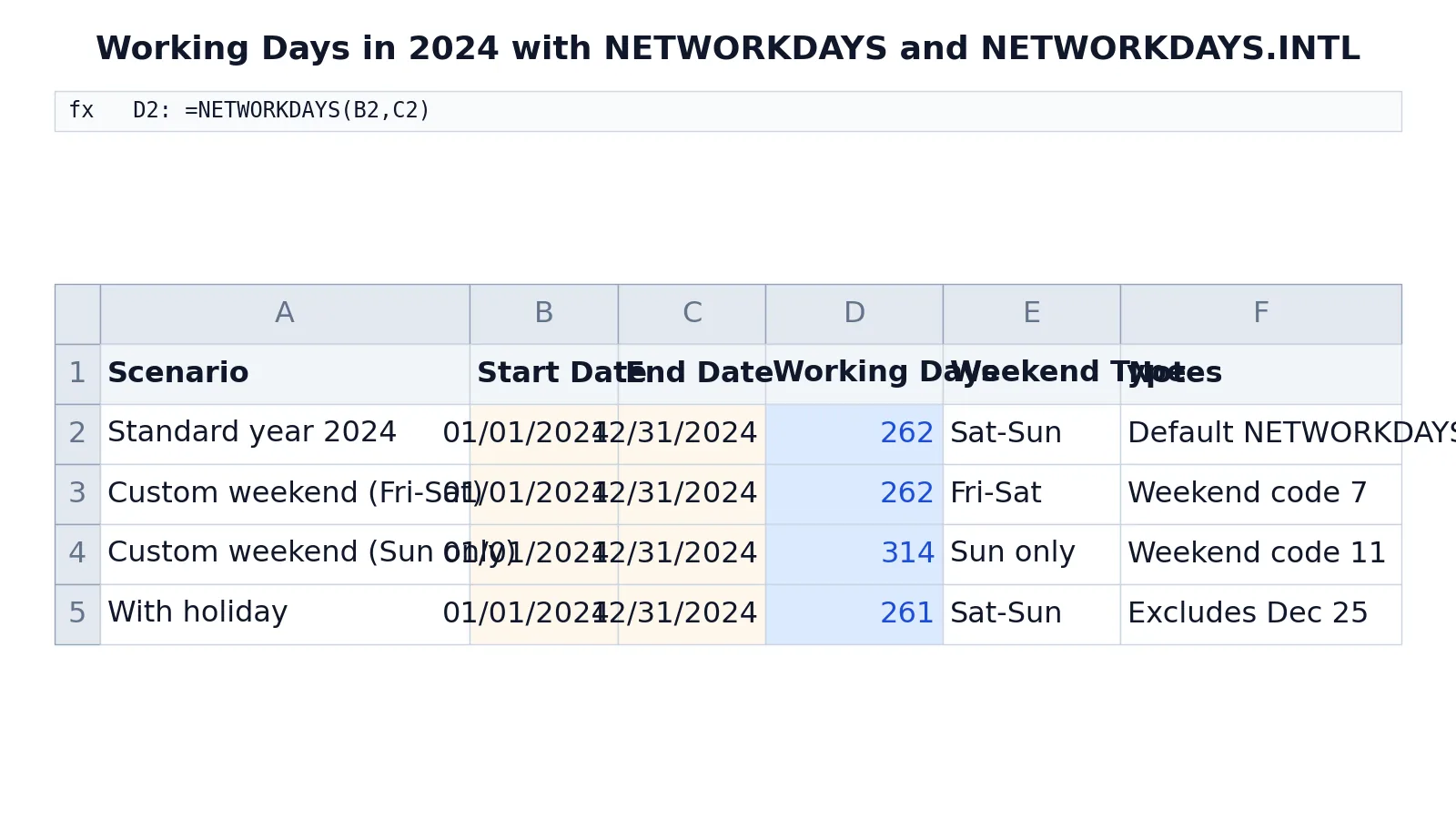
The table below shows four scenarios for the 2024 calendar year, all using the same start and end dates but different weekend and holiday settings. Each formula was evaluated in Excel and the returned value is shown in the Working Days column.
| A | B | C | D | E | F | |
|---|---|---|---|---|---|---|
| 1 | Scenario | Start Date | End Date | Working Days | Weekend Type | Notes |
| 2 | Standard year 2024 | =DATE(2024,1,1) -> displays 01/01/2024 | =DATE(2024,12,31) -> displays 12/31/2024 | =NETWORKDAYS(B2,C2) -> displays 262 | Sat-Sun | Default NETWORKDAYS |
| 3 | Custom weekend (Fri-Sat) | =DATE(2024,1,1) -> displays 01/01/2024 | =DATE(2024,12,31) -> displays 12/31/2024 | =NETWORKDAYS.INTL(B3,C3,7) -> displays 262 | Fri-Sat | Weekend code 7 |
| 4 | Custom weekend (Sun only) | =DATE(2024,1,1) -> displays 01/01/2024 | =DATE(2024,12,31) -> displays 12/31/2024 | =NETWORKDAYS.INTL(B4,C4,11) -> displays 314 | Sun only | Weekend code 11 |
| 5 | With holiday | =DATE(2024,1,1) -> displays 01/01/2024 | =DATE(2024,12,31) -> displays 12/31/2024 | =NETWORKDAYS(B5,C5,DATE(2024,12,25)) -> displays 261 | Sat-Sun | Excludes Dec 25 |
Row 2 counts working days between the start and end dates using the default Saturday-Sunday weekend, returning 262. Row 3 uses a custom weekend of Friday and Saturday, weekend code 7, and also returns 262 because 2024 happens to contain the same number of Fridays and Saturdays as Saturdays and Sundays. Row 4 treats only Sunday as the weekend, weekend code 11, and returns 314. Row 5 keeps the default weekend but excludes the holiday December 25, 2024, returning 261.
The difference between 262 and 314 shows how much the weekend definition changes the answer. If you pick the wrong code, your annual capacity, billing, or staffing number can be off by dozens of days.
Other Ways to Do It
NETWORKDAYS and NETWORKDAYS.INTL are the standard tools, but a few related functions help in specific cases.
If you want the number of working days from today to the end of the year, combine TODAY with the end date: =NETWORKDAYS(TODAY(),DATE(2024,12,31)). This updates each day you open the file.
If you need the count of a specific weekday in a year, NETWORKDAYS.INTL is not the right tool. You can use SUMPRODUCT with WEEKDAY over a date sequence, or count occurrences of a weekday directly. The day of the week formula guide covers WEEKDAY and TEXT in detail.
If you are building a date from parts, the Excel date formulas guide explains how DATE, addition, and formatting interact. When you need to shift a date by a number of days, see how to add days to a date in Excel.
For quick checks outside Excel, the Date Calculator & Business Days Duration tool returns business-day counts between two dates.
Troubleshooting
If the formula returns a #VALUE! error, one of your date arguments is text. Check the cell alignment. Real dates align right by default, text aligns left. Rebuild the date with DATE or convert the text with DATEVALUE.
If the result is off by one or two days, check whether your start or end date falls on a weekend. NETWORKDAYS counts both endpoints when they are working days. If you want to exclude the start date, add 1 to the start date inside the formula.
If the holiday argument does nothing, confirm the holiday cells contain real dates and not text. A holiday that falls on a weekend is already excluded, so it will not reduce the count further.
If NETWORKDAYS.INTL returns an unexpected number, recheck the weekend code. Code 1 is Saturday-Sunday, code 7 is Friday-Saturday, and code 11 is Sunday only. Mixing these up is the most common source of a wrong annual total.
Common Mistakes
- Using text dates instead of real dates. The fix is to build dates with
DATEor convert text withDATEVALUE. - Assuming the default weekend is universal. The fix is to use
NETWORKDAYS.INTLwith the correct weekend code for your region or organization. - Forgetting that both endpoints are counted. The fix is to adjust the start date by one day if you want an exclusive start.
- Passing holidays as text. The fix is to store holidays as real dates in cells and reference the range.
- Listing a holiday that already falls on a weekend and expecting the count to drop. The fix is to remove weekend holidays from the list, since they are excluded anyway.
- Reusing a formula from a different year without updating the dates. The fix is to reference year cells or rebuild the dates with
DATE.
Limitations
NETWORKDAYS and NETWORKDAYS.INTL only know about weekends and the holidays you give them. They do not know about half days, shift patterns, regional public holidays you forgot to list, or company-specific closures. If your working calendar has rotating rest days or partial days, these functions will overcount.
The functions also assume a single weekend pattern for the whole range. If your weekend changes partway through the year, you need to split the range into segments and add the results. For anything more complex, a dedicated calendar table with a working-day flag per date is more reliable.
Frequently Asked Questions
How many working days are there in 2024?
With a Saturday-Sunday weekend and no holidays excluded, 2024 has 262 working days. If you exclude December 25, the count drops to 261. The exact number depends on which holidays you remove and which days your organization treats as the weekend.
What is the difference between NETWORKDAYS and NETWORKDAYS.INTL?
NETWORKDAYS always uses Saturday and Sunday as the weekend. NETWORKDAYS.INTL adds a weekend argument so you can choose any combination of rest days, including Friday-Saturday or Sunday only. Use NETWORKDAYS.INTL when your weekend is not the standard one.
How do I exclude holidays from the working day count?
Add the holidays as the last argument. You can pass a single date with DATE, a range of cells, or an array constant. Any holiday that falls on a working day reduces the count by one. Holidays that fall on a weekend have no effect because those days are already excluded.
Does NETWORKDAYS count the start and end dates?
Yes. If the start date and end date are both working days, both are included in the count. If either falls on a weekend or a listed holiday, it is not counted. To exclude the start date, add 1 to it inside the formula.
Can I count working days for a partial year?
Yes. Set the start date to the first day of your period and the end date to the last day. For example, =NETWORKDAYS(DATE(2024,7,1),DATE(2024,12,31)) counts working days from July 1 through December 31, 2024. The same weekend and holiday rules apply.
References
This article draws on the standard references listed under Further Reading.
Further Reading
- Broman KW, Woo KH (2018). Data Organization in Spreadsheets. The American Statistician
- Ziemann M, Eren Y, El-Osta A (2016). Gene name errors are widespread in the scientific literature. Genome Biology
- Microsoft Support: Excel help and learning
- McCullough B, Heiser DA (2008). On the accuracy of statistical procedures in Microsoft Excel 2007. Computational Statistics & Data Analysis
- Abeysooriya M, Soria M, Kasu MS et al. (2021). Gene name errors: Lessons not learned. PLOS Computational Biology
- Wilson G, Bryan J, Cranston K et al. (2017). Good enough practices in scientific computing. PLOS Computational Biology