How to Get the Number of Days in a Month in Excel
By Dr. Zubair Khalid, DVM, MS, PhD ·
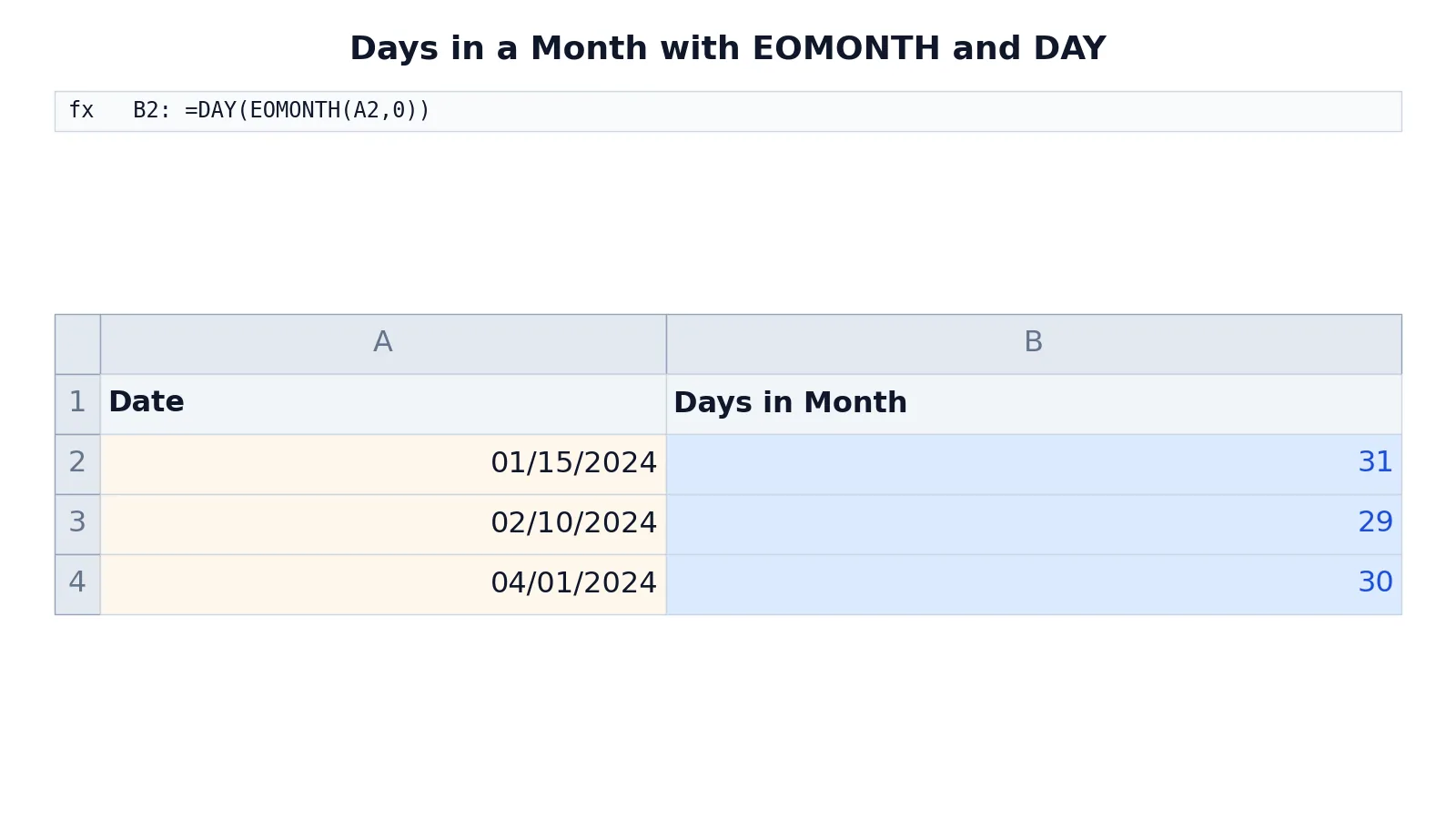
To get the number of days in a month in Excel, combine two functions: =DAY(EOMONTH(date,0)). EOMONTH returns the last date of the month, and DAY extracts the day number from that date, which equals the total days in month. This works for every month, including February in leap years.
Quick Answer
- The core formula is
=DAY(EOMONTH(A2,0)), whereA2holds a date. EOMONTH(A2,0)returns the last day of the same month asA2.DAY(...)then returns that day number, which is the count of days in month.- For February 2024 the formula returns 29 because 2024 is a leap year.
- For a month with no date attached, use
=DAY(EOMONTH(DATE(2024,4,1),0))and change the year and month numbers.
Syntax
The formula uses two functions. EOMONTH finds the month end, and DAY reads the day number from it.
EOMONTH(start_date, months)
| Argument | Required? | Meaning |
|---|---|---|
| start_date | Required | The date that identifies the month. Can be a cell reference, a DATE formula, or a date serial number. |
| months | Required | The number of months before or after start_date. Use 0 for the same month. |
DAY(serial_number)
| Argument | Required? | Meaning |
|---|---|---|
| serial_number | Required | A date value. DAY returns the day of the month as a number from 1 to 31. |
The combined formula is:
$$ \text{Days in month} = \text{DAY}(\text{EOMONTH}(\text{date}, 0)) $$
How It Works
Excel stores dates as serial numbers, where each whole number represents one day. The date 01/15/2024 is a single number that Excel formats to look like a date. Functions read that number and return parts of it.
EOMONTH takes a date and a month offset. With an offset of 0, it returns the serial number of the last day of that same month. For 01/15/2024, it returns 01/31/2024. The offset can be negative or positive, so EOMONTH(A2,-1) returns the last day of the previous month and EOMONTH(A2,1) returns the last day of the next month.
DAY takes a date and returns the day of the month as a whole number. Applied to 01/31/2024, it returns 31. Since the last day of a month is always numbered by the length of that month, DAY of the month end gives you the days in month directly.
This two-step approach handles leap years automatically. Excel knows that February 2024 has 29 days and February 2023 has 28, so you do not need any special logic for leap years. The same formula covers 30-day and 31-day months without changes.
If you want to count months between two dates instead of days within one month, that is a different calculation covered in how to calculate months between two dates in Excel.
Worked Example
The table below lists three dates in column A and the days in month formula in column B. Column A shows the date each formula produces, and column B shows the number each formula returns.
| A | B | |
|---|---|---|
| 1 | Date | Days in Month |
| 2 | =DATE(2024,1,15) -> displays 01/15/2024 | =DAY(EOMONTH(A2,0)) -> displays 31 |
| 3 | =DATE(2024,2,10) -> displays 02/10/2024 | =DAY(EOMONTH(A3,0)) -> displays 29 |
| 4 | =DATE(2024,4,1) -> displays 04/01/2024 | =DAY(EOMONTH(A4,0)) -> displays 30 |
Row 2 returns the last day of January 2024, then DAY extracts the day number, which is 31. Row 3 returns 29 for February 2024 because 2024 is a leap year. Row 4 returns 30 for April 2024.
The formula in B2 is =DAY(EOMONTH(A2,0)). It returns the number of days in the month of the date in A2. Copy it down column B and each row reports the length of its own month.
More Examples
Days in the current month. Use TODAY as the start date so the result updates each day:
=DAY(EOMONTH(TODAY(),0))On any date in April, this returns 30. On any date in February 2024, it returns 29.
Days in a month from year and month numbers. If you have the year in one cell and the month number in another, build a date first:
=DAY(EOMONTH(DATE(2024,2,1),0))This returns 29. Change the year and month arguments to test other months.
Days in the previous month. Use an offset of -1:
=DAY(EOMONTH(A2,-1))If A2 is 04/15/2024, this returns 31, the number of days in March 2024.
Days remaining in the current month. Subtract today's day number from the month length:
=DAY(EOMONTH(TODAY(),0))-DAY(TODAY())This gives the number of days left after today in the current month.
Days in a month as part of a date calculation. If you need to add a fixed number of days to a date, see how to add days to a date in Excel. If you need to convert a month name to its number first, use how to convert month to number in Excel.
Working days instead of calendar days. The formula above counts every calendar day. To count only business days in a month, use NETWORKDAYS, which is covered in how to calculate working days in a year in Excel.
Errors and How to Fix Them
#NAME? error. This appears when Excel does not recognize EOMONTH. In older versions of Excel, EOMONTH was part of the Analysis ToolPak add-in and required that add-in to be enabled. In current versions it is a built-in function. Check the spelling of the function name and confirm the add-in is active if you are on a very old release.
#VALUE! error. This happens when start_date is text that Excel cannot interpret as a date. If your dates were imported as text, convert them to real dates first. A quick test is to check whether the cell is right-aligned by default, which indicates a real date value.
A serial number instead of a date. If EOMONTH returns something like 45322 instead of 01/31/2024, the cell is formatted as General or Number. The formula still works because DAY reads the serial number. Format the cell as a date only if you want to see the date itself.
Wrong month because of the offset. EOMONTH(A2,1) returns the end of the next month, not the current one. Use 0 when you want the same month as the input date.
Result of 1 instead of a month length. If the formula returns 1, you likely applied DAY to the first of the month rather than the last. Confirm that EOMONTH is inside the DAY call.
Common Mistakes
- Using
DAY(A2)alone.DAY(A2)returns the day number of the date in A2, not the length of the month. For 01/15/2024 it returns 15. WrapEOMONTHinsideDAYto get the month length. - Forgetting the second argument.
EOMONTHrequires the months argument.=EOMONTH(A2)is not valid. Always include0for the same month. - Hardcoding 28 for February. February has 29 days in leap years. The
EOMONTHapproach handles this automatically, so avoid typing fixed numbers. - Treating text dates as real dates. If A2 contains text like "January 15, 2024" stored as a string, the formula may fail. Convert the text to a date value first.
- Assuming the result is a date. The formula returns a plain number such as 31. If you format it as a date, Excel may display 01/31/1900, which is confusing. Leave the result formatted as a number.
- Mixing up month offsets. A positive offset moves forward and a negative offset moves backward. Double-check the sign when you want a month other than the one in the input cell.
Limitations
The formula returns the total number of calendar days in a month. It does not exclude weekends or holidays. If you need a count of working days, use NETWORKDAYS or NETWORKDAYS.INTL with a holiday list instead.
The result depends on the date being a valid Excel date value. Text that looks like a date but is stored as text will not work without conversion. The formula also cannot tell you which days fall on a weekend or how many Mondays a month contains. Those questions need different functions, such as WEEKDAY, which is covered in the day of the week formula in Excel. For general date arithmetic and formatting, see Excel date formulas: how to add, subtract and format dates.
Frequently Asked Questions
What is the formula for the number of days in a month in Excel?
Use =DAY(EOMONTH(A2,0)), where A2 contains a date. EOMONTH returns the last day of the month, and DAY returns that day number, which equals the month length. The formula works for all months and adjusts for leap years on its own.
How do I get the days in February for a leap year?
The same formula handles it. For a date in February 2024, =DAY(EOMONTH(A2,0)) returns 29. For February 2023 it returns 28. Excel tracks leap years internally, so you do not need a separate rule.
Can I get the days in month without a date in a cell?
Yes. Build the date inside the formula with DATE. For example, =DAY(EOMONTH(DATE(2024,4,1),0)) returns 30. Replace the year and month numbers to test any month.
Why does my formula return a number like 45322?
That number is a date serial number, which means the cell is formatted as General or Number. The calculation is correct. Format the cell as a date if you want to see the date, or leave it as a number if you only need the count.
Does this formula count working days?
No. It counts every calendar day in the month, including weekends and holidays. To count only business days, use NETWORKDAYS with the first and last day of the month as the start and end dates.
References
This article draws on the standard references listed under Further Reading.
Further Reading
- Broman KW, Woo KH (2018). Data Organization in Spreadsheets. The American Statistician
- Ziemann M, Eren Y, El-Osta A (2016). Gene name errors are widespread in the scientific literature. Genome Biology
- Microsoft Support: Excel help and learning
- McCullough B, Heiser DA (2008). On the accuracy of statistical procedures in Microsoft Excel 2007. Computational Statistics & Data Analysis
- Abeysooriya M, Soria M, Kasu MS et al. (2021). Gene name errors: Lessons not learned. PLOS Computational Biology
- Wilson G, Bryan J, Cranston K et al. (2017). Good enough practices in scientific computing. PLOS Computational Biology