SQL ROW_NUMBER Function: Syntax and Examples
By Dr. Zubair Khalid, DVM, MS, PhD ·
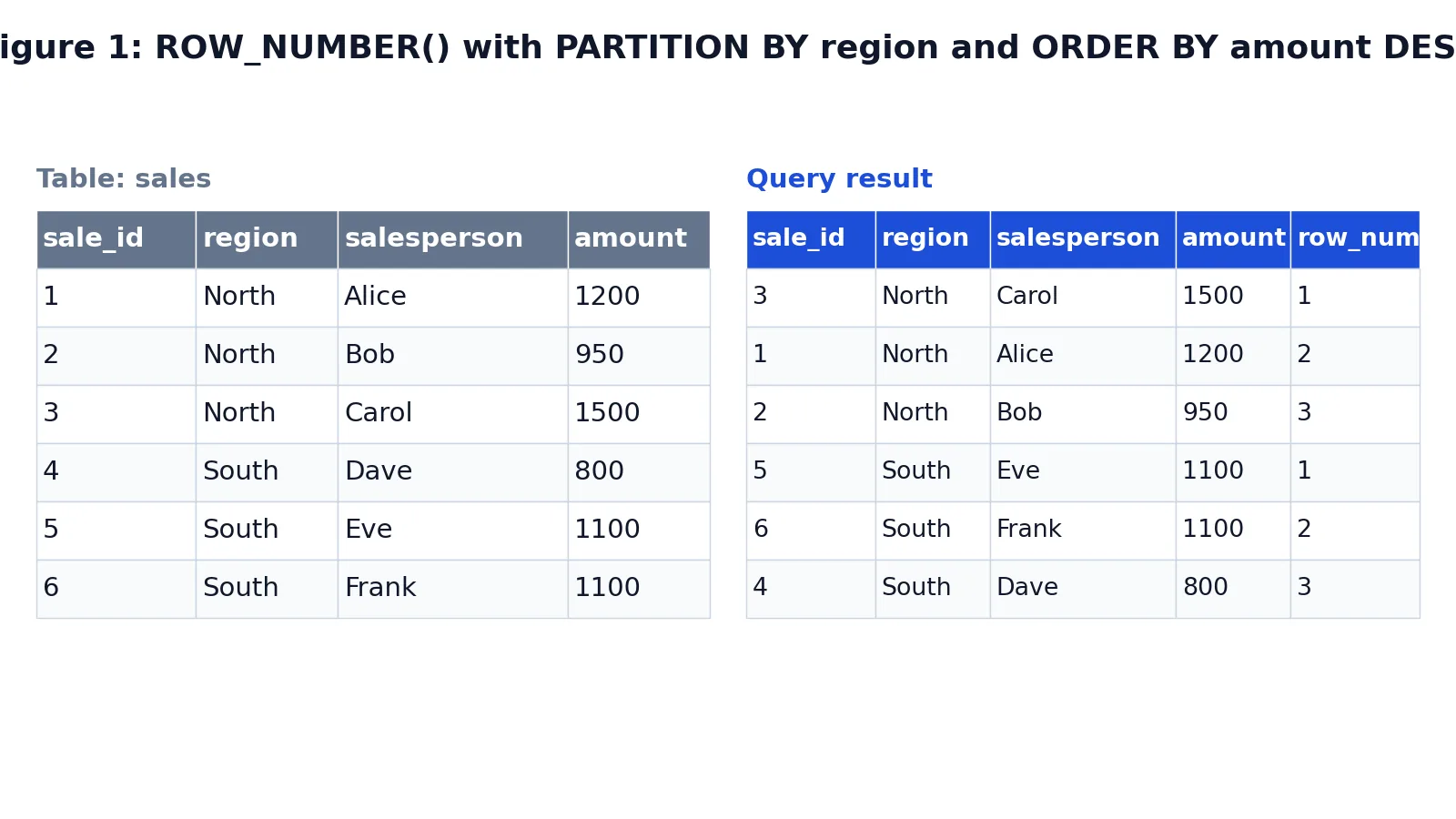
ROW_NUMBER() is a window function that assigns a unique sequential integer to each row in a result set, starting at 1. You control the numbering with the OVER clause, and you can restart the count for each group by adding PARTITION BY. This article explains the syntax and shows how a row number SQL query behaves on real data.
Quick Answer
ROW_NUMBER() OVER (ORDER BY column)numbers every row in the query from 1 upward, following the sort order you give [1].- Add
PARTITION BYto restart the numbering at 1 for each group, such as each region or department [1]. - The function always returns distinct numbers, even when two rows have identical sort values [2].
- You cannot filter on the row number in the same
WHEREclause. Wrap the query in a subquery or CTE and filter the outer query [3]. - Use
RANK()orDENSE_RANK()instead when tied values should share the same rank [1].
Syntax
The general form is:
ROW_NUMBER() OVER (
  [PARTITION BY column_list]
  ORDER BY column_list
) AS alias| Argument | Required? | Meaning |
|---|---|---|
ROW_NUMBER() | Yes | Takes no arguments. The empty parentheses are part of the call. |
OVER | Yes | Marks the function as a window function and opens the window definition. |
PARTITION BY | No | Divides the rows into groups. Numbering restarts at 1 in each group. |
ORDER BY | Yes in practice | Sets the sequence the numbers follow. Without a defined order, results are not deterministic [1]. |
The ORDER BY inside OVER is separate from any ORDER BY at the end of the query. The window ORDER BY decides the numbering. The final ORDER BY decides how the output rows are displayed.
How It Works
The database engine processes a window function in stages. It first builds the result set from the FROM and WHERE clauses. It then splits those rows into partitions. Inside each partition it sorts the rows by the window ORDER BY. Finally it walks the sorted rows and writes 1, 2, 3 and so on.
Two details matter for correctness. First, the numbering is per partition, so a query with three partitions produces three separate sequences that each start at 1. Second, ties do not share a number. If two rows have the same value in the sort column, they still receive different row numbers, and which one comes first is not guaranteed [1]. Microsoft documents ROW_NUMBER() as nondeterministic for this reason [1]. MariaDB makes the same point, noting that identical values receive different row numbers, unlike RANK() and DENSE_RANK() [2].
That tie behavior is what separates the three ranking functions. ROW_NUMBER() gives every row a distinct number. RANK() gives tied rows the same rank and then skips numbers. DENSE_RANK() gives tied rows the same rank with no gaps [4]. If you need a stable tie-break, add a unique column to the window ORDER BY, such as a primary key.
Worked Example
The dataset is a small sales table with six rows across two regions. Each row records a sale, its region, the salesperson and the amount.
Input table:
| sale_id | region | salesperson | amount |
|---|---|---|---|
| 1 | North | Alice | 1200 |
| 2 | North | Bob | 950 |
| 3 | North | Carol | 1500 |
| 4 | South | Dave | 800 |
| 5 | South | Eve | 1100 |
| 6 | South | Frank | 1100 |
The query partitions by region and orders by amount descending:
SELECT
  sale_id,
  region,
  salesperson,
  amount,
  ROW_NUMBER() OVER (PARTITION BY region ORDER BY amount DESC) AS row_num
FROM sales
ORDER BY region, row_num;
Result:
| sale_id | region | salesperson | amount | row_num |
|---|---|---|---|---|
| 3 | North | Carol | 1500 | 1 |
| 1 | North | Alice | 1200 | 2 |
| 2 | North | Bob | 950 | 3 |
| 5 | South | Eve | 1100 | 1 |
| 6 | South | Frank | 1100 | 2 |
| 4 | South | Dave | 800 | 3 |
The result was checked with an equivalent SQLite query.
Notice the South partition. Eve and Frank both have an amount of 1100, yet they receive row numbers 1 and 2. The function does not share numbers on ties. If you ran this query again, the engine could swap those two numbers, because the sort order does not fully determine which row comes first.
More Examples
Number all rows without partitioning. Drop PARTITION BY and the numbering runs across the whole result set. This is the pattern Microsoft shows for adding a row number column in front of each row, where the query's own ORDER BY moves up into the OVER clause [1].
SELECT
  salesperson,
  amount,
  ROW_NUMBER() OVER (ORDER BY amount DESC) AS overall_rank
FROM sales;
Top N per group. Oracle's documentation describes nesting a ROW_NUMBER() subquery inside an outer query to retrieve a specific range of rows, which supports top-N and bottom-N reporting [3]. The inner query numbers the rows, and the outer query keeps only the numbers you want.
WITH ranked AS (
  SELECT
    region,
    salesperson,
    amount,
    ROW_NUMBER() OVER (PARTITION BY region ORDER BY amount DESC) AS rn
  FROM sales
)
SELECT region, salesperson, amount
FROM ranked
WHERE rn <= 2
ORDER BY region, rn;
A page of rows. The same pattern returns a slice of a larger result. Microsoft's example numbers rows by order date and returns only rows 50 to 60 inclusive [1]. You filter with a range on the row number column in the outer query.
Numbering with a stable tie-break. Add a unique column to the window ORDER BY so the numbering is repeatable.
SELECT
  sale_id,
  region,
  amount,
  ROW_NUMBER() OVER (PARTITION BY region ORDER BY amount DESC, sale_id ASC) AS rn
FROM sales;
With sale_id as the tie-break, Eve (sale_id 5) always comes before Frank (sale_id 6) in the South partition.
Errors and How to Fix Them
Filtering on the row number in WHERE. This fails because WHERE runs before the window function is evaluated.
SELECT salesperson, ROW_NUMBER() OVER (ORDER BY amount DESC) AS rn
FROM sales
WHERE rn <= 3;
The fix is to compute the number in a subquery or CTE and filter in the outer query, as in the top-N example above [3].
Missing ORDER BY inside OVER. Some engines reject ROW_NUMBER() OVER () outright, and where it is accepted the numbering has no defined order. Always supply an ORDER BY in the window.
Using ROW_NUMBER() where ties should match. If two employees share the same salary and you want them to share a rank, ROW_NUMBER() gives them different numbers. Switch to RANK() or DENSE_RANK() [1][2].
Expecting the output order to match the numbering. The window ORDER BY controls the numbers, not the row order of the result. Add a final ORDER BY when you want the rows displayed in numbered order.
Assuming the numbering is stable across runs. Because the function is nondeterministic on ties, the same query can assign different numbers to tied rows on different executions [1]. Add a unique tie-break column.
Common Mistakes
- Filtering the window function in
WHERE. The fix is a CTE or subquery with the filter applied outside. - Forgetting
PARTITION BYwhen you want per-group numbering. Without it, the count runs across the entire result set. - Sorting by a non-unique column and expecting repeatable output. Add a unique column such as a primary key to the window
ORDER BY[1]. - Confusing
ROW_NUMBER()withRANK().ROW_NUMBER()never repeats a number, whileRANK()assigns the same rank to tied rows and then skips [2][4]. - Relying on the row number as a permanent identifier. It is computed at query time and changes whenever the underlying data or sort order changes.
- Putting the window
ORDER BYin the wrong place. It belongs insideOVER, not at the end of the statement [1].
Limitations
ROW_NUMBER() cannot be used in a WHERE, GROUP BY or HAVING clause, because window functions are evaluated after those clauses. You must wrap the query to filter on the generated number [3]. It also does not reduce rows. It labels them, so a query that returns a million rows still returns a million rows unless you filter the outer query.
The bigger risk is determinism. When the window ORDER BY does not uniquely identify each row, the assignment among tied rows is arbitrary and can change between executions [1]. For reporting where the exact order of tied rows matters, always add a unique tie-break column. For ranking where tied rows should share a position, use RANK() or DENSE_RANK() instead [2].
Frequently Asked Questions
What is the difference between ROW_NUMBER and RANK?
ROW_NUMBER() gives every row a distinct number, so tied rows get different values. RANK() gives tied rows the same rank and then skips the following numbers, so a tie at rank 1 produces the next rank as 3 [2][4]. DENSE_RANK() also shares ranks but leaves no gaps.
Can I use ROW_NUMBER in a WHERE clause?
No. The WHERE clause is evaluated before window functions, so the row number does not exist yet at that point. Compute it in a subquery or CTE, then filter the outer query on the resulting column [3].
Does ROW_NUMBER restart for each group?
Only if you include PARTITION BY. The numbering restarts at 1 whenever the partition column value changes [1]. Without PARTITION BY, one sequence covers the whole result set.
Why do I get different row numbers each time I run the query?
Your window ORDER BY probably does not uniquely identify each row. When ties exist, the engine is free to order them differently on each run, and Microsoft documents ROW_NUMBER() as nondeterministic for this reason [1]. Add a unique column to the window ORDER BY to make the result repeatable.
How do I get the top 3 rows per group?
Number the rows inside each partition with ROW_NUMBER() OVER (PARTITION BY group_column ORDER BY sort_column DESC), then filter the outer query with WHERE rn <= 3. Oracle documents this nested pattern for top-N reporting [3]. For related ranking and aggregation patterns, see the guides on the SQL RANK function and the SQL COUNT function.
References
- ROW_NUMBER (Transact-SQL) - SQL Server | Microsoft Learn
- ROW_NUMBER | Server | MariaDB Documentation
- ROW_NUMBER
- MySQL :: MySQL 26.7 Reference Manual :: 14.20.1 Window Function Descriptions
Further Reading
- Codd EF (1970). A relational model of data for large shared data banks. Communications of the ACM
- PostgreSQL Documentation: SELECT
- SQLite: SQL As Understood By SQLite
- Wilson G, Bryan J, Cranston K et al. (2017). Good enough practices in scientific computing. PLOS Computational Biology