SQL LEAD Function: Syntax and Examples
By Dr. Zubair Khalid, DVM, MS, PhD ·
The SQL LEAD function returns a value from a row that comes after the current row in the same result set, without a self join. You use it to compare a row with the next row, such as this month's revenue against next month's revenue. This article covers the syntax of lead SQL, how the window frame affects results, and worked examples you can run yourself.
Quick Answer
LEAD(expression, offset, default) OVER (ORDER BY ...)returns the value ofexpressionfrom the rowoffsetpositions after the current row.- The
offsetargument defaults to 1, soLEAD(revenue)looks one row ahead [1]. - The
defaultargument is returned when the offset goes past the end of the partition. If you omit it, the result is NULL [1]. LEADis an analytic (window) function. It reads more than one row at a time without a self join [1].- The
ORDER BYinsideOVERdefines what "next row" means. Without it, the order is undefined.
Syntax
The general form is:
LEAD(value_expr [, offset [, default]]) OVER (
  [PARTITION BY partition_expr]
  ORDER BY sort_expr
)| Argument | Required? | Meaning |
|---|---|---|
value_expr | Yes | The column or expression whose value you want from a later row. You cannot nest another analytic function inside it [1]. |
offset | No | A positive integer giving how many rows ahead to look. Defaults to 1 [1]. |
default | No | The value returned when the offset goes beyond the scope of the partition. Defaults to NULL [1]. |
PARTITION BY | No | Splits the rows into groups. LEAD restarts at each partition boundary. |
ORDER BY | Yes in practice | Defines row order within each partition. This is what makes "next" meaningful. |
Some databases add a RESPECT NULLS or IGNORE NULLS clause. The default is RESPECT NULLS, which means null values of value_expr are included in the calculation [1]. SQL Server documents the same behavior for its version of the function [2].
How It Works
Think of the query result as a list of rows in a fixed order. For each row, LEAD moves the cursor forward by offset positions and reads value_expr from the row it lands on [1]. The current row is untouched. The function only reads.
Two details control the output.
First, the ORDER BY inside OVER sets the sequence. If you order by month, the "next" row is the next month. If you order by revenue descending, the "next" row is the one with the next lower revenue. The same data gives different answers depending on this clause.
Second, the partition boundary stops the lookup. When the cursor would move past the last row of a partition, LEAD returns the default value, or NULL if you did not supply one [1]. In a query with PARTITION BY department, the last row of each department gets the default, not the first row of the next department.
LEAD is the mirror image of LAG, which looks backward. Both are nondeterministic in the sense that the database does not guarantee a fixed result if the ordering is not unique [2]. If two rows tie on the sort key, the database may return either one as the "next" row. Add a tiebreaker column to the ORDER BY when ties are possible.
Worked Example
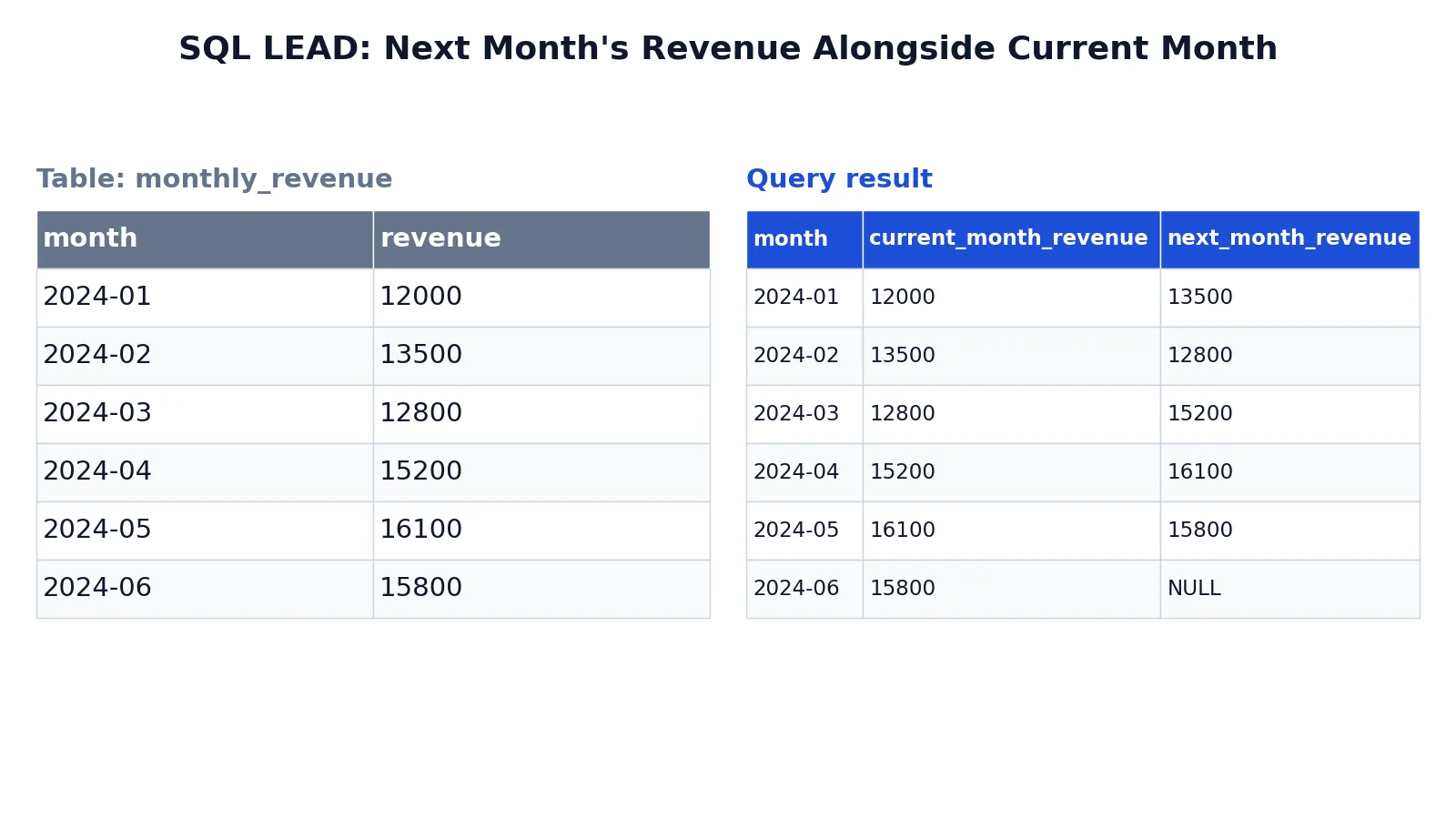
The dataset is a small table of monthly revenue for the first half of 2024.
Input table monthly_revenue:
| month | revenue |
|---|---|
| 2024-01 | 12000 |
| 2024-02 | 13500 |
| 2024-03 | 12800 |
| 2024-04 | 15200 |
| 2024-05 | 16100 |
| 2024-06 | 15800 |
The query puts each month's revenue next to the following month's revenue:
SELECT
  month,
  revenue AS current_month_revenue,
  LEAD(revenue) OVER (ORDER BY month) AS next_month_revenue
FROM monthly_revenue
ORDER BY month;
Result:
| month | current_month_revenue | next_month_revenue |
|---|---|---|
| 2024-01 | 12000 | 13500 |
| 2024-02 | 13500 | 12800 |
| 2024-03 | 12800 | 15200 |
| 2024-04 | 15200 | 16100 |
| 2024-05 | 16100 | 15800 |
| 2024-06 | 15800 | NULL |
The result was checked with an equivalent SQLite query.
Here is what each part does. SELECT month, revenue AS current_month_revenue returns each month and its revenue, aliasing the revenue column for clarity. LEAD(revenue) OVER (ORDER BY month) looks at the next row in month order and returns its revenue value. AS next_month_revenue names the computed column. FROM monthly_revenue reads the six rows. ORDER BY month sorts the final result chronologically.
The last row has NULL for next_month_revenue because no next row exists. That is the default behavior when you omit the default argument [1]. If you want a zero there instead, write LEAD(revenue, 1, 0), which is the pattern Microsoft shows in its quota example [2].
Once you have both columns, you can subtract them to get a month-over-month change:
SELECT
  month,
  revenue AS current_month_revenue,
  LEAD(revenue) OVER (ORDER BY month) AS next_month_revenue,
  LEAD(revenue) OVER (ORDER BY month) - revenue AS change_to_next_month
FROM monthly_revenue
ORDER BY month;
For 2024-01 the change is 13500 - 12000 = 1500. For 2024-02 it is 12800 - 13500 = -700. The last row is NULL because the subtraction involves a NULL.
More Examples
Look two rows ahead. Pass an offset of 2 to skip a row:
SELECT
  month,
  revenue,
  LEAD(revenue, 2) OVER (ORDER BY month) AS revenue_two_months_ahead
FROM monthly_revenue
ORDER BY month;
For 2024-01 this returns 12800, the revenue for 2024-03. The last two rows return NULL because the offset goes past the end of the table [1].
Supply a default. Replace the trailing NULL with a value:
SELECT
  month,
  revenue,
  LEAD(revenue, 1, 0) OVER (ORDER BY month) AS next_month_revenue
FROM monthly_revenue
ORDER BY month;
Now 2024-06 shows 0 instead of NULL. This is useful when a downstream calculation would break on NULL, and it matches the pattern in Microsoft's sales quota example [2].
Restart the lookup per group. Add PARTITION BY to compute the next value within each category:
SELECT
  department,
  employee,
  hire_date,
  LEAD(hire_date, 1) OVER (
    PARTITION BY department
    ORDER BY hire_date
  ) AS next_hire_in_department
FROM employees
ORDER BY department, hire_date;
Oracle uses this exact shape to show, for each employee in a department, the hire date of the employee hired just after [1]. The last employee in each department gets NULL because the partition ends there.
Compare with the previous row too. LAG looks backward, so you can show both neighbors in one query:
SELECT
  month,
  LAG(revenue) OVER (ORDER BY month) AS prev_month_revenue,
  revenue AS current_month_revenue,
  LEAD(revenue) OVER (ORDER BY month) AS next_month_revenue
FROM monthly_revenue
ORDER BY month;
This gives a three-point view of the trend around each row. If you need to rank rows instead of reading neighbors, the SQL RANK function covers that pattern.
Handle NULLs in the compared column. If value_expr contains NULLs, the default RESPECT NULLS behavior includes them, so a NULL can be returned as the "next" value [1]. SQL Server lets you write LEAD(column_b) RESPECT NULLS OVER (ORDER BY column_a) explicitly, and the default without the clause behaves the same way [2]. Check your database's documentation before relying on IGNORE NULLS, since support varies.
Errors and How to Fix Them
"LEAD is not a recognized built-in function name." The database does not support the window function form, or you are on a version that predates it. Check the version. SQL Server added LEAD in SQL Server 2012, and Oracle has supported it as an analytic function for much longer [2][1].
"Column must appear in the GROUP BY clause" or a similar error. You placed LEAD in a query that aggregates, and its argument or its ORDER BY refers to a column that is neither grouped nor aggregated. Window functions are evaluated after GROUP BY, so they can only see grouped columns and aggregates. Write LEAD(SUM(revenue)) OVER (ORDER BY month) with GROUP BY month, or aggregate in a subquery first and apply LEAD to the result.
"ORA-30483: window functions are not allowed here." You tried to nest LEAD inside another analytic function, or you used it in a place that does not accept window functions, such as a WHERE clause [1]. Compute the LEAD value in a subquery or CTE, then filter in the outer query.
Wrong values in the "next" column. The ORDER BY inside OVER is missing or does not match what you intended. Remember that the outer ORDER BY only sorts the final output. It does not affect which row LEAD reads.
Unexpected NULLs in the middle of the result. Either the offset goes past a partition boundary, or the next row's value_expr is genuinely NULL. Add a default argument to distinguish the two cases, or inspect the raw rows.
Common Mistakes
- Confusing the outer
ORDER BYwith the windowORDER BY. The clause insideOVERcontrols the lookup. The clause at the end of the query only sorts the output. Always set the window order explicitly. - Forgetting that
LEADrestarts at each partition. WithPARTITION BY, the last row of every group returns the default. If you expected a value to carry across groups, you do not want partitioning. - Assuming the offset can be negative. Use
LAGfor backward lookups. A negative offset is not valid forLEAD[1]. - Leaving ties in the sort key. If two rows share the same
ORDER BYvalue, the database may pick either as the next row [2]. Add a unique tiebreaker such as a primary key. - Ignoring the trailing NULL. The final row of each partition returns NULL unless you pass a
default. Downstream arithmetic on that NULL produces NULL, which can silently break a report. Wrap it with COALESCE if you need a number. - Nesting analytic functions. You cannot put
LEADinside another analytic function as itsvalue_expr[1]. Use a subquery or CTE to stage the first result, then apply the second function.
Limitations
LEAD reads values that already exist in the result set. It cannot predict, interpolate, or fill in missing rows. If a month is absent from the table, LEAD skips straight to the next month that is present, so the "next" value may be two calendar months away. You have to build a complete date spine first if you need every period represented.
The function also depends entirely on the ordering you give it. Change the ORDER BY and every result changes. When the sort key has duplicates, the result is not deterministic, and the database does not warn you [2]. For large tables, the sort required by the window clause can be expensive, and the cost grows with the number of rows in each partition. Finally, LEAD cannot see rows filtered out by the WHERE clause, because filtering happens before the window function is evaluated.
Frequently Asked Questions
What is the difference between LEAD and LAG in SQL?
LEAD looks forward to a later row and LAG looks backward to an earlier row. Both take the same arguments and both use the same OVER clause. Oracle describes LEAD as providing access to a row at a given physical offset beyond the cursor position [1]. Use LEAD when you want the next value, and LAG when you want the previous one.
What happens if the offset goes past the last row?
The function returns the default value you supplied. If you did not supply one, it returns NULL [1]. In a partitioned query, this happens at the end of every partition, not just at the end of the whole result set.
Can I use LEAD without an ORDER BY clause?
Technically the clause is optional in some databases, but the result is then undefined because there is no defined row order. Always include ORDER BY inside OVER so the "next row" is well defined. If you need a stable result, add a unique column as a tiebreaker.
Does LEAD work with PARTITION BY?
Yes. PARTITION BY splits the rows into groups, and LEAD restarts its lookup at each group boundary. This is how you compute the next hire date within each department, or the next order within each customer, without the values leaking across groups [1].
How do I replace the NULL in the last row with a number?
Pass a third argument to the function, as in LEAD(revenue, 1, 0). The zero is returned whenever the offset goes beyond the scope of the partition [1]. Microsoft's sales quota example uses exactly this pattern to avoid a NULL in the final row [2]. You can also wrap the whole call in COALESCE if you prefer to handle it outside the function.
If you are still getting comfortable with window functions, start with a plain SELECT statement and add the OVER clause once the base query returns the rows you expect.
References
Further Reading
- LEAD
- Codd EF (1970). A relational model of data for large shared data banks. Communications of the ACM
- PostgreSQL Documentation: SELECT
- SQLite: SQL As Understood By SQLite
- Wilson G, Bryan J, Cranston K et al. (2017). Good enough practices in scientific computing. PLOS Computational Biology