SQL DATEDIFF Function: Syntax and Examples in MySQL and SQL Server
By Dr. Zubair Khalid, DVM, MS, PhD ·
SQL Server DATEDIFF returns the number of date part boundaries crossed between a start date and an end date. MySQL also has a DATEDIFF function, but it only returns whole days and takes just two arguments. The two functions share a name and almost nothing else, so the first thing to check is which database you are writing for.
Quick Answer
- SQL Server syntax:
DATEDIFF(datepart, startdate, enddate). It returns an integer count of the specified date part boundaries crossed between the two dates [1]. - MySQL syntax:
DATEDIFF(expr1, expr2). It returnsexpr1 - expr2expressed in days, and it ignores the time portion of datetime values [2]. - SQL Server counts boundaries, not elapsed units.
DATEDIFF(day, '2024-01-01 23:59', '2024-01-02 00:01')returns 1 even though only two minutes passed [1]. - MySQL has no datepart argument. To get hours, months or years you use
TIMESTAMPDIFF(unit, expr1, expr2)instead [2]. - Both functions return a signed integer. If the end date is earlier than the start date, the result is negative.
Syntax
SQL Server and MySQL take different argument lists, so the tables are separate.
SQL Server
| Argument | Required? | Meaning |
|---|---|---|
datepart | Yes | The unit to count, such as year, month, day, hour, minute, second or millisecond [1] |
startdate | Yes | The starting date or datetime expression |
enddate | Yes | The ending date or datetime expression |
DATEDIFF(datepart, startdate, enddate)MySQL
| Argument | Required? | Meaning |
|---|---|---|
expr1 | Yes | The date or datetime value being subtracted from |
expr2 | Yes | The date or datetime value being subtracted |
DATEDIFF(expr1, expr2)The return type in SQL Server is int, so the largest difference you can express is about 2.1 billion units. In MySQL the result is an integer number of days.
How It Works
SQL Server does not measure elapsed time. It counts how many times the boundary of the requested date part is crossed between the two values [1]. Ask for day and the function counts midnights. Ask for month and it counts the first of each month. Ask for year and it counts January 1.
That behavior explains a result that surprises most people. Two timestamps one second apart can differ by one day if a midnight falls between them. Two timestamps 23 hours apart can differ by zero days if no midnight falls between them.
MySQL works differently. DATEDIFF() subtracts the date parts of the two values and returns whole days, discarding any time component [2]. DATEDIFF('2024-01-02 00:01', '2024-01-01 23:59') returns 1 in MySQL, and so does the same call with both times set to noon.
The practical consequence is that SQL Server DATEDIFF is a boundary counter and MySQL DATEDIFF is a calendar day subtractor. If you need elapsed time in SQL Server, you have to build it from smaller units, which is exactly what the Microsoft documentation's own example does when it decomposes a difference into years, months, days, hours, minutes, seconds and milliseconds [1].
Worked Example
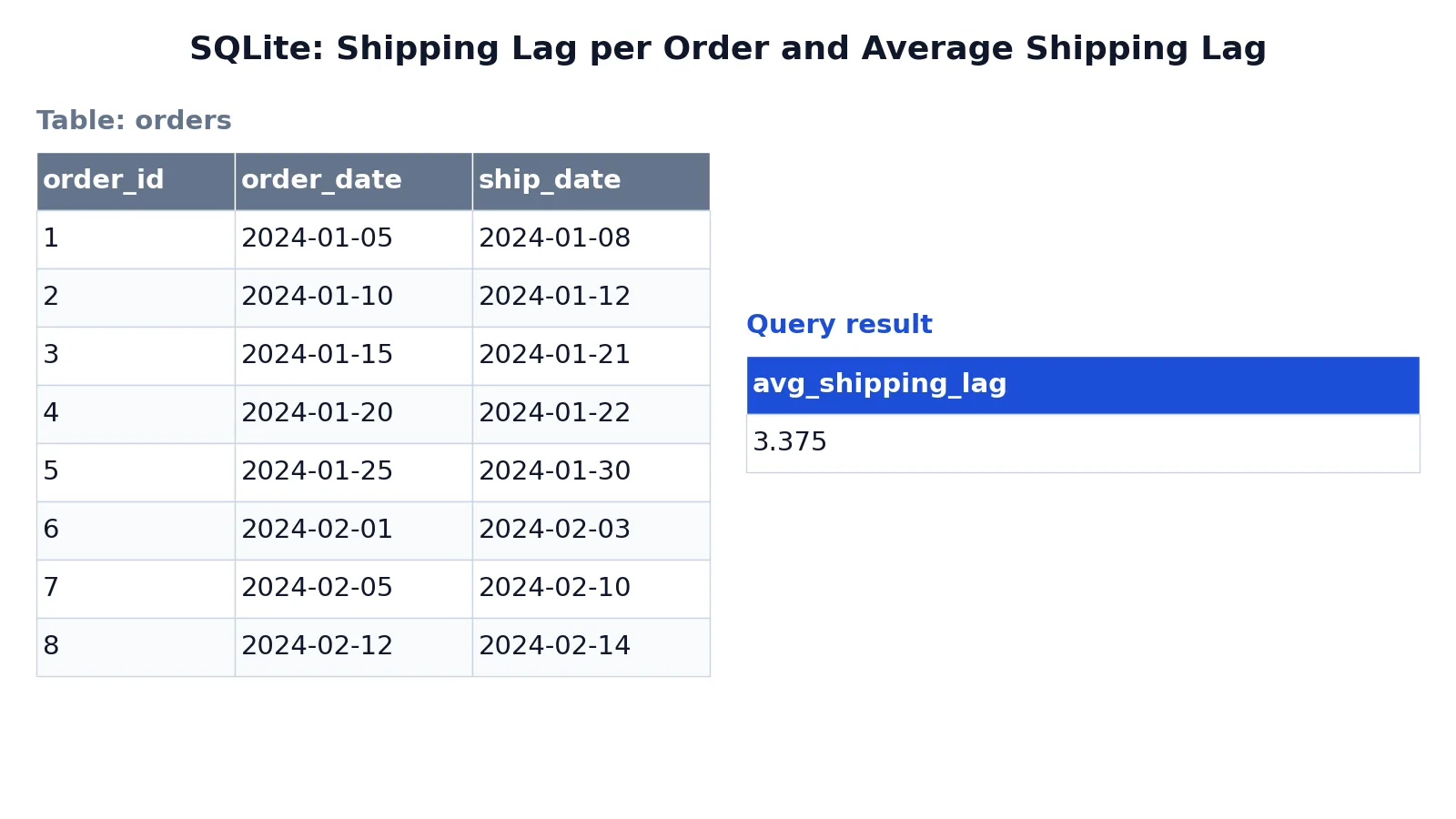
The dataset is an orders table with eight orders, each carrying an order_date and a ship_date. The goal is the shipping lag in whole days per order, plus the average lag across all orders.
| order_id | order_date | ship_date |
|---|---|---|
| 1 | 2024-01-05 | 2024-01-08 |
| 2 | 2024-01-10 | 2024-01-12 |
| 3 | 2024-01-15 | 2024-01-21 |
| 4 | 2024-01-20 | 2024-01-22 |
| 5 | 2024-01-25 | 2024-01-30 |
| 6 | 2024-02-01 | 2024-02-03 |
| 7 | 2024-02-05 | 2024-02-10 |
| 8 | 2024-02-12 | 2024-02-14 |
SELECT
  order_id,
  order_date,
  ship_date,
  CAST(julianday(ship_date) - julianday(order_date) AS INTEGER) AS shipping_days
FROM orders
ORDER BY order_id;

SELECT
  AVG(CAST(julianday(ship_date) - julianday(order_date) AS INTEGER)) AS avg_shipping_lag
FROM orders;
The result was checked with an equivalent SQLite query, which uses julianday() because SQLite has no DATEDIFF function.
| avg_shipping_lag |
|---|
| 3.375 |
The per-order lags are 3, 2, 6, 2, 5, 2, 5 and 2 days. They sum to 27, and 27 divided by 8 gives the average of 3.375. In SQL Server the same per-order value comes from DATEDIFF(day, order_date, ship_date), and in MySQL from DATEDIFF(ship_date, order_date).
More Examples
Days between two columns in SQL Server
SELECT order_id, DATEDIFF(day, order_date, ship_date) AS shipping_days
FROM orders;
Months between two dates
SELECT DATEDIFF(month, '2024-01-15', '2024-04-14') AS months_apart;This returns 3. The day of the month does not matter to the count, only how many first-of-month boundaries were crossed.
Years between a birth date and today
SELECT DATEDIFF(year, birth_date, GETDATE()) AS age_years
FROM people;
This is an approximation. Someone born on December 31 will show a full year of age on January 1 of the following year, because the year boundary was crossed. For exact age, compare month and day values as well.
The same day count in MySQL
SELECT order_id, DATEDIFF(ship_date, order_date) AS shipping_days
FROM orders;
Hours and minutes in MySQL
SELECT TIMESTAMPDIFF(hour, order_date, ship_date) AS shipping_hours
FROM orders;
TIMESTAMPDIFF is the MySQL function that accepts a unit argument, so it covers the cases where SQL Server would use DATEDIFF with hour, minute or second [2].
Filtering on a date difference
SELECT order_id
FROM orders
WHERE DATEDIFF(day, order_date, ship_date) > 4;
This returns orders 3, 5 and 7. Wrapping a column in a function like this prevents an index on ship_date from being used for the filter, so on large tables consider comparing dates directly instead.
Errors and How to Fix Them
"The datediff function requires 3 argument(s)" appears in SQL Server when you pass two arguments. Add the datepart as the first argument.
"Incorrect parameter count in the call to native function 'DATEDIFF'" appears in MySQL when you pass three arguments. Remove the unit and use TIMESTAMPDIFF if you need something other than days.
"Invalid parameter 1 specified for datediff" appears in SQL Server when the first argument is not a recognized datepart name. Use a documented abbreviation or the full name [1].
Argument data type errors occur when a string that is not a valid date is passed as startdate or enddate. Convert the value explicitly or fix the source data.
Overflow errors occur in SQL Server when the difference in the requested unit exceeds the range of int. Use a coarser datepart, or use DATEDIFF_BIG, which returns bigint (SQL Server 2016 and later).
Common Mistakes
- Assuming DATEDIFF measures elapsed time in SQL Server. It counts boundaries. For elapsed time, subtract the values in the smallest unit you need and convert.
- Using MySQL syntax in SQL Server or the reverse. SQL Server needs three arguments, MySQL needs two. The error messages are different and both are easy to misread.
- Using DATEDIFF for age. Year boundaries are not birthdays. Compute age from the month and day as well as the year.
- Forgetting that MySQL ignores the time portion. Two datetimes 20 hours apart can return 0 days if they fall on the same calendar date [2].
- Filtering with a function on an indexed column.
WHERE DATEDIFF(day, order_date, ship_date) > 4cannot use an index on either date column in most engines. - Ignoring the sign. The result is negative when the end date precedes the start date, which silently breaks averages and sums.
Limitations
SQL Server DATEDIFF cannot express a difference in weeks, quarters or years as an exact elapsed duration. It counts boundaries, so the result is a whole number that can be off by one relative to the true elapsed time. The function also returns int, which caps the magnitude of the result and rules out very large millisecond or microsecond differences.
MySQL DATEDIFF only returns days. Anything finer or coarser requires TIMESTAMPDIFF, and that function has its own unit list and its own boundary behavior. Neither function handles business days, holidays or time zones. If your analysis depends on working days between two dates, you need a calendar table and a join, not a date function.
Frequently Asked Questions
What is the difference between SQL Server DATEDIFF and MySQL DATEDIFF?
SQL Server takes three arguments and counts boundaries of any date part you name. MySQL takes two arguments and returns whole days only. The names match, the behavior does not.
How do I get the date difference in SQL Server in hours or minutes?
Pass hour or minute as the datepart. DATEDIFF(hour, startdate, enddate) counts hour boundaries crossed, which is not the same as elapsed hours. For elapsed time, subtract the values in seconds and divide.
Why does DATEDIFF return 1 when only a few minutes passed?
Because a boundary was crossed. If the start time is late on one day and the end time is early on the next, the midnight boundary counts as one full day in SQL Server [1].
How do I calculate age in years with DATEDIFF?
Use DATEDIFF(year, birth_date, GETDATE()) as a starting point, then subtract 1 when the current month and day are earlier than the birth month and day. The raw year count alone overstates age for anyone whose birthday has not yet occurred this year.
Can I use DATEDIFF to find working days between two dates?
No. DATEDIFF counts calendar boundaries and knows nothing about weekends or holidays. Build a calendar table with a working-day flag and sum it between the two dates. For more date arithmetic patterns, see SQL DATEADD and DATEDIFF, and for filtering on relative dates see SQL WHERE Date Is Today and SQL CURRENT_DATE. If you need to reformat the inputs first, SQL Convert Date covers the common formats, and SQL AVG Function shows how to average the resulting differences.
References
- DATEDIFF (Transact-SQL) - SQL Server | Microsoft Learn
- MySQL :: MySQL 26.7 Reference Manual :: 14.7 Date and Time Functions
Further Reading
- Codd EF (1970). A relational model of data for large shared data banks. Communications of the ACM
- PostgreSQL Documentation: SELECT
- SQLite: SQL As Understood By SQLite
- Wilson G, Bryan J, Cranston K et al. (2017). Good enough practices in scientific computing. PLOS Computational Biology