SQL LAG Function: Syntax and Examples for Previous Row Values
By Dr. Zubair Khalid, DVM, MS, PhD ·
The LAG function SQL analysts reach for most often returns a value from a previous row in the same result set. You use it to compare a row with the one before it, such as this month's revenue against last month's. It is a window function, so it reads other rows without collapsing them the way GROUP BY does.
Quick Answer
LAG(expression, offset, default) OVER (ORDER BY ...)returns the value ofexpressionfrom a rowoffsetpositions before the current row.- The default offset is 1, so
LAG(revenue)looks one row back. - The first row in each window has no previous row, so LAG returns NULL unless you supply a default value.
- LAG does not change the number of rows. Every input row stays in the output.
- Add
PARTITION BYto restart the "previous row" logic inside each group, such as each customer or each product.
Syntax
LAG(expression [, offset [, default]]) OVER (
  [PARTITION BY partition_expression, ...]
  ORDER BY sort_expression [ASC | DESC], ...
)| Argument | Required? | Meaning |
|---|---|---|
expression | Yes | The column or expression whose earlier value you want. |
offset | No | How many rows back to look. Defaults to 1. Must be a non-negative integer. |
default | No | The value returned when no row exists at that offset. Defaults to NULL. |
PARTITION BY | No | Splits rows into independent groups. LAG restarts at the first row of each group. |
ORDER BY | Yes inside OVER | Defines what "previous" means. Without a deterministic order, results are unpredictable. |
The OVER clause is what makes LAG a window function. The ORDER BY inside OVER is separate from the ORDER BY at the end of the query, which only controls how rows are displayed.
How It Works
Think of the window as a moving frame. For each row, the database sorts the partition by the OVER (ORDER BY ...) keys, then looks back offset rows and reads expression from that row.
Three details matter in practice.
First, the ordering must be unique enough to be meaningful. If two rows share the same sort key, the database picks an arbitrary order between them, and LAG may return either one. Add a tiebreaker column to the ORDER BY when ties are possible.
Second, LAG reads rows, not time periods. It does not know that January is missing from your data. If a month is absent, LAG simply returns the value from whatever row happens to sit above the current one. That is a common source of wrong comparisons.
Third, the default value only applies when the offset points outside the partition. You can pass 0, 'none', or any expression that matches the column type.
LAG has a mirror function, LEAD, which looks forward instead of backward. Both belong to the same family as ranking functions such as ROW_NUMBER and RANK, which also read across rows without grouping them.
Worked Example
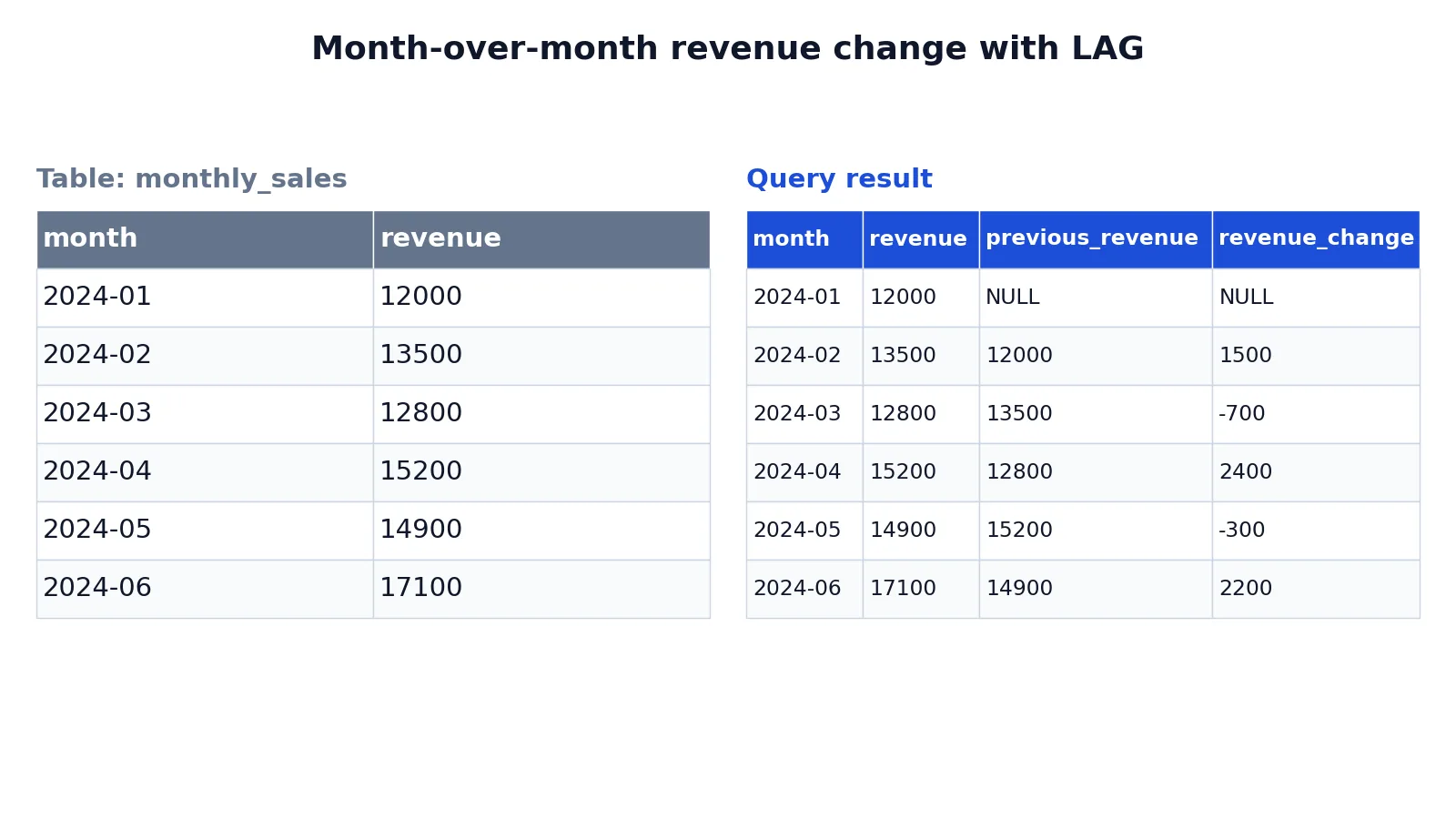
The table below holds six months of revenue for one product line.
| month | revenue |
|---|---|
| 2024-01 | 12000 |
| 2024-02 | 13500 |
| 2024-03 | 12800 |
| 2024-04 | 15200 |
| 2024-05 | 14900 |
| 2024-06 | 17100 |
To compare each month with the month before it, use LAG twice: once to show the previous value and once to compute the difference.
SELECT
  month,
  revenue,
  LAG(revenue) OVER (ORDER BY month) AS previous_revenue,
  revenue - LAG(revenue) OVER (ORDER BY month) AS revenue_change
FROM monthly_sales
ORDER BY month;
The result was checked with an equivalent SQLite query.
| month | revenue | previous_revenue | revenue_change |
|---|---|---|---|
| 2024-01 | 12000 | null | null |
| 2024-02 | 13500 | 12000 | 1500 |
| 2024-03 | 12800 | 13500 | -700 |
| 2024-04 | 15200 | 12800 | 2400 |
| 2024-05 | 14900 | 15200 | -300 |
| 2024-06 | 17100 | 14900 | 2200 |
The first row returns NULL for both new columns because January has no previous month. February shows a gain of 1500 over January. March drops by 700. April recovers with a gain of 2400, May slips by 300, and June closes with a gain of 2200.
If you want a percentage change instead of an absolute one, divide the change by the previous value. The formula is:
$$ \text{change \%} = \frac{\text{revenue} - \text{LAG(revenue)}}{\text{LAG(revenue)}} \times 100 $$
Guard against division by zero when the previous value can be 0.
More Examples
Replace the NULL with a readable label. The first row has no previous value, so supply a default.
SELECT
  month,
  revenue,
  LAG(revenue, 1, 0) OVER (ORDER BY month) AS previous_revenue
FROM monthly_sales
ORDER BY month;
Now January shows 0 instead of NULL. That is convenient for display but misleading for arithmetic, because a change of 12000 against a fake zero looks like infinite growth.
Compare with the same month last year. Set the offset to 12 when you have monthly data.
SELECT
  month,
  revenue,
  LAG(revenue, 12) OVER (ORDER BY month) AS revenue_last_year
FROM monthly_sales
ORDER BY month;
With only six rows, every result here is NULL. The offset must exist inside the partition.
Restart the comparison for each group. Add PARTITION BY so each product gets its own previous row.
SELECT
  product_id,
  month,
  revenue,
  LAG(revenue) OVER (
    PARTITION BY product_id
    ORDER BY month
  ) AS previous_revenue
FROM product_monthly_sales
ORDER BY product_id, month;
The first month of each product returns NULL, and the sequence restarts cleanly.
Fill gaps before comparing. If months can be missing, generate a complete calendar and left join your facts to it, then apply LAG. Comparing against a missing row silently compares against the wrong period. Aggregation functions such as COUNT and AVG help you audit whether every expected period is present before you trust the differences.
Handle the NULL in downstream math. Wrap the LAG result in COALESCE when you need a numeric fallback, and remember that COALESCE changes the value, not the underlying gap.
Errors and How to Fix Them
"LAG is not a recognized built-in function name." You are on a database that does not support window functions, or you wrote the call without OVER. LAG requires the OVER clause. Check your engine's version support before assuming the syntax is wrong.
"Window function is not allowed in WHERE." Window functions are evaluated after WHERE, so you cannot filter on a LAG result in the same query level. Wrap the query in a subquery or a common table expression and filter the outer query.
SELECT *
FROM (
  SELECT
    month,
    revenue,
    LAG(revenue) OVER (ORDER BY month) AS previous_revenue
  FROM monthly_sales
) t
WHERE previous_revenue IS NOT NULL;
"The offset must be a non-negative integer." You passed a negative number or a non-integer. Use LEAD for forward lookups and keep LAG offsets at 0 or above.
Wrong values with no error. This usually means the ORDER BY inside OVER is missing or non-deterministic. Add the sort key and a tiebreaker.
Common Mistakes
- Forgetting
ORDER BYinsideOVER. Without it, "previous row" has no defined meaning and results vary between runs. Always specify the order. - Assuming LAG respects the outer
ORDER BY. The finalORDER BYonly sorts the output. The window order is set insideOVER. - Treating NULL as zero. The first row of each partition returns NULL by design. If you replace it with 0, percentage changes become meaningless. Keep NULL and handle it in reporting.
- Ignoring gaps in the time series. LAG compares adjacent rows, not adjacent periods. A missing month makes the comparison span two months. Build a complete date spine first.
- Using a non-unique sort key. Duplicate keys let the engine choose the order, so the "previous" row can change between executions. Add a unique tiebreaker.
- Repeating the LAG expression instead of using a subquery. Writing the same window expression several times is legal but hard to read. Compute it once in a subquery or CTE and reuse the alias.
Limitations
LAG cannot compare a row with a period that is not present in the data. It has no concept of calendar time, so it will happily compare March with January if February is missing. It also cannot look back a fixed amount of time, only a fixed number of rows. If your periods are irregular, you need a self join on a date range or a calendar table instead.
Performance is another constraint. Window functions require sorting the partition, so on very large tables LAG can be expensive. An index on the partition and order columns helps, but the sort still happens. For simple two-row comparisons on small data, a self join with an offset condition is sometimes easier to reason about, though LAG is usually clearer and faster.
Frequently Asked Questions
What is the difference between LAG and LEAD?
LAG looks backward to a previous row. LEAD looks forward to a following row. Both take the same three arguments and both require an OVER clause. Use LAG for "compared with last period" and LEAD for "compared with next period."
Does LAG work without an ORDER BY?
The syntax allows it in some engines, but the result is not meaningful because row order is undefined. Always include ORDER BY inside the OVER clause so the previous row is deterministic.
Why does the first row return NULL?
There is no row before the first row in the partition, so LAG has nothing to return. Supply a default value as the third argument if you need a specific value, or filter the NULL out in an outer query.
Can I use LAG with PARTITION BY?
Yes. PARTITION BY splits the rows into independent groups, and LAG restarts at the first row of each group. This is how you compare each customer, product, or region against its own history.
How do I calculate month-over-month growth with LAG?
Subtract the LAG value from the current value, then divide by the LAG value and multiply by 100. Use NULLIF or a CASE expression on the LAG result so a previous value of 0 does not cause a division-by-zero error. The first row simply returns NULL, because any arithmetic with NULL gives NULL.
References
This article draws on the standard references listed under Further Reading.
Further Reading
- Codd EF (1970). A relational model of data for large shared data banks. Communications of the ACM
- PostgreSQL Documentation: SELECT
- SQLite: SQL As Understood By SQLite
- Wilson G, Bryan J, Cranston K et al. (2017). Good enough practices in scientific computing. PLOS Computational Biology
- PostgreSQL Tutorial: The SQL Language
- SQLite: Built-In Scalar SQL Functions