The %in% Operator in R: Syntax and Examples
By Dr. Zubair Khalid, DVM, MS, PhD ·
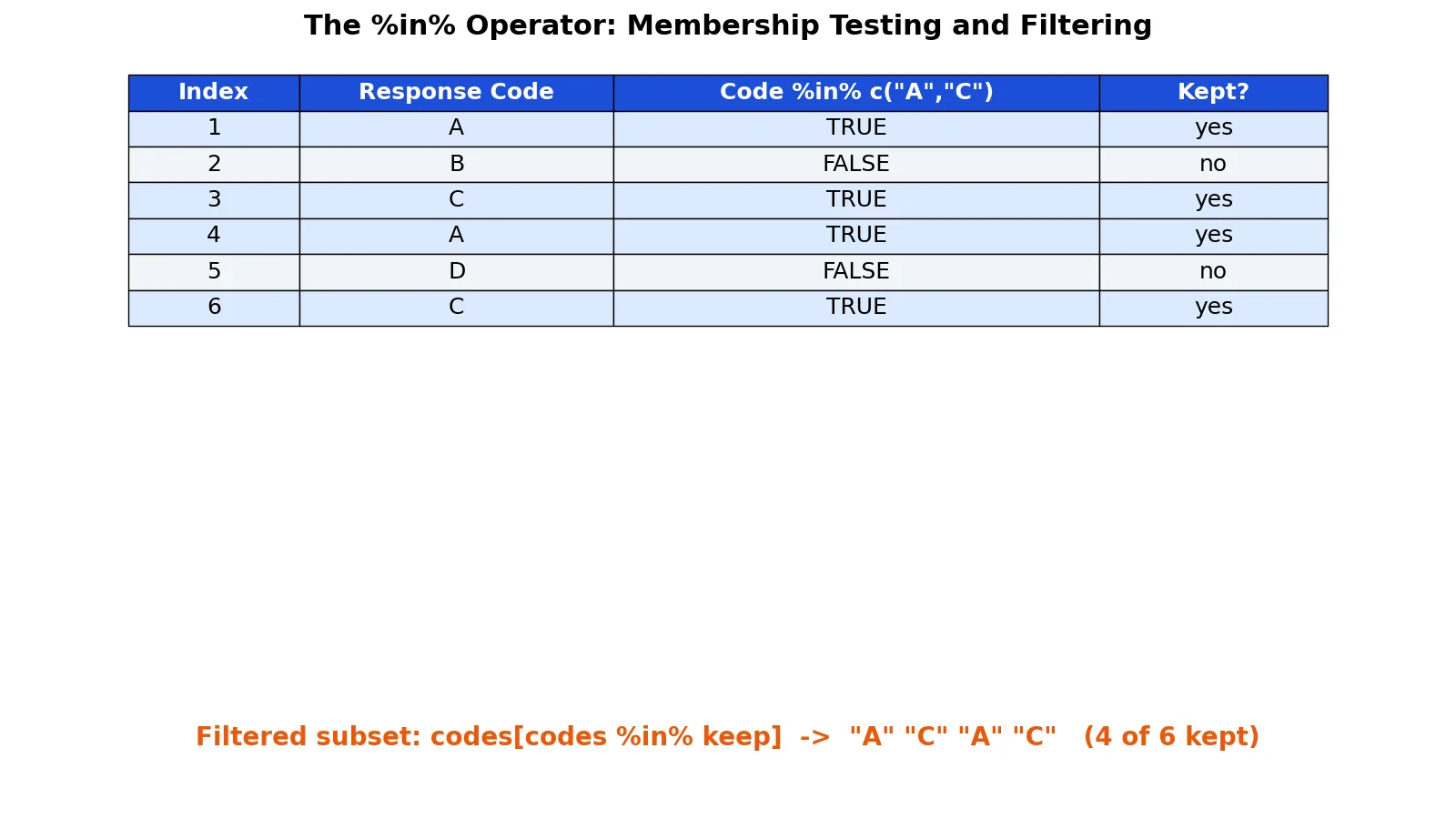
The %in% operator in R tests whether each element of a vector appears in another vector. It returns a logical vector of the same length as the left-hand side, with TRUE where a match is found and FALSE where it is not. Because the result is logical, you can use %in% directly inside square brackets to filter vectors, data frames, and other objects.
Quick Answer
x %in% yreturns a logical vector as long asx, withTRUEfor each element ofxthat appears anywhere iny.- The result has the same length as the left-hand side, so it works as a filtering index.
codes[codes %in% keep]keeps only the elements that match, andsum(codes %in% keep)counts them.- Negate with
!to find non-matches, as in!(x %in% y). %in%compares values, not positions, so order and duplicates inydo not matter.
Syntax
%in% is an infix operator, so it sits between two objects: x %in% table. It is a special operator, which is why it is wrapped in percent signs.
| Argument | Required? | Meaning |
|---|---|---|
x | Yes | The vector whose elements you want to test. This is the left-hand side. |
table | Yes | The vector of values to test against. This is the right-hand side. |
The output is always a logical vector with the same length as x. If x has length zero, the result has length zero. If table has length zero, every result is FALSE.
How It Works
For each element of x, R checks whether that value appears anywhere in table. The comparison is by value, so the position of a match in table is irrelevant. If a value appears in table more than once, that does not change the result, because a single match is enough to produce TRUE.
The length rule is the part that trips people up. The output length follows the left-hand side, not the right-hand side. If you test a vector of 6 codes against a set of 2 codes, you get 6 logical values back, not 2.
This is what makes %in% useful for filtering. A logical vector of the same length as your data can be placed inside [ to select rows or elements. You can build the vector with c() when you need to define the membership set by hand.
Mathematically, for a vector $x = (x_1, \dots, x_n)$ and a set $S$, the operator produces
$$ x_i \in S \quad \text{for each } i = 1, \dots, n $$
where each result is TRUE or FALSE. The count of matches is the sum of that logical vector, since TRUE counts as 1 and FALSE counts as 0.
Worked Example
Suppose you ran a short survey and recorded a response code for each of 6 respondents. You want to keep only the codes A and C.
| index | response_code |
|---|---|
| 1 | A |
| 2 | B |
| 3 | C |
| 4 | A |
| 5 | D |
| 6 | C |
The steps below show the input vector, the membership set, the logical result, and the filtered subset.
| Step | Value |
|---|---|
| Input vector (R) | codes <- c("A", "B", "C", "A", "D", "C") |
| Membership set (R) | keep <- c("A", "C") |
Apply %in% | TRUE FALSE TRUE TRUE FALSE TRUE |
| Subset with logical index | "A" "C" "A" "C" |
| Count of matches | sum(codes %in% keep) = 4 |
| Count of non-matches | sum(!(codes %in% keep)) = 2 |
Here is the code and its output.
codes <- c("A", "B", "C", "A", "D", "C")
keep  <- c("A", "C")
codes %in% keep
codes[codes %in% keep]
> codes %in% keep
[1] TRUE FALSE TRUE TRUE FALSE TRUE
> codes[codes %in% keep]
[1] "A" "C" "A" "C"The logical vector has 6 values, one per respondent. Positions 1, 3, 4, and 6 are TRUE because those codes are A or C. The filtered subset keeps 4 of the 6 codes, and the two non-matches are B and D.
More Examples
Filter a data frame by a column. The same logic applies to rows. If df has a response_code column, you can keep matching rows with a comma after the condition.
df[df$response_code %in% c("A", "C"), ]Count matches and non-matches. Wrapping the logical vector in sum() counts TRUE values. Negating with ! flips the result so you count the other side.
sum(codes %in% keep)
sum(!(codes %in% keep))
Combine conditions. You can join %in% with other logical tests using & for "and" and | for "or". This is common when you filter on two columns at once.
df[df$response_code %in% c("A", "C") & df$score > 10, ]Use it inside ifelse(). Because %in% returns a logical vector, it pairs well with vectorized conditionals. You can label matches and non-matches in one call.
ifelse(codes %in% keep, "keep", "drop")Test numeric values. %in% is not limited to strings. It works on numbers, and it is often used to check whether a value belongs to a set of allowed IDs.
c(1, 2, 3, 4) %in% c(2, 4)Errors and How to Fix Them
Unexpected FALSE for values that look equal. This usually comes from a type mismatch. A character "1" is not the same as a numeric 1, so "1" %in% 1 returns FALSE. Check types with class() or str() and convert with as.numeric() or as.character() as needed.
Whitespace differences in strings. "A " and "A" are different values. If your data came from a file or a form, trailing spaces can cause silent non-matches. Trim with trimws() before testing.
Factor columns. A factor stores integer codes with labels. Testing a factor against a character vector can behave in ways you do not expect. Convert with as.character() first when you want value-based matching.
Wrong length in the index. If you build a logical vector by hand and its length does not match the number of rows, R recycles it or errors. Always derive the index from the data itself, as in df$col %in% set.
Floating point comparisons. Values that should be equal can differ by a tiny amount. 0.3 %in% c(0.1 + 0.2) returns FALSE because of floating point representation. Round first if exact equality is not reliable.
Common Mistakes
- Confusing
%in%with==.==compares element by element and requires equal lengths or recycling.%in%tests membership against a whole set. Use%in%when the right-hand side is a list of allowed values. - Expecting the output length to follow the right-hand side. The result is always as long as the left-hand side. If you test 6 codes against 2, you get 6 logical values.
- Misreading the negation.
!x %in% ygives the same result as!(x %in% y), because%in%binds more tightly than!in R. Write the parentheses anyway so the intent is obvious to readers. - Using
%in%for position matching. It ignores order and duplicates. If you need to match by position, usematch()or==instead. - Assuming
NAmatchesNA.NA %in% NAreturnsTRUE, butNA %in% c("A", "C")returnsFALSE. Missing values need separate handling withis.na(). - Filtering without checking the count first. Run
sum(x %in% y)before you subset. A count of zero tells you the set is wrong before you waste time debugging an empty result.
Limitations
%in% answers a yes-or-no question about membership. It does not tell you where a match occurred in the right-hand side, how many times it occurred, or which position it holds. If you need that information, match() returns the first position of each match and table() counts frequencies.
The operator also does not handle approximate matching. Strings must match exactly, apart from type coercion rules, and numbers must be equal within floating point limits. For pattern matching you need functions like grepl() or grep(). For joining two data frames on a key, a merge or join operation is the right tool, since %in% only tells you whether a value exists somewhere in the other vector.
Frequently Asked Questions
What does %in% return in R?
It returns a logical vector with the same length as the left-hand side. Each element is TRUE if that value appears anywhere in the right-hand side, and FALSE otherwise. You can use the result directly as an index, count it with sum(), or negate it with !.
What is the difference between %in% and == in R?
== compares two vectors element by element and returns a logical vector based on position. %in% checks each element of the left side against the entire right side. Use %in% when the right side is a set of allowed values and you do not care about position.
How do I filter a data frame with %in%?
Put the membership test in the row position of the bracket. For example, df[df$col %in% c("A", "C"), ] keeps only rows where col is A or C. The trailing comma is required to select rows and keep all columns.
How do I count how many values match?
Wrap the logical vector in sum(). Since TRUE counts as 1 and FALSE as 0, sum(x %in% y) gives the number of matches. For non-matches, use sum(!(x %in% y)).
Does %in% work with NA values?
NA %in% NA returns TRUE, but NA %in% c("A", "C") returns FALSE. Missing values are treated as a value that can match another missing value. If you need to handle NA separately, test with is.na() and combine the conditions.
References
This article draws on the standard references listed under Further Reading.
Further Reading
- Wickham H (2014). Tidy Data. Journal of Statistical Software
- Wickham H, Averick M, Bryan J et al. (2019). Welcome to the Tidyverse. Journal of Open Source Software
- An Introduction to R (R Core Team)
- Wickham H, Cetinkaya-Rundel M, Grolemund G. R for Data Science (2e)
- ggplot2 Reference
- Wilson G, Bryan J, Cranston K et al. (2017). Good enough practices in scientific computing. PLOS Computational Biology