How to Rename a Column in R (Base R and dplyr)
By Dr. Zubair Khalid, DVM, MS, PhD ·
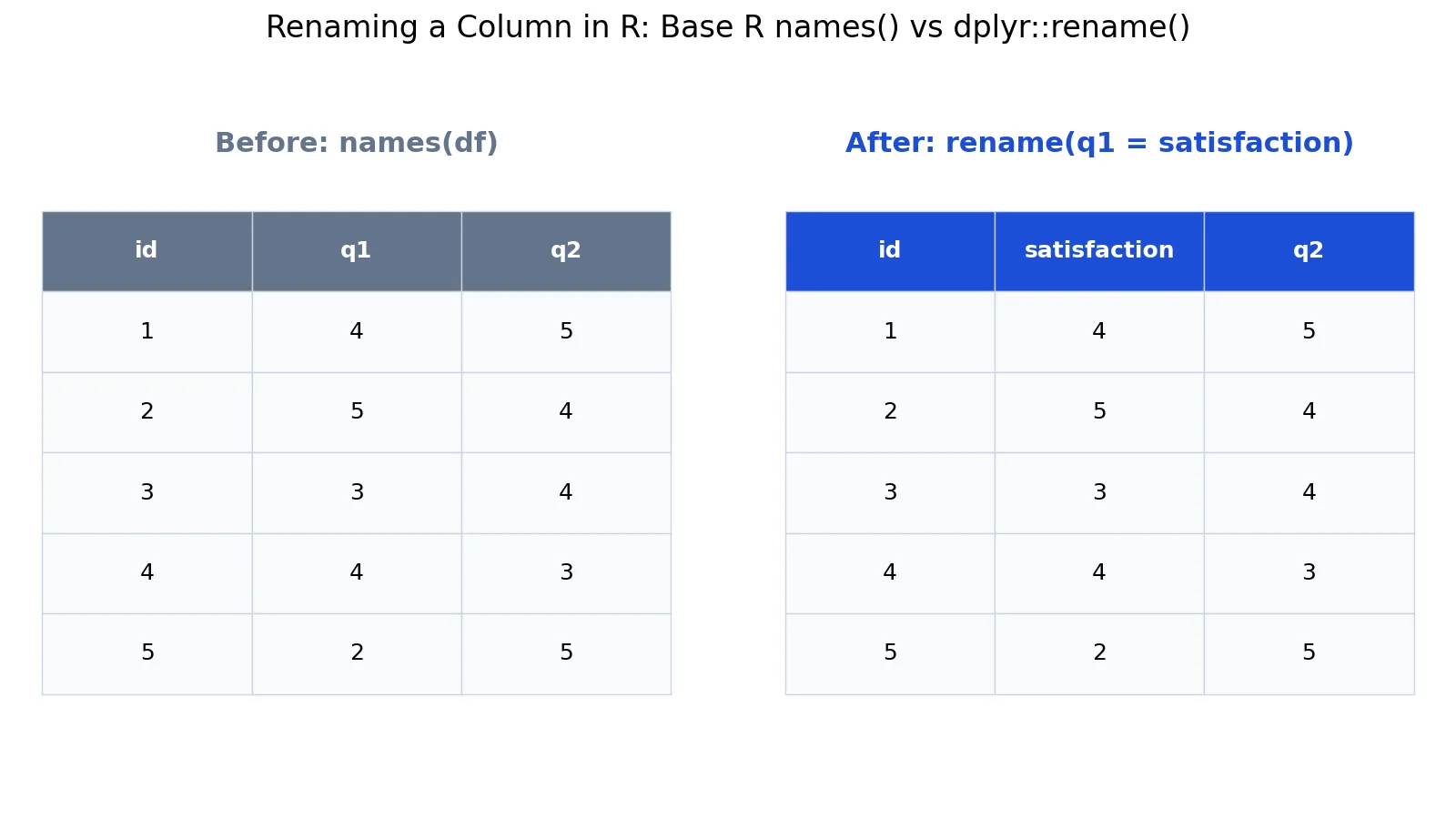
Renaming a column in R takes one line of code, and you have two main routes. Base R changes the name in place through names() or colnames(), while dplyr::rename() returns a copy with the new name and keeps the original untouched. This article shows both, plus the exact syntax, a worked example, and the errors you are most likely to hit.
Quick Answer
- Base R, by position:
names(df)[2] <- "satisfaction"renames the second column. - Base R, by name:
names(df)[names(df) == "q1"] <- "satisfaction"renames only if the old name exists. colnames()works the same way on a data frame or matrix:colnames(df)[2] <- "satisfaction".- dplyr:
df %>% rename(satisfaction = q1)usesnew_name = old_nameorder [1]. rename()keeps column order and returns a new object, so assign it back if you want to keep the change [1].
Before You Start
You need a data frame and a clear idea of the old name and the new name. Check what you actually have before you change anything:
names(df)          # character vector of column names
colnames(df)       # same result for a data frame
Both functions return the same character vector for a data frame. colnames() is the more general function because it also works on matrices, while names() is the standard accessor for data frames and lists.
Two facts drive everything below. First, column names in R are just a character vector, so you can edit them with any vector operation. Second, dplyr's rename() uses the pattern new_name = old_name, which is the reverse of what many people expect [1]. Getting that order wrong is the single most common source of confusion.
If you want to rename many columns at once by pattern, rename_with() applies a function to selected columns, for example rename_with(iris, toupper, starts_with("Petal")) [1]. That is a different task from renaming one column, so this article focuses on single and small sets of renames.
Step by Step
- Inspect the current names. Run
names(df)and note the exact spelling, including case and punctuation. R is case sensitive, soQ1andq1are different columns.
- Pick your method. Use base R when you want to modify the object in place with no dependencies. Use dplyr when you are already in a pipe and want the rename to read as part of a longer chain.
- Rename by position (base R).
names(df)[2] <- "satisfaction"replaces whatever is in position 2. This is fast but fragile, because inserting or reordering a column later changes which column position 2 refers to.
- Rename by name (base R).
names(df)[names(df) == "q1"] <- "satisfaction"targets the column calledq1regardless of where it sits. If no column matches, the assignment silently does nothing, so verify withnames(df)afterward.
- Rename with dplyr.
df <- df %>% rename(satisfaction = q1)produces a data frame with the same columns in the same order, only the name changed [1]. Without the assignment, the originaldfis unchanged.
- Verify. Run
names(df)again and compare against what you expected. Then check that the data still lines up, for examplemean(df$satisfaction).
Worked Example
The dataset is a small survey with 5 respondents and three columns: id, q1, and q2. Each row is one respondent, and q1 holds a satisfaction score from 2 to 5.
| id | q1 | q2 |
|---|---|---|
| 1 | 4 | 5 |
| 2 | 5 | 4 |
| 3 | 3 | 4 |
| 4 | 4 | 3 |
| 5 | 2 | 5 |
The goal is to rename q1 to satisfaction so the column name describes what it measures.
Step 1. Check the original names.
names(df)[1] "id" "q1" "q2"Step 2. Rename with base R.
df_orig <- df
names(df)[names(df) == "q1"] <- "satisfaction"
names(df)
[1] "id" "satisfaction" "q2"Step 3. Rename with dplyr on a fresh copy.
library(dplyr)
df_dplyr <- df_orig %>% rename(satisfaction = q1)
names(df_dplyr)
[1] "id" "satisfaction" "q2"Step 4. Confirm the two approaches agree.
identical(names(df), names(df_dplyr))[1] TRUEBoth routes produce the same three names in the same order: id, satisfaction, q2. Column order is preserved, and no values moved between columns.
Step 5. Check the data survived the rename. The renamed column still holds the original values 4, 5, 3, 4, 2, so:
$$ \bar{x} = \frac{4 + 5 + 3 + 4 + 2}{5} = \frac{18}{5} = 3.6 $$
mean(df$satisfaction)[1] 3.6The mean is 3.6, which matches the mean of the original q1 column. A rename changes labels only, never values.
Other Ways to Do It
colnames() instead of names(). The two are interchangeable on a data frame:
colnames(df)[colnames(df) == "q1"] <- "satisfaction"Rename several columns at once with base R. Build a lookup and match by position:
old <- c("q1", "q2")
new <- c("satisfaction", "loyalty")
names(df)[match(old, names(df))] <- new
Rename several columns with dplyr. Pass multiple new = old pairs in one call [1]:
df %>% rename(satisfaction = q1, loyalty = q2)Rename from a named vector. dplyr supports a named character vector through all_of(), which is handy when the mapping is stored elsewhere [1]:
lookup <- c(satisfaction = "q1")
df %>% rename(all_of(lookup))
Rename by pattern with rename_with(). Apply a function to selected columns, for example to convert names to lowercase [1]:
df %>% rename_with(tolower)A note on df.rename(). Some packages ship their own rename helper with a different argument order. The misty package's df.rename() uses old_name = new_name, the opposite of dplyr, and also accepts from and to character vectors [2]. If you mix packages, check the argument order in the help page before you run the call.
Troubleshooting
The rename did nothing. With base R, names(df)[names(df) == "q1"] <- "satisfaction" only fires when a column is named exactly q1. A trailing space, different case, or a different name means no match and no error. Print names(df) and copy the name from the output.
The dplyr rename produced an error about columns that do not exist. rename() requires the old name on the right side to be a real column [1]. If you swap the sides, dplyr looks for a column called satisfaction and fails.
The change disappeared after the next line. rename() returns a new data frame and does not modify in place [1]. Assign the result, either with df <- df %>% rename(...) or by storing it in a new object.
You renamed the wrong column. Positional renaming is the usual cause. Prefer the name-based form unless you have a specific reason to use an index.
You renamed a column that a later step depends on. Downstream code that references q1 will now fail. Search your script for the old name before you commit the change.
Common Mistakes
- Reversing the dplyr argument order.
rename()usesnew_name = old_name, sorename(q1 = satisfaction)is wrong [1]. Fix: put the new name on the left of the equals sign. - Forgetting to assign the result.
df %>% rename(satisfaction = q1)prints a renamed data frame but leavesdfalone. Fix:df <- df %>% rename(satisfaction = q1). - Renaming by position and later reordering columns.
names(df)[2] <- "satisfaction"breaks silently if the column order changes. Fix: match on the old name instead. - Assuming a failed match throws an error. Base R name matching does nothing when there is no match. Fix: check
names(df)after the assignment, or usematch()and inspect the result. - Mixing up
rename()andrename_with().rename()changes individual names, whilerename_with()applies a function to a set of columns [1]. Fix: userename()for one-off renames andrename_with()for pattern-based changes. - Renaming a column that is duplicated. If two columns share a name, a name-based rename hits both. Fix: run
anyDuplicated(names(df))first and make names unique.
Limitations
Renaming changes labels only. It does not fix a column that holds the wrong data, and it does not convert types. If q1 was read in as text because of a stray character, renaming it to satisfaction leaves it as text, and mean() will return NA with a warning. Check str(df) or class(df$satisfaction) after renaming if a summary looks wrong.
Base R and dplyr also differ in how they treat invalid names. Base R will happily assign a name with spaces or unusual characters, which then needs backticks to reference. dplyr's rename() accepts such names too, but the resulting code is harder to read. Prefer names that are valid R identifiers: letters, digits, underscores, and dots, not starting with a digit. Finally, neither approach renames columns inside a list column or a nested data frame. You have to reach into that element and rename there.
Frequently Asked Questions
How do I rename a column in R without dplyr?
Use base R. names(df)[names(df) == "q1"] <- "satisfaction" renames the column called q1 in place, and colnames(df)[2] <- "satisfaction" does the same by position. Both work on plain data frames with no packages loaded.
What is the difference between names() and colnames() in R?
For a data frame they return the same character vector and either can be used to rename columns. colnames() also works on matrices, while names() is the general accessor for data frames and lists. Pick whichever reads more clearly in your script.
Why does my dplyr rename not change the data frame?
rename() returns a new data frame and does not modify its input [1]. If you run df %>% rename(satisfaction = q1) without assigning the result, df keeps the old name. Assign it back with df <- df %>% rename(satisfaction = q1).
Can I rename multiple columns at once in R?
Yes. In dplyr, pass several pairs in one call: df %>% rename(satisfaction = q1, loyalty = q2) [1]. In base R, build vectors of old and new names and assign through match(), which handles any number of columns in one statement.
Does renaming a column change the data?
No. A rename changes the label attached to the column and nothing else. The values, their order, and their type stay exactly as they were, which is why the mean of the renamed column in the worked example is still 3.6.
References
Further Reading
- Wickham H (2014). Tidy Data. Journal of Statistical Software
- Wickham H, Averick M, Bryan J et al. (2019). Welcome to the Tidyverse. Journal of Open Source Software
- An Introduction to R (R Core Team)
- Wickham H, Cetinkaya-Rundel M, Grolemund G. R for Data Science (2e)