Pandas loc: How to Select Rows and Columns by Label
By Dr. Zubair Khalid, DVM, MS, PhD ·
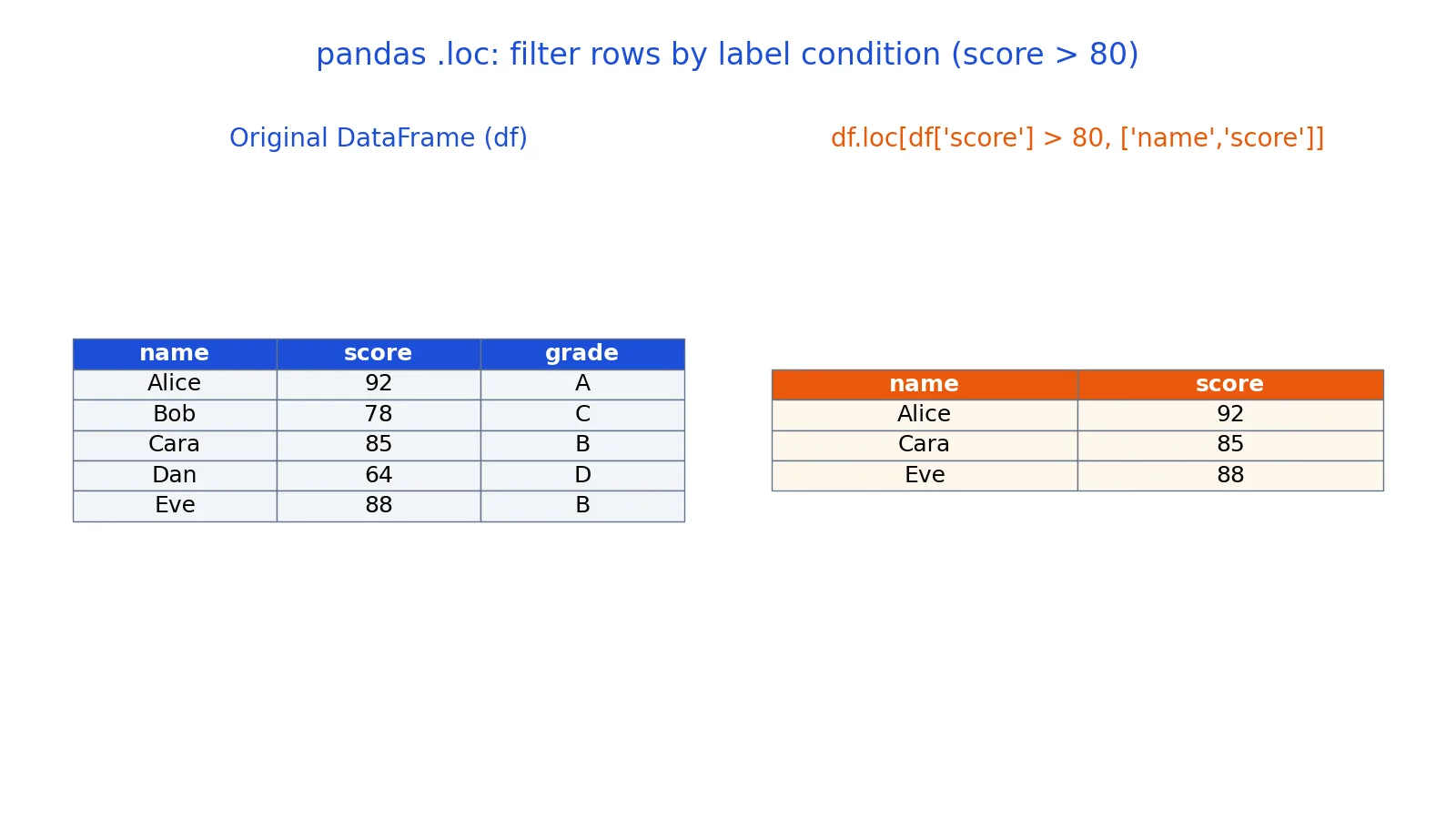
pandas loc is the label-based indexer on a DataFrame or Series. You pass row labels and column labels inside a single pair of brackets, separated by a comma, and pandas returns the matching data. Unlike positional indexing, .loc matches the actual labels in your index and columns, so it keeps working when rows are reordered or filtered.
Quick Answer
- Use
df.loc[row_labels, column_labels]to select by label, not by integer position. - A single label returns a Series, a list of labels returns a DataFrame, and a slice returns both endpoints inclusive.
- Boolean conditions go in the row slot, for example
df.loc[df['score'] > 80, ['name','score']]. - Wrap each condition in parentheses when you combine them with
&or|[1]. .localso assigns values, and when you assign a Series it aligns by index label, not by order [1].
Syntax
The indexer takes two arguments inside one set of brackets: a row indexer and a column indexer.
| Argument | Required? | Meaning |
|---|---|---|
row_indexer | Yes | A label, list of labels, slice, boolean array, boolean Series, or callable that returns one of these [1] |
column_indexer | No | A label, list of labels, or slice of column names. If omitted, all columns are returned |
Both arguments accept several forms. A scalar label selects one row or column. A list selects several in the order you give. A slice such as 'cobra':'viper' includes both endpoints, which differs from Python list slicing [2]. A boolean Series or array selects rows where the value is True. A callable, such as lambda df: df['shield'] == 8, is evaluated against the DataFrame and must return a valid indexer [1].
How It Works
.loc resolves each label against the index and column objects. For a scalar row label, pandas looks up that label and returns the row as a Series. For a list, it returns a DataFrame containing those rows in the listed order. For a slice, pandas finds the start and stop labels and returns everything between them, inclusive of both ends [3].
Boolean indexing works differently. When the row indexer is a boolean Series aligned to the index, pandas keeps the rows where the value is True and drops the rest. The boolean Series must have the same length as the row axis, or pandas raises an error [2]. This is the mechanism behind filtering, and it is why .loc is the standard tool for conditional selection.
Column selection is independent of row selection. You can pick all rows with : and a subset of columns, or pick specific rows and specific columns at once. The two indexers are applied together, so the result is the intersection of the rows you asked for and the columns you asked for.
Worked Example
The dataset holds scores and grades for 5 students in a class.
| name | score | grade |
|---|---|---|
| Alice | 92 | A |
| Bob | 78 | C |
| Cara | 85 | B |
| Dan | 64 | D |
| Eve | 88 | B |
Start by building the DataFrame. It has 5 rows and 3 columns: ['name', 'score', 'grade'].
Next, build a boolean mask with a threshold of 80. The mask is [True, False, True, False, True], matching Alice, Cara, and Eve.
Apply .loc with that row mask and a column list of ['name','score']. The result selects 3 rows and 2 columns.
import pandas as pd
df = pd.DataFrame({
    'name': ['Alice','Bob','Cara','Dan','Eve'],
    'score': [92, 78, 85, 64, 88],
    'grade': ['A','C','B','D','B'],
})
df.loc[df['score'] > 80, ['name','score']]
The output is:
    name  score
0  Alice     92
2   Cara     85
4    Eve     88
The filtered names are ['Alice', 'Cara', 'Eve'] and the filtered scores are [92, 85, 88]. The mean of the filtered scores is 88.3333. The original 5 rows became 3, and only the two requested columns survived.
More Examples
Select a single row by label. If the index holds student names, df.loc['Alice'] returns that row as a Series. To keep it as a DataFrame, pass a list: df.loc[['Alice']] [2].
Select a slice of rows. df.loc['Alice':'Cara'] returns Alice, Bob, and Cara, because label slices include the stop label [2].
Select specific rows and columns together. df.loc[['Alice','Eve'], ['name','grade']] returns two rows and two columns.
Combine two conditions. df.loc[(df['score'] > 80) & (df['grade'] == 'B')] keeps rows where both conditions hold. Each condition needs its own parentheses [1].
Filter by text with a boolean Series. If you need to match substrings, a method like pandas str.contains produces the boolean Series that .loc consumes.
Assign values to matching rows. df.loc[df['score'] > 80, 'grade'] = 'Pass' writes 'Pass' into the grade column for every row where the condition is true [1].
Assign a Series and watch the alignment. When you assign a Series to .loc[row_indexer, col_indexer], pandas aligns it by index label, not by position or order [1]. A Series with reversed index order still lands on the correct rows.
Read only the columns you need before filtering. If your file is large, pandas read_csv usecols trims the columns at load time, which makes later .loc calls cheaper.
Errors and How to Fix Them
A KeyError means a label you passed is not in the index or columns. Check the exact spelling and case of the label, and confirm whether the index is a default integer index or a named column.
A boolean list or array of the wrong length raises IndexError: Boolean index has wrong length, and a boolean Series whose index does not match the DataFrame's index raises IndexingError: Unalignable boolean Series provided as indexer. Reset the index or rebuild the mask from the same DataFrame.
Combining conditions without parentheses raises an error or produces the wrong result. Write (df['a'] > 1) & (df['b'] < 8) with each condition wrapped [1].
Using .loc with an integer when the index is not integer-based raises a KeyError. If you want position-based selection, use .iloc instead.
Common Mistakes
- Using
.locfor positional selection..locmatches labels, sodf.loc[0]looks for the label0, not the first row. Use.iloc[0]for position. - Forgetting parentheses around combined conditions.
df.loc[df['a'] > 1 & df['b'] < 8]fails or misbehaves. Wrap each condition [1]. - Assuming a slice excludes the stop label. Label slices in
.locinclude both endpoints, unlike Python list slices [2]. - Passing a single label and expecting a DataFrame. A scalar label returns a Series. Pass a list to keep the DataFrame shape [2].
- Assigning a Series and assuming positional order. pandas aligns by index label, so mismatched indexes produce
NaNvalues [1]. - Chaining filters instead of one
.loccall. Repeated boolean indexing copies data and can trigger warnings. Combine conditions in a single.loc.
Limitations
.loc requires labels that exist in the index. It cannot select by integer position, and it cannot invent labels that are not there. If your index is a default RangeIndex and you reorder rows, the labels travel with the rows, so label-based selection may not match what you expect from position.
Boolean masks must align to the row axis. A mask built from a different DataFrame, or one that has been filtered separately, will not line up and will raise an error [2]. For very large frames, boolean indexing creates an intermediate mask array, which costs memory. When you have three or more conditions, the pandas documentation suggests considering alternatives for readability and performance [1].
Frequently Asked Questions
What is the difference between loc and iloc in pandas?
.loc selects by label, so you pass the actual index and column names. .iloc selects by integer position, so you pass zero-based integers. If your index is the default RangeIndex, the two often agree, but they diverge as soon as you set a custom index or reorder rows.
Does pandas loc include the end of a slice?
Yes. A label slice such as df.loc['cobra':'viper'] includes both 'cobra' and 'viper' [2]. This differs from standard Python slicing, where the stop value is excluded. Keep this in mind when you compute slice boundaries from other values.
Can I use loc to set values, not just read them?
Yes. df.loc[df['shield'] > 35] = 0 sets every matching row to 0, and df.loc[['viper','sidewinder'], ['shield']] = 50 sets specific cells [1]. Assignment follows the same label rules as selection, so the row and column indexers must resolve to real labels.
How do I filter rows with multiple conditions using loc?
Put each condition in parentheses and join them with & for AND or | for OR. For example, df.loc[(df['max_speed'] > 1) & (df['shield'] < 8)] keeps rows where both hold [1]. Without the parentheses, Python evaluates the operators in the wrong order.
Why does my loc call return a Series instead of a DataFrame?
A single scalar label in the row slot returns a Series, because one row is one-dimensional [2]. To keep a DataFrame, pass a list of labels such as df.loc[['viper']]. The same rule applies to columns: a scalar column label returns a Series, a list returns a DataFrame.
References
- pandas.DataFrame.loc, pandas 3.0.6 documentation
- pandas.Series.loc, pandas 2.3.3 documentation
- Indexing and selecting data, pandas 3.0.6 documentation
Further Reading
- pandas.Series.loc, pandas 3.0.6 documentation
- Harris CR, Millman KJ, van der Walt SJ et al. (2020). Array programming with NumPy. Nature
- McKinney W (2010). Data Structures for Statistical Computing in Python. Proceedings of the Python in Science Conference