Python Dictionaries: What They Are and How to Use Them
By Dr. Zubair Khalid, DVM, MS, PhD ·
A dict in Python is a built-in data structure that stores data as key-value pairs, where each key maps to exactly one value. You create one with curly braces, access values with square brackets or the get() method, and update values by assigning to an existing key. This article covers creation, access, updates, iteration and the mistakes that trip people up most often.
Quick Answer
- A dict in Python is a mutable mapping of unique keys to values, written as
{"key": value}[1]. - Keys must be hashable and unique within one dictionary. Values can be anything [1].
- Access a value with
d[key], which raisesKeyErrorif the key is missing, or withd.get(key), which returnsNoneor a default instead [1]. - Assigning to an existing key overwrites the old value. Assigning to a new key adds a pair [1].
- Since Python 3.7, dictionaries preserve insertion order, so iteration follows the order you added items [1].
What a Python Dictionary Means
In plain terms, a dict in Python is a labeled container. Instead of finding a value by its position, as you do in a list, you find it by a name you chose. If you have sample IDs and their measured concentrations, the sample ID is the key and the concentration is the value.
The precise definition: a dictionary is a mutable mapping object that associates hashable keys with arbitrary values, requires keys to be unique within the dictionary, and supports constant-time average lookup by key [1]. "Mutable" means you can add, change and remove entries after creation. "Hashable" means the key has a stable hash value, which is why strings, numbers and tuples work as keys but lists do not.
This structure is closely related to other Python containers. If you want an unordered collection of unique items with no values attached, see Python Sets: What They Are and How to Use Them. If you want to understand what kinds of objects can serve as keys or values, Python Data Types: Definition, Examples and How to Check Them covers that ground.
How It Works
A dictionary is a collection of pairs. Each pair has the form:
$$d[k] = v$$
where $d$ is the dictionary, $k$ is the key and $v$ is the value stored under that key. When you write d[k], Python hashes $k$, looks up the matching slot, and returns $v$. When you write d[k] = v, Python either updates the existing slot for $k$ or creates a new one.
The main operations are:
| Operation | Syntax | Behavior |
|---|---|---|
| Create | d = {"a": 1} | Builds a dictionary with one pair |
| Read | d["a"] | Returns the value, raises KeyError if absent [1] |
| Safe read | d.get("a") | Returns None or a default if absent [1] |
| Add or update | d["b"] = 2 | Creates the key or overwrites its value [1] |
| Delete | del d["a"] | Removes the pair [1] |
| List keys | list(d) | Returns keys in insertion order [1] |
| Iterate | d.items() | Yields key-value pairs |
You can also build a dictionary from a sequence of pairs using the dict() constructor, or with a dictionary comprehension when you are transforming existing data [1]. When your keys are simple strings, keyword arguments in the constructor are a compact alternative [1].
Worked Example
The dataset is a small lab record mapping sample IDs to measured concentrations in mg/L.
| sample_id | concentration_mg_L |
|---|---|
| S-101 | 12.4 |
| S-102 | 9.3 |
| S-103 | 15.2 |
| S-104 | 11.8 |
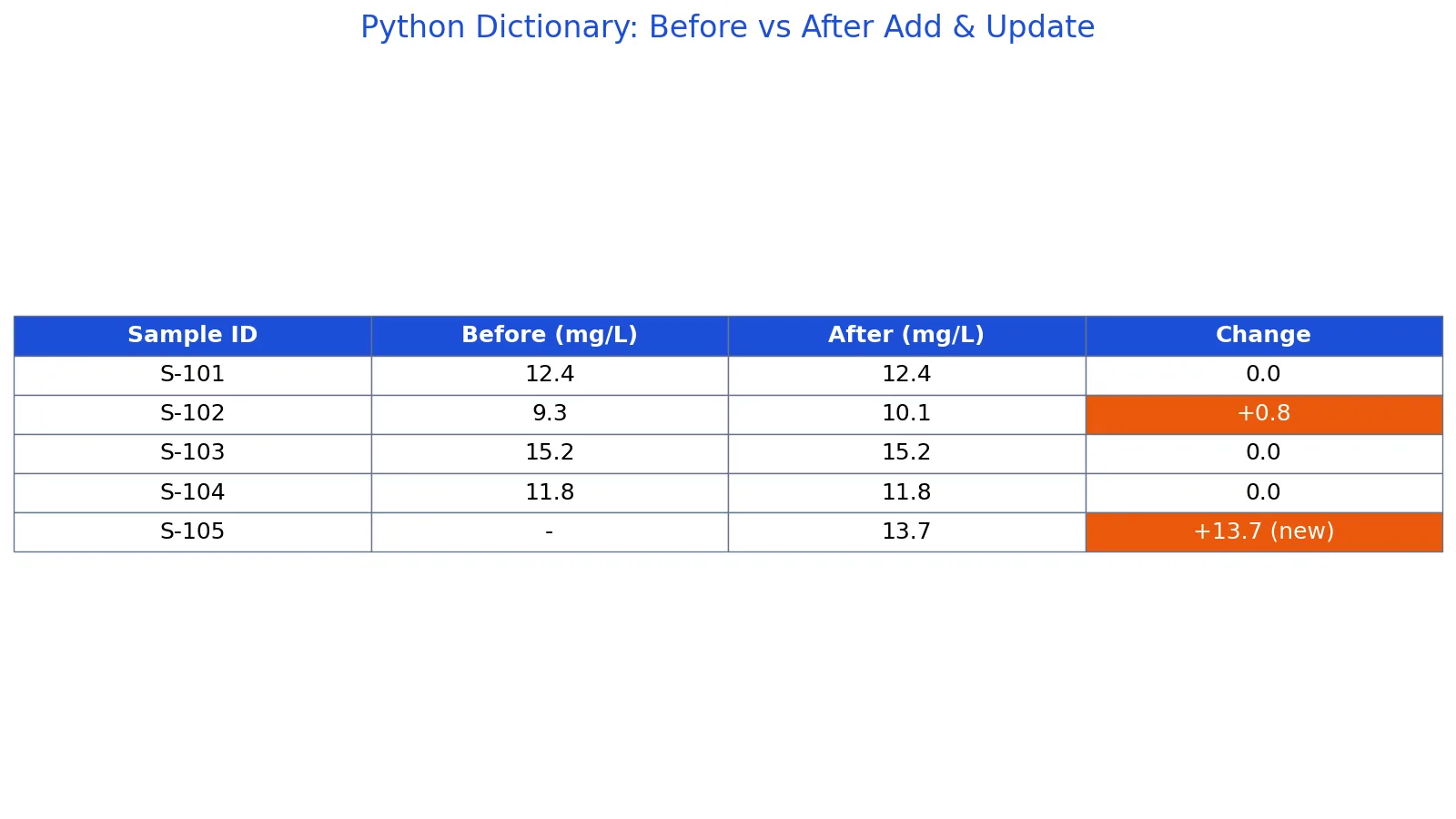
Start by creating the dictionary with four samples. The starting state holds 4 entries, with S-102 at 9.3.
Next, add a new sample S-105 with a concentration of 13.7. Assigning to a key that does not exist creates it, so len(samples) becomes 5.
Then update S-102. Its value was 9.3 and you assign 10.1. Because the key already exists, the old value is forgotten and replaced [1].
Finally, loop over the items and print each pair. The output follows insertion order, so S-105 appears last.
samples = {"S-101": 12.4, "S-102": 9.3, "S-103": 15.2, "S-104": 11.8}
samples["S-105"] = 13.7   # add a new sample
samples["S-102"] = 10.1   # update an existing value
for sid, conc in samples.items():
    print(f"{sid}: {conc} mg/L")
Output:
S-101: 12.4 mg/L
S-102: 10.1 mg/L
S-103: 15.2 mg/L
S-104: 11.8 mg/L
S-105: 13.7 mg/L
The dictionary went from 4 entries to 5, and S-102 moved from 9.3 to 10.1. Nothing else changed.
How to Interpret It
Read the result as a lookup table, not a sequence. The position of a pair tells you when it was inserted, not what it means. The key carries the meaning.
Two numbers matter in the worked example. The count went from 4 to 5, which confirms the addition. The S-102 value went from 9.3 to 10.1, which confirms the overwrite. If you expected 4 entries after adding a sample, you would have a bug in how you assigned the key.
When you print a dictionary, you see the current state, not a history. If you need to track changes over time, store the history separately, for example as a list of dictionaries or a table. This is the same discipline you apply when you document variables in a data dictionary for research teams, where each field name has one agreed meaning.
When to Use It (and when not to)
Use a dictionary when you need fast lookup by a meaningful label. Sample IDs, parameter names, configuration settings and counts by category are all natural fits. Use it when you need to attach metadata to an identifier, or when you want to count occurrences of things.
Avoid a dictionary when order is the primary meaning of your data and you will index by position. A list is clearer there. Avoid it when you need arithmetic across columns, filtering by condition, or joining two tables. That work belongs in a DataFrame, and Pandas in Python: What It Is and How to Use DataFrames explains how to move from raw dictionaries into that structure.
Also avoid using a dictionary as a database. It lives in memory, it disappears when the process ends, and it has no query language.
Dictionary vs List
| Feature | Dictionary | List |
|---|---|---|
| Access by | Key | Integer position |
| Order meaning | Insertion order [1] | Positional order |
| Duplicate keys | Not allowed [1] | Duplicates allowed |
| Typical use | Labeled lookup | Ordered sequence |
| Missing access | KeyError [1] | IndexError |
The practical test is simple. If you would ask "what is the value for S-102," use a dictionary. If you would ask "what is the third item," use a list.
Common Mistakes
- Using
d[key]on a key that may not exist. This raisesKeyError[1]. Used.get(key)ord.get(key, default)instead. - Assuming a missing key returns
Nonefrom subscript access. It does not. Onlyget()returnsNoneby default [1]. - Trying to use a list as a key. Lists are not hashable. Convert to a tuple if the contents are fixed.
- Expecting duplicate keys to coexist. The second assignment overwrites the first, and the old value is forgotten [1].
- Mutating a dictionary while iterating over it. Collect the keys you want to change first, then apply the changes.
- Confusing
dict.items()withdict.keys().items()yields pairs, so you need two loop variables.
Limitations
A dictionary cannot enforce a schema. Nothing stops you from storing a string under one key and a number under another, and nothing warns you when a value has the wrong type or unit. Validation is your responsibility.
Dictionaries also do not support vectorized operations. You cannot add 1 to every value with a single expression the way you can with a numeric array or a DataFrame column. For anything beyond simple lookups and counts, you will usually convert to a table structure. Memory use is another constraint, since each entry carries key and value overhead, which matters when you hold millions of pairs.
Frequently Asked Questions
How do I create an empty dictionary in Python?
Use a pair of braces with nothing inside, or call the constructor with no arguments. Both produce an empty dictionary you can fill later. The braces form is shorter and is the common choice in code.
What is the difference between d[key] and d.get(key)?
Subscript access returns the value and raises KeyError when the key is absent [1]. The get() method returns None by default, or a default you supply, when the key is absent [1]. Use get() whenever the key might not be there.
Can a dictionary have duplicate keys?
No. Keys are unique within one dictionary [1]. If you assign a value to a key that already exists, the old value is replaced. If you need multiple values per key, store a list as the value.
Does a Python dictionary keep its order?
Yes. Iterating a dictionary returns keys in insertion order, and list(d) gives you the keys in that same order [1]. If you need sorted output, apply sorted() to the keys.
How do I loop through a dictionary?
Call items() and unpack each pair into two variables, one for the key and one for the value. If you only need keys, iterate the dictionary directly. If you only need values, call values().
References
Further Reading
- collections, Container datatypes, Python 3.14.8 documentation
- Harris CR, Millman KJ, van der Walt SJ et al. (2020). Array programming with NumPy. Nature
- McKinney W (2010). Data Structures for Statistical Computing in Python. Proceedings of the Python in Science Conference
- The Python Tutorial
- Wilson G, Bryan J, Cranston K et al. (2017). Good enough practices in scientific computing. PLOS Computational Biology