pandas read_csv usecols: Select Columns When Reading Files
By Dr. Zubair Khalid, DVM, MS, PhD ·
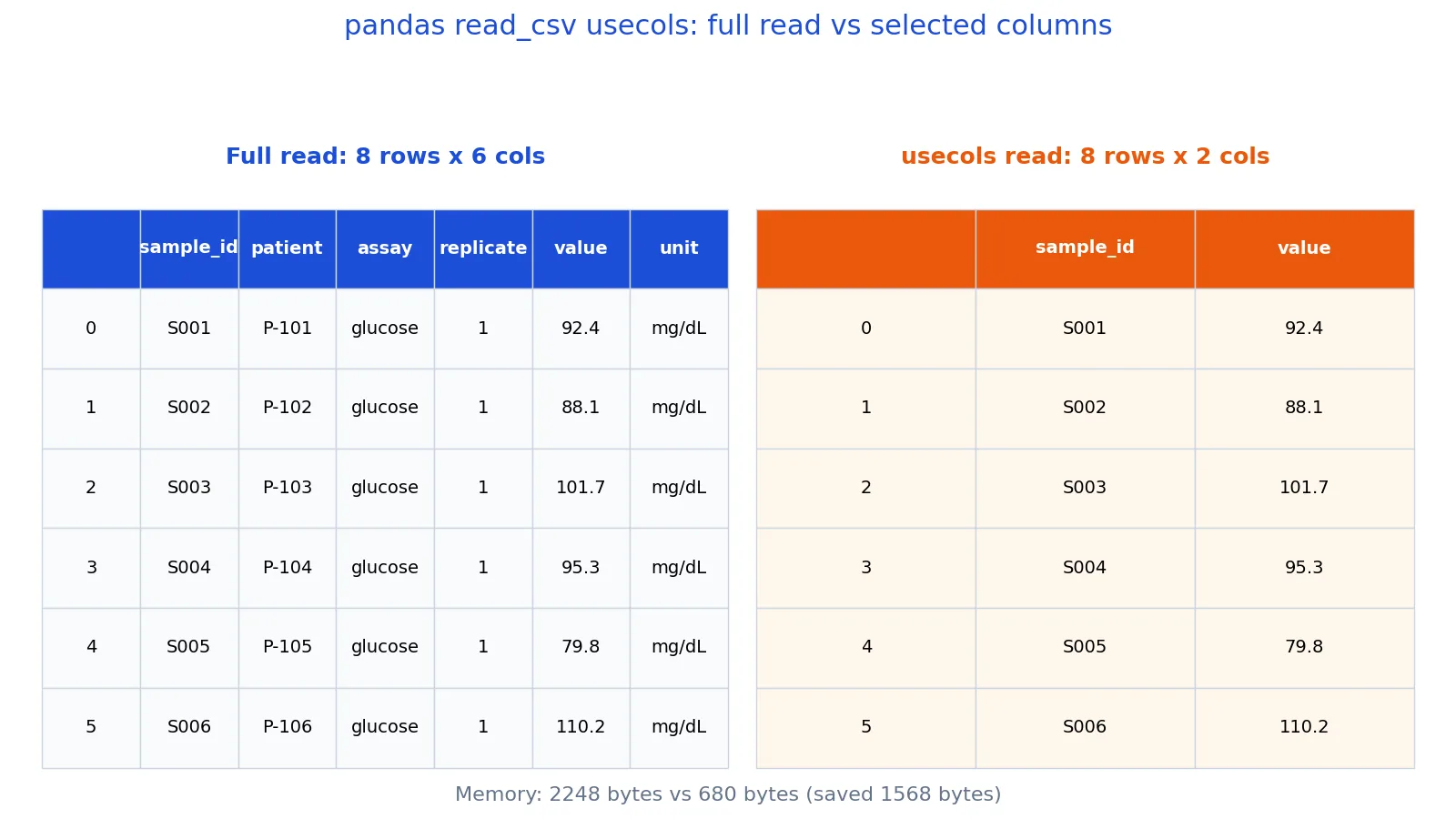
If you want to load only part of a CSV file, the usecols parameter in pandas.read_csv is the direct tool for the job. You pass it a list of column names or column positions, and pandas parses only those columns into the DataFrame. This keeps the same values you would get from a full read, while using less memory and less time.
Quick Answer
usecolsaccepts a list of column names, a list of integer positions, or a callable that takes a column name and returnsTrueorFalse.- Name-based selection is safer than position-based selection because it survives column reordering in the file.
- Columns are returned in the order they appear in the file, not in the order you list them. Reorder afterward with
df[[...]]if needed. - The values in the kept columns are identical to a full read. Only the shape and memory footprint change.
- You can combine
usecolswithdtype,parse_dates, andindex_colto control types and indexing at load time.
Syntax
pandas.read_csv(filepath_or_buffer, usecols=None, ...)
| Argument | Required? | Meaning |
|---|---|---|
filepath_or_buffer | Yes | Path to the CSV file, a URL, or a file-like object. |
usecols | No | Which columns to read. Accepts a list of names, a list of integer positions, or a callable. Default None reads all columns. |
dtype | No | Type or dict of types for the columns you keep. |
index_col | No | Column to use as the row labels of the returned DataFrame. |
parse_dates | No | Columns to parse as dates. |
header | No | Row number to use as the column names. Default 0 (first row). |
names | No | Custom column names to use instead of the header row. |
The usecols argument is optional, so omitting it reads every column. When you pass names, pandas matches them against the header row. When you pass integers, it matches them against positions starting at 0.
How It Works
pandas reads the header row first to learn the column names. Then it decides which columns to keep based on usecols. Only the kept columns are parsed into memory, so the parser skips the rest of the text on each line.
Three forms of usecols behave differently:
- A list of strings, such as
["sample_id", "value"], selects by name. The output columns follow the order of the file, not your list. - A list of integers, such as
[0, 4], selects by position. Position 0 is the first column in the file. - A callable, such as
lambda name: name.startswith("sample"), keeps any column whose name returnsTrue.
Name-based selection raises an error if a name is missing. Position-based selection raises an error if a position is out of range. Both behaviors are useful because they stop a silent mismatch between your code and the file.
Because the parser skips unselected fields, the memory saving scales with how many columns you drop. The row count never changes. If you later need the dropped columns, you must re-read the file or read them in a separate pass.
Worked Example
The dataset is a lab glucose file with 8 samples across 6 columns.
| sample_id | patient | assay | replicate | value | unit |
|---|---|---|---|---|---|
| S001 | P-101 | glucose | 1 | 92.4 | mg/dL |
| S002 | P-102 | glucose | 1 | 88.1 | mg/dL |
| S003 | P-103 | glucose | 1 | 101.7 | mg/dL |
| S004 | P-104 | glucose | 1 | 95.3 | mg/dL |
| S005 | P-105 | glucose | 1 | 79.8 | mg/dL |
| S006 | P-106 | glucose | 1 | 110.2 | mg/dL |
| S007 | P-107 | glucose | 1 | 84.6 | mg/dL |
| S008 | P-108 | glucose | 1 | 97.9 | mg/dL |
The columns available in the file are ['sample_id', 'patient', 'assay', 'replicate', 'value', 'unit']. A full read returns a shape of 8 rows by 6 columns. Reading with usecols=["sample_id", "value"] returns 8 rows by 2 columns, and the kept columns are ['sample_id', 'value'].
import pandas as pd

full = pd.read_csv("lab.csv")
subset = pd.read_csv("lab.csv", usecols=["sample_id", "value"])

print(full.shape)    # (8, 6)
print(subset.shape)  # (8, 2)
print(subset.columns.tolist())  # ['sample_id', 'value']
Output:
(8, 6)
(8, 2)
['sample_id', 'value']
The mean of value is 93.7500 in both reads. Dropping four columns did not touch the data you kept. Memory tells the same story. The full read holds 2248 bytes, the usecols read holds 680 bytes, and the difference is 1568 bytes saved. On a wide file with hundreds of columns, that gap grows quickly.
More Examples
Select by position when the file has no header or when you want to be explicit about physical order:
subset = pd.read_csv("lab.csv", usecols=[0, 4]) # first and fifth columnsSelect with a callable when the rule is easier to express as a condition:
subset = pd.read_csv("lab.csv", usecols=lambda name: name in {"sample_id", "value"})Combine usecols with index_col to make a kept column the row index:
subset = pd.read_csv("lab.csv", usecols=["sample_id", "value"], index_col="sample_id")Combine usecols with dtype to control types only for the columns you load:
subset = pd.read_csv("lab.csv", usecols=["sample_id", "value"], dtype={"value": "float32"})After loading, you can slice further with label-based selection. The pandas loc guide covers row and column selection on an already-loaded DataFrame, which is the right tool once the data is in memory. If you are new to the library, start with what pandas is and how DataFrames work before tuning read options.
Errors and How to Fix Them
ValueError: Usecols do not match columns, columns expected but not found: ['value'] means a name in your list is not in the header. Check spelling, capitalization, and leading or trailing spaces in the header row. Print the header with pd.read_csv("lab.csv", nrows=0).columns.tolist() to see exactly what pandas sees.
ValueError: Usecols do not match columns, columns expected but not found: [4] with an integer list usually means the file has fewer columns than you assumed, or the header row is not where you think it is. Verify the column count and set header correctly.
ValueError: 'usecols' must either be list-like of all strings, all unicode, all integers or a callable. from passing a single string instead of a list is a common slip. usecols="value" is not the same as usecols=["value"]. Wrap single names in a list.
Repeated header names do not raise an error. pandas renames the duplicates, so a second value column becomes value.1. Select it by that name or by position.
Common Mistakes
- Passing a single string instead of a list. Fix: use
usecols=["value"]. - Mixing names and positions in one list, such as
["sample_id", 4]. Fix: pick one style and stay consistent. - Assuming output order matches your
usecolslist. Fix: remember the output follows the file order, so reorder withdf[["value", "sample_id"]]after loading if you need a different order. - Selecting by position on a file whose column order may change. Fix: select by name so the code breaks loudly instead of silently reading the wrong column.
- Forgetting that
usecolsdoes not filter rows. Fix: usenrowsfor a row limit or filter after loading. - Expecting dropped columns to be recoverable from the returned DataFrame. Fix: re-read the file if you need them later.
Limitations
usecols only controls which columns enter memory. It cannot filter rows, change values, or fix malformed rows. If a row has the wrong number of fields, the parser still has to deal with it, and errors such as ParserError can still occur even when the offending field is in a column you dropped.
Position-based selection is fragile. If someone inserts a column at the front of the file, every position shifts by one and your code reads the wrong data without raising an error, as long as the positions are still in range. Name-based selection fails loudly in that situation, which is usually what you want. Also note that usecols does not reduce the cost of reading the header or scanning line boundaries, so on a file with very few columns the saving is modest.
Frequently Asked Questions
Does usecols change the values in the columns I keep?
No. The kept columns contain exactly the same values as a full read. In the worked example, the mean of value is 93.7500 whether you read all 6 columns or just 2. Only the shape and memory footprint change.
Can I use usecols with column positions instead of names?
Yes. Pass a list of integers, where 0 is the first column. This is useful for headerless files or when you know the physical layout. Names are generally safer because they survive column reordering.
What happens if a column name in usecols does not exist?
pandas raises a ValueError listing the names it could not find. This is intentional, since a silent mismatch would give you a DataFrame missing data you thought you had loaded.
Does usecols make reading faster?
It reduces parse work and memory because unselected fields are skipped. The gain depends on how many columns you drop and how wide the file is. On the 6-column example, memory dropped from 2248 bytes to 680 bytes.
Can I select columns by a pattern with usecols?
Yes, pass a callable. For example, usecols=lambda name: name.startswith("sample") keeps every column whose name begins with "sample". The callable receives each column name and returns True to keep it.
References
This article draws on the standard references listed under Further Reading.
Further Reading
- Harris CR, Millman KJ, van der Walt SJ et al. (2020). Array programming with NumPy. Nature
- McKinney W (2010). Data Structures for Statistical Computing in Python. Proceedings of the Python in Science Conference
- The Python Tutorial
- Wilson G, Bryan J, Cranston K et al. (2017). Good enough practices in scientific computing. PLOS Computational Biology
- Virtanen P, Gommers R, Oliphant TE et al. (2020). SciPy 1.0: fundamental algorithms for scientific computing in Python. Nature Methods
- pandas User Guide