pandas str.contains: Filter Rows by Text in Python
By Dr. Zubair Khalid, DVM, MS, PhD ·
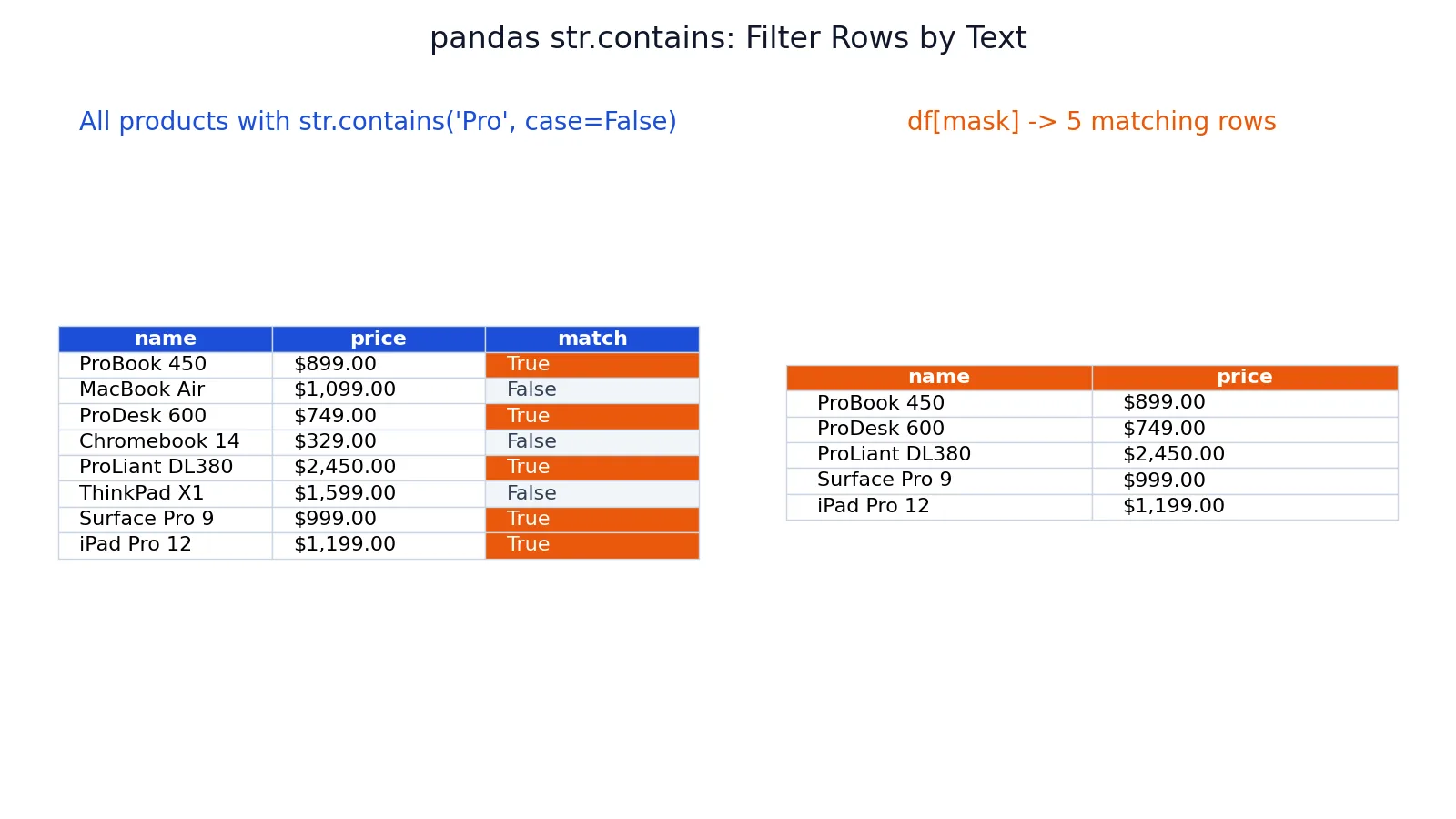
If you want to filter a pandas DataFrame by text, str.contains in Python is the tool you reach for. It tests each string in a Series against a substring or regular expression and returns a boolean mask you can pass straight into df[...]. This article covers the syntax, the arguments that matter, a full worked example, and the errors that trip people up.
Quick Answer
df['col'].str.contains('text')returns a boolean Series,Truewhere the pattern appears in the string.- Pass that mask into
df[mask]to keep only the matching rows. - Set
case=Falseto ignore capitalization. The default iscase=True, so'pro'and'Pro'are different by default. str.containstreats the pattern as a regular expression by default. Setregex=Falseto match literal text.- Missing values (
NaN) produceNaNin the mask, which raises an error when used for indexing. Handle them withna=False.
Syntax
The method is called on a string Series, not on the DataFrame itself.
Series.str.contains(pat, case=True, flags=0, na=None, regex=True)| Argument | Required? | Meaning |
|---|---|---|
pat | Yes | The substring or regular expression to search for. |
case | No | If True (default), the match is case sensitive. If False, case is ignored. |
flags | No | Regex flags passed to the underlying engine, such as re.IGNORECASE. |
na | No | Value to use for missing entries. The default None leaves NaN in the result. |
regex | No | If True (default), pat is treated as a regular expression. If False, it is matched literally. |
The return value is a boolean Series aligned to the original index.
How It Works
str.contains walks each string element of the Series and asks whether the pattern appears anywhere inside it. Non-string elements such as numbers or missing values are not converted, they produce a missing value in the result. The result is a Series of True and False values with the same index as the input.
That boolean Series is a mask. When you write df[mask], pandas keeps the rows where the mask is True and drops the rest. The row order is preserved, and the index labels travel with the rows.
Two behaviors are worth remembering. First, the search is a substring search by default, so 'Pro' matches 'ProBook', 'Surface Pro 9', and 'iPad Pro 12' alike. Second, because regex=True is the default, characters like ., *, +, ?, (, ), [, ], ^, and $ carry special meaning. If your search text contains any of those and you want a literal match, pass regex=False.
The mask is a plain boolean Series, so it composes with other masks using & (and), | (or), and ~ (not). Wrap each condition in parentheses when you combine them.
Worked Example
The dataset is a small product catalog with 8 product names and prices.
| name | price |
|---|---|
| ProBook 450 | 899 |
| MacBook Air | 1099 |
| ProDesk 600 | 749 |
| Chromebook 14 | 329 |
| ProLiant DL380 | 2450 |
| ThinkPad X1 | 1599 |
| Surface Pro 9 | 999 |
| iPad Pro 12 | 1199 |
Build the DataFrame and apply the mask.
import pandas as pd
df = pd.DataFrame({
    "name": ["ProBook 450", "MacBook Air", "ProDesk 600", "Chromebook 14",
             "ProLiant DL380", "ThinkPad X1", "Surface Pro 9", "iPad Pro 12"],
    "price": [899.00, 1099.00, 749.00, 329.00, 2450.00, 1599.00, 999.00, 1199.00],
})
mask = df['name'].str.contains('Pro', case=False)
filtered = df[mask]
print(filtered)
Output:
             name   price
0     ProBook 450   899.0
2     ProDesk 600   749.0
4  ProLiant DL380  2450.0
6   Surface Pro 9   999.0
7     iPad Pro 12  1199.0
Step by step:
- The DataFrame has 8 rows and columns
['name', 'price']. str.contains('Pro', case=False)produces the mask[True, False, True, False, True, False, True, True].mask.sum()is 5, so 5 of 8 rows match, which is 62.5%.- With
case=Truethe count is still 5, because every match here already has a capitalPro. - Using the regex
r'^Pro'gives 3 matches, since only three names start withPro. df[mask]returns the 5 rows:ProBook 450,ProDesk 600,ProLiant DL380,Surface Pro 9, andiPad Pro 12.
Notice that Surface Pro 9 and iPad Pro 12 match even though Pro is not at the start. That is the substring behavior in action. If you only want names that begin with Pro, anchor the pattern with ^.
More Examples
Case-sensitive search. The default is case=True.
df[df['name'].str.contains('pro')] # 0 rows, lowercase 'pro' appears nowhereIgnore case. Add case=False to catch every capitalization.
df[df['name'].str.contains('pro', case=False)] # 5 rowsAnchor to the start with regex. The ^ character means "start of string."
df[df['name'].str.contains(r'^Pro')] # 3 rows: ProBook, ProDesk, ProLiantMatch literal text with special characters. Turn off regex so + and . are treated as plain characters.
df[df['name'].str.contains('X1', regex=False)] # 1 row: ThinkPad X1Combine two conditions. Use & for AND and | for OR, with parentheses around each mask.
mask = df['name'].str.contains('Pro', case=False) & (df['price'] > 1000)
df[mask]  # ProLiant DL380 and iPad Pro 12
Handle missing values. Pass na=False so NaN entries become False instead of NaN.
df['name'].str.contains('Pro', case=False, na=False)If you need to select rows and columns by label at the same time, pandas loc accepts the same boolean mask and lets you name the columns you want back.
Errors and How to Fix Them
ValueError: Cannot mask with non-boolean array containing NA / NaN values. This happens when the column has missing values and you did not set na. The mask contains NaN, and pandas cannot index with it. Fix it by passing na=False.
df[df['name'].str.contains('Pro', case=False, na=False)]AttributeError: Can only use .str accessor with string values. The column is not a string dtype, often because it is numeric or mixed. Convert it first with df['col'].astype(str) before calling .str.contains.
re.error: nothing to repeat or similar regex errors. Your pattern contains regex metacharacters that are not valid on their own, such as a leading * or +. Escape them with a backslash or set regex=False for a literal match.
TypeError: bad operand type for unary ~: 'float'. You applied ~ to a mask that contains NaN. Set na=False so the mask is purely boolean before negating it.
Common Mistakes
- Forgetting
case=False. The default is case sensitive, so'pro'will not match'ProBook'. Addcase=Falsewhen capitalization should not matter. - Leaving
regex=Truewith special characters. A pattern like'C++'or'a.b'is interpreted as a regex. Passregex=Falsefor literal matching. - Ignoring
NaNvalues. Missing entries produceNaNin the mask and break indexing. Always setna=Falsewhen the column may have gaps. - Using
and/orinstead of&/|. Python'sandandordo not work element-wise on Series. Use&and|and wrap each condition in parentheses. - Calling
str.containson the DataFrame. The method lives on a Series. Writedf['name'].str.contains(...), notdf.str.contains(...). - Assuming
str.containsmatches whole strings. It matches substrings anywhere in the value. Anchor with^and$if you need the full string to match.
Limitations
str.contains is a substring and regex test, not a fuzzy matcher. It will not find 'Macbook' when the data says 'MacBook' unless you normalize case first, and it will not handle typos, transpositions, or near-matches. For approximate matching you need a different approach, such as normalizing the text or using a string similarity library.
It also operates element by element, so it does not scale as well as vectorized numeric operations on very large frames. On millions of rows, a regex pattern can be noticeably slower than a literal one, and regex=False is the faster path when you do not need pattern matching. Finally, the mask reflects the data as stored. Leading or trailing whitespace, invisible characters, and inconsistent encodings can all cause a match to fail even when the text looks correct on screen.
Frequently Asked Questions
How do I filter a DataFrame by substring in pandas?
Call str.contains on the string column to get a boolean mask, then index the DataFrame with it. For example, df[df['name'].str.contains('Pro', case=False)] keeps every row whose name contains Pro in any capitalization. The mask preserves row order and index labels.
What is the difference between case=True and case=False?
case=True is the default and makes the match case sensitive, so 'Pro' and 'pro' are treated as different patterns. case=False ignores capitalization and matches either form. Use case=False when your data has inconsistent capitalization, which is common in scraped or user-entered text.
Does str.contains use regular expressions by default?
Yes. The regex argument defaults to True, so the pattern is compiled as a regular expression. That means ^, $, ., *, and other metacharacters have special meaning. Set regex=False when you want the pattern treated as plain literal text.
How do I match text at the start or end of a string?
Use regex anchors. r'^Pro' matches strings that begin with Pro, and r'12$' matches strings that end with 12. You can combine them, as in r'^Pro.*450$', to require both ends to match. Anchors only work while regex=True.
Why does str.contains raise a ValueError about NaN?
The mask contains NaN for missing entries, and pandas cannot use a mask with missing values for indexing. Pass na=False so missing entries become False and the mask stays purely boolean. This is the most common fix for that error.
If you work in spreadsheets too, the same idea of testing whether a cell contains text appears in Excel CONTAINS checks and in Excel IF formulas for cell text, and you can return matching rows with the Excel FILTER function.
References
This article draws on the standard references listed under Further Reading.
Further Reading
- Harris CR, Millman KJ, van der Walt SJ et al. (2020). Array programming with NumPy. Nature
- McKinney W (2010). Data Structures for Statistical Computing in Python. Proceedings of the Python in Science Conference
- The Python Tutorial
- Wilson G, Bryan J, Cranston K et al. (2017). Good enough practices in scientific computing. PLOS Computational Biology
- Virtanen P, Gommers R, Oliphant TE et al. (2020). SciPy 1.0: fundamental algorithms for scientific computing in Python. Nature Methods
- pandas User Guide