c() in R: How to Create Vectors (With Examples)
By Dr. Zubair Khalid, DVM, MS, PhD ·
The c() function in R combines values into a vector. The name stands for "combine" or "concatenate," and it is one of the first functions anyone learning R meets. You use c in R to build vectors from individual values, from other vectors, or from a mix of both.
Quick Answer
c()combines its arguments into a single vector, in the order you list them.c(1, 2, 3)creates a numeric vector of length 3.c("a", "b")creates a character vector. The type is decided by R's coercion rules.c(vector1, vector2)concatenates two vectors into one longer vector.- The result is always a vector (an atomic vector, or a list when you pass a list), never a matrix or data frame. Set
recursive = TRUEto flatten lists into an atomic vector.
Syntax
The function has a simple signature. The arguments are:
| Argument | Required? | Meaning |
|---|---|---|
... | Yes | The values or vectors to combine. You can pass any number of them. |
recursive | No | Logical. If TRUE, c() descends into lists and combines their elements. Default is FALSE. |
use.names | No | Logical. If TRUE (the default), names on the arguments are kept in the result. |
A basic call looks like this:
c(1, 2, 3)That returns a numeric vector with the three values in order.
How It Works
c() takes every argument you give it and places the elements end to end. If you pass single values, you get a vector of those values. If you pass vectors, their elements are appended in sequence.
The type of the result follows R's coercion hierarchy. When you mix types, R picks the type that can hold everything. The order from least to most flexible is logical, integer, double, character. So c(1, "a") becomes a character vector, because "a" cannot be stored as a number. This is a common surprise for beginners.
Names behave in a specific way. If any argument has names, those names carry into the result. If an argument has no names, its elements get empty names in the output. You can control this with use.names.
For lists, c() behaves differently. It combines the list elements into a longer list by default. Setting recursive = TRUE flattens the result into a plain vector.
Worked Example
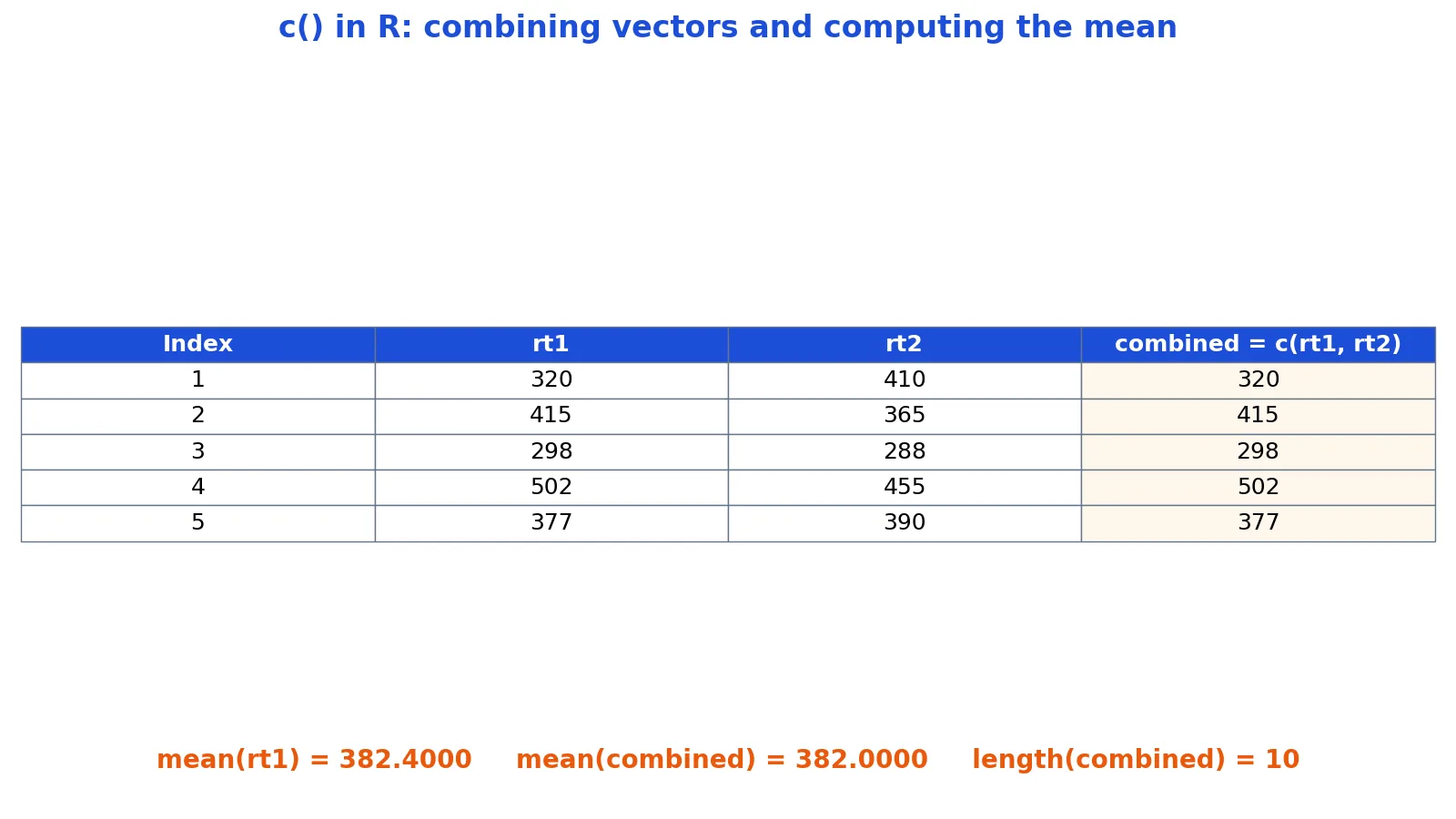
Suppose you recorded reaction times in milliseconds across two blocks of five trials each. The data look like this:
| Trial | rt1 | rt2 |
|---|---|---|
| 1 | 320 | 410 |
| 2 | 415 | 365 |
| 3 | 298 | 288 |
| 4 | 502 | 455 |
| 5 | 377 | 390 |
You can build each block as its own vector with c(), then combine them.
rt1 <- c(320, 415, 298, 502, 377)
rt2 <- c(410, 365, 288, 455, 390)
combined <- c(rt1, rt2)
mean(rt1)
mean(combined)
The output is:
mean(rt1) = 382.4000
mean(combined) = 382.0000
Step by step:
rt1 <- c(320, 415, 298, 502, 377)creates a numeric vector of length 5.rt2 <- c(410, 365, 288, 455, 390)creates a second numeric vector of length 5.combined <- c(rt1, rt2)concatenates them into a vector of length 10, holding all ten values in order.mean(rt1)returns 382.4000, the average of the first block.mean(combined)returns 382.0000, the average across both blocks.
The combined vector is 320, 415, 298, 502, 377, 410, 365, 288, 455, 390. Notice that the two means differ slightly. The first block averages 382.4000 and the full set averages 382.0000, because the second block pulls the overall average down a little.
More Examples
Character vectors. Combine text values the same way.
conditions <- c("control", "treatment", "placebo")Logical vectors. Useful for flags or filters.
passed <- c(TRUE, FALSE, TRUE, TRUE)Sequences inside c(). You can nest other functions.
c(1:3, 7, 9)This returns 1, 2, 3, 7, 9.
Named vectors. Names attach to the elements.
scores <- c(alice = 88, bob = 92, carol = 79)Concatenating many vectors at once. c() accepts any number of arguments.
all_rt <- c(rt1, rt2, c(300, 310))Checking length and type. After combining, inspect the result.
length(combined)
class(combined)
The first returns 10, the second returns "numeric".
If you need a vector of all ones for indexing or weights, see R ones: How to Create a Vector of Ones in R. To test membership after building a vector, the %in% operator in R is the standard tool. When you want conditional logic across a vector, ifelse in R applies element by element. To summarize a combined vector, how to find the median in R covers the details. If you plan to rescale values, how to normalize a vector walks through the formula.
Errors and How to Fix Them
Unexpected character output. If c(1, 2, "3") returns "1" "2" "3", that is coercion working as designed. Remove the quoted value or convert it with as.numeric().
NULL arguments disappear. c(1, NULL, 2) returns 1, 2. NULL is dropped because it has length zero. If you need a missing value, use NA instead.
Lists do not flatten by default. c(list(1, 2), list(3)) gives a list of three elements. Add recursive = TRUE to get a numeric vector.
Names get lost or duplicated. When you combine named vectors, duplicate names can appear. Use unname() or reassign names after combining.
Wrong length after combining. Check length() on each input before you combine. A silent recycling or a stray value changes the result.
Common Mistakes
- Mixing types without checking.
c(1, "a")silently becomes character. Fix: inspect withclass()after combining, or convert explicitly. - Forgetting that
c()dropsNULL. PassingNULLremoves the element entirely. Fix: useNAwhen you need a missing slot. - Assuming
c()flattens lists. It does not by default. Fix: setrecursive = TRUEwhen you want a flat vector. - Overwriting a vector by accident.
x <- c(x, new_value)grows the vector each time, which is slow in loops. Fix: preallocate withvector()and fill by index. - Using
c()where a data frame is needed.c()returns a vector, not a table. Fix: usedata.frame()orcbind()for tabular data. - Losing factor levels. Combining factors can produce unexpected levels. Fix: convert to character first, then combine.
Limitations
c() only builds vectors. It cannot create matrices, arrays, or data frames on its own. For those structures you need matrix(), array(), or data.frame(). It also does not check that the values you combine make sense together. If you mix units or types, R will coerce silently and you may not notice until later.
Performance is another limit. Growing a vector one element at a time inside a loop is slow because R copies the whole vector on each call. For large data, preallocate the vector and assign by position. Finally, c() does not preserve attributes like dimensions or factor structure in the way you might expect. Check the result with str() when the input has attributes.
Frequently Asked Questions
What does c() stand for in R?
The c stands for combine or concatenate. It joins its arguments into a single vector. The name reflects its job, which is to put values end to end in the order you supply them.
Is c() the same as the C programming language?
No. The c() function in R is unrelated to the C language. The shared letter is a coincidence. In R, c() is a base function for building vectors, and it has nothing to do with compiling C code.
How do I combine two vectors in R?
Pass both vectors to c() as arguments, like c(vector1, vector2). The result holds all elements of the first vector followed by all elements of the second. You can pass as many vectors as you like in one call.
Why does c(1, "a") return text?
R coerces mixed types to a common type. Since "a" is character and character can hold any value as text, the numbers become text too. The result is a character vector. Convert the text to a number first if you need numeric output.
Can c() create an empty vector?
Yes. c() with no arguments returns NULL, which has length zero. To create a typed empty vector, use numeric(0), character(0), or logical(0) depending on the type you need.
References
This article draws on the standard references listed under Further Reading.
Further Reading
- Wickham H (2014). Tidy Data. Journal of Statistical Software
- Wickham H, Averick M, Bryan J et al. (2019). Welcome to the Tidyverse. Journal of Open Source Software
- An Introduction to R (R Core Team)
- Wickham H, Cetinkaya-Rundel M, Grolemund G. R for Data Science (2e)
- ggplot2 Reference
- Wilson G, Bryan J, Cranston K et al. (2017). Good enough practices in scientific computing. PLOS Computational Biology