ifelse in R: Vectorized If-Else With Examples
By Dr. Zubair Khalid, DVM, MS, PhD ·
If you need to apply a condition to every element of a vector at once, ifelse() in R is the base function built for the job. It evaluates a logical test element by element and returns one value where the test is TRUE and another where it is FALSE. This article covers the syntax, how the function works, worked examples and the mistakes that trip people up.
Quick Answer
ifelse(test, yes, no)takes a logical vectortestand returns a vector of the same length.- Where
testisTRUE, the result takes the matching element ofyes. WheretestisFALSE, it takes the matching element ofno[1]. - The output length is determined by
test, soyesandnoare recycled when they are shorter [1]. - It is vectorized, so one call handles a whole column without a loop.
- For a single true/false decision, plain
if (test) yes else nois more efficient and often preferable [1].
Syntax
The function signature is ifelse(test, yes, no).
| Argument | Required? | Meaning |
|---|---|---|
test | Yes | An object that can be coerced to logical mode. Its length sets the output length. |
yes | Yes | The values returned where test is TRUE. |
no | Yes | The values returned where test is FALSE. |
All three arguments are required. There is no default for yes or no.
How It Works
ifelse() is a vectorized conditional. Instead of branching once, it walks the test vector and picks from yes or no at each position. The result is a vector with the same length as test [1].
The selection rule is simple. At position $i$:
$$ \text{result}_i = \begin{cases} \text{yes}_i & \text{if } \text{test}_i = \text{TRUE} \\ \text{no}_i & \text{if } \text{test}_i = \text{FALSE} \end{cases} $$
Two behaviors matter in practice.
First, yes and no are recycled. If yes is a single value like "Pass", it is reused at every position where the test is true. If yes is shorter than test but longer than one, R recycles it in order.
Second, missing values propagate. If test contains NA, the corresponding result is NA unless you handle it separately [1].
The type of the output follows the type of the values you return. Returning numbers gives a numeric vector. Returning strings gives a character vector. This is why ifelse() is convenient for labeling a column.
Worked Example
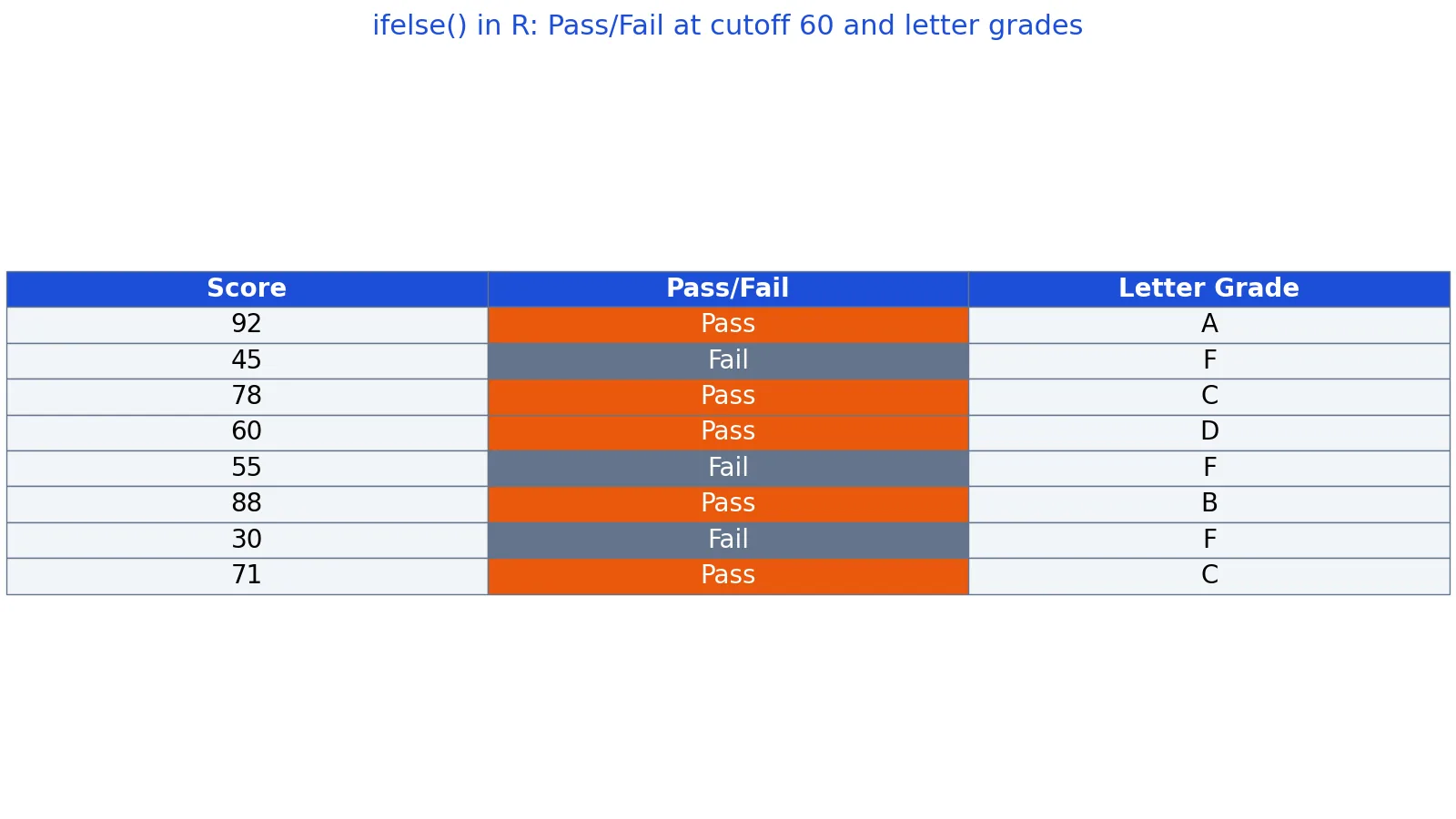
The dataset is a vector of eight student exam scores, used to label each score as Pass or Fail and then assign a letter grade.
| score | result | grade |
|---|---|---|
| 92 | Pass | A |
| 45 | Fail | F |
| 78 | Pass | C |
| 60 | Pass | D |
| 55 | Fail | F |
| 88 | Pass | B |
| 30 | Fail | F |
| 71 | Pass | C |
Step 1. Build the input vector.
scores <- c(92, 45, 78, 60, 55, 88, 30, 71)
Step 2. Set the cutoff at 60.
Step 3. Apply the pass/fail test with ifelse(score >= cutoff, 'Pass', 'Fail'). The results are 92 to Pass, 45 to Fail, 78 to Pass, 60 to Pass, 55 to Fail, 88 to Pass, 30 to Fail and 71 to Pass.
Step 4. Nest ifelse() calls to produce letter grades. The results are 92 to A, 45 to F, 78 to C, 60 to D, 55 to F, 88 to B, 30 to F and 71 to C.
Step 5. Count the outcomes. Pass equals 5 and Fail equals 3.
scores <- c(92, 45, 78, 60, 55, 88, 30, 71)
result <- ifelse(scores >= 60, "Pass", "Fail")
grade  <- ifelse(scores >= 90, "A",
          ifelse(scores >= 80, "B",
          ifelse(scores >= 70, "C",
          ifelse(scores >= 60, "D", "F"))))
data.frame(scores, result, grade)
Output:
  scores result grade
1     92   Pass     A
2     45   Fail     F
3     78   Pass     C
4     60   Pass     D
5     55   Fail     F
6     88   Pass     B
7     30   Fail     F
8     71   Pass     C
Notice that 60 lands in the Pass group and receives a D. The boundary is inclusive because the test uses >=. If you want 60 to fail, change the comparison to >.
The nested version reads from the top down. A score of 92 satisfies the first test, so the inner calls never run for that element. A score of 45 fails every test and falls through to the final "F".
More Examples
Labeling with a single value. When yes and no are single values, they recycle across the whole vector.
x <- c(3, -1, 0, 7, -4)
ifelse(x > 0, "positive", "non-positive")
Output:
[1] "positive" "non-positive" "non-positive" "positive" "non-positive"Returning numbers instead of text. The output type follows the returned values, so you can build a numeric flag.
x <- c(3, -1, 0, 7, -4)
ifelse(x > 0, x, 0)
Output:
[1] 3 0 0 7 0Handling missing values. If the test contains NA, the result is NA at that position [1]. You can catch it with a nested call.
x <- c(3, NA, -1)
ifelse(is.na(x), "missing", ifelse(x > 0, "positive", "negative"))
Output:
[1] "positive" "missing" "negative"Combining with membership tests. The %in% operator returns a logical vector, which is exactly what ifelse() expects. You can read more about it in The %in% Operator in R: Syntax and Examples.
colors <- c("red", "blue", "green", "red")
ifelse(colors %in% c("red", "blue"), "primary", "other")
Output:
[1] "primary" "primary" "other" "primary"Inside a data frame. Because ifelse() returns a vector the same length as the test, it drops neatly into a new column.
df <- data.frame(scores = c(92, 45, 78, 60))
df$result <- ifelse(df$scores >= 60, "Pass", "Fail")
df
Output:
  scores result
1     92   Pass
2     45   Fail
3     78   Pass
4     60   Pass
If you are reshaping columns after this step, the R transform Function: Syntax and Examples article shows how to add or modify columns in one call.
Errors and How to Fix Them
"argument 'no' is missing, with no default". You supplied only two arguments. All three are required. Add the no value.
"the condition has length > 1". This error comes from if, not ifelse(). R 4.2.0 and later stop with this error, while older versions only warned that the first element would be used. You wrote if (x > 0) where x is a vector. Switch to ifelse(x > 0, ...) for element-wise work.
Unexpected NA in the output. Your test vector contains NA. Either filter those rows out first or add a nested is.na() branch as shown above.
Wrong output type. If you mix numbers and strings in yes and no, R coerces everything to character. Keep both branches the same type.
Length mismatch surprises. If yes or no is longer than test, the extra elements are ignored. If it is shorter, it is recycled. Check length(test) when the output looks wrong.
Common Mistakes
- Using
ifelse()for a single condition. Iftestis one true/false value,if (test) yes else nois faster and clearer [1]. Reserveifelse()for vectors. - Forgetting that
NApropagates. A missing value in the test produces a missing value in the result. Add an explicitis.na()branch when you want a label instead. - Expecting class attributes to survive.
ifelse()strips attributes such as the class of aDateor a factor, so dates can come back as plain numbers [1]. Reassign the class afterward or use a different approach. - Nesting too deeply. Four or five levels of nested
ifelse()become hard to read and easy to get wrong. Considercut()for numeric bins or a lookup table for many categories. - Assuming both branches are evaluated lazily. Both
yesandnoare evaluated in full before selection, so expensive expressions run for every element. - Mixing types across branches. Returning a number in
yesand a string innoforces the whole vector to character, which can silently break later arithmetic.
Limitations
ifelse() is designed for vectors, not for control flow. It cannot skip work the way if does, because both branches are computed for the entire vector before the selection happens. For a single decision, if is more efficient and often preferable [1].
The function also drops attributes. When you pass a Date or a factor through ifelse(), the class information is not carried into the result, so the output may not behave like the input [1]. This is a documented case where it is better not to use ifelse() and to index the vector directly instead [1].
Finally, ifelse() has no built-in way to handle missing values in the condition. The tidyverse if_else() function adds a missing argument for exactly this case and preserves types, which makes it a better fit when type stability matters [2]. If you work mostly in base R, nested is.na() checks cover the same ground.
Frequently Asked Questions
What is the difference between if and ifelse in R?
if evaluates a single logical value and runs one block of code. ifelse() takes a logical vector and returns a vector of the same length, choosing element by element. Use if for control flow and ifelse() for column-wise or vector-wise transformations.
Does ifelse in R work on data frame columns?
Yes. A column is a vector, so ifelse(df$score >= 60, "Pass", "Fail") returns a vector you can assign to a new column. This is one of the most common uses of the function in data analysis.
How do I handle NA values with ifelse?
Add a branch that tests for missingness before the main comparison, as in ifelse(is.na(x), "missing", ifelse(x > 0, "positive", "negative")). Without this, any NA in the test produces an NA in the result [1].
Can I nest multiple ifelse calls?
Yes, and the worked example above does exactly that to assign letter grades. Keep the nesting shallow, ideally three or four levels. Beyond that, a lookup table or cut() is easier to read and maintain.
Why does ifelse return numbers when I expected dates?
ifelse() does not preserve the class attribute of its inputs, so a Date vector can come back as numeric [1]. Reassign the class with class(result) <- "Date" or index the original vector directly instead of using ifelse().
Is ifelse faster than a for loop?
For most vector operations, yes. ifelse() is implemented in compiled code and avoids the overhead of an explicit R loop. The gap widens as the vector grows, which is why vectorized logic is preferred in R.
If you are building up the vectors you feed into ifelse(), the c() in R: How to Create Vectors (With Examples) article covers the basics, and How to Find the Median in R (With Examples) shows another common summary step you can pair with conditional labels.
References
Further Reading
- Wickham H (2014). Tidy Data. Journal of Statistical Software
- Wickham H, Averick M, Bryan J et al. (2019). Welcome to the Tidyverse. Journal of Open Source Software
- An Introduction to R (R Core Team)
- Wickham H, Cetinkaya-Rundel M, Grolemund G. R for Data Science (2e)