How to Update a Row in SQL (UPDATE Statement)
By Dr. Zubair Khalid, DVM, MS, PhD ·
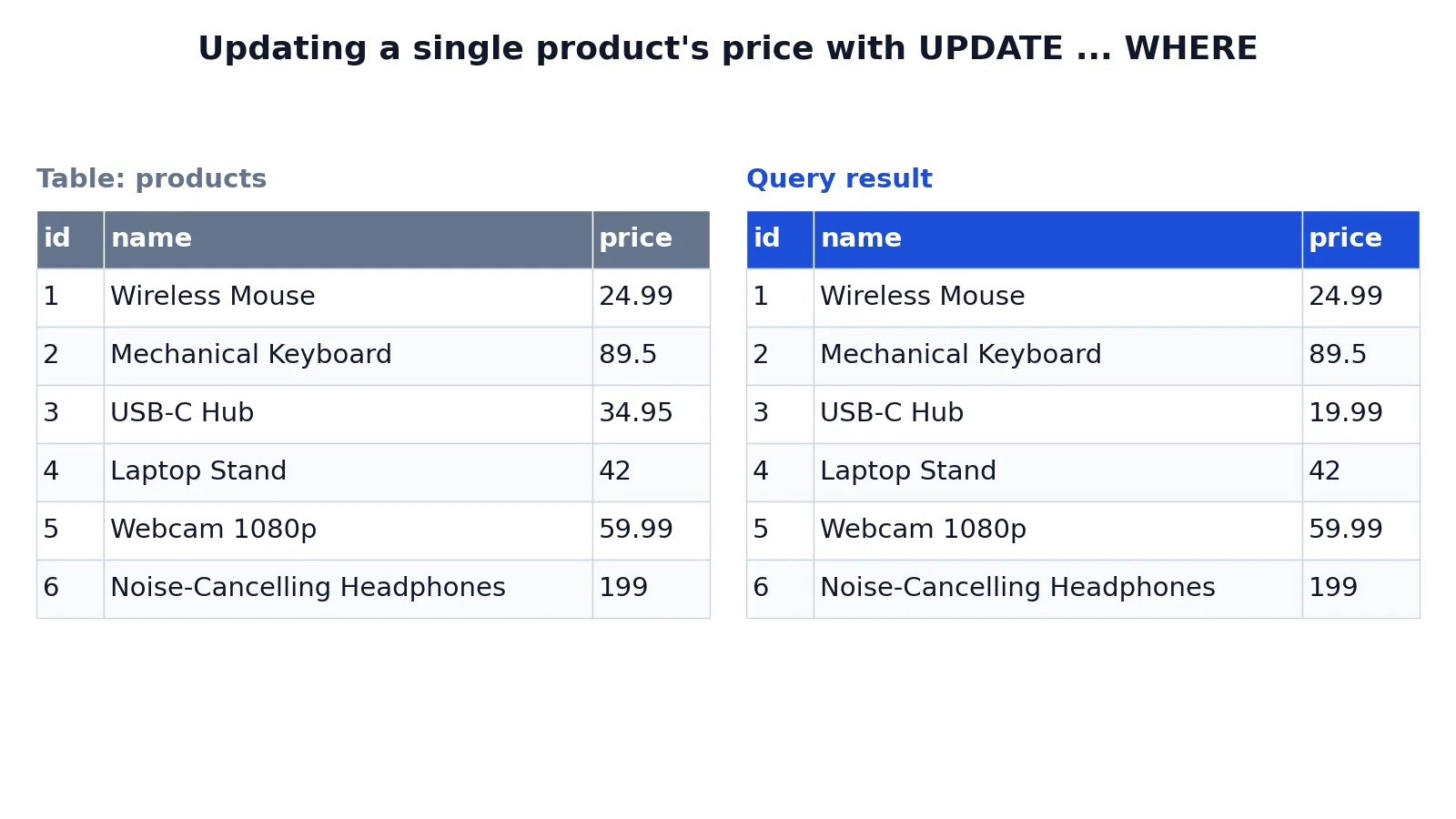
To update a row in SQL, use the UPDATE statement with a WHERE clause that identifies the row you want to change. The SET clause holds the new values, and the WHERE clause decides which rows receive them. Without a WHERE clause, every row in the table is updated.
Quick Answer
- Syntax:
UPDATE table_name SET column = value WHERE condition; SETassigns new values. You can list several assignments separated by commas.WHEREfilters the rows. Only rows where the condition is true get modified.- Always run a
SELECTwith the sameWHEREclause first to preview the affected rows. - The database reports how many rows were updated, which is your confirmation that the filter matched what you expected [1].
Before You Start
You need three things before you write the statement.
First, the exact table name. If your database has multiple schemas, qualify the name, for example sales.products.
Second, the exact column names. A typo in a column name raises an error, so the statement fails safely. A typo in a value does not. Writing 19.99 when you meant 199.99 updates the row with the wrong number and reports success.
Third, a way to identify the target rows. The safest identifier is the primary key, because it is unique by definition. If you filter on a non-unique column such as name or status, you may match more rows than you intend.
If you are new to reading tables, review the SQL SELECT statement first. Reading data is the skill that makes writing data safe.
One more habit worth building: check whether your client runs statements in autocommit mode. In autocommit mode, the change is permanent the moment you run it. In a transaction, you can inspect the result and roll back if something looks wrong.
Step by Step
- Write a SELECT with your intended filter. Run
SELECT * FROM products WHERE id = 3;and look at the rows returned. If you see one row and it is the right one, your filter is correct.
- Count the matches. Run
SELECT COUNT(*) FROM products WHERE id = 3;. If the count is larger than you expected, tighten the condition before you change anything.
- Write the UPDATE. Start with the table name, then
SET, then the column and its new value, then theWHEREclause.
- Run the statement. The database returns a command tag showing how many rows were updated [1].
- Verify with a SELECT. Re-run the same
SELECTfrom step 1 and confirm the new value appears in the right row and nowhere else.
- Commit or roll back. If you opened a transaction and the result is correct, commit. If not, roll back and start again.
The order matters. Steps 1 and 2 cost nothing and catch most mistakes before they touch your data.
Worked Example
The example uses a small products table with six rows, one per product, holding an id, a name, and a price.
Here is the table before the change.
| id | name | price |
|---|---|---|
| 1 | Wireless Mouse | 24.99 |
| 2 | Mechanical Keyboard | 89.50 |
| 3 | USB-C Hub | 34.95 |
| 4 | Laptop Stand | 42.00 |
| 5 | Webcam 1080p | 59.99 |
| 6 | Noise-Cancelling Headphones | 199.00 |
The goal is to lower the price of the USB-C Hub to 19.99 and leave every other product alone.
UPDATE products
SET price = 19.99
WHERE id = 3;
Each line has a job. UPDATE products names the table whose existing rows you want to modify. SET price = 19.99 assigns the new value to the price column for every row matched by the WHERE clause. WHERE id = 3 restricts the change to the single row whose id is 3, so no other product's price is touched. The check query selects the table so you can confirm only row 3 changed and the other five rows kept their original prices.
The result was checked with an equivalent SQLite query. Here is the table after the update.
| id | name | price |
|---|---|---|
| 1 | Wireless Mouse | 24.99 |
| 2 | Mechanical Keyboard | 89.50 |
| 3 | USB-C Hub | 19.99 |
| 4 | Laptop Stand | 42.00 |
| 5 | Webcam 1080p | 59.99 |
| 6 | Noise-Cancelling Headphones | 199.00 |
Row 3 now reads 19.99. Rows 1, 2, 4, 5, and 6 are unchanged. The command tag reported one row updated, which matches the single row the filter selected [1].
If you want to add rows instead of changing them, the INSERT statement guide covers that path.
Other Ways to Do It
Update several columns at once. Separate assignments with commas.
UPDATE products
SET price = 19.99, name = 'USB-C Hub (2024)'
WHERE id = 3;
Update several rows with one condition. Use the IN operator to list the ids you want. The SQL IN operator keeps the clause readable when the list grows.
UPDATE products
SET price = 19.99
WHERE id IN (3, 5);
Compute the new value from the old one. The right side of SET can reference the current column value.
UPDATE products
SET price = price * 0.9
WHERE id = 3;
That statement applies a 10 percent discount to the existing price. The general form is:
$$new\_value = f(old\_value)$$
Update from another table. Many databases support UPDATE ... FROM or a correlated subquery, which lets you pull values from a second table. The exact syntax differs by database, so check your engine's documentation.
Return the changed rows. PostgreSQL supports a RETURNING clause, which returns the updated rows like a SELECT would [1]. That saves a separate verification query.
Replace text inside a value. If you only need to swap a substring, the SQL REPLACE function can do it inside the SET clause.
Troubleshooting
The statement ran but nothing changed. Your WHERE clause matched zero rows. A command tag of 0 is not an error, it just means no rows were updated [1]. Re-run your SELECT with the same condition and see what it returns.
You got a syntax error near SET. Check the table name and the comma placement. Missing commas between assignments and stray commas before WHERE are the usual causes.
The value type does not match the column. Assigning text to a numeric column fails in most databases. Convert the value first, or quote it correctly if the column stores text.
A trigger blocked the change. A BEFORE UPDATE trigger can suppress an update, so the reported count may be lower than the number of rows your condition matched [1].
A concurrent session caused a serialization failure. In PostgreSQL, if one session updates a row's partition key while another session updates or deletes that same row, the second session can fail with SQLSTATE 40001. Retrying the transaction is the recommended response [1].
You updated too many rows. If you are inside a transaction, roll back. If you already committed, you need a second UPDATE to restore the old values, which means you must know what they were.
Common Mistakes
- Forgetting the WHERE clause.
UPDATE products SET price = 19.99;changes every row in the table. Fix: write theWHEREclause first, then fill inSET. - Using a condition that matches more rows than you think. Filtering on a non-unique column such as
namecan hit duplicates. Fix: filter on the primary key, or run aCOUNT(*)with the same condition before updating. - Trusting the row count without checking the data. A count of 1 confirms one row changed, not that it was the right row. Fix: run the verification
SELECTand read the values. - Updating a column to the value it already has. In PostgreSQL and SQLite the row still counts as updated, so the reported number can mislead you [1]. MySQL reports only rows that actually changed by default. Fix: add a condition such as
AND price <> 19.99if you only want real changes. - Skipping the transaction. In autocommit mode there is no undo. Fix: wrap the statement in
BEGINandCOMMITwhen your database supports it. - Assuming the update is instant for other users. Other sessions see the committed version of the row, and long-running transactions can hold locks. Fix: keep update transactions short.
Limitations
UPDATE changes stored values. It cannot change a column's data type, rename a column, or add a column. Those are schema changes handled by ALTER TABLE, which is a different statement with different rules. People sometimes search for "sql alter row" when they mean changing data, but ALTER operates on table structure, not on individual rows.
The statement also gives you limited feedback. It reports how many rows were updated, and in PostgreSQL that count includes rows whose values did not change [1]. It does not tell you which rows those were unless your database supports a RETURNING clause. If you need a full audit trail of old and new values, you have to build that yourself with a history table or a trigger.
There is also no built-in undo. Once the transaction commits, the previous values are gone unless you captured them beforehand. For any update that touches production data, save the affected rows to a backup table first.
Frequently Asked Questions
How do I update a single row in SQL?
Add a WHERE clause that matches exactly one row, ideally on the primary key. UPDATE products SET price = 19.99 WHERE id = 3; changes only that row. Confirm the match count with a SELECT before you run the update.
What happens if I forget the WHERE clause?
Every row in the table is updated. The statement succeeds and reports the total row count, so nothing warns you. If you are in a transaction, roll back immediately. If not, you need the old values to restore them.
Can I update multiple columns in one statement?
Yes. List the assignments in the SET clause separated by commas, for example SET price = 19.99, name = 'USB-C Hub (2024)'. All assignments apply to the same set of rows matched by the WHERE clause.
How do I update a row using a value from another table?
Use UPDATE ... FROM where your database supports it, or a correlated subquery in the SET clause. Syntax varies between engines, so check your database's documentation for the exact form.
How do I undo an UPDATE?
Roll back the transaction if it has not been committed. After a commit, you must run a second UPDATE that writes the old values back. That is why previewing the rows and saving them before the change is worth the extra step.
Does UPDATE work the same in every database?
The core syntax is standard and works across PostgreSQL, MySQL, SQLite, SQL Server, and Oracle. Extras differ. RETURNING is available in PostgreSQL and some others, while SQL Server uses an OUTPUT clause. Test on your target engine before relying on a feature.
References
Further Reading
- Codd EF (1970). A relational model of data for large shared data banks. Communications of the ACM
- PostgreSQL Documentation: SELECT
- SQLite: SQL As Understood By SQLite
- Wilson G, Bryan J, Cranston K et al. (2017). Good enough practices in scientific computing. PLOS Computational Biology
- PostgreSQL Tutorial: The SQL Language