SQL UPDATE Statement: How to Change Values in a Table
By Dr. Zubair Khalid, DVM, MS, PhD ·
To edit in SQL, you use the UPDATE statement. It changes the values in one or more existing rows of a table, and a WHERE clause decides which rows are affected [1]. Without that clause, every row in the table is changed.
Quick Answer
UPDATE table_name SET column = value WHERE conditionis the basic form [1].- The
SETclause lists the columns and their new values. You can change several columns in one statement [1]. - The
WHEREclause selects the rows to change. Leave it out and all rows are updated [1]. - The database returns a count of rows updated. A count of 0 is not an error, it just means nothing matched [2].
- Always run a
SELECTwith the sameWHEREclause first to preview the rows you are about to change.
Before You Start
You need three things before you run an update.
First, the UPDATE privilege on the table or column you are changing. Without it the statement fails [1].
Second, values that satisfy every constraint on the table. Primary keys, unique indexes, CHECK constraints and NOT NULL constraints all apply to the new values [1]. If your new value breaks one of them, the whole statement is rejected.
Third, a way to check your work. Run a SELECT that returns the rows your WHERE clause will match. If the row count looks wrong, fix the condition before you change anything. This one habit prevents most accidental data loss.
It also helps to know the column types. Assigning text to a numeric column may fail or may be converted, depending on the database. Check the schema if you are unsure.
Step by Step
- Identify the table. Write the table name after
UPDATE. In the example below the table isemployees.
- Write the
SETclause. List each column you want to change and its new value, separated by commas. You can assign a literal, an expression, or a subquery [1][2]. For example,SET salary = salary * 1.10raises each matched salary by 10 percent.
- Write the
WHEREclause. This is the part that limits the damage. Use the primary key when you are changing a single row, such asWHERE id = 2. Use a broader condition when you are changing a group, such asWHERE department = 'Sales'.
- Preview the target rows. Run a
SELECTwith the identicalWHEREclause. Compare the rows returned with what you expect. If you are updating a single row, theSELECTshould return exactly one row.
- Run the
UPDATE. Execute the statement. The database reports how many rows were updated [2].
- Verify the result. Run a
SELECTagain and confirm the new values. Check that rows outside your condition are unchanged.
- Commit or roll back. If your database uses explicit transactions, commit when the result is correct. Roll back if it is not.
Worked Example
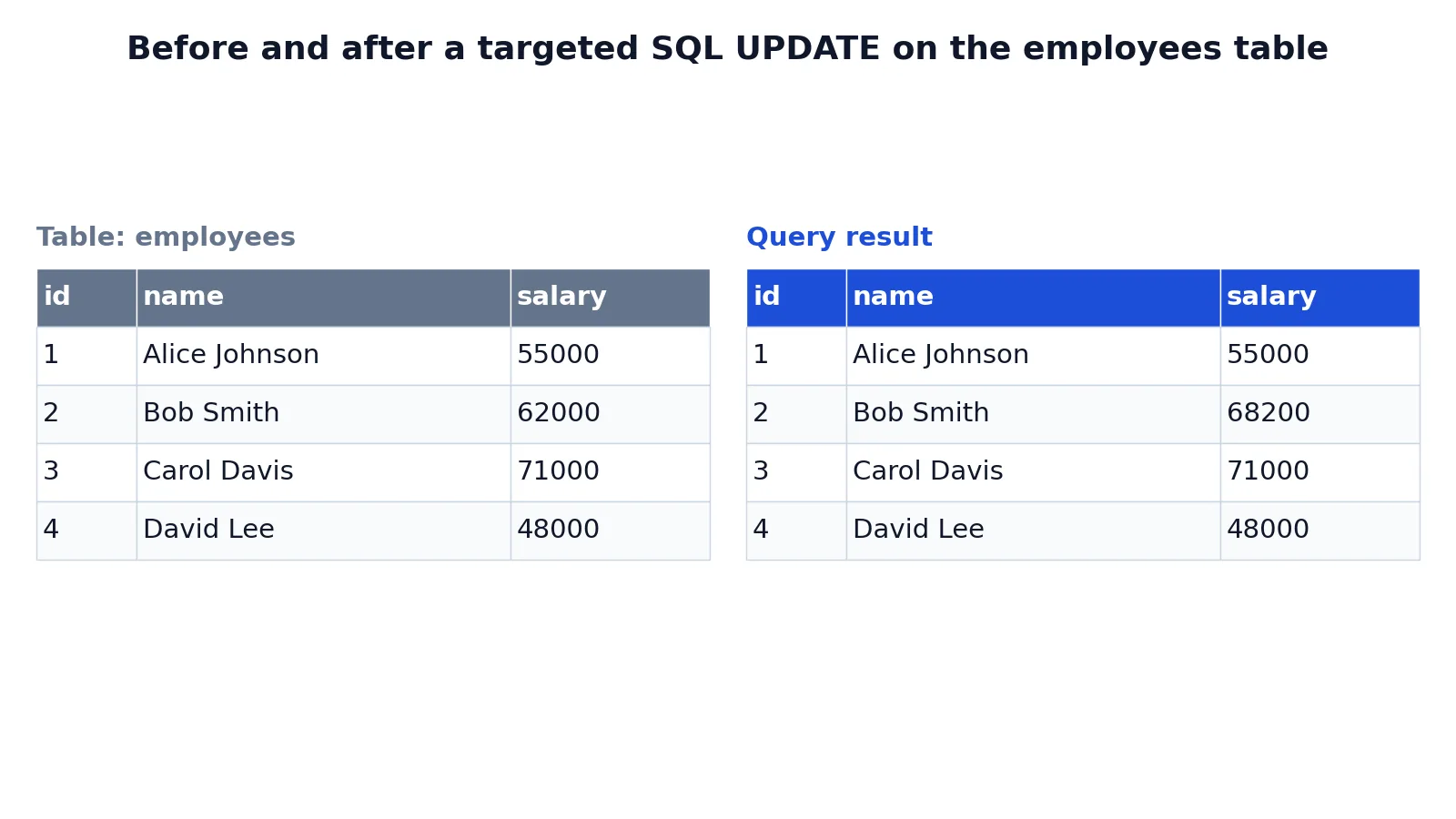
The example uses a small employees table with four rows. Here is the table before any change.
| id | name | salary |
|---|---|---|
| 1 | Alice Johnson | 55000 |
| 2 | Bob Smith | 62000 |
| 3 | Carol Davis | 71000 |
| 4 | David Lee | 48000 |
The goal is to give one employee, Bob Smith, a 10 percent raise. The statement is:
UPDATE employees SET salary = salary * 1.10 WHERE id = 2;The statement works in three parts. UPDATE employees targets the table. SET salary = salary * 1.10 assigns each matched row a new salary equal to its current salary increased by 10 percent. WHERE id = 2 restricts the change to the row whose id is 2, which prevents accidental updates to the other employees.
The result was checked with an equivalent SQLite query. Here is the table after the update.
| id | name | salary |
|---|---|---|
| 1 | Alice Johnson | 55000 |
| 2 | Bob Smith | 68200 |
| 3 | Carol Davis | 71000 |
| 4 | David Lee | 48000 |
Only Bob Smith's salary changed, from 62000 to 68200. The other three rows are untouched. The arithmetic is $62000 \times 1.10 = 68200$.
If you had left off the WHERE clause, all four salaries would have risen by 10 percent. That is the difference a single line makes.
Other Ways to Do It
Update several columns at once. Separate the assignments with commas [1]:
UPDATE employees SET salary = 70000, name = 'Robert Smith' WHERE id = 2;Update from another table. Many databases support a FROM clause or a subquery in the SET clause, so values can come from a second table [1][2]. The exact syntax differs between systems, so check your database's documentation.
Use a subquery in SET. A subquery that returns one row can supply the new values. If it returns no rows, the target columns are set to NULL [2]. Make sure that outcome is acceptable before you run it.
Return the changed rows. PostgreSQL supports a RETURNING clause that shows the updated values, similar to a SELECT [2]. This saves a separate verification query.
Set a column to its default. Assigning DEFAULT sets the column to its default value, which is NULL if no default was defined [2].
Troubleshooting
The statement reports 0 rows updated. Your WHERE clause matched nothing. Check for typos in the value, wrong data types, or trailing spaces in text columns. A count of 0 is not an error [2].
The statement fails with a constraint error. The new value violates a primary key, unique index, CHECK constraint or NOT NULL constraint [1]. Inspect the constraint and adjust the value.
More rows changed than you expected. Your WHERE clause was too broad. Restore the data from a backup or transaction log, then rerun with a tighter condition.
The update seems to hang. Another transaction may hold a lock on the same rows. Wait for it to finish or check for blocking sessions.
Text values look wrong after the update. You may have assigned a value with different casing or extra whitespace. Query the rows to confirm.
Common Mistakes
- Forgetting the
WHEREclause. Every row is updated [1]. Fix: write theWHEREclause first, then theSETclause. - Using a condition that matches more rows than intended. A
WHEREon a non-unique column can hit many rows. Fix: preview withSELECTand check the row count before running the update. - Assuming the update succeeded because no error appeared. A count of 0 rows is silent and valid [2]. Fix: read the reported row count and verify with a
SELECT. - Updating a primary key to a value that already exists. This violates the unique constraint and the statement fails [1]. Fix: check for duplicates before assigning key values.
- Running the update without a transaction. There is no easy undo. Fix: wrap the statement in a transaction and commit only after verification.
- Ignoring triggers. A
BEFORE UPDATEtrigger can suppress an update, so the reported count may be lower than the number of matched rows [2]. Fix: check which triggers exist on the table.
Limitations
UPDATE changes data in place, so there is no automatic history. Unless your database keeps an audit log or you use a transaction, the previous values are gone once the statement commits. That makes a preview query and a transaction the two most valuable habits when you edit in SQL.
The statement also cannot change a table's structure. Adding, dropping or renaming columns is a different operation. And behavior varies between databases. The FROM clause, the RETURNING clause and subquery rules are not identical everywhere [1][2], so a statement that works in one system may need rewriting in another.
Frequently Asked Questions
How do I change a value in SQL?
Use UPDATE table_name SET column = new_value WHERE condition. The SET clause names the column and its new value, and the WHERE clause picks the rows [1]. Run a SELECT with the same condition first to confirm which rows you are about to change.
What happens if I forget the WHERE clause?
Every row in the table is updated [1]. There is no prompt and no warning. If the table is large, the change can be hard to reverse, so always preview the target rows before running the statement.
Can I update multiple columns in one statement?
Yes. List each assignment in the SET clause separated by commas, for example SET salary = 70000, name = 'Robert Smith' [1]. All assignments apply to the same matched rows in a single pass.
How do I check that the update worked?
Run a SELECT after the update and compare the values with what you expected. The database also reports the number of rows updated, and a count of 0 means nothing matched [2]. If your database supports RETURNING, you can see the new values directly from the update statement [2].
Can I undo an UPDATE?
Only if you have not committed it. Inside a transaction, a rollback restores the previous values. After a commit, you need a backup, a transaction log, or an audit table to recover the old data. This is why running the update inside a transaction matters when the table holds important data.
References
Further Reading
- Codd EF (1970). A relational model of data for large shared data banks. Communications of the ACM
- PostgreSQL Documentation: SELECT
- SQLite: SQL As Understood By SQLite
- Wilson G, Bryan J, Cranston K et al. (2017). Good enough practices in scientific computing. PLOS Computational Biology