How to Insert a Row in SQL (Step by Step)
By Dr. Zubair Khalid, DVM, MS, PhD ·
To insert a row in SQL, use the INSERT INTO statement with the table name, a list of columns, and a matching list of values. The database adds one new row to the table. This article walks through the syntax, a worked example, and the errors that trip people up.
Quick Answer
- The basic form is
INSERT INTO table_name (column1, column2) VALUES (value1, value2);[1]. - List the columns explicitly. Many developers consider that better style than relying on column order [1].
- Values must match the listed columns in number, order, and data type.
- Text and date values go inside single quotes. Numbers do not [1].
- Run a
SELECTafterward to confirm the row landed where you expected.
Before You Start
You need three things before you can add a row in SQL.
First, a table that already exists. INSERT adds rows to a table. It does not create one. If the table is missing, you get an error about an unknown table or relation.
Second, the column names and their data types. Run a quick SELECT * FROM table_name LIMIT 1; or check your schema so you know which columns accept text, which accept numbers, and which allow NULL.
Third, permission to write. A read-only account can run SELECT all day and still fail on every INSERT.
One design detail matters more than the rest. If a column is defined as NOT NULL and has no default value, you must supply a value for it. If a column has a default, you can skip it and the database fills it in [2]. If a column allows NULL and you skip it, the new row stores NULL there.
Step by Step
- Name the target table. Write
INSERT INTOfollowed by the table name. This tells the database where the row goes [1].
- List the columns in parentheses. Write the column names in the order you plan to supply values. The order you list them does not have to match the table's physical order, and you can omit columns you do not want to fill [1].
- Write the
VALUESkeyword. This separates the column list from the data.
- Supply one value per listed column. Wrap the values in parentheses, separated by commas. The count must match the column list exactly.
- Quote text and dates. Constants that are not simple numeric values usually need single quotes around them [1]. So
'Maya'is text, while88is a number.
- Run the statement. The database inserts one row and reports how many rows were affected.
- Verify with a
SELECT. Query the table and check that the row appears with the values you intended.
The general shape is:
$$ \text{INSERT INTO } T(c_1, c_2, \dots, c_n) \text{ VALUES } (v_1, v_2, \dots, v_n) $$
Worked Example
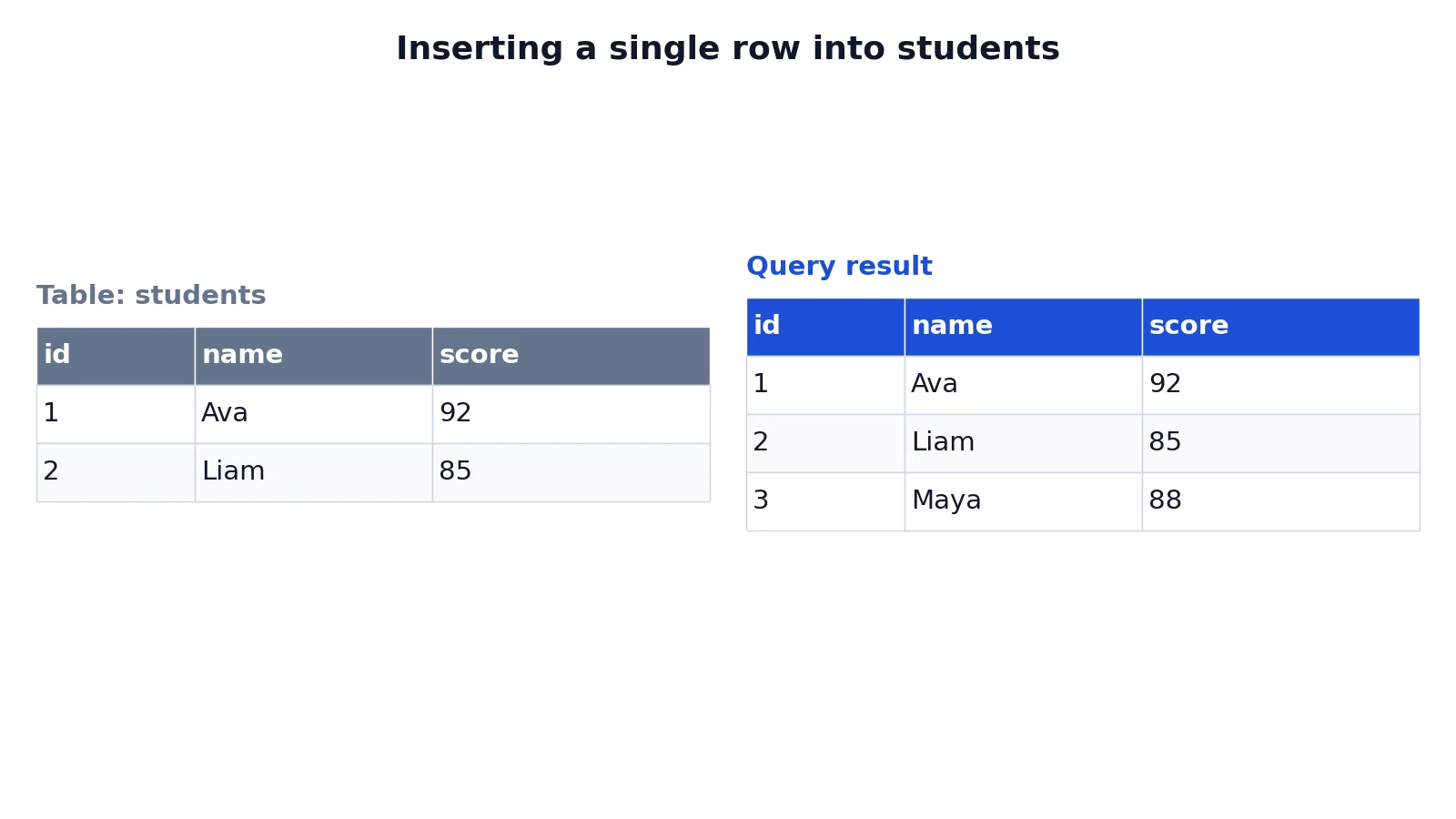
The dataset is a small students table holding an id, a name, and a score. It starts with two rows.
| id | name | score |
|---|---|---|
| 1 | Ava | 92 |
| 2 | Liam | 85 |
You want to add a third student, Maya, with a score of 88. Here is the statement:
INSERT INTO students (id, name, score) VALUES (3, 'Maya', 88);Reading it left to right:
INSERT INTO studentsnames the target table.(id, name, score)lists the columns receiving values.VALUESbegins the row data.(3, 'Maya', 88)supplies one value per listed column.- The statement adds a single row, and
SELECTconfirms it.
Now check the table:
SELECT * FROM students ORDER BY id;| id | name | score |
|---|---|---|
| 1 | Ava | 92 |
| 2 | Liam | 85 |
| 3 | Maya | 88 |
The result was checked with an equivalent SQLite query. The table now holds three rows, and Maya's row sits at the end because the id is 3.
Other Ways to Do It
The column list is optional in most databases. You can write INSERT INTO students VALUES (3, 'Maya', 88); and the database maps values to columns in table order [1]. That works, but it breaks the moment someone adds or reorders a column. Listing columns is safer.
You can also insert a row built from a query. The INSERT INTO ... SELECT form takes the rows a query returns and inserts them into the target table [3]. That is the standard way to copy rows between tables.
Some databases support DEFAULT VALUES, which inserts one row where every column gets its default value or NULL [4]. Others let you write the DEFAULT keyword in a specific position to use that column's default while supplying the rest [2].
If you need to add many rows at once, a multi-row VALUES list handles it in one statement. SQL Server caps that list at 1,000 rows and returns error 10738 beyond that [5]. For bulk loads, a dedicated bulk tool is faster than repeated INSERT statements [1].
Once rows exist, changing them is a separate job. See how to update a row in SQL for the UPDATE statement.
Troubleshooting
"No such column" or "Invalid column name." You misspelled a column, or you are pointing at the wrong table. Check the schema.
"Table has N columns but M values were supplied." Your value count does not match your column count. Count both lists.
"NOT NULL constraint failed." You skipped a column that requires a value. Add it to the column list and supply a value.
"UNIQUE constraint failed" or a duplicate key error. The value you supplied already exists in a column that must be unique, often the primary key. Pick a new value.
"Datatype mismatch." You put text where a number belongs, or the reverse. Check the column type and adjust the value.
The row inserted but the order looks wrong. Tables have no guaranteed row order. Add an ORDER BY clause to your SELECT to sort the output.
Common Mistakes
- Omitting the column list.
INSERT INTO students VALUES (...)depends on table order, which can change. Fix it by naming the columns every time [1]. - Mismatched value counts. Three columns listed but two values supplied raises an error. Fix it by counting both lists before you run the statement.
- Forgetting quotes around text.
VALUES (3, Maya, 88)fails because the database readsMayaas a column name. Fix it with'Maya'. - Quoting numbers.
'88'may be converted, but it can also land in a text column or fail a strict type check. Fix it by leaving numeric values unquoted. - Assuming the row goes last. Insertion order is not retrieval order. Fix it by sorting with
ORDER BYin your verification query. - Skipping verification. A statement that reports success can still store a value you did not expect. Fix it by selecting the row back.
Limitations
INSERT adds rows. It cannot change an existing row, remove one, or alter the table's structure. Those are separate statements. It also cannot bypass constraints. Primary keys, unique indexes, foreign keys, and NOT NULL rules all apply to inserted data, and a violation stops the statement.
The column-list form protects you from column reordering, but it does not protect you from type changes. If someone alters a column's type, your statement may still run and store a converted value. Verification with SELECT is the only reliable check. For larger jobs, remember that a multi-row VALUES list has row limits in some systems [5], and that bulk loading tools exist for a reason [1].
Frequently Asked Questions
What is the basic syntax to insert a row in SQL?
Write INSERT INTO table_name (column1, column2) VALUES (value1, value2);. The column list names the fields you are filling, and the values list supplies one value for each. Text values need single quotes, numbers do not [1].
Do I have to list the column names?
No, the column list is optional in most databases. If you omit it, values map to columns in the table's defined order [1]. Listing columns is safer because it survives schema changes and makes the statement readable.
How do I add a row with only some columns filled?
List only the columns you are supplying. Columns you omit receive their default value, or NULL if the column allows it and has no default [2]. If an omitted column is NOT NULL with no default, the statement fails.
How do I insert a row and get it back?
PostgreSQL supports a RETURNING clause on INSERT, which returns the inserted row's values [3]. Other databases vary. A portable approach is to run the INSERT, then a SELECT that filters on the values you just supplied.
Can I insert more than one row at once?
Yes. Add more parenthesized value groups after VALUES, separated by commas [2]. SQL Server limits a single VALUES clause to 1,000 rows and returns error 10738 above that [5]. For larger volumes, use a bulk loading method instead [1].
Why does my INSERT fail with a duplicate key error?
A column in your row already holds the value you supplied, and that column has a unique constraint or is the primary key. Choose a different value, or use an upsert form such as ON CONFLICT in PostgreSQL [3] or the upsert clause in SQLite [4] if you want the statement to update the existing row instead.
References
- PostgreSQL: Documentation: 18: 2.4. Populating a Table With Rows
- INSERT - Azure Databricks - Databricks SQL | Microsoft Learn
- PostgreSQL: Documentation: 18: INSERT
- INSERT
- Table Value Constructor (Transact-SQL) - SQL Server | Microsoft Learn
Further Reading
- INSERT (Transact-SQL) - SQL Server | Microsoft Learn
- Codd EF (1970). A relational model of data for large shared data banks. Communications of the ACM
- PostgreSQL Documentation: SELECT
- SQLite: SQL As Understood By SQLite
- Wilson G, Bryan J, Cranston K et al. (2017). Good enough practices in scientific computing. PLOS Computational Biology