How to Join Three Tables in SQL (Step by Step)
By Dr. Zubair Khalid, DVM, MS, PhD ·
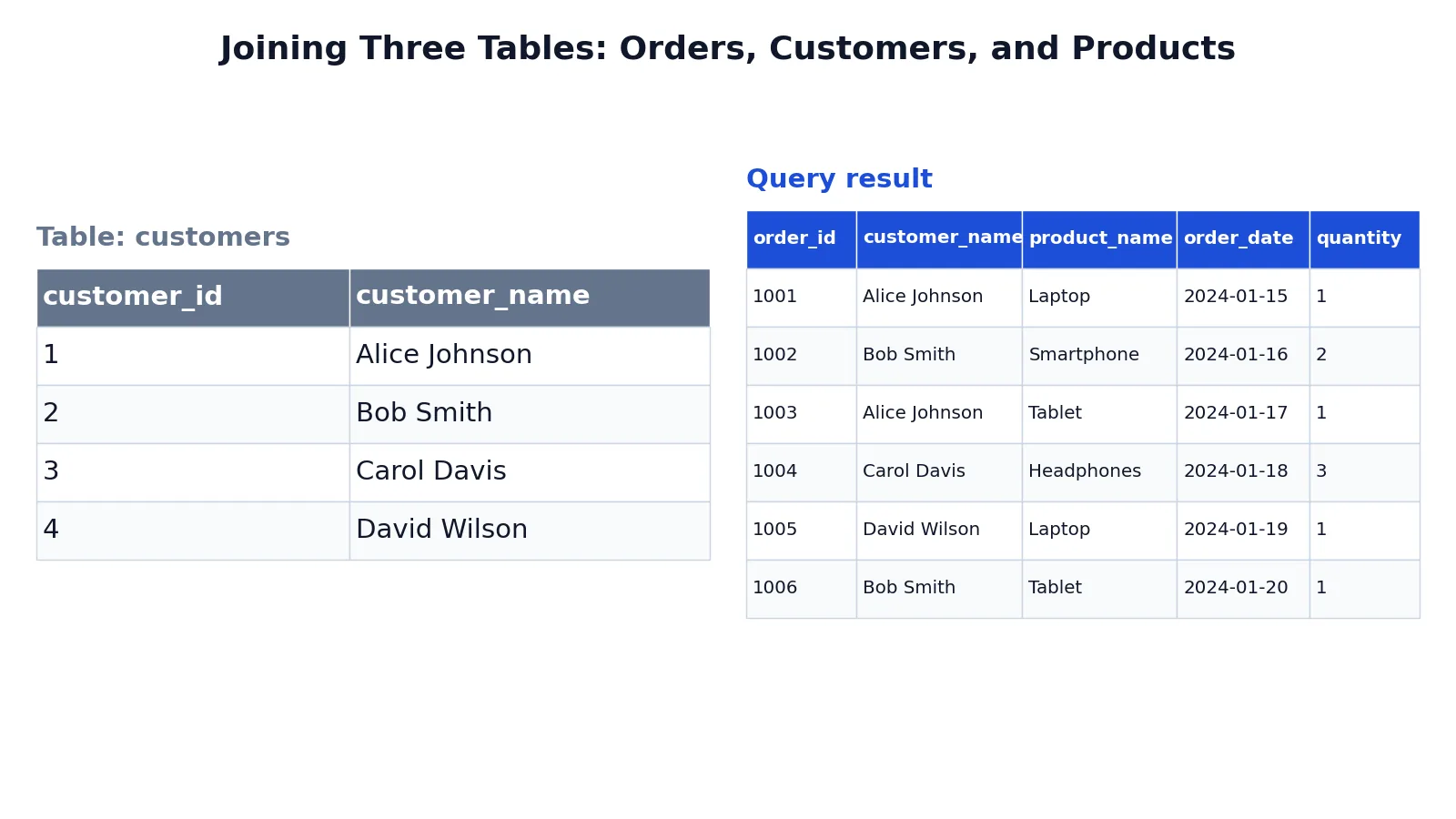
Joining three tables in SQL means chaining two join conditions so that one base table connects to two others through its foreign keys. You write one JOIN clause per relationship, and each ON clause names the matching columns. This article walks through the order of the joins, the keys involved, and a complete example that returns orders with customer and product names.
Quick Answer
- Pick the table that holds the foreign keys as your base table. In a typical order system, that is the
orderstable. - Add one
JOINper related table, and put the matching condition in eachONclause. - Join on keys, not on names.
orders.customer_id = customers.customer_idis reliable, while matching on a text name can fail on duplicates or spelling. - Qualify every column with its table name or alias so the query stays readable and does not break when a duplicate column name appears [1].
- The order of the joins usually does not change the result for inner joins, but it does change readability and can affect performance on large tables.
Before You Start
You need three tables where one table references the other two. A common shape is a fact table plus two dimension tables. The fact table stores the events, and the dimension tables store the descriptive attributes.
In this article the three tables are:
| Table | Key column | What it holds |
|---|---|---|
customers | customer_id | One row per customer |
products | product_id | One row per product, with price |
orders | order_id | One row per order, with customer_id and product_id |
The orders table has two foreign keys. One points at customers.customer_id and one points at products.product_id. Those two columns are what make a three-table join possible.
Before writing the query, check two things. First, confirm the key columns exist and hold the same type of value on both sides of each relationship. Second, decide which columns you actually need in the output. Selecting only the columns you need keeps the result readable and avoids duplicate column names.
If you are new to the basic two-table form, the SQL INNER JOIN syntax and examples guide covers the single-join case first.
Step by Step
- Choose the base table. Start
FROMwith the table that contains the foreign keys. Here that isorders, because it links to bothcustomersandproducts.
- Join the first related table. Add
JOIN customers ON orders.customer_id = customers.customer_id. This attaches the customer name to each order row.
- Join the second related table. Add
JOIN products ON orders.product_id = products.product_id. This attaches the product name to each order row.
- Select the columns you want. List
orders.order_id,customers.customer_name,products.product_name,orders.order_date, andorders.quantity. Qualify each one with its table name.
- Add an
ORDER BYclause. Sorting byorders.order_idmakes the output easy to scan and compare.
The general shape looks like this:
SELECT base.column_a, dim1.column_b, dim2.column_c
FROM base_table AS base
JOIN dim1 ON base.key1 = dim1.key1
JOIN dim2 ON base.key2 = dim2.key2;
Each JOIN adds one table. Each ON names the pair of columns that must match. With three tables you have exactly two ON clauses, one per relationship.
You can also write the same logic with table aliases to shorten the query. Aliases are optional but they reduce typing once the table names get long.
Worked Example
The dataset is a small order system with four customers, four products, and six orders. The goal is to list each order with the customer name and the product name.
The customers table:
| customer_id | customer_name |
|---|---|
| 1 | Alice Johnson |
| 2 | Bob Smith |
| 3 | Carol Davis |
| 4 | David Wilson |
The products table:
| product_id | product_name | price |
|---|---|---|
| 101 | Laptop | 999.99 |
| 102 | Smartphone | 699.99 |
| 103 | Tablet | 399.99 |
| 104 | Headphones | 149.99 |
The orders table:
| order_id | customer_id | product_id | order_date | quantity |
|---|---|---|---|---|
| 1001 | 1 | 101 | 2024-01-15 | 1 |
| 1002 | 2 | 102 | 2024-01-16 | 2 |
| 1003 | 1 | 103 | 2024-01-17 | 1 |
| 1004 | 3 | 104 | 2024-01-18 | 3 |
| 1005 | 4 | 101 | 2024-01-19 | 1 |
| 1006 | 2 | 103 | 2024-01-20 | 1 |
The query:
SELECT orders.order_id, customers.customer_name, products.product_name, orders.order_date, orders.quantity
FROM orders
JOIN customers ON orders.customer_id = customers.customer_id
JOIN products ON orders.product_id = products.product_id
ORDER BY orders.order_id;
The result:
| order_id | customer_name | product_name | order_date | quantity |
|---|---|---|---|---|
| 1001 | Alice Johnson | Laptop | 2024-01-15 | 1 |
| 1002 | Bob Smith | Smartphone | 2024-01-16 | 2 |
| 1003 | Alice Johnson | Tablet | 2024-01-17 | 1 |
| 1004 | Carol Davis | Headphones | 2024-01-18 | 3 |
| 1005 | David Wilson | Laptop | 2024-01-19 | 1 |
| 1006 | Bob Smith | Tablet | 2024-01-20 | 1 |
The result was checked with an equivalent SQLite query. All six orders appear, and each row carries the correct customer name and product name.
Notice how the join order works. The query starts from orders, then reaches out to customers through customer_id, then reaches out to products through product_id. The two relationships are independent, so the two ON clauses never reference each other.
Other Ways to Do It
Use table aliases. Short aliases keep long queries readable:
SELECT o.order_id, c.customer_name, p.product_name, o.order_date, o.quantity
FROM orders AS o
JOIN customers AS c ON o.customer_id = c.customer_id
JOIN products AS p ON o.product_id = p.product_id
ORDER BY o.order_id;
Use LEFT JOIN when a match may be missing. An inner join drops rows with no match. If some orders have a null product_id, a LEFT JOIN keeps those orders and fills the product columns with nulls. The CROSS JOIN vs LEFT JOIN comparison explains how the outer variants change which rows survive.
Join in a different order. For inner joins, FROM customers JOIN orders ... JOIN products ... returns the same rows as long as the conditions are the same. The database planner is free to reorder the work internally. Pick the order that reads most naturally, usually base table first.
Use a subquery for one side. If you only need a filtered slice of one table, a subquery can shrink the input before the join. The subqueries in SQL guide covers the types and when each one helps.
Add a computed column. You can multiply orders.quantity by products.price to get a line total. That works because both columns are available after the joins:
$$ \text{line\_total} = \text{quantity} \times \text{price} $$
Troubleshooting
The query returns fewer rows than expected. An inner join drops rows where the key has no match. Check for nulls or orphaned foreign keys in the base table.
The query returns more rows than expected. One side of a join has duplicate key values. If customers.customer_id is not unique, each order can match several customer rows and the result multiplies.
A column name is ambiguous. Two tables share a column name, so the database cannot tell which one you mean. Qualify it, for example orders.order_id.
The join condition is wrong. A join on the wrong pair of columns can still run and still return rows, but the values will be mismatched. Verify that both sides hold the same kind of identifier.
Performance is slow on large tables. Make sure the join columns are indexed. A join on an unindexed column forces a full scan of that table for every row on the other side.
Common Mistakes
- Joining on names instead of keys. Matching
orders.customer_name = customers.customer_namebreaks when two customers share a name or when spelling differs. Fix it by joining on the integer key columns. - Forgetting one
ONclause. Three tables need two join conditions. In SQLite and MySQL a missing condition turns that join into a cross join, so every row so far is repeated once per row of the unconditioned table. PostgreSQL rejects a plainJOINwith noONclause. See SQL CROSS JOIN explained for what that looks like. - Mixing up which table holds the foreign key. The condition must connect the base table's foreign key to the dimension table's primary key. Reversing them can still run but returns the wrong pairs.
- Leaving column names unqualified. It works until a duplicate name appears, then the query fails [1]. Qualify every column from the start.
- Using
LEFT JOINwhen you want an inner join, or the reverse. The choice changes which rows survive. Decide whether unmatched rows should be kept or dropped before you write the query. - **Selecting
on three tables.* You get every column from all three, including duplicate key columns. List the columns you need.
Limitations
A three-table join only works when the relationships exist in the data. If the base table has no foreign key to one of the other tables, there is nothing to join on, and you would need a different modeling approach or an intermediate table.
Inner joins also hide missing data. If an order references a customer that was deleted, that order disappears from the result with no warning. Outer joins keep the row but fill the missing side with nulls, which shifts the problem to how you interpret nulls downstream. Neither behavior is wrong, but you have to know which one you want before you trust the row count.
Joins on large tables can be expensive. The database has to compare key values across tables, and without indexes on the join columns that work grows quickly with table size. The query stays correct, but the runtime may not be acceptable.
Frequently Asked Questions
Can I join three tables without a foreign key?
Yes, technically. Any two columns can appear in an ON clause as long as the types are compatible. But without a real relationship the matches are arbitrary, and the result is usually meaningless. Foreign keys exist to make the relationship explicit and to let the database enforce it.
Does the order of joins matter?
For inner joins, the final result is the same regardless of the order you write the tables. The database planner can reorder the operations anyway. The order matters for readability and sometimes for performance, and it matters for outer joins, where the sequence changes which rows are preserved.
How many ON clauses do I need for three tables?
Two. Each JOIN introduces one new table and needs one condition to connect it to something already in the query. Four tables would need three conditions, and so on.
What is the difference between joining three tables and using a subquery?
A three-table join combines all the tables in one FROM clause and returns a flat result. A subquery computes one part first and feeds the result into the outer query. Both can produce the same output. Joins are usually easier to read when the relationships are simple, and subqueries help when one side needs heavy filtering or aggregation first.
Why does my three-table join return duplicate rows?
One of the joined tables has more than one row per key value. For example, if a customer has multiple addresses in a separate table and you join that table too, each order for that customer repeats once per address. Check the uniqueness of the key columns on the "one" side of each relationship.
References
Further Reading
- Codd EF (1970). A relational model of data for large shared data banks. Communications of the ACM
- PostgreSQL Documentation: SELECT
- SQLite: SQL As Understood By SQLite
- Wilson G, Bryan J, Cranston K et al. (2017). Good enough practices in scientific computing. PLOS Computational Biology
- PostgreSQL Tutorial: The SQL Language