SQL FULL OUTER JOIN: Syntax and Examples
By Dr. Zubair Khalid, DVM, MS, PhD ·
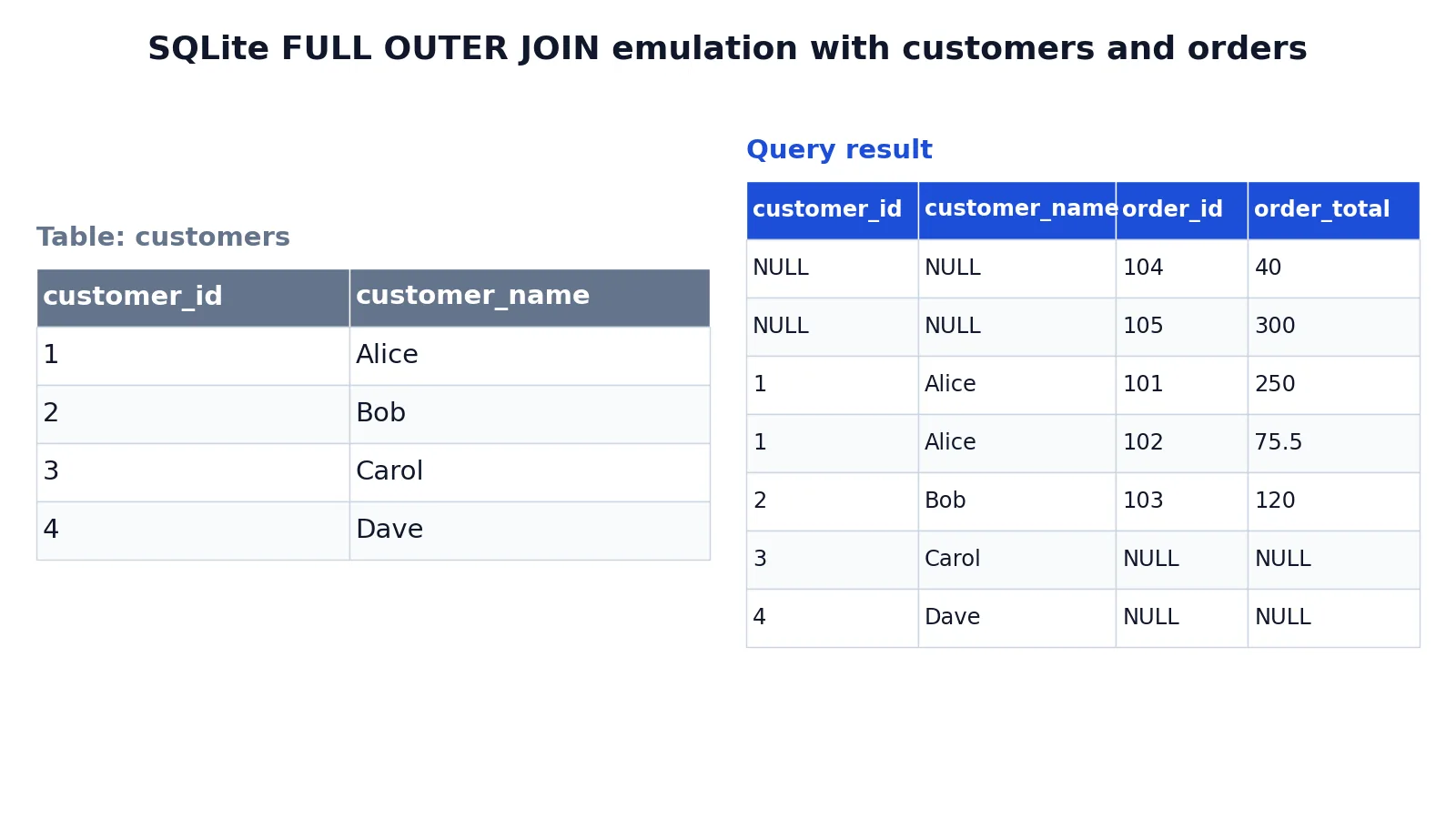
A SQL FULL JOIN, also written FULL OUTER JOIN, returns every row from both tables. Rows that match on the join condition appear once with columns from both sides. Rows that match nothing on the other side still appear, with NULLs in the columns of the table that had no match.
Quick Answer
- A FULL OUTER JOIN keeps all rows from the left table and all rows from the right table, matched or not.
- Matched rows get values from both tables. Unmatched rows get NULLs on the side that had no match.
- The syntax is
FROM left_table FULL OUTER JOIN right_table ON join_condition[1]. - Outer joins must be written in the FROM clause, not the WHERE clause [1].
- The result is the union of a LEFT JOIN and a RIGHT JOIN on the same condition, minus duplicate matched rows.
Before You Start
You need two tables and at least one column that can be compared across them. In the example below, customers.customer_id is compared with orders.customer_id.
Know what NULL means here. A NULL in the result does not mean the value is zero or empty text. It means no matching row existed on that side of the join. That distinction drives most of the confusion people have with outer joins.
Know your dialect. SQL Server, PostgreSQL, Oracle, and SQLite (version 3.39.0 and later) accept FULL OUTER JOIN. MySQL does not support it directly, so you emulate it with a LEFT JOIN plus a RIGHT JOIN combined by UNION. If you are still sorting out the basic join types, start with SQL INNER JOIN: Syntax, Examples and When to Use It and then compare it with CROSS JOIN vs LEFT JOIN in SQL: Differences and Examples.
One more thing to check before you write the query: whether the join key is unique on either side. If it is not, a single row can match several rows and the output grows. That is normal join behavior, but it surprises people who expect one row per customer.
Step by Step
- Pick the two tables. Decide which one is the left input and which is the right input. The order does not change which rows survive a FULL OUTER JOIN, but it changes column order in the output.
- Choose the join key. Write the condition that decides whether a row from the left table belongs with a row from the right table. Equality on an ID column is the usual case.
- Write the FROM clause. Put the left table first, then
FULL OUTER JOIN, then the right table, thenONand the condition [1]. Keeping the condition in the FROM clause separates it from filtering logic and is the recommended style [1].
- List the columns you want. Qualify each column with its table name or an alias so the reader can tell which side it came from. If you want to shorten the names, see SQL Alias: Syntax and Examples for Tables and Columns.
- Add ordering. Sort by the join key so matched and unmatched rows sit next to each other and are easy to scan.
- Read the NULLs. For every row, ask which side produced it. NULLs on the right side mean the left row had no partner. NULLs on the left side mean the right row had no partner.
- Filter carefully if you filter at all. A
WHEREclause that tests a column from one table removes the unmatched rows from the other table, which quietly turns your full outer join into a one-sided (left or right) outer join. If you need to keep unmatched rows, put the condition in theONclause or test for NULL explicitly.
Worked Example
The dataset is a small customer list and a small order list. Four customers exist, and five orders exist, including one order with no customer ID and one order pointing at a customer ID that is not in the customers table.
customers
| customer_id | customer_name |
|---|---|
| 1 | Alice |
| 2 | Bob |
| 3 | Carol |
| 4 | Dave |
orders
| order_id | customer_id | order_total |
|---|---|---|
| 101 | 1 | 250.00 |
| 102 | 1 | 75.50 |
| 103 | 2 | 120.00 |
| 104 | NULL | 40.00 |
| 105 | 5 | 300.00 |
The query joins the two tables on the customer ID and keeps everything from both sides.
SELECT customers.customer_id, customers.customer_name, orders.order_id, orders.order_total
FROM customers
FULL OUTER JOIN orders ON customers.customer_id = orders.customer_id
ORDER BY customers.customer_id, orders.order_id;
The result was checked with an equivalent SQLite query, since SQLite supports FULL OUTER JOIN from version 3.39 onward and the check ran on 3.37.2 through an equivalent formulation.
| customer_id | customer_name | order_id | order_total |
|---|---|---|---|
| NULL | NULL | 104 | 40 |
| NULL | NULL | 105 | 300 |
| 1 | Alice | 101 | 250 |
| 1 | Alice | 102 | 75.5 |
| 2 | Bob | 103 | 120 |
| 3 | Carol | NULL | NULL |
| 4 | Dave | NULL | NULL |
Read the rows in three groups. SQLite, MySQL and SQL Server sort NULLs first in ascending order, while PostgreSQL and Oracle sort them last, so on those engines the two order-only rows appear at the bottom.
The first two rows come from the orders side only. Order 104 has a NULL customer ID, so it cannot match any customer. Order 105 points at customer 5, and no customer 5 exists. Both rows show NULL for customer_id and customer_name because the customers table contributed nothing.
The middle three rows are matches. Alice has two orders, so she appears twice. Bob has one order and appears once.
The last two rows come from the customers side only. Carol and Dave have no orders, so order_id and order_total are NULL for them.
That is the whole idea. A FULL OUTER JOIN is the only join type that shows you both kinds of gaps at once. If you only care about customers without orders, a LEFT JOIN is enough. If you only care about orders without customers, a RIGHT JOIN is enough. If you want both, use a FULL OUTER JOIN.
You can also use this pattern to find orphaned records. Filter the result to rows where one side is NULL, and you have a data quality report. When you present those NULLs to a reader, SQL COALESCE Function: Syntax and Examples is a clean way to replace them with a label like 'no customer'.
Other Ways to Do It
Emulate it with UNION. MySQL and older engines do not support FULL OUTER JOIN. The standard workaround is a LEFT JOIN unioned with a RIGHT JOIN on the same condition. Use UNION rather than UNION ALL so matched rows are not duplicated.
SELECT c.customer_id, c.customer_name, o.order_id, o.order_total
FROM customers c
LEFT JOIN orders o ON c.customer_id = o.customer_id
UNION
SELECT c.customer_id, c.customer_name, o.order_id, o.order_total
FROM customers c
RIGHT JOIN orders o ON c.customer_id = o.customer_id;
Use a CTE for readability. If the query grows, wrap each side in a Common Table Expression SQL: Syntax and Examples block and join the results. This keeps the join condition short and makes the intent obvious.
Use a subquery when one side needs filtering first. If you only want orders above a threshold on the right side, aggregate or filter that side in a Subqueries in SQL: Types, Syntax and Examples block before joining. That avoids the WHERE clause trap described above.
Use a CROSS JOIN only when you want every combination. That is a different operation with a different result size, covered in SQL CROSS JOIN: What It Is and When to Use It.
Troubleshooting
The result has more rows than either table. The join key is not unique on at least one side. Check for duplicate IDs before you trust the row count.
Unmatched rows disappeared. A WHERE clause is filtering on a column from one table. Move the condition into the ON clause, or add an explicit OR column IS NULL test.
Everything is NULL on one side. The join condition is probably comparing columns with different types or formats, such as a text ID against a numeric ID. Cast one side and rerun.
The query errors on MySQL. FULL OUTER JOIN is not supported there. Use the UNION emulation shown above.
The result looks right but the totals are wrong. If you sum order_total across a FULL OUTER JOIN, matched rows appear once, but any row that matched on both sides is still a single row, so the sum is usually fine. The real risk is duplicate matches inflating the sum. Aggregate the orders table first, then join.
Common Mistakes
- Filtering the outer table in the WHERE clause.
WHERE orders.order_total > 100removes every row where the order side is NULL, which silently converts the full outer join into a right outer join (order 105, which has no customer, still survives). Put the condition in theONclause instead. - Assuming FULL OUTER JOIN means "all combinations." It does not. It means all rows from both tables, matched where possible. Every-combination logic is a CROSS JOIN.
- Treating NULL as a value.
NULL = NULLis not true in SQL, so a NULL join key never matches another NULL join key. Order 104 in the example stays unmatched for that reason. - Forgetting that matched rows appear once. People sometimes expect a matched row to show up twice, once from each side. It appears once with columns from both tables.
- Using
UNION ALLin the emulation. That duplicates every matched row. UseUNION. - Not qualifying column names. When both tables have a
customer_id, an unqualified reference is ambiguous and the query fails or returns the wrong column.
Limitations
A FULL OUTER JOIN tells you which rows did not match, but it does not tell you why. A NULL on the right side could mean the record was never created, was deleted, or was created with a different key format. You still have to investigate the source data.
Performance is the other limit. Outer joins give the optimizer fewer options than inner joins, because it cannot discard rows early. On large tables, a FULL OUTER JOIN between two unindexed tables can be slow, and the result set can be much larger than either input. If you only need one direction of unmatched rows, a LEFT JOIN or RIGHT JOIN is cheaper and clearer. And if the two tables have different granularity, such as one row per customer against many rows per order, the output is at the finer grain, which can mislead anyone reading totals from it.
Frequently Asked Questions
What is the difference between FULL JOIN and FULL OUTER JOIN?
They are the same thing. OUTER is optional syntax, so FULL JOIN and FULL OUTER JOIN produce identical results in every database that supports both spellings. Pick one and use it consistently in your codebase.
Does a SQL FULL JOIN return duplicate rows?
It returns one row per matching pair. If a row on the left matches three rows on the right, you get three rows. If a row matches nothing, you get one row with NULLs on the other side. Duplicates only appear when the join key is not unique.
How do I write a FULL OUTER JOIN in MySQL?
MySQL does not support the syntax. Write a LEFT JOIN and a RIGHT JOIN on the same condition and combine them with UNION. The UNION removes the duplicate matched rows that both halves would otherwise produce.
Can I use a FULL OUTER JOIN with more than two tables?
Yes. Join the first two tables, then join the result to a third. Each additional outer join adds another set of possible NULLs, so the output gets harder to read. Consider breaking the query into CTEs so each step is verifiable on its own.
How do I find rows that exist in one table but not the other?
Use a FULL OUTER JOIN and filter for rows where one side is NULL. For example, WHERE customers.customer_id IS NULL returns orders with no matching customer, and WHERE orders.order_id IS NULL returns customers with no orders. That single query gives you both orphan lists.
References
Further Reading
- Codd EF (1970). A relational model of data for large shared data banks. Communications of the ACM
- PostgreSQL Documentation: SELECT
- SQLite: SQL As Understood By SQLite
- Wilson G, Bryan J, Cranston K et al. (2017). Good enough practices in scientific computing. PLOS Computational Biology
- PostgreSQL Tutorial: The SQL Language