SQL Convert Date: Functions, Formats and Examples
By Dr. Zubair Khalid, DVM, MS, PhD ·
To convert a date in SQL, you pass a string or timestamp to a conversion function and tell the database what type or format you want back. The exact function depends on the dialect: SQL Server uses CAST and CONVERT, MySQL uses STR_TO_DATE and DATE_FORMAT, PostgreSQL uses TO_DATE and TO_CHAR, and SQLite uses date() and strftime(). This guide shows how each one works, where they differ, and how to fix the errors you will hit along the way.
Quick Answer
CAST(value AS DATE)is the portable way to convert a string or timestamp to a date. It works in SQL Server, MySQL, and PostgreSQL.- SQL Server adds
CONVERT(data_type, value, style), where the style number controls the input or output format [1]. - MySQL uses
STR_TO_DATE(text, format)to parse a string andDATE_FORMAT(date, format)to display it. - PostgreSQL uses
TO_DATE(text, format)to parse andTO_CHAR(date, format)to display [2]. - SQLite has no date type. It stores dates as text, numbers, or Julian day values, and
date()plusstrftime()convert and format them [3].
Syntax
The table below covers the arguments shared by the main conversion functions. Not every argument exists in every dialect, so the notes column says where each one applies.
| Argument | Required? | Meaning |
|---|---|---|
value | Required | The string, timestamp, or column you want to convert. |
data_type | Required | The target type, such as DATE, DATETIME, or VARCHAR. Used by CAST and CONVERT. |
style | Optional | A number that sets the input or output format. SQL Server CONVERT only [1]. |
format | Required for parsing | A pattern string such as '%Y-%m-%d' or 'YYYY-MM-DD'. Used by MySQL, PostgreSQL, and SQLite. |
length | Optional | The character length for the target string type, for example VARCHAR(10). |
The two families of functions behave differently. CAST and CONVERT change the data type, so the result is a real date value you can sort and compare. Formatting functions such as DATE_FORMAT, TO_CHAR, and strftime return text, which is meant for display.
How It Works
Conversion runs in one of two directions.
The first direction is parsing. You have a string like '2024-03-15' and you want a date value. The database reads the string, checks it against a known pattern, and builds a date. If the string does not match any accepted pattern, the query fails with a conversion error [4].
The second direction is formatting. You have a date value and you want a specific display string, such as '15/03/2024'. The database reads the date parts and assembles them in the order and separators you specify.
A few rules apply across dialects.
When you convert a timestamp to a date, the time portion is dropped, not rounded [1]. A value of 2024-03-15 23:59:59 becomes 2024-03-15.
When you convert a date to a timestamp, the time is set to midnight. In SQL Server, converting a date to datetime2 copies the date and sets the time to 00:00:00.000 [5]. Converting to datetimeoffset also sets the offset to +00:00 [5].
Range limits matter. The SQL Server datetime type starts at year 1753, while date and datetime2 start at year 0001. Converting a date value before 1753 to datetime raises error 242 [1].
SQLite is the outlier. It has no dedicated date type, so date() returns an ISO-8601 text string in YYYY-MM-DD form, and strftime() returns text in whatever pattern you give it [3].
Worked Example
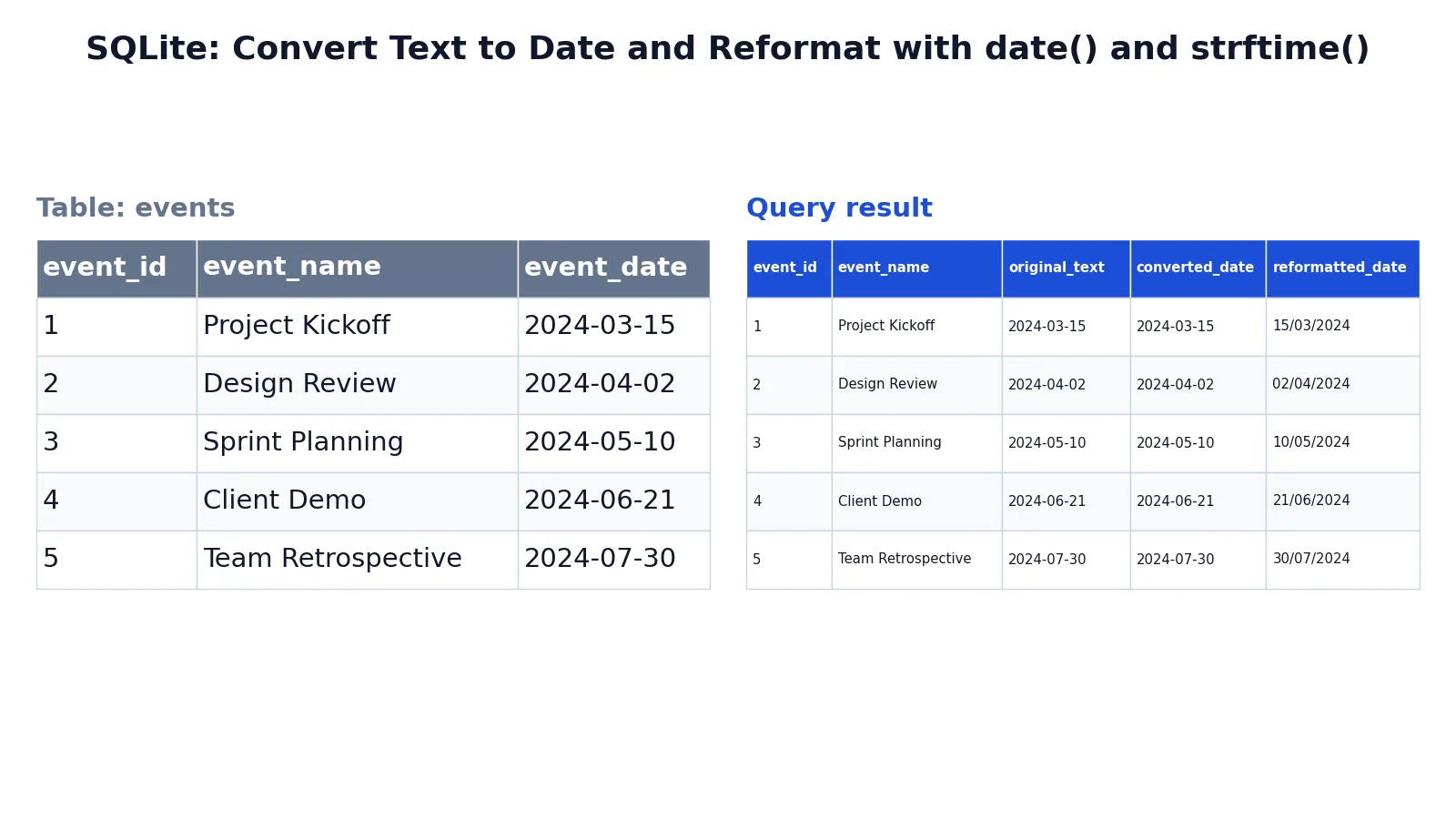
The events table below stores each event date as text. The goal is to convert that text into a usable date and also produce a day/month/year display string.
| event_id | event_name | event_date |
|---|---|---|
| 1 | Project Kickoff | 2024-03-15 |
| 2 | Design Review | 2024-04-02 |
| 3 | Sprint Planning | 2024-05-10 |
| 4 | Client Demo | 2024-06-21 |
| 5 | Team Retrospective | 2024-07-30 |
SELECT event_id, event_name, event_date AS original_text, date(event_date) AS converted_date, strftime('%d/%m/%Y', event_date) AS reformatted_date FROM events;The result was checked with an equivalent SQLite query.
| event_id | event_name | original_text | converted_date | reformatted_date |
|---|---|---|---|---|
| 1 | Project Kickoff | 2024-03-15 | 2024-03-15 | 15/03/2024 |
| 2 | Design Review | 2024-04-02 | 2024-04-02 | 02/04/2024 |
| 3 | Sprint Planning | 2024-05-10 | 2024-05-10 | 10/05/2024 |
| 4 | Client Demo | 2024-06-21 | 2024-06-21 | 21/06/2024 |
| 5 | Team Retrospective | 2024-07-30 | 2024-07-30 | 30/07/2024 |
Three things happen in this query. event_date AS original_text shows the raw stored value. date(event_date) converts it into a SQLite date so it can be used in date arithmetic. strftime('%d/%m/%Y', event_date) reformats it as day/month/year for display [3].
The converted_date column looks identical to original_text here because the stored strings already use ISO-8601 format. That is the format SQLite expects, so the conversion is a normalization step. If the stored text were '03/15/2024', date() would return NULL because SQLite would not recognize it as a valid date.
More Examples
SQL Server: string to date with CAST
SELECT CAST('2024-03-15' AS DATE) AS converted;SQL Server: string to date with a style code
SELECT CONVERT(DATE, '15/03/2024', 103) AS converted;Style 103 tells SQL Server to read the string as dd/mm/yyyy [1]. Without the style, the same string may fail or be misread depending on the session language.
SQL Server: timestamp to date
SELECT CAST(GETDATE() AS DATE) AS today_only;This drops the time portion and keeps the date [1]. The same pattern works with SYSDATETIME(), SYSUTCDATETIME(), and GETUTCDATE() [6].
SQL Server: date to ISO 8601 text
SELECT CONVERT(NVARCHAR(30), GETDATE(), 126) AS iso_text;Style 126 produces output like 2022-04-18T09:58:04.570 [1].
MySQL: parse a non-standard string
SELECT STR_TO_DATE('15/03/2024', '%d/%m/%Y') AS converted;MySQL: format a date for display
SELECT DATE_FORMAT(order_date, '%Y-%m') AS month_bucket FROM orders;PostgreSQL: parse and format
SELECT TO_DATE('15/03/2024', 'DD/MM/YYYY') AS converted;
SELECT TO_CHAR(order_date, 'DD/MM/YYYY') AS display_date FROM orders;
SQLite: convert a Unix timestamp
SELECT datetime(1092941466, 'unixepoch') AS converted;This turns a Unix timestamp into a readable date and time [3].
SQLite: last day of the current month
SELECT date('now','start of month','+1 month','-1 day') AS last_day;The modifiers chain together to move to the start of the month, add one month, then subtract a day [3].
Errors and How to Fix Them
Conversion failed when converting date and time from character string. The string does not match any format the database accepts. Fix it by using a style code in SQL Server, or by passing an explicit format string in MySQL or PostgreSQL.
The conversion of a date data type to a datetime data type resulted in an out-of-range value. You are converting a date before 1753 into a SQL Server datetime column. Use datetime2 instead, which supports years from 0001 [1].
The conversion of a date data type to a smalldatetime data type resulted in an out-of-range value. The date falls outside the smalldatetime range. The value is set to NULL and error 242 is raised [5]. Widen the column type.
NULL results with no error. In SQLite, date() returns NULL when the input is not a recognized date format [3]. Check the stored text against the accepted ISO-8601 patterns.
Wrong day and month after conversion. A string like '03/04/2024' is ambiguous. Without an explicit format, the database applies its default, which may be month/day/year. Always pass a format or style code when the input is not ISO-8601.
Common Mistakes
- Assuming every dialect uses the same function.
CONVERTin SQL Server takes a style number, while MySQL'sCONVERT(value, type)has no style argument andCONVERT(value USING charset)changes character sets. UseCASTwhen you want portable code, and check the dialect before copying a snippet. - Formatting a date and then comparing it as a date.
DATE_FORMATandTO_CHARreturn text. Comparing that text to a date column forces an implicit conversion and can skip an index. Format only in the finalSELECTlist. - Leaving out the style or format code.
CONVERT(DATE, '15/03/2024')without style 103 may fail or return the wrong date. Ambiguous strings need an explicit pattern. - Expecting time to round. Converting a timestamp to a date truncates the time.
2024-03-15 23:59:59becomes2024-03-15, not the next day [1]. - Storing dates as text in the first place. Text columns accept invalid values and sort lexically. Use a real date type and convert only at the boundaries of your query.
- Ignoring the session language. SQL Server interprets some formats based on the session language setting. A query that works on your machine can fail on a server with a different locale.
Limitations
Conversion functions cannot rescue data that was never a valid date. If a text column contains 'N/A', 'unknown', or a partial value like '2024-03', the conversion returns NULL or raises an error. You have to clean the source data first, and that cleanup is usually a separate step from the conversion itself.
Formatting also loses information. Once you convert a date to a display string, you cannot sort it correctly as a date, compare it to a date column, or do date arithmetic on it. Keep the native date value in your result set and add the formatted string as an extra column when you need both. Range limits are another constraint. Each date type has a minimum and maximum year, and converting across those boundaries raises an error instead of clamping the value [1][5].
Frequently Asked Questions
How do I convert a string to a date in SQL?
Use CAST('2024-03-15' AS DATE) for ISO-8601 strings, which works in SQL Server, MySQL, and PostgreSQL. For other formats, use CONVERT with a style code in SQL Server, STR_TO_DATE in MySQL, or TO_DATE in PostgreSQL. SQLite uses date('2024-03-15').
How do I change the format of a date in SQL?
Formatting functions return text. In SQL Server, use CONVERT(VARCHAR(10), date_column, 103) for dd/mm/yyyy. In MySQL, use DATE_FORMAT(date_column, '%d/%m/%Y'). In PostgreSQL, use TO_CHAR(date_column, 'DD/MM/YYYY'). In SQLite, use strftime('%d/%m/%Y', date_column) [3].
What is the difference between CAST and CONVERT?
CAST is ANSI standard and takes two arguments, the value and the target type. CONVERT is SQL Server specific and takes a third argument, the style number, which controls how the string is read or written [1]. Use CAST when portability matters and CONVERT when you need format control.
Why does my date conversion return NULL?
The input string does not match a format the database recognizes. In SQLite, date() returns NULL for unrecognized input [3]. In other dialects you usually get an error instead. Check for leading or trailing spaces, wrong separators, and ambiguous day/month ordering.
Can I convert a date back to a timestamp?
Yes. Converting a date to datetime2 copies the date and sets the time to 00:00:00.000 [5]. Converting to datetimeoffset also sets the offset to +00:00 [5]. The reverse conversion, timestamp to date, drops the time portion entirely [1].
References
- CAST and CONVERT (Transact-SQL) - SQL Server | Microsoft Learn
- PostgreSQL: Documentation: 18: 9.9. Date/Time Functions and Operators
- Date And Time Functions
- datetime (Transact-SQL) - SQL Server | Microsoft Learn
- date (Transact-SQL) - SQL Server | Microsoft Learn
- GETUTCDATE (Transact-SQL) - SQL Server | Microsoft Learn
Further Reading
- datetimeoffset (Transact-SQL) - SQL Server | Microsoft Learn
- Codd EF (1970). A relational model of data for large shared data banks. Communications of the ACM
- PostgreSQL Documentation: SELECT
- SQLite: SQL As Understood By SQLite
- Wilson G, Bryan J, Cranston K et al. (2017). Good enough practices in scientific computing. PLOS Computational Biology