SQL DATEADD and DATEDIFF: Syntax and Examples
By Dr. Zubair Khalid, DVM, MS, PhD ·
DATEADD SQL adds or subtracts a time interval from a date, and DATEDIFF returns the number of date boundaries between two dates. Both functions are staples of date arithmetic in SQL Server, and every major database has an equivalent. This article covers the syntax, a worked example, common errors and the limits you should know before you rely on either function.
Quick Answer
DATEADD(datepart, number, date)returns a new date after addingnumberunits ofdateparttodate. A negativenumbersubtracts.DATEDIFF(datepart, startdate, enddate)returns the count ofdatepartboundaries crossed between the two dates.- SQL Server uses
DATEADDandDATEDIFFdirectly. MySQL usesDATE_ADD()andDATEDIFF(). PostgreSQL usesdate_add()and date subtraction with intervals [1]. - SQLite has no
DATEADDorDATEDIFF. You usedate(date, '+7 days')to add days andjulianday()subtraction to measure the gap. - The
datepartargument controls the unit, such asday,month,year,hourorminute.
Syntax
The table below describes the SQL Server form, which is the reference implementation most people mean when they write "dateadd sql".
| Argument | Required? | Meaning |
|---|---|---|
datepart | Yes | The unit to add or count. Common values are year, quarter, month, day, hour, minute, second. |
number | Yes | The amount to add for DATEADD. Negative values subtract. |
date | Yes | The starting date or datetime expression. |
startdate | Yes for DATEDIFF | The earlier date in the comparison. |
enddate | Yes for DATEDIFF | The later date in the comparison. |
DATEADD(datepart, number, date)
DATEDIFF(datepart, startdate, enddate)
The same idea appears across dialects with different names. MySQL offers DATE_ADD(date, INTERVAL n unit) and DATEDIFF(enddate, startdate). PostgreSQL provides date_add(timestamp, interval) and date_subtract(timestamp, interval), and you can also subtract one timestamp from another to get an interval [1]. The .NET Entity Framework exposes the SQL Server function as SqlFunctions.DateAdd, which returns a new datetime value based on adding an interval to the specified date [2].
How It Works
DATEADD performs calendar arithmetic on a single value. It takes the date you give it, moves it forward or backward by the requested number of units, and returns a new date. The original value is untouched. If you add one month to January 31, the result depends on the engine's month-end rules, so always test boundary dates in your own database.
DATEDIFF works differently. It does not measure elapsed time. It counts how many times the specified boundary is crossed between the two dates. This distinction matters. From 10:59 to 11:01 on the same day, DATEDIFF(hour, ...) returns 1 because one hour boundary was crossed, even though only two minutes of clock time passed. From 23:59 to 00:01, DATEDIFF(day, ...) returns 1 even though less than two minutes passed.
The general relationship is:
$$ \text{DATEDIFF}(\text{unit}, a, b) = \text{count of unit boundaries crossed from } a \text{ to } b $$
Because of this, DATEDIFF is the right tool for questions like "how many calendar days apart are these two dates" and the wrong tool for "how many full 24-hour periods elapsed." For the latter, subtract the timestamps and convert the result.
Worked Example
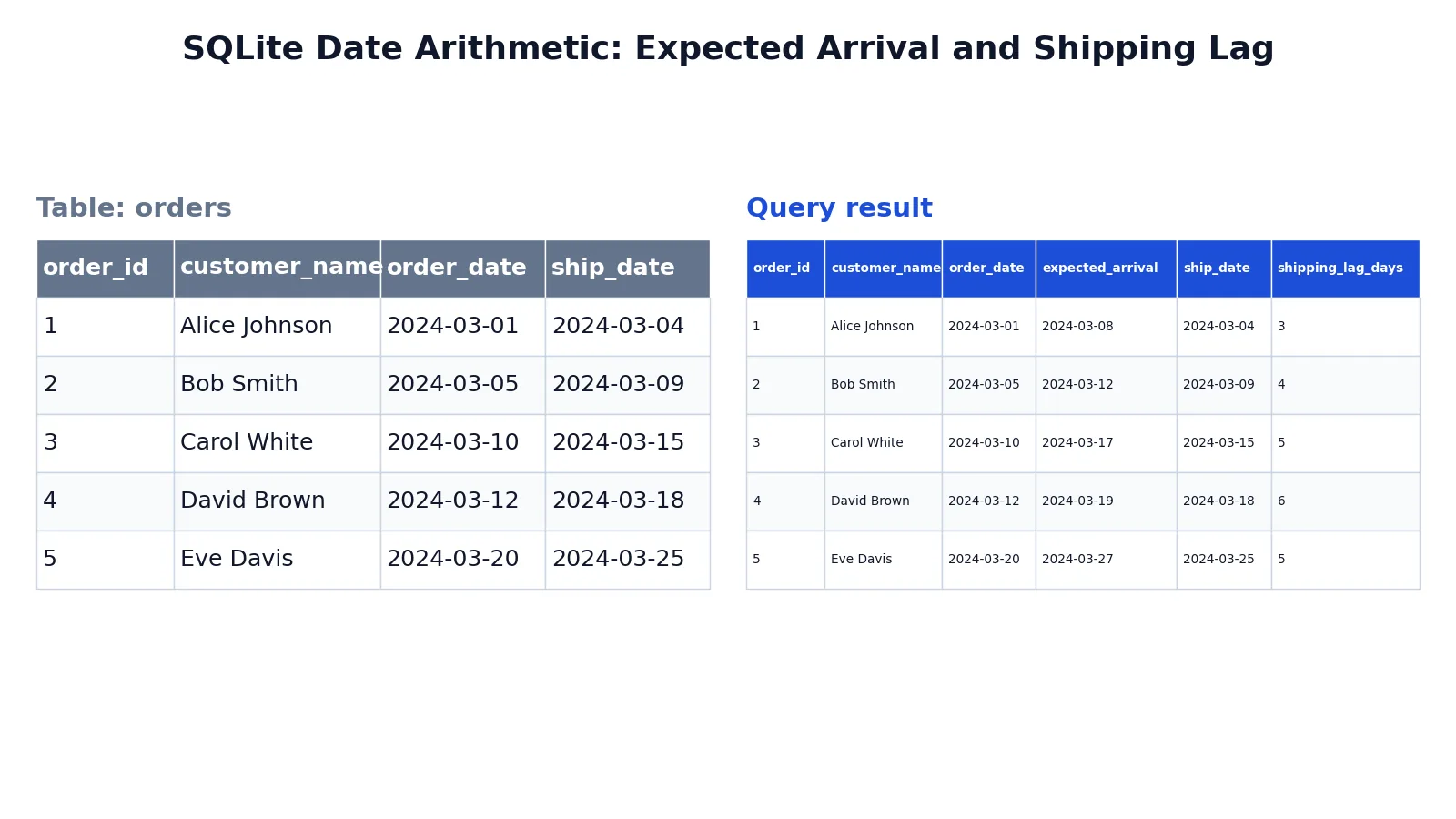
The dataset is a small orders table with five rows, each holding an order date and a ship date. The goal is to compute an expected arrival seven days after the order and the shipping lag in days.
Input table:
| order_id | customer_name | order_date | ship_date |
|---|---|---|---|
| 1 | Alice Johnson | 2024-03-01 | 2024-03-04 |
| 2 | Bob Smith | 2024-03-05 | 2024-03-09 |
| 3 | Carol White | 2024-03-10 | 2024-03-15 |
| 4 | David Brown | 2024-03-12 | 2024-03-18 |
| 5 | Eve Davis | 2024-03-20 | 2024-03-25 |
SELECT
  order_id,
  customer_name,
  order_date,
  date(order_date, '+7 days') AS expected_arrival,
  ship_date,
  CAST(julianday(ship_date) - julianday(order_date) AS INTEGER) AS shipping_lag_days
FROM orders
ORDER BY order_id;
Result:
| order_id | customer_name | order_date | expected_arrival | ship_date | shipping_lag_days |
|---|---|---|---|---|---|
| 1 | Alice Johnson | 2024-03-01 | 2024-03-08 | 2024-03-04 | 3 |
| 2 | Bob Smith | 2024-03-05 | 2024-03-12 | 2024-03-09 | 4 |
| 3 | Carol White | 2024-03-10 | 2024-03-17 | 2024-03-15 | 5 |
| 4 | David Brown | 2024-03-12 | 2024-03-19 | 2024-03-18 | 6 |
| 5 | Eve Davis | 2024-03-20 | 2024-03-27 | 2024-03-25 | 5 |
The result was checked with an equivalent SQLite query. The date() function adds seven days to each order date, and julianday() subtraction gives the day gap, which CAST(... AS INTEGER) truncates to a whole number of days. In SQL Server the same logic reads DATEADD(day, 7, order_date) and DATEDIFF(day, order_date, ship_date).
More Examples
Add months to a date. This returns the date one month later, useful for renewal or billing cycles.
SELECT DATEADD(month, 1, '2024-01-15') AS next_month;Subtract days from a date. A negative number moves the date backward.
SELECT DATEADD(day, -30, '2024-03-31') AS thirty_days_earlier;Count months between two dates. This is a common way to measure account age or tenure.
SELECT DATEDIFF(month, '2024-01-01', '2024-04-01') AS months_apart;Filter rows by a relative window. Combine the function with a WHERE clause to keep only recent records. If you need the current date instead of a literal, see SQL CURRENT_DATE and SQL WHERE Date Is Today.
SELECT order_id, order_date
FROM orders
WHERE order_date >= DATEADD(day, -7, '2024-03-20');
Extract a single date part. When you only need the month or year number, SQL DATEPART is the cleaner choice.
SELECT DATEPART(month, order_date) AS order_month FROM orders;Format the output. To control how the resulting date is displayed, see SQL Convert Date.
Rename the computed column. Aliases keep the output readable, and SQL Alias explains the rules for tables and columns.
Errors and How to Fix Them
Invalid datepart. Passing days instead of day, or an abbreviation the engine does not accept, raises an error. Use the documented singular forms.
Wrong argument order in DATEDIFF. MySQL's DATEDIFF takes (enddate, startdate), the reverse of SQL Server's (startdate, enddate). Swapping them flips the sign of the result. Check the dialect before you copy a query.
Implicit string conversion. Passing a string where a date is expected works in some engines and fails in others. Use explicit date literals or CAST so the intent is clear.
Overflow on large numbers. Adding an enormous number of units can exceed the supported date range and produce an error. Validate inputs before the function sees them.
NULL propagation. If any argument is NULL, the result is NULL. Wrap the input in COALESCE when a default is acceptable.
Time zone surprises. Functions that accept a time zone argument can shift the result across a day boundary. For example, PostgreSQL's date_add accepts an optional time zone, and adding one day across a daylight saving change can land on an unexpected hour [1].
Common Mistakes
- Treating DATEDIFF as elapsed time. It counts boundaries, not duration. Fix: subtract the timestamps when you need true elapsed time.
- Assuming every database has DATEADD. MySQL, PostgreSQL and SQLite use different names. Fix: check the dialect and use its native function, such as
DATE_ADDordate(). - Forgetting that negative numbers subtract. Some people write a separate subtraction expression. Fix: pass a negative
numbertoDATEADDinstead. - Ignoring month-end behavior. Adding a month to the 31st can roll into the next month. Fix: test your boundary dates and decide on the rule you want.
- Mixing date and datetime types. Comparing a date to a datetime can drop or shift rows. Fix: cast both sides to the same type before comparing.
- Hardcoding today's date. Literals go stale. Fix: use the current-date function so the query stays valid.
Limitations
DATEADD and DATEDIFF are not portable as written. The names, argument order and accepted datepart values differ between SQL Server, MySQL, PostgreSQL and SQLite, so a query that runs in one engine often fails in another [1]. SQLite in particular has neither function and requires date() plus julianday() arithmetic.
DATEDIFF also hides information. Because it counts boundaries, it cannot tell you the exact elapsed duration, and it cannot express fractional units. If you need precision down to the second, or you need to handle time zones and daylight saving correctly, work with timestamps and intervals directly. For a deeper look at the difference function in other dialects, see SQL DATEDIFF Function.
Frequently Asked Questions
What is the difference between DATEADD and DATEDIFF?
DATEADD changes a date by adding or subtracting an interval and returns a new date. DATEDIFF compares two dates and returns the number of unit boundaries between them. One produces a date, the other produces a number.
Does MySQL have DATEADD?
MySQL does not use the name DATEADD. It provides DATE_ADD(date, INTERVAL n unit) for adding intervals and DATEDIFF(enddate, startdate) for differences. The behavior is similar, but the syntax and argument order are not identical to SQL Server.
How do I subtract dates in SQL?
Use DATEADD with a negative number, or use DATEDIFF to get the gap as a number. In SQLite, subtract two julianday() values to get the difference in days, then cast the result to an integer.
Why does DATEDIFF return 1 for dates less than a day apart?
DATEDIFF counts boundary crossings, not elapsed time. If the two timestamps fall on different calendar days, the day boundary was crossed once, so the result is 1 even when only minutes separate them.
Can I use DATEADD with hours and minutes?
Yes. Pass hour, minute or second as the datepart argument. The function returns a datetime value that reflects the smaller unit, so the time component changes as well as the date.
References
- PostgreSQL: Documentation: 18: 9.9. Date/Time Functions and Operators
- SqlFunctions.DateAdd Method (System.Data.Entity.SqlServer) | Microsoft Learn
Further Reading
- Codd EF (1970). A relational model of data for large shared data banks. Communications of the ACM
- PostgreSQL Documentation: SELECT
- SQLite: SQL As Understood By SQLite
- Wilson G, Bryan J, Cranston K et al. (2017). Good enough practices in scientific computing. PLOS Computational Biology