Pandas Merge: How to Join DataFrames in Python (Examples)
By Dr. Zubair Khalid, DVM, MS, PhD ·
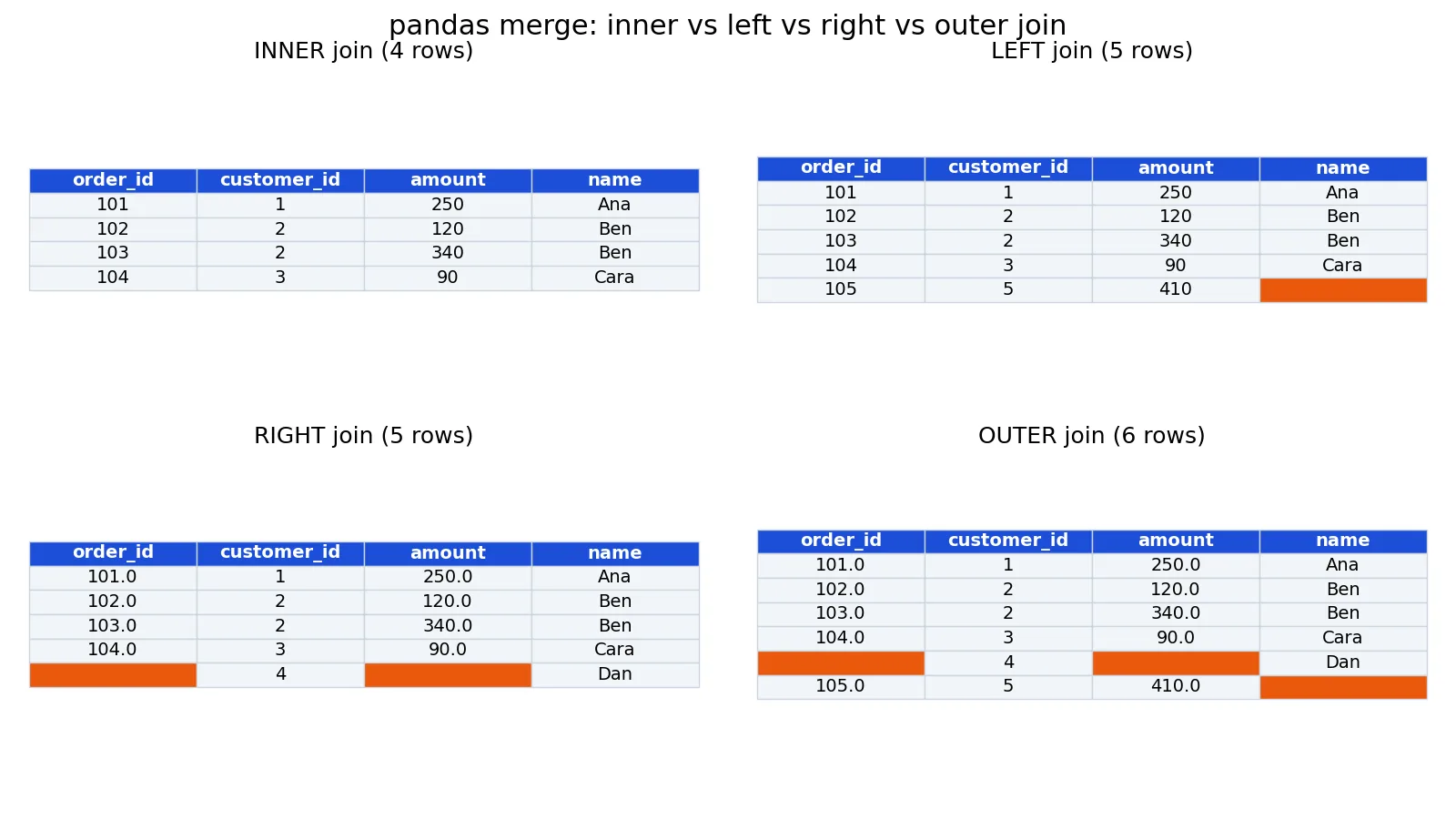
pandas merge combines two DataFrames by matching values in one or more shared columns, much like a SQL join. You choose the join type with the how argument: inner, left, right, or outer. This article walks through the syntax, a small worked example, and the errors you will hit most often.
Quick Answer
pd.merge(left, right, on="key", how="inner")is the basic call.onnames the shared column,howsets the join type [1].innerkeeps only rows whose key exists in both DataFrames. It is the defaulthowvalue [1].leftkeeps every row from the left DataFrame and fills missing matches withNaN.rightdoes the mirror image [1].outerkeeps the union of keys from both sides, so unmatched rows from either side survive withNaNin the other side's columns [1].- When both DataFrames have a non-key column with the same name, pandas appends
_xand_ysuffixes by default [1].
Syntax
The function signature is pandas.merge(left, right, how='inner', on=None, left_on=None, right_on=None, left_index=False, right_index=False, sort=False, suffixes=('_x', '_y'), copy=None, indicator=False, validate=None) [2].
| Argument | Required? | Meaning |
|---|---|---|
left | Yes | The left DataFrame. |
right | Yes | The right DataFrame. |
how | No | Join type: 'inner', 'left', 'right', 'outer', or 'cross'. Defaults to 'inner' [1]. |
on | No | Column name or list of names present in both DataFrames to join on. |
left_on | No | Column(s) in the left DataFrame to join on when names differ. |
right_on | No | Column(s) in the right DataFrame to join on when names differ. |
left_index | No | Use the left DataFrame's index as the join key. |
right_index | No | Use the right DataFrame's index as the join key. |
suffixes | No | Tuple of strings appended to overlapping column names. Defaults to ('_x', '_y') [1]. |
indicator | No | Adds a column showing whether each key came from left_only, right_only, or both [1]. |
validate | No | Checks the merge type, such as 'one_to_one' or 'many_to_one', and raises if the data does not match [1]. |
You can also call it as a method: df1.merge(df2, on="key"). Both forms behave the same way [1].
How It Works
A merge has three moving parts: the key, the join type, and the column handling.
The key is the column or columns whose values must match. With on="customer_id", pandas compares each customer_id in the left DataFrame against each one in the right. If you pass a list, such as on=["customer_id", "region"], a row matches only when every listed column matches.
The join type decides which rows survive. An inner join keeps only keys found on both sides. A left join keeps every left row and attaches matching right columns, leaving NaN where there is no match. A right join does the reverse. An outer join keeps the union of keys from both sides [1].
Column handling matters when names collide. If both DataFrames carry a column called amount and it is not the join key, pandas renames them amount_x and amount_y so nothing is silently overwritten [1]. You can rename them yourself with suffixes=("_orders", "_customers") [2].
One detail that surprises people: a merge is not a lookup that returns one row per key. If a key appears three times on the left and twice on the right, the result contains six rows for that key. That is standard relational behavior, and it is why row counts can grow after a merge.
Worked Example
The dataset is a 5-row orders table merged with a 4-row customers table on customer_id.
orders
| order_id | customer_id | amount |
|---|---|---|
| 101 | 1 | 250 |
| 102 | 2 | 120 |
| 103 | 2 | 340 |
| 104 | 3 | 90 |
| 105 | 5 | 410 |
customers
| customer_id | name |
|---|---|
| 1 | Ana |
| 2 | Ben |
| 3 | Cara |
| 4 | Dan |
Customer 5 placed an order but has no customer record. Customer 4 has a record but no orders. Those two gaps drive the row counts below.
import pandas as pd

orders = pd.DataFrame({
    "order_id": [101, 102, 103, 104, 105],
    "customer_id": [1, 2, 2, 3, 5],
    "amount": [250, 120, 340, 90, 410],
})
customers = pd.DataFrame({
    "customer_id": [1, 2, 3, 4],
    "name": ["Ana", "Ben", "Cara", "Dan"],
})

inner = pd.merge(orders, customers, on="customer_id", how="inner")
left  = pd.merge(orders, customers, on="customer_id", how="left")
right = pd.merge(orders, customers, on="customer_id", how="right")
outer = pd.merge(orders, customers, on="customer_id", how="outer")

print(len(inner), len(left), len(right), len(outer))
Output:
4 5 5 6Walking through each join:
- Inner join: 4 rows. Only customer IDs 1, 2, 2, and 3 appear on both sides. Order 105 (customer 5) drops out, and customer 4 never appears.
- Left join: 5 rows. All 5 orders survive. Order 105 keeps its amount of 410 and gets
NaNfornamebecause customer 5 has no record. There is 1 unmatched order. - Right join: 5 rows. All 4 customers survive, plus the extra row for customer 2, who has two orders. Customer 4 gets
NaNin the order columns. There is 1 unmatched customer. - Outer join: 6 rows. The union of both sides. You get the 4 inner matches, plus the unmatched order for customer 5, plus the unmatched customer 4. That is 2 unmatched rows in total.
The pattern to remember: inner gives the smallest result, outer gives the largest, and left and right sit in between depending on which side has more unmatched keys.
More Examples
Joining on columns with different names. Use left_on and right_on when the key columns are not named the same [1].
result = orders.merge(customers, left_on="customer_id", right_on="customer_id")Renaming overlapping columns. If both tables have an amount column, set your own suffixes [2].
result = orders.merge(customers, on="customer_id", suffixes=("_order", "_customer"))Finding unmatched rows. The indicator argument adds a _merge column with values left_only, right_only, or both, which makes it easy to filter for the rows that failed to match [1].
result = orders.merge(customers, on="customer_id", how="outer", indicator=True)
unmatched = result[result["_merge"] != "both"]
Checking merge quality. Pass validate="many_to_one" to confirm that keys are unique on the right side. If they are not, pandas raises an error instead of quietly duplicating rows [1].
result = orders.merge(customers, on="customer_id", validate="many_to_one")If you are still getting comfortable with DataFrame basics, the guide to Pandas in Python: What It Is and How to Use DataFrames covers indexing and column selection first. Once your merged data is ready, Pandas groupby: How to Group and Aggregate Data in Python shows how to summarize it by group.
Errors and How to Fix Them
MergeError: No common columns to perform merge on. You did not pass on and the two DataFrames share no column names. If you pass an on column that is missing from one side, pandas raises KeyError instead. Check df.columns for each frame and switch to left_on and right_on if the names are different.
ValueError: columns overlap but no suffix specified. Both DataFrames have a non-key column with the same name and you passed suffixes=(False, False), which tells pandas not to rename anything [1]. Either drop the duplicate column or supply real suffixes.
MergeError: Merge keys are not unique in right dataset. You used validate="one_to_one" or "many_to_one" and the right side has duplicate keys [3]. Either deduplicate the right DataFrame or relax the validation to match the real relationship.
Unexpected row count growth. This is usually duplicate keys on one side. Run df["key"].duplicated().sum() on each frame before merging to see how many repeats exist.
NaN values in columns you expected to be filled. Those rows had no match on the other side. Use indicator=True to confirm, then decide whether to drop them or fill them.
Common Mistakes
- Assuming the default join is a left join. The default
howis'inner', so rows without a match disappear silently [1]. Passhow="left"explicitly when you want to keep all left rows. - Merging on a column with mismatched data types. A key stored as
int64on one side andobject(string) on the other raisesValueError: You are trying to merge on int64 and object columns. Convert withastypebefore merging. - Ignoring duplicate keys. Duplicates on either side multiply rows. Check uniqueness first, or use
validateto catch it [1]. - Forgetting about overlapping column names. Without suffixes, pandas appends
_xand_y, which is easy to misread later [1]. Set descriptive suffixes instead. - Using
mergewhenconcatis the right tool.mergealigns rows by key values.concatstacks or aligns objects along an axis without matching keys [3]. If you are appending monthly files with identical columns,concatis correct. - Trusting the row count without checking. Always compare
len(result)against the input sizes. A merge that returns more rows than either input means duplicate keys.
Limitations
merge only matches on equality of key values. It cannot express range conditions, fuzzy text matching, or "closest date" logic. For nearest-key matching, pandas provides merge_asof, and for ordered merges it provides merge_ordered [3]. If your join condition is more complex than "these columns are equal," you need one of those or a manual approach.
Memory is the other constraint. Merging two large DataFrames builds an intermediate result that can be several times larger than either input, especially with many-to-many keys. A merge that produces millions of duplicate rows can exhaust memory before you notice the key problem. Checking key uniqueness and filtering columns down to what you need before merging keeps the operation manageable.
Frequently Asked Questions
What is the difference between pandas merge and join?
merge is the general-purpose function and lets you join on columns or indexes with any join type [3]. DataFrame.join is a convenience method that joins on the index by default and is best for index-aligned data [3]. For most column-based joins, use merge.
What is the default join type in pandas merge?
The default is 'inner', which keeps only rows whose key appears in both DataFrames [1]. If you want to keep all rows from one side, set how="left" or how="right" explicitly.
How do I merge on multiple columns?
Pass a list to on, such as on=["customer_id", "region"]. A row matches only when every column in the list matches. If the column names differ between the two DataFrames, use left_on=["a", "b"] and right_on=["c", "d"] instead [1].
Why did my merge create more rows than I started with?
Duplicate keys on one or both sides. If a key appears twice on the left and three times on the right, that key produces six rows. Check for duplicates with duplicated() and use validate to enforce the relationship you expect [1].
How do I keep only the rows that did not match?
Use how="outer" with indicator=True, then filter the _merge column for left_only or right_only [1]. That gives you the anti-join result, which is the set of keys present on one side but not the other.
References
- pandas.DataFrame.merge, pandas 3.0.6 documentation
- pandas.merge, pandas 3.0.6 documentation
- Merge, join, concatenate and compare, pandas 3.0.6 documentation
Further Reading
- pandas.merge, pandas 2.2.3 documentation
- Harris CR, Millman KJ, van der Walt SJ et al. (2020). Array programming with NumPy. Nature
- McKinney W (2010). Data Structures for Statistical Computing in Python. Proceedings of the Python in Science Conference