Lowercase in R: How to Convert Strings with tolower()
By Dr. Zubair Khalid, DVM, MS, PhD ·
Converting text to lowercase in R is a one-function job: tolower() takes a character vector and returns every letter in lower case. It is the standard first step when you clean category labels, standardize user input, or prepare text for matching and counting. This article shows the exact syntax, a worked example on messy survey data, and the mistakes that trip people up.
Quick Answer
tolower(x)converts every uppercase letter in a character vector to lowercase and leaves everything else unchanged.- It is vectorized, so one call handles an entire column or vector at once.
- It does not remove whitespace. Combine it with
trimws()to clean labels that have stray spaces. - It returns
NAforNAinput and does not error on numbers stored as text. - For more control over case rules, the
quantedapackage offerschar_tolower()(calledtoLower()in older versions), which can skip all-uppercase words such as acronyms withkeep_acronyms = TRUE[1].
Syntax
tolower() is a base R function, so you do not need to install or load any package.
tolower(x)| Argument | Required? | Meaning |
|---|---|---|
x | Yes | A character vector, or an object that R can coerce to character. Each element is converted independently. |
The function has no other arguments. There is no option to skip certain words, preserve acronyms, or set a locale. If you need that behavior, use a package function such as char_tolower() from quanteda, which accepts keep_acronyms = TRUE to leave all-uppercase words alone [1].
The companion function toupper() does the reverse and takes the same single argument.
How It Works
tolower() walks each element of the input vector and maps every uppercase letter to its lowercase counterpart. Characters that are already lowercase, digits, punctuation, and spaces pass through untouched. The output has the same length and order as the input.
Because the operation is element-wise, the result of tolower() on a vector of length 8 is a vector of length 8. Nothing is dropped or reordered. That property is what makes it safe to use inside a data pipeline, for example as tolower(df$category) or inside dplyr::mutate().
Two details matter in practice. First, tolower() does not trim whitespace, so "yes " and "yes" stay different strings after conversion. Second, it does not collapse multiple spellings of the same concept. If your data contains "Yes", "YES", and "yes", lowercasing turns all three into "yes", which is exactly the point. If it contains "Y" and "yes", lowercasing gives you "y" and "yes", which are still two categories. Case conversion standardizes letter case, not meaning.
The function is also locale-aware in the sense that R uses the character-type rules (LC_CTYPE) of your current locale for letter mapping. In most English-language workflows this is invisible. If you work with Turkish text, where the uppercase dotted I maps to a different lowercase letter than in English, check your locale settings before trusting the output.
Worked Example
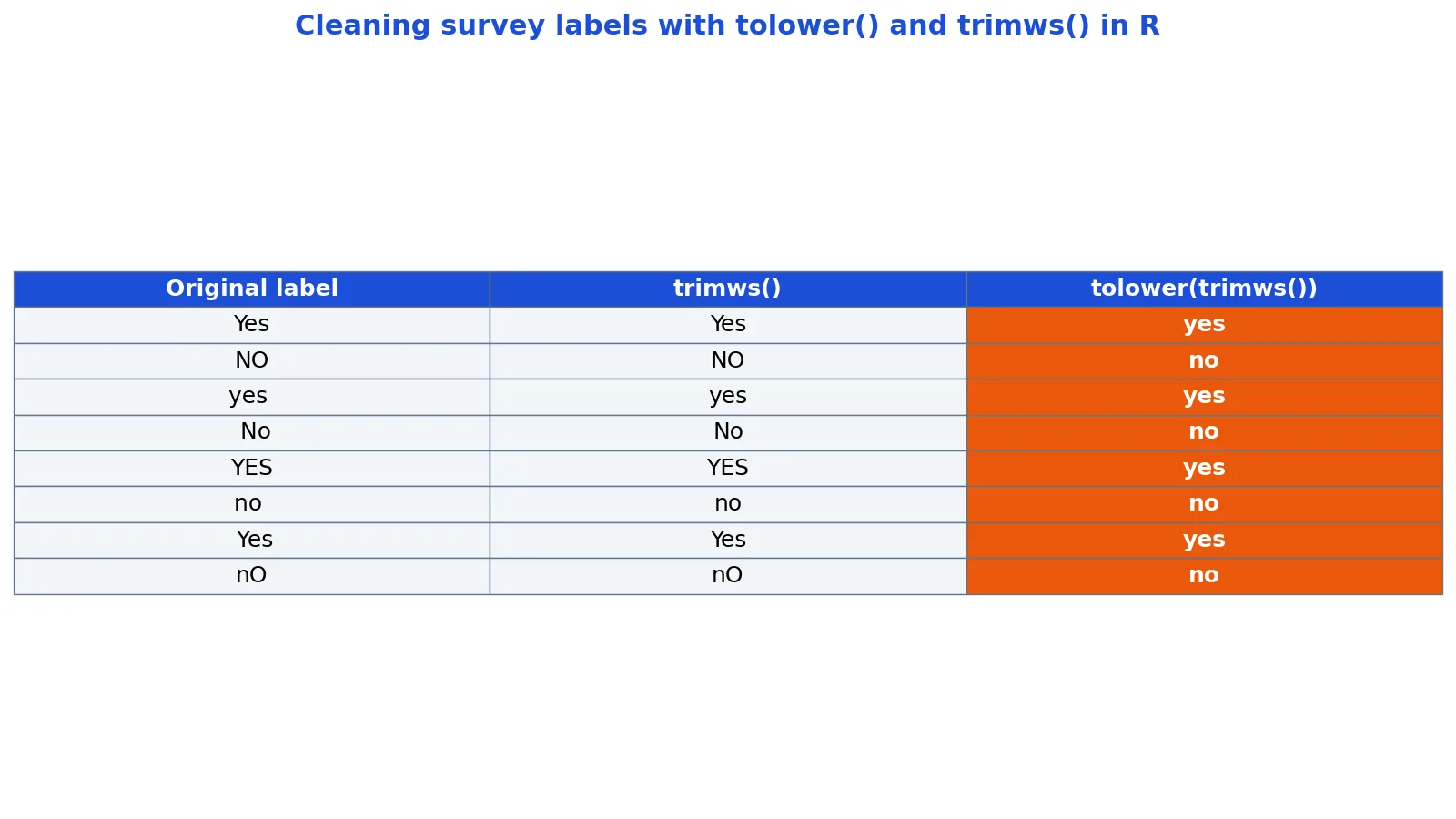
The dataset below is a small survey extract with eight messy category labels. Each row shows the original label, the result of trimws(), and the result of tolower(trimws()).
| original | trimws | tolower_trimws |
|---|---|---|
| Yes | Yes | yes |
| NO | NO | no |
| yes | yes | yes |
| No | No | no |
| YES | YES | yes |
| no | no | no |
| Yes | Yes | yes |
| nO | nO | no |
The starting vector is:
x <- c("Yes", "NO", "yes ", " No", "YES", "no ", " Yes", "nO")Step 1: trimws(x) removes leading and trailing whitespace. The values become "Yes", "NO", "yes", "No", "YES", "no", "Yes", "nO". Note that the internal letters are unchanged, so "nO" stays "nO".
Step 2: tolower(trimws(x)) lowercases every element. The result is "yes", "no", "yes", "no", "yes", "no", "yes", "no".
Step 3: unique() on the cleaned vector returns two categories, "yes" and "no", in order of first appearance. The original eight labels collapsed to two.
Here is the full snippet and its output:
x <- c("Yes", "NO", "yes ", " No", "YES", "no ", " Yes", "nO")
tolower(trimws(x))
Eight labels in, two unique categories out. That is the entire cleaning step for this column.
More Examples
Lowercase a single string.
tolower("Hello World")Lowercase a data frame column.
df$category <- tolower(df$category)Lowercase and trim in one expression.
df$category <- tolower(trimws(df$category))Count categories after cleaning. Once the labels are standardized, table() gives you a clean frequency count.
table(tolower(trimws(x)))Check membership after cleaning. The %in% operator works well on cleaned vectors. See the %in% operator in R for the full syntax.
Generate lowercase letters. If you need the alphabet itself rather than converted text, the built-in letters constant gives you "a" through "z" directly. The R letters function covers that in detail.
Use char_tolower() for acronym-safe conversion. The quanteda function (named toLower() in older versions) accepts keep_acronyms = TRUE, which leaves all-uppercase words untouched. This is useful when "NATO" and "NASA" should stay uppercase in a corpus [1].
quanteda::char_tolower("England and France are members of NATO and UNESCO", keep_acronyms = TRUE)Errors and How to Fix Them
tolower() returns NA unexpectedly. If your input contains NA, the output contains NA in the same position. This is correct behavior, not a bug. Decide whether to drop those rows or replace them before conversion.
Non-character input. If x is a factor, tolower() converts it with as.character() and returns a lowercase character vector of the labels, so the result is no longer a factor. Convert it back with factor() if you need one. In modern R, factors are less common in data frames, but they still appear in older code and in some file imports.
Unexpected output with non-ASCII text. Accented characters and non-Latin scripts depend on your locale. If "É" does not convert as expected, check Sys.getlocale() and consider setting a UTF-8 locale.
toLower() not found. That function belonged to older versions of the quanteda package and is not part of base R [1]. In current quanteda, call quanteda::char_tolower() instead. Do not confuse it with base R's tolower().
Whitespace survives conversion. This is the most common surprise. tolower("Yes ") returns "yes " with the trailing space intact. Add trimws().
Common Mistakes
- Forgetting
trimws(). Lowercasing"yes "gives"yes ", which is still a different string from"yes". Always trim before or alongside conversion when labels come from free-text entry. - Assuming
tolower()fixes typos. It converts case only."yse"stays"yse". You still need spelling normalization or fuzzy matching. - Applying it to numeric columns.
tolower()on a numeric vector coerces values to character, so1becomes"1". That silently changes the column type. Convert only character columns. - Using
toLower()in current code. Base R hastolower(), nottoLower(), and currentquantedareplacedtoLower()withchar_tolower()[1]. - Expecting a factor back.
tolower()on a factor returns a character vector of lowercase labels, not a factor. Wrap the result infactor()if you need the factor type. - Ignoring locale for non-English text. Turkish, German, and other languages have case rules that differ from English. Test on a sample before running the conversion on a full dataset.
Limitations
tolower() changes letter case and nothing else. It cannot merge categories that differ by spelling, punctuation, or word order. "Yes" and "Y" both lowercase cleanly but remain two distinct values. If your goal is to reduce a messy column to a small set of canonical categories, case conversion is one step in a longer pipeline that may also need trimming, punctuation removal, and manual mapping.
The function also gives you no control over which words get converted. Acronyms, proper nouns, and codes all get flattened. For text analysis where "NATO" and "UNESCO" should keep their uppercase form, the char_tolower() function in quanteda offers an option to skip all-uppercase words [1]. Base R has no equivalent setting, so you would need to protect those tokens yourself before conversion.
Frequently Asked Questions
What is the difference between tolower() and toLower() in R?
tolower() is a base R function with a single argument and no options. toLower() was a function in older versions of the quanteda package that converted texts or tokens to lower case and could leave all-uppercase words unchanged [1]. Current quanteda replaces it with char_tolower() and tokens_tolower(), which take a keep_acronyms argument. Use tolower() for general string cleaning and char_tolower() when you need corpus-aware behavior.
Does tolower() remove spaces?
No. tolower() only changes letter case. Spaces, tabs, and newlines pass through unchanged. If your strings have leading or trailing whitespace, wrap the call in trimws(), as in tolower(trimws(x)).
How do I convert an entire column to lowercase in R?
Assign the result back to the column: df$category <- tolower(df$category). If the column is a factor, convert it first with as.character(). Inside dplyr, use mutate(category = tolower(category)).
Can I convert a vector of strings to lowercase all at once?
Yes. tolower() is vectorized, so tolower(c("A", "B", "C")) returns c("a", "b", "c") in one call. There is no need for a loop or apply().
Why does tolower() return NA for some values?
Because those input values are NA. The function preserves missing values rather than dropping them. Check with is.na() and decide whether to filter or replace those rows before conversion.
References
Further Reading
- Wickham H (2014). Tidy Data. Journal of Statistical Software
- Wickham H, Averick M, Bryan J et al. (2019). Welcome to the Tidyverse. Journal of Open Source Software
- An Introduction to R (R Core Team)
- Wickham H, Cetinkaya-Rundel M, Grolemund G. R for Data Science (2e)
- ggplot2 Reference