Database Normalization: 1NF, 2NF, 3NF Explained with Examples
By Dr. Zubair Khalid, DVM, MS, PhD ·
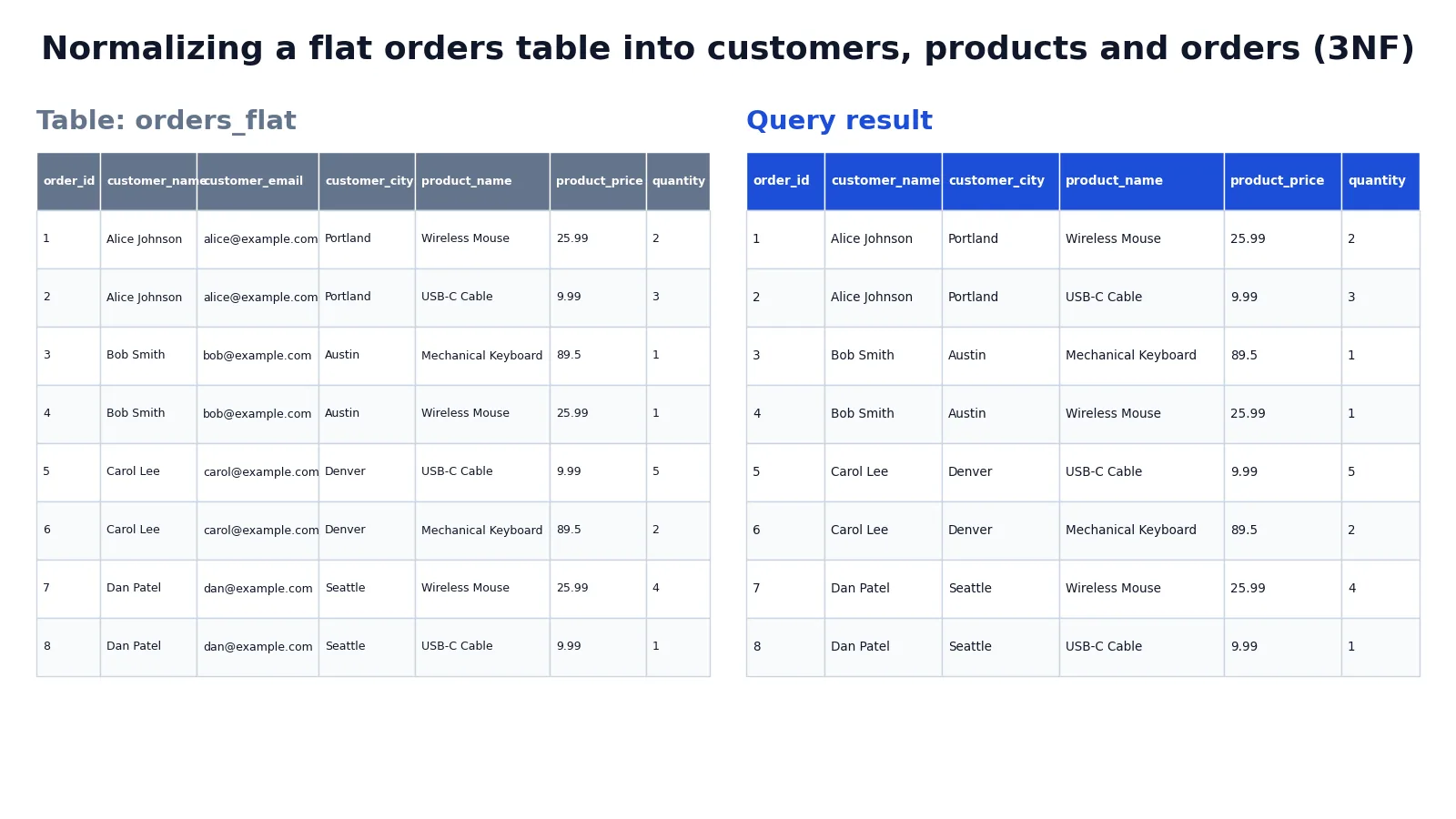
Database normalisation is the process of organizing columns and tables so that each fact is stored in exactly one place. You apply it by checking a table against a series of rules called normal forms, starting with 1NF, then 2NF, then 3NF. Each form removes a specific kind of redundancy, and most transactional schemas stop at 3NF.
Quick Answer
- 1NF requires atomic values in every cell, no repeating groups, and a way to identify each row.
- 2NF requires 1NF plus no partial dependency, meaning no non-key column depends on only part of a composite key.
- 3NF requires 2NF plus no transitive dependency, meaning no non-key column depends on another non-key column.
- The fix is usually to split one wide table into several smaller tables linked by primary and foreign keys.
- Normalisation reduces update anomalies, but it adds joins, so reporting tables are sometimes left denormalized on purpose.
What Database Normalisation Means
In plain terms, database normalisation means designing tables so that changing one fact requires changing one row in one table. If a customer moves to a new city, you update that customer once, not once per order.
The precise definition comes from the relational model. A relation is a table, a row is a tuple, and a column is an attribute [1]. Normalisation is a set of constraints on those relations that eliminate redundancy and update anomalies while preserving the same information. The concept of a normal form for database relations was introduced by E. F. Codd in his 1970 paper on the relational model [2].
The three forms build on each other. A table in 3NF is automatically in 2NF, and a table in 2NF is automatically in 1NF. You cannot skip a level.
How It Works
Each normal form is a condition on functional dependencies. A functional dependency $X \to Y$ means that if two rows agree on the columns in $X$, they must agree on the columns in $Y$.
First normal form (1NF). Every column holds a single atomic value, there are no repeating groups of columns, and each row is uniquely identifiable by a primary key.
Second normal form (2NF). The table is in 1NF, and every non-key column depends on the entire primary key. If the key is composite, say $(A, B)$, then no non-key column may depend on $A$ alone or $B$ alone. Formally, for every non-key attribute $Y$ and every proper subset $X$ of the key:
$$X \to Y \text{ is not allowed in 2NF}$$
Third normal form (3NF). The table is in 2NF, and no non-key column depends on another non-key column. For any non-key attributes $A$ and $B$:
$$A \to B \text{ is not allowed in 3NF unless } A \text{ is a candidate key}$$
A transitive dependency is the pattern $Key \to A \to B$. The value of $B$ is determined indirectly through $A$, so $B$ belongs in a table keyed by $A$.
Worked Example
The dataset is a flat order table for a small online store, with eight orders across four customers and three products. The table orders_flat stores customer details and product details in every row.
| order_id | customer_name | customer_email | customer_city | product_name | product_price | quantity |
|---|---|---|---|---|---|---|
| 1 | Alice Johnson | [email protected] | Portland | Wireless Mouse | 25.99 | 2 |
| 2 | Alice Johnson | [email protected] | Portland | USB-C Cable | 9.99 | 3 |
| 3 | Bob Smith | [email protected] | Austin | Mechanical Keyboard | 89.50 | 1 |
| 4 | Bob Smith | [email protected] | Austin | Wireless Mouse | 25.99 | 1 |
| 5 | Carol Lee | [email protected] | Denver | USB-C Cable | 9.99 | 5 |
| 6 | Carol Lee | [email protected] | Denver | Mechanical Keyboard | 89.50 | 2 |
| 7 | Dan Patel | [email protected] | Seattle | Wireless Mouse | 25.99 | 4 |
| 8 | Dan Patel | [email protected] | Seattle | USB-C Cable | 9.99 | 1 |
This table is in 1NF because every cell holds one value. Its key is the single column order_id, so it cannot have partial dependencies and is technically in 2NF. It fails 3NF because customer_name, customer_email and customer_city depend on the customer, not directly on the order, and product_price depends on the product, not on the order. These are transitive dependencies such as order_id to product_name to product_price. Alice's city is stored twice, and the mouse price is stored three times.
The fix is to create three tables. customers holds one row per customer, products holds one row per product, and orders holds the order key plus foreign keys and the quantity.
CREATE TABLE customers (customer_id INTEGER PRIMARY KEY, customer_name TEXT NOT NULL, customer_email TEXT NOT NULL, customer_city TEXT NOT NULL); CREATE TABLE products (product_id INTEGER PRIMARY KEY, product_name TEXT NOT NULL, product_price REAL NOT NULL); CREATE TABLE orders (order_id INTEGER PRIMARY KEY, customer_id INTEGER NOT NULL REFERENCES customers(customer_id), product_id INTEGER NOT NULL REFERENCES products(product_id), quantity INTEGER NOT NULL); INSERT INTO customers (customer_id, customer_name, customer_email, customer_city) SELECT DISTINCT MIN(order_id), customer_name, customer_email, customer_city FROM orders_flat GROUP BY customer_name, customer_email, customer_city; INSERT INTO products (product_id, product_name, product_price) SELECT DISTINCT MIN(order_id), product_name, product_price FROM orders_flat GROUP BY product_name, product_price; INSERT INTO orders (order_id, customer_id, product_id, quantity) SELECT o.order_id, c.customer_id, p.product_id, o.quantity FROM orders_flat o JOIN customers c ON c.customer_name = o.customer_name AND c.customer_email = o.customer_email AND c.customer_city = o.customer_city JOIN products p ON p.product_name = o.product_name AND p.product_price = o.product_price;The result was checked with an equivalent SQLite query that joins the three tables back together.
| order_id | customer_name | customer_city | product_name | product_price | quantity |
|---|---|---|---|---|---|
| 1 | Alice Johnson | Portland | Wireless Mouse | 25.99 | 2 |
| 2 | Alice Johnson | Portland | USB-C Cable | 9.99 | 3 |
| 3 | Bob Smith | Austin | Mechanical Keyboard | 89.50 | 1 |
| 4 | Bob Smith | Austin | Wireless Mouse | 25.99 | 1 |
| 5 | Carol Lee | Denver | USB-C Cable | 9.99 | 5 |
| 6 | Carol Lee | Denver | Mechanical Keyboard | 89.50 | 2 |
| 7 | Dan Patel | Seattle | Wireless Mouse | 25.99 | 4 |
| 8 | Dan Patel | Seattle | USB-C Cable | 9.99 | 1 |
The output matches the original table row for row. The difference is that customer and product facts now live in one place each. The join that rebuilds the view uses the foreign keys, which is the same pattern you use in any SQL alias query where tables are joined and columns need clear names.
How to Interpret It
Read the result as proof that normalisation is lossless. Every order still resolves to the same customer and the same product at the same price. Nothing was dropped, only moved.
The redundancy count is the clearest signal. In the flat table, customer data appears eight times for four customers. In the normalized schema, it appears four times. Product data drops from eight rows to three. Each update now touches one row.
You can also read the schema as a set of dependencies. customer_id determines name, email and city. product_id determines name and price. order_id determines customer, product and quantity. Each arrow points from a key to the attributes it owns.
When to Use It (and when not to)
Use normalisation for transactional systems where data is written and updated often. Order systems, customer records, inventory and any schema where the same entity appears in many rows all benefit. It is also the default for teaching relational design because it forces you to name your entities.
Skip full normalisation for read-heavy analytical tables. A reporting table that joins five tables on every query can be slower than one wide table, and columnar warehouses often store denormalized data on purpose. If you are building a dataset for analysis, the tradeoff is between storage and query speed, which is the same tension covered in structured vs unstructured data.
A middle path is to normalize the source tables and build denormalized views or materialized tables on top. You keep clean writes and fast reads.
3NF vs BCNF
Boyce-Codd normal form (BCNF) is a stricter version of 3NF. The difference appears when a table has overlapping candidate keys.
| Property | 3NF | BCNF |
|---|---|---|
| Base requirement | 2NF plus no transitive dependency | 1NF plus every determinant is a candidate key |
| Handles overlapping candidate keys | Allows some exceptions | Does not allow them |
| Typical use | Most business schemas | Schemas with multiple candidate keys |
| Difficulty to apply | Easier | Requires checking every determinant |
In practice, most tables that reach 3NF also satisfy BCNF. The gap shows up in edge cases, such as a table with two composite candidate keys that share a column.
Common Mistakes
- Storing a list in one column. A column like
phone_numbersholding "555-0101, 555-0102" breaks 1NF. Fix it by moving each value to its own row in a related table. - Using a composite key but leaving partial dependencies. If
ordersis keyed by(order_id, product_id)and also storesproduct_name, that name depends onproduct_idalone. Fix it by moving product columns to aproductstable. - Leaving transitive dependencies in place. Storing
customer_cityandcustomer_ziptogether when zip determines city creates a 3NF violation. Fix it by moving zip and city to a lookup table keyed by zip. - Adding a surrogate key and assuming that fixes 2NF. A new
idcolumn does not remove partial dependencies if the natural composite key still exists. Fix the dependencies first, then add the surrogate key. - Normalizing everything, including lookup values. Splitting a two-value status column into its own table adds a join for no benefit. Keep small, stable, low-cardinality values inline.
- Forgetting foreign key constraints. Splitting tables without
REFERENCESlets orphan rows appear. Add the constraints when you create the tables.
Limitations
Normalisation cannot tell you what your entities are. It checks dependencies, but choosing the right grain for a table is a modeling decision that depends on the business rules. Two analysts can normalize the same flat table into different schemas and both can be correct.
It also cannot fix bad source data. If the flat table has two spellings of the same city, normalisation will create two customer rows, not one. Cleaning values is a separate step, and it belongs in your data management process before or during the load.
Finally, normalisation optimizes for write correctness, not read speed. Deeply normalized schemas need many joins, and on large tables those joins cost time. That cost is real and should be measured, not assumed away.
Frequently Asked Questions
What is the difference between 2NF and 3NF?
2NF removes dependencies on part of a composite key. 3NF removes dependencies between non-key columns. A table can be in 2NF and still fail 3NF if, for example, a zip code column determines a city column while neither is the primary key.
Does normalisation always improve performance?
No. It improves write performance and data integrity by removing redundancy. Read performance often gets worse because queries need more joins. Analytical workloads frequently use denormalized tables for this reason.
Can a table be in 3NF but not BCNF?
Yes. BCNF is stricter. A table with overlapping candidate keys can satisfy 3NF while violating BCNF, because 3NF permits a non-key attribute to determine part of a candidate key in some cases.
How do I convert a flat table to 3NF in SQL?
Group the repeated attributes by the entity they describe, create one table per entity with a primary key, then rebuild the original table with foreign keys. The INSERT ... SELECT DISTINCT pattern in the worked example does this in one pass. If you need to reshape rows during the load, a common table expression keeps the steps readable.
Is normalisation the same as standardization?
No. Normalisation in databases is about table structure and dependencies. Standardization is about making values consistent, such as using the same date format or the same unit of measure across a dataset.
References
- PostgreSQL: Documentation: 18: 2.2. Concepts
- Codd EF (1970). A relational model of data for large shared data banks. Communications of the ACM
Further Reading
- PostgreSQL Documentation: SELECT
- SQLite: SQL As Understood By SQLite
- Wilson G, Bryan J, Cranston K et al. (2017). Good enough practices in scientific computing. PLOS Computational Biology
- PostgreSQL Tutorial: The SQL Language
Related Articles
- Structured vs Unstructured Data: Differences and Examples
- Dataset Examples: Types of Data Sets With Real Samples
- SQL RIGHT Function: Syntax, Examples and Use Cases
- SQL Alias: Syntax and Examples for Tables and Columns
- SQL COALESCE Function: Syntax and Examples
- RNA-Seq Normalization
- Data Management Basics: Principles, Processes, and Best Practices
- Single-Cell RNA-Seq Normalization