What Is Cardinality? Definition and Examples in Data
By Dr. Zubair Khalid, DVM, MS, PhD ·
Cardinality is the number of distinct values in a set or column. In a database, the cardinality of a column is how many unique values it holds, not how many rows the table contains. That single number drives index choices, query plans and how fast your SQL runs.
Quick Answer
- Cardinality counts distinct values. A column with values 101, 101, 102, 103 has a cardinality of 3, even though it holds 4 rows.
- In mathematics, cardinality is an inherent property of sets, roughly the number of individual objects they contain, which may be infinite [1].
- High cardinality means many unique values relative to the row count. Low cardinality means few.
- Database engines estimate cardinality to decide how to execute a query, and those estimates come mainly from histograms built when indexes or statistics are created [2].
- Cardinality is not the same as row count. Row count is how many rows exist, cardinality is how many distinct values appear.
What Cardinality Means
In plain terms, cardinality answers the question "how many different values are here?" If you have a column of customer IDs and 8 orders come from 6 different customers, the cardinality of that column is 6. The table still has 8 rows.
The precise statistical definition is the size of the set of distinct values in a population or sample. Formally, for a column $X$ with observed values $x_1, x_2, \dots, x_n$, the cardinality is:
$$|X| = \left| \{ x_i : i = 1, \dots, n \} \right|$$
The vertical bars mean "the number of elements in the set." The set notation removes duplicates, so repeated values collapse into one. This is why cardinality and row count diverge whenever duplicates exist.
In mathematics, two sets have the same cardinality if a one-to-one correspondence exists between them, meaning their objects can be paired so each object has a pair and no object is paired more than once [1]. That definition extends to infinite sets, where cardinality describes different sizes of infinity. For everyday data work, you rarely need that extension. You need the finite, countable version.
How It Works
The mechanism is straightforward counting of distinct values, but the interesting part is how databases use it.
The basic formula is:
$$\text{cardinality}(X) = \text{COUNT(DISTINCT } X)$$
Each symbol means the following:
- $\text{COUNT}$ is the SQL aggregate that counts rows.
- $\text{DISTINCT}$ removes duplicate values before counting, so each value contributes once.
- $X$ is the column or expression you are measuring.
A related measure is selectivity, the fraction of rows a predicate is expected to match:
$$\text{selectivity} = \frac{\text{rows matched by the predicate}}{\text{total rows}}$$
Low selectivity means a filter matches few rows, which favors an index seek. High selectivity means it matches many rows, which often favors a scan.
Database engines do not count distinct values on every query. They estimate cardinality, which is how the query optimizer estimates the total number of rows processed at each level of a query plan [2]. Those estimates come primarily from histograms created when indexes or statistics are created, either manually or automatically [2]. When the estimate is wrong, the optimizer can pick a bad plan, and inaccurate cardinality estimates often cause poor performance during query optimization [3].
Worked Example
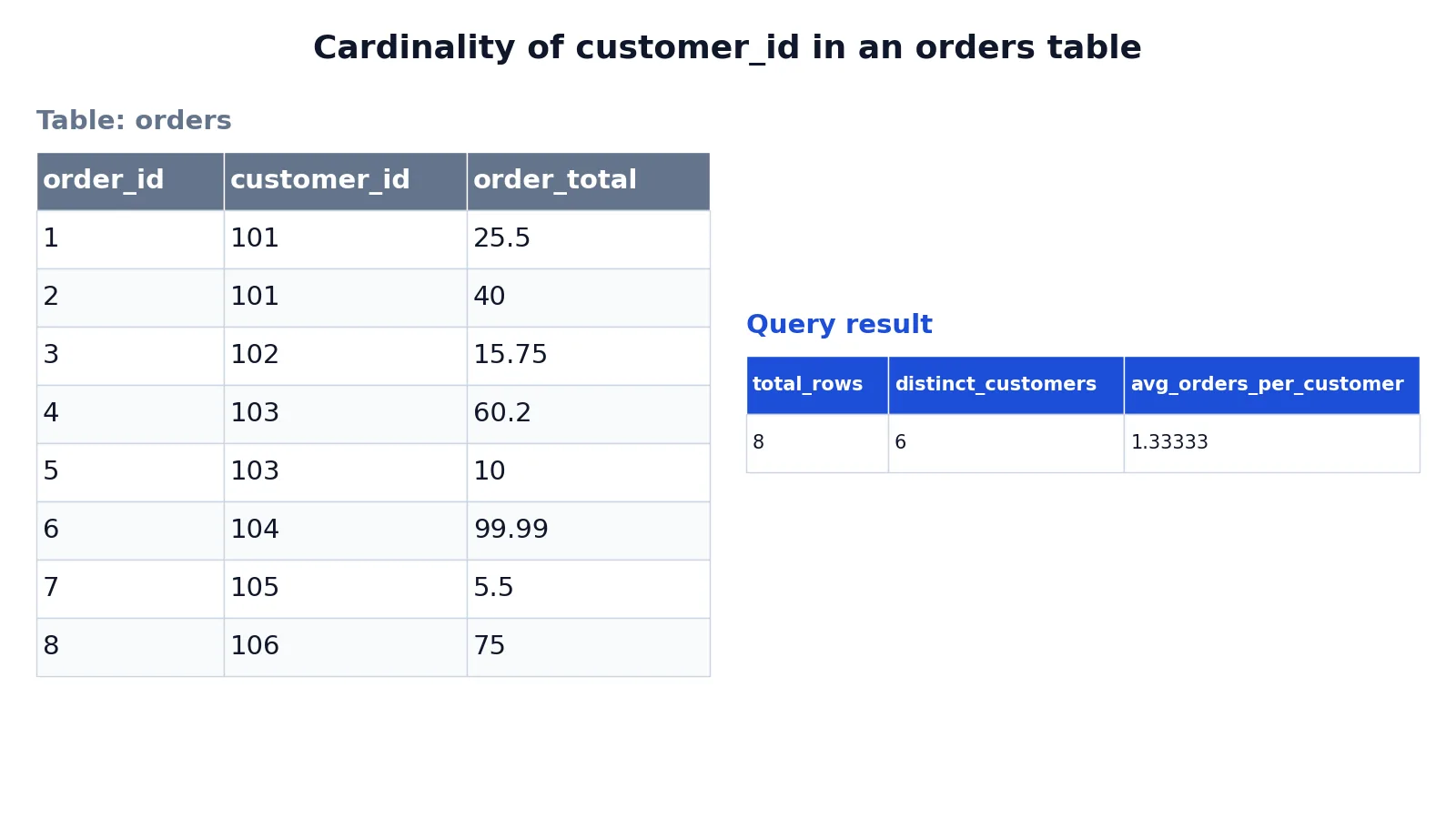
The dataset is a small orders table with 8 rows, where customer_id identifies who placed each order.
| order_id | customer_id | order_total |
|---|---|---|
| 1 | 101 | 25.50 |
| 2 | 101 | 40.00 |
| 3 | 102 | 15.75 |
| 4 | 103 | 60.20 |
| 5 | 103 | 10.00 |
| 6 | 104 | 99.99 |
| 7 | 105 | 5.50 |
| 8 | 106 | 75.00 |
The query counts rows, counts distinct customers, and divides one by the other:
SELECT COUNT(*) AS total_rows, COUNT(DISTINCT customer_id) AS distinct_customers, COUNT(*) * 1.0 / COUNT(DISTINCT customer_id) AS avg_orders_per_customer FROM orders;The result:
| total_rows | distinct_customers | avg_orders_per_customer |
|---|---|---|
| 8 | 6 | 1.3333333333333333 |
The result was checked with an equivalent SQLite query.
Reading the output: COUNT(*) returns 8, the total number of rows. COUNT(DISTINCT customer_id) returns 6, which is the cardinality of that column. The ratio shows 1.33 orders per customer on average, which tells you that most customer IDs appear only once. That makes customer_id a relatively high cardinality column in this table.
How to Interpret It
Compare cardinality to the row count. The ratio is what matters.
| Ratio of distinct values to rows | Label | Typical example |
|---|---|---|
| Close to 1.0 | High cardinality | Primary keys, email addresses, order IDs |
| Around 0.1 to 0.5 | Medium cardinality | City names, product categories in a large catalog |
| Very small, often under 10 values | Low cardinality | Status flags, boolean columns, country codes |
High cardinality columns are good candidates for indexes because a lookup narrows the result set sharply. Low cardinality columns are usually poor index candidates on their own, because a filter like status = 'active' may match most rows, and the engine still has to read them all.
Cardinality also matters in relationship design. In Power BI, the one-to-many and many-to-one cardinality options are essentially the same and are the most common cardinality types, while a one-to-one relationship means both columns contain unique values [4]. A one-to-one relationship is uncommon and likely signals a suboptimal model design because of redundant data storage [4].
When to Use It (and when not to)
Use cardinality when you are:
- Choosing which columns to index.
- Diagnosing a slow query and checking whether the optimizer's row estimates match reality.
- Profiling a new dataset to see which columns are identifiers and which are categories.
- Designing relationships between tables in a BI model or a normalized schema.
Skip it when the question is about volume, not variety. If you want to know how much data you have, use row count or table size. Cardinality tells you nothing about how many rows exist, only how many different values appear. It also tells you nothing about distribution. A column can have high cardinality and still be heavily skewed, with one value appearing in 90 percent of rows.
Cardinality vs Row Count
These two are confused constantly, so keep the distinction sharp.
| Property | Cardinality | Row count |
|---|---|---|
| What it counts | Distinct values in a column or set | Total rows in a table |
| Typical SQL | COUNT(DISTINCT col) | COUNT(*) |
| Changes when you add a duplicate row | No | Yes |
| Used for | Index selection, query planning, relationship design | Volume checks, sizing, aggregation |
| Example from the table above | 6 distinct customers | 8 orders |
A quick way to remember it: row count measures how much data you have, cardinality measures how varied it is.
Common Mistakes
- Treating cardinality as row count. They are different numbers whenever duplicates exist. Fix: always run
COUNT(*)andCOUNT(DISTINCT col)side by side before drawing conclusions. - Assuming high cardinality always means a good index. A unique column with millions of rows is a great index candidate, but a high cardinality column that is never filtered is wasted overhead. Fix: index columns that appear in
WHERE,JOINandORDER BYclauses. - Ignoring low cardinality columns entirely. A low cardinality column can still help in a composite index when paired with a selective column. Fix: evaluate composite indexes instead of rejecting the column outright.
- Trusting the optimizer's estimate as fact. Estimates come from histograms and model assumptions, and they can be wrong, especially with correlated columns. Fix: compare estimated and actual row counts in the execution plan.
- Forgetting that cardinality changes as data grows. A column that looks unique today may accumulate duplicates later. Fix: refresh statistics after large loads.
- Confusing cardinality with uniqueness. A column can be unique without being a key, and a key is unique by definition. Fix: check for nulls and constraints before assuming uniqueness.
Limitations
Cardinality is a single number, so it compresses a lot of information into very little. It cannot tell you the shape of a distribution, which values are frequent, or whether one value dominates. Two columns with identical cardinality can behave completely differently under the same query, because one is evenly spread and the other is skewed.
Cardinality estimates in query optimizers are approximations built from statistics, and they degrade when data is correlated, when statistics are stale, or when predicates combine in ways the model does not anticipate. Modern engines add feedback mechanisms to correct these errors over time, but the underlying estimates remain estimates. Treat cardinality as a strong signal for planning and profiling, not as a guarantee about performance.
Frequently Asked Questions
What is cardinality in simple terms?
Cardinality is the number of distinct values in a set or column. If a column contains 101, 101, 102, 103, its cardinality is 3 because only three different values appear. It is not the same as the number of rows.
What is the difference between high and low cardinality?
High cardinality means most values are unique, as with primary keys or email addresses. Low cardinality means few distinct values repeat across many rows, as with status flags or boolean columns. The distinction matters because it changes which indexes and query plans perform well.
How do I find the cardinality of a column in SQL?
Use COUNT(DISTINCT column_name). For example, SELECT COUNT(DISTINCT customer_id) FROM orders; returns the number of unique customers. Compare it to COUNT(*) to see how much repetition exists.
Why does cardinality matter for database performance?
Query optimizers use cardinality estimates to decide how many rows each step of a plan will process, and those estimates come mainly from histograms built when indexes or statistics are created [2]. When estimates are far off, the optimizer can choose a plan that reads far more data than necessary, which slows the query down.
Can cardinality be infinite?
Yes, in mathematics. The set of natural numbers has an infinite cardinality, and different infinite sets can have different cardinalities, which is how mathematicians describe different sizes of infinity [1]. In database and statistics work, cardinality is always a finite count of distinct values in your data.
References
- Cardinality - Wikipedia
- Cardinality Estimation Feedback - SQL Server | Microsoft Learn
- Cardinality Estimation Feedback for Expressions in SQL Server 2025 - SQL Server | Microsoft Learn
- Model relationships in Power BI Desktop - Power BI | Microsoft Learn
Further Reading
- Cardinality Estimation (SQL Server) - SQL Server | Microsoft Learn
- cardinality - Azure Databricks | Microsoft Learn
- Codd EF (1970). A relational model of data for large shared data banks. Communications of the ACM
- PostgreSQL Documentation: SELECT
- SQLite: SQL As Understood By SQLite
- Wilson G, Bryan J, Cranston K et al. (2017). Good enough practices in scientific computing. PLOS Computational Biology
Related Articles
- What Is Data Granularity? Definition and Examples
- Structured vs Unstructured Data: Differences and Examples
- Dataset Examples: Types of Data Sets With Real Samples
- What Is Data Aggregation? Definition and Examples
- Database Normalization: 1NF, 2NF, 3NF Explained with Examples
- Tabular Data: What It Is and How to Analyze It