SQL ORDER BY: Ascending and Descending Sorting
By Dr. Zubair Khalid, DVM, MS, PhD ·
Sorting query results in SQL is the job of the ORDER BY clause. You add ASC to sort from smallest to largest, or DESC to sort in descending order in SQL, from largest to smallest. If you leave the direction out, the database sorts ascending by default [1].
Quick Answer
ORDER BY column_name ASCsorts smallest to largest.ASCis the default, soORDER BY column_namemeans the same thing [1].ORDER BY column_name DESCsorts largest to smallest, which is what people mean by desc order in SQL.- Ascending order uses the
<operator to decide what comes first. Descending order uses the>operator [1]. - You can sort by several columns. Later columns break ties left by earlier ones [1].
- In PostgreSQL and Oracle, nulls sort as if they were larger than any non-null value, so
NULLS FIRSTis the default forDESCandNULLS LASTis the default otherwise [1]. SQLite, MySQL and SQL Server treat nulls as smaller, so they come first in ascending order.
Before You Start
You need a working SELECT statement and a table with at least one column you can compare. Numbers, text and dates all sort, but they follow different rules. Numbers sort by value. Text sorts by the database's collation, which is usually alphabetical for plain English words but can differ for accents, case and non-Latin scripts. Dates sort chronologically.
You also need to know that ORDER BY runs after the select list is processed. The clause can use any expression that would be valid in the select list, so ORDER BY price * quantity is legal [1]. Without an ORDER BY, the rows come back in an unspecified order that depends on the scan and join plan and the order on disk. That order must not be relied on [1].
If you want to rank rows inside groups instead of sorting the whole result, that is a different tool. See SQL RANK Function: Syntax, PARTITION BY and Examples for that pattern.
Step by Step
- Write the base query. Start with
SELECTandFROMso you know which columns you have. - Pick the sort column. Choose the column whose values define the order you want, such as
priceorname. - Choose the direction. Add
DESCfor highest first orASCfor lowest first. Omitting the keyword gives youASC[1]. - Add tie-breakers if needed. List a second column after a comma. The second column only decides the order of rows that are equal on the first [1].
- Decide how nulls should appear. Add
NULLS FIRSTorNULLS LASTwhen your column can contain nulls and the default is wrong for your report [1]. PostgreSQL, Oracle and SQLite 3.30+ support these keywords, but MySQL and SQL Server do not, so there you sort on an expression such asCASE WHEN col IS NULL THEN 1 ELSE 0 ENDfirst. - Run the query and check the first and last rows. Those two rows tell you quickly whether the direction is what you intended.
The general shape of the clause is:
ORDER BY sort_expression1 [ ASC | DESC ] [ NULLS { FIRST | LAST } ]
       [ , sort_expression2 [ ASC | DESC ] [ NULLS { FIRST | LAST } ] ... ]
Worked Example
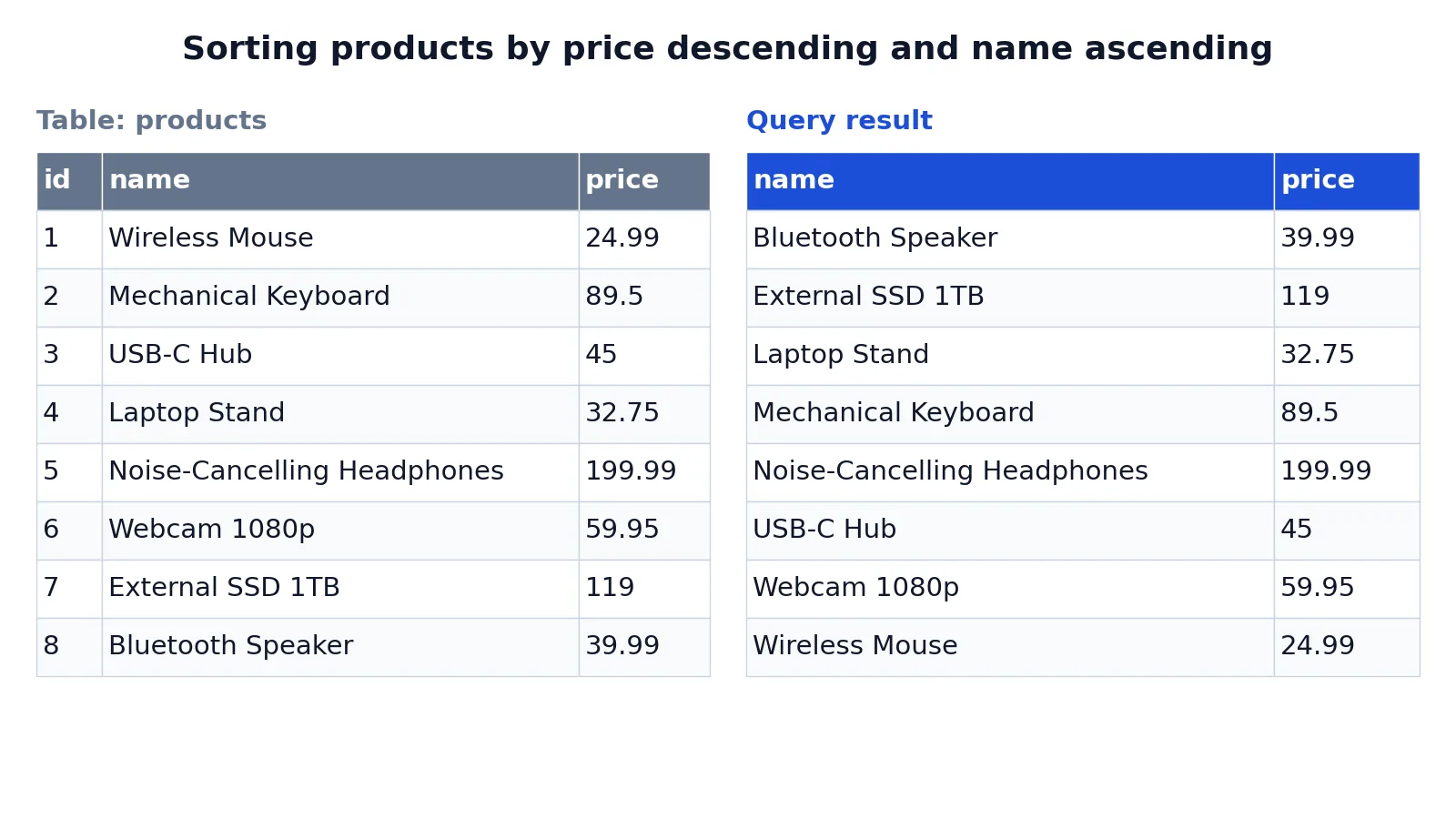
The dataset is a small products table with eight rows, each holding a product name and a price.
| id | name | price |
|---|---|---|
| 1 | Wireless Mouse | 24.99 |
| 2 | Mechanical Keyboard | 89.50 |
| 3 | USB-C Hub | 45.00 |
| 4 | Laptop Stand | 32.75 |
| 5 | Noise-Cancelling Headphones | 199.99 |
| 6 | Webcam 1080p | 59.95 |
| 7 | External SSD 1TB | 119.00 |
| 8 | Bluetooth Speaker | 39.99 |
The query sorts by price from highest to lowest, then by name from A to Z:
SELECT name, price
FROM products
ORDER BY price DESC;

SELECT name, price
FROM products
ORDER BY name ASC;
The result was checked with an equivalent SQLite query.
| name | price |
|---|---|
| Bluetooth Speaker | 39.99 |
| External SSD 1TB | 119 |
| Laptop Stand | 32.75 |
| Mechanical Keyboard | 89.5 |
| Noise-Cancelling Headphones | 199.99 |
| USB-C Hub | 45 |
| Webcam 1080p | 59.95 |
| Wireless Mouse | 24.99 |
The steps are short. SELECT name, price chooses the columns to display. FROM products reads the rows. ORDER BY price DESC sorts from the highest price to the lowest. ORDER BY name ASC sorts alphabetically from A to Z by product name.
Notice that the two sorts produce different orders. Price descending puts the 199.99 headphones first. Name ascending puts Bluetooth Speaker first because B comes before E, L, M, N, U, W and W. Neither order is more correct. The right one depends on the question you are answering.
Other Ways to Do It
You can sort by a column you do not display. SELECT name FROM products ORDER BY price DESC is valid, and it is useful when the sort key is an internal id or a timestamp you do not want in the output.
You can sort by an expression. ORDER BY price * 1.08 sorts by price with tax applied, and ORDER BY LENGTH(name) sorts by name length. The expression must be valid in the select list [1].
You can sort by position number, as in ORDER BY 2 DESC, which sorts by the second column in the select list. This is compact but fragile, because inserting a column into the select list silently changes the sort.
You can sort by an alias defined in the select list, as in SELECT price * 1.08 AS price_with_tax FROM products ORDER BY price_with_tax DESC. This reads well and keeps the expression in one place.
If your sort column comes from a joined table or a computed set of rows, the same clause applies. For patterns where one query feeds another, see Subqueries in SQL: Types, Syntax and Examples.
Troubleshooting
If the order looks random, check whether the ORDER BY clause is actually in the query. Without it, the row order is unspecified and can change between runs as the plan changes [1].
If ties appear in an unexpected order, add a tie-breaker column. Rows that are equal on the first sort expression are ordered by the later ones, and if no later expression exists their relative order is not defined [1].
If nulls land at the top when you wanted them at the bottom, add NULLS LAST where your database supports it. In PostgreSQL the default for DESC is NULLS FIRST, and the default otherwise is NULLS LAST [1]. SQLite, MySQL and SQL Server do the reverse.
If text sorts in a way that looks wrong, the issue is usually collation, not ORDER BY. Case sensitivity and accent handling are decided by the column's collation.
If the query is slow on a large table, the sort may be spilling to disk. An index on the sort column can help, but only when the direction and null placement match what the index provides.
Common Mistakes
- Assuming rows come back in insertion order. They do not. Add an explicit
ORDER BYwhenever the order matters [1]. - Writing
ORDER BY price DESC, nameand expecting the name to also sort descending. Each expression carries its own direction, sonamehere sorts ascending. WriteORDER BY price DESC, name DESCif you want both descending. - Forgetting that
ASCis the default.ORDER BY nameandORDER BY name ASCare the same query [1]. - Sorting by a column position after editing the select list.
ORDER BY 2points at whatever is now second, which may not be the column you meant. - Assuming every database places nulls the same way. PostgreSQL puts nulls first in a
DESCsort [1], while SQLite, MySQL and SQL Server put them last. State the null placement explicitly when it matters. - Sorting by a text column and assuming numeric behavior. Text sorts lexicographically, so
'10'can come before'9'when the values are stored as strings.
Limitations
ORDER BY sorts the rows the query returns. It does not change what the query returns, and it does not persist. The next query without an ORDER BY has no guaranteed order [1]. Sorting also costs work. On large result sets the database may need to sort in memory or on disk, and that cost grows with the number of rows.
The clause cannot express every ordering rule you might want. Custom orders such as a specific priority list, a business calendar or a hand-picked sequence need a CASE expression or a lookup table that assigns sort keys. Text ordering also depends on collation, so the same query can produce different orders on two databases configured differently. When the exact order matters for a report or a downstream process, test it against the real data and the real database settings.
Frequently Asked Questions
What is the default sort order in SQL?
Ascending. If you write ORDER BY price with no direction keyword, the database sorts from smallest to largest, using the < operator to compare values [1]. You only need to type ASC when you want the direction to be explicit for readers.
How do I write descending order in SQL?
Add the DESC keyword after the sort expression, as in ORDER BY price DESC. This sorts from largest to smallest using the > operator [1]. The keyword applies to the expression it follows, so in a multi-column sort you repeat it for each column you want reversed.
Can I sort by more than one column?
Yes. Separate the expressions with commas, as in ORDER BY price DESC, name ASC. The later values sort rows that are equal according to the earlier values [1]. This is how you get a stable, predictable order when the first column has duplicates.
Where do NULL values appear in a sorted result?
In PostgreSQL and Oracle, nulls sort as if they were larger than any non-null value. That makes NULLS FIRST the default for DESC order and NULLS LAST the default otherwise [1]. SQLite, MySQL and SQL Server treat nulls as smaller than any value, so the placement is reversed. Use the NULLS FIRST or NULLS LAST options to override this per expression where they are supported (not in MySQL or SQL Server).
Does ORDER BY change the data in the table?
No. ORDER BY only affects the order of rows in the result set. The stored rows are unchanged, and the sort is not remembered for later queries. If you need a permanent order, store a sort key column and update it yourself.
References
Further Reading
- Codd EF (1970). A relational model of data for large shared data banks. Communications of the ACM
- PostgreSQL Documentation: SELECT
- SQLite: SQL As Understood By SQLite
- Wilson G, Bryan J, Cranston K et al. (2017). Good enough practices in scientific computing. PLOS Computational Biology
- PostgreSQL Tutorial: The SQL Language