Ensembl Variant Search Not Finding Your rsID: How to Fix
By Dr. Zubair Khalid, DVM, MS, PhD ·

The most common cause of an Ensembl Variant Search failure is a genome assembly mismatch. You pasted a valid rsID into a search box that is pointing at the wrong reference genome, at an archive release, or at an Ensembl service that does not carry variation data for that species. The second most common cause is a merged or withdrawn rsID, which happens because dbSNP, the public SNP database at NCBI that assigns every rsID, periodically merges duplicate records and retires obsolete ones.
Before anything else, run this 30-second check. Open the main Ensembl site at ensembl.org, confirm the species and assembly shown in the top banner (for human data it should read GRCh38), then paste the rsID with no spaces and no extra text into the search bar and choose the "Variation" search option if your interface shows one. If the search still returns nothing, work through the causes below in order. This article explains why each failure happens, how to confirm which one is affecting you, and how to fix it, plus how to get your answer from Ensembl even when the search box itself will not cooperate.
What the Ensembl Variant Search Actually Does
Understanding the mechanics makes every troubleshooting step easier, and it is the fastest way to learn how to use Ensembl productively rather than by trial and error.
Ensembl is a genome browser and annotation database maintained by EMBL-EBI (the European Molecular Biology Laboratory's European Bioinformatics Institute) together with the Wellcome Sanger Institute. When you type an rsID into the search bar, Ensembl does not search the raw genome sequence. It looks up that identifier in its Variation database, which is imported from dbSNP and other sources at each Ensembl release. An rsID (for example rs334, the variant underlying sickle cell disease in the HBB gene) is simply a dbSNP reference number. Ensembl stores those numbers as cross-references to its own internal variant records.
That design creates four distinct points of failure:
- The rsID exists in dbSNP but has not been imported into the Ensembl release you are searching.
- The rsID was merged or withdrawn in dbSNP, so the number you have is no longer the current one.
- You are searching a release or service that does not include variation data (an archive site, Ensembl Rapid Release, Ensembl Genomes for non-vertebrate species, or a species with no imported variant set).
- The lookup itself is fine but the input is malformed, or you are using the wrong search tool for the job.
Knowing which of these you are facing turns a vague "Ensembl variant search rsID not found" problem into a specific, fixable issue.
Quick Diagnostic Sequence
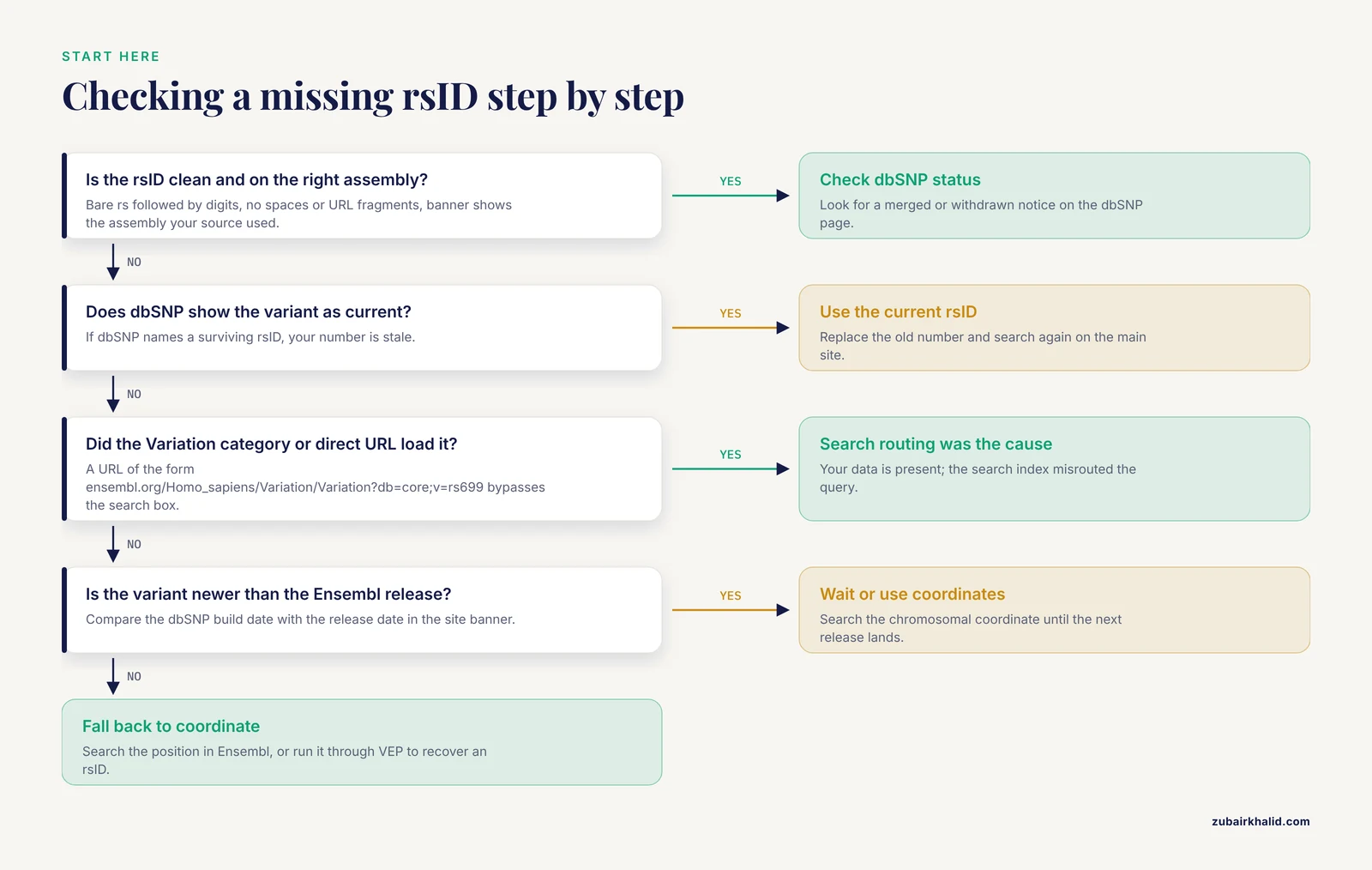
Follow these steps in order. Most readers resolve their problem at step 2 or step 3.
- Check the exact string. Copy the rsID again from your source. It should match the pattern rs followed by digits (for example rs699). Remove leading or trailing spaces, line breaks, quotes, commas, or a pasted URL fragment. Ensembl is tolerant of the "rs" prefix being present but a stray character will produce a no-result page rather than an error.
- Confirm species and assembly. Look at the top banner of the page. It names the species and assembly. If you need human GRCh38 data, the main ensembl.org site is correct. If your source paper used GRCh37 (also called hg19), you need the GRCh37 archive site, which Ensembl maintains separately.
- Use the right search type. On the results page, Ensembl offers categorized search options such as Gene, Variation, Phenotype, and Location. Choose Variation. The default all-categories search sometimes surfaces a gene or a phenotype entry first and can appear to have "not found" your variant when in fact the variant result is lower on the page.
- Cross-check in dbSNP. Search the same rsID at the NCBI dbSNP website. If dbSNP shows the variant but Ensembl does not, note the dbSNP "current" rs number, the organism, and the build, because those three facts point directly at the cause.
- Try the identifier directly in the URL. Ensembl supports direct variation pages. A URL of the form ensembl.org/Homo_sapiens/Variation/Variation?db=core;v=rs699 loads the variant record for rs699 without going through the search interface at all. If that page loads but the search box failed, your problem was in the search routing, not the data.
- Check for merged IDs. On the dbSNP page for your rsID, look for a "merged" notice. If your number was merged into another rsID, Ensembl will usually resolve the old number automatically, but during release transitions it may not. Use the current rs number instead.
If all six steps fail, your variant is likely absent from the Ensembl Variation import for that species and release. The later sections on alternatives cover what to do then.
Troubleshooting Table
This table is the core reference for the article. Each row pairs a symptom with the mechanism behind it, a way to confirm it, and the fix.
| Symptom | Likely cause | How to confirm | Fix |
|---|---|---|---|
| Search returns "no results" for an rsID you know is real | Wrong assembly or archive site | Banner shows GRCh37, a year-old release number, or a mirror domain | Switch to the main ensembl.org site for current GRCh38 data, or the dedicated GRCh37 archive site if your source used hg19 |
| dbSNP shows the variant, Ensembl does not | Merged or withdrawn rsID | dbSNP page displays a merge notice or "withdrew" status | Use the current (merged-into) rs number, or search the chromosomal coordinate instead |
| Search works for human rsIDs but not your species | Species has little or no imported variation data | Check the species page for a Variation link, and check which dbSNP build Ensembl imported | Query dbSNP directly for that organism, or use the species-specific variation sources listed on its Ensembl page |
| You get a gene page or phenotype page instead of a variant page | Wrong search category selected | The results page shows tabs or grouped hits | Choose the Variation category, or load the variant by direct URL |
| Paste of several rsIDs finds only some | Malformed list or mixed-assembly IDs | Check each ID individually | Search one ID at a time, or use a batch method (see the bulk section below) |
| Variant page exists but has no genotype frequency, no clinical significance, or no phenotype data | The variant record exists but a specific data layer is empty | Compare the empty track against the same page in a recent release | Enable the relevant track or check the source database (such as dbSNP or ClinVar at NCBI) directly, since Ensembl imports some annotations on a slower cycle |
| REST API returns 404 for an rsID the website finds | Endpoint, species, or expansion mismatch in the request | Inspect the exact URL and the species segment | Correct the endpoint path and confirm the species name matches the Ensembl naming convention |
| Variant appears in a paper at a coordinate but has no rsID | The paper's variant was never submitted to dbSNP, or is a somatic or novel variant | Search the coordinate itself in Ensembl | Use coordinate-based search, and assign the variant your own internal identifier |
Causes From Most Common to Rarest
1. Genome Assembly Mismatch
Human reference genomes come in major versions. GRCh38 (Genome Reference Consortium build 38, released in 2013 and referred to as hg38 in UCSC terminology) is the current Ensembl default. GRCh37 (hg19) remains heavily used because many large datasets, including some clinical pipelines, were built on it. Ensembl keeps a separate GRCh37 archive site so old coordinate mappings stay reproducible.
The failure mode looks like this: you read a paper that reports rs12345 at a GRCh37 coordinate, you open Ensembl, and the site is serving GRCh38. If the variant was imported under its GRCh37 context and the current release has repositioned it, or if you are on the archive site while the variant only appears in newer releases, the search can return nothing. Conversely, being on the archive site and searching a recently submitted variant will also fail, because archives are frozen snapshots of a past release and never gain new data.
The mechanism is worth restating plainly. Archive sites are fixed. They do not update. Any variant that dbSNP accepted after the archive release date will never appear there. If your workflow depends on GRCh37 for coordinate stability, search your rsIDs on the main site first, since Ensembl projects most variant positions between assemblies, then fall back to the archive only for coordinate verification.
2. Merged and Withdrawn rsIDs
dbSNP assigns an rsID when a variant is first submitted. When two submissions turn out to describe the same variant, or when a submission is retracted, NCBI does not delete the old number. It marks it as merged into a surviving rsID, or as withdrawn. This preserves citation history but creates exactly the situation that generates most "Ensembl variant search rsID not found" complaints: the number in your spreadsheet or in an old paper is no longer the live identifier.
Ensembl's Variation database is built from dbSNP imports. In most cases Ensembl resolves merged IDs transparently and lands you on the current record. However, timing matters. There is a window between a dbSNP merge event and the next Ensembl release in which the old ID can fail to resolve. Withdrawn variants are the sharper problem: a withdrawn rsID may have no current variant record at all, and no search strategy will return one, because the underlying claim was retracted by the submitting laboratory.
How to confirm: the NCBI dbSNP page for any rsID states its status at the top. If it says the RS was merged, it names the surviving rsID. If it says withdrawn, it explains why. Both are definitive.
How to fix: replace the stale rsID with the current one and re-run your search. If the variant was withdrawn, treat the variant claim itself as unsupported and look for whether it was re-annotated under a different accession.
3. Using the Wrong Search Tool or Search Category
Ensembl's homepage search is a multi-index search. It tries to interpret your string as a gene symbol, a protein name, a phenotype, a genomic location, or a variant identifier. A clean rsID usually routes to the Variation index, but messy input does not. Common real inputs that fail include:
- A pasted URL such as a full dbSNP link instead of the bare rsID
- An rsID with a trailing space, comma, or period from a spreadsheet cell
- Mixed capitalization such as RS699, which Ensembl generally tolerates but some third-party tools do not
- An rsID with a leading "s" lost during copy-paste, turning it into a number that matches nothing
A related and very common mistake is searching for the rsID in a gene-specific page's variation table filter. Ensembl's Variation Table, available on any Location or Gene view under the Variation tab, lists variants in that region. If your variant is a short distance outside the displayed region, or outside the gene boundaries you assumed, filtering that table will never find it even though the variant exists and is searchable globally.
The fix is to always run the first lookup from the global search bar with the bare rsID, then navigate to regional views afterward.
4. Release Lag Between dbSNP and Ensembl
dbSNP accepts new submissions continuously. Ensembl imports and processes variation data on a release cycle, roughly a few times per year for the main vertebrate release. A variant submitted to dbSNP three months ago can be fully present at NCBI but absent from the current Ensembl release. This is not an error on either side. It is a pipeline interval.
How to confirm: check the dbSNP "build" information on the variant page, which states when the variant entered dbSNP, and compare it with the Ensembl release date shown in the site banner. If the variant is newer than the Ensembl release, the absence is expected.
How to fix: query dbSNP directly for the current record, and use the chromosomal coordinate in Ensembl in the meantime. The coordinate search works regardless of variation import status because it reads the reference sequence, not the variant database. When the next Ensembl release lands, the rsID will resolve normally.
5. Non-Human Species and Species With Sparse Variation Imports
rsIDs are not human-only. Dog, cattle, mouse, chicken, rice, and many other organisms have dbSNP entries, and Ensembl imports variation for many of them. But import depth varies enormously. Human variation data runs to hundreds of millions of records from large population sequencing projects. For many livestock and wildlife species, Ensembl imports whatever the community has submitted, which may be a small fraction of actual variation in that breed or population.
This matters for readers working across species: a farm animal or companion animal variant can be real, published, and genotyped in your own data, yet absent from Ensembl because no one submitted it to dbSNP or because the relevant Ensembl release did not include that dataset. Searching harder will not fix a data gap.
How to confirm: open the species page on Ensembl and check whether a Variation link exists and what variation sources are listed. Then check the organism's dbSNP presence at NCBI directly.
How to fix: for sparse species, treat dbSNP and breed-specific or species-specific variant resources as the primary source, and use Ensembl for gene annotation and coordinate context rather than variant lookup.
6. Ensembl Rapid Release and Ensembl Genomes Differences
Not all Ensembl sites carry the same data. Ensembl Rapid Release is a service that publishes newly annotated genomes on a faster cycle than the main release, and it supports a more limited set of tools and data types. Ensembl Genomes covers plants, bacteria, fungi, protists, and metazoa outside the main vertebrate browser. Variation support on these services is thinner and sometimes absent.
If a search works on the main site but not on Rapid Release, or if you landed on an Ensembl Genomes page for a species that also exists in the vertebrate browser, the service itself is the cause. The fix is to run the search on the main Ensembl site and confirm which service holds variation data for your species.
7. Strand, Allele, and Coordinate Confusion in the Source Material
Sometimes the rsID search fails because the number itself was transcribed incorrectly upstream. Papers and older databases occasionally report rsIDs with flipped alleles or with coordinates from a different assembly. If the paper you are working from made an assembly error or a transcription error, no amount of correct searching will find the variant.
How to confirm: search the coordinate from the paper rather than the rsID. If the coordinate lands on a variant but with a different rs number, you have found a transcription or merge discrepancy. If the coordinate lands on no variant, check the coordinate in both GRCh37 and GRCh38.
8. Somatic, Novel, and Non-dbSNP Variants
COSMIC, the Catalogue of Somatic Mutations in Cancer maintained by the Wellcome Sanger Institute, catalogues many tumor variants that never received rsIDs because they are somatic (acquired in a tumor rather than inherited) or rare. Similarly, variants discovered in your own sequencing data that were never submitted to dbSNP have no rsID by definition. There is nothing for the search to find.
The fix is to search by coordinate. Ensembl's Location view accepts input like chromosome, position, for example a chromosome number followed by a base position, and will show you every variant recorded at that site.
9. Programmatic Access Problems
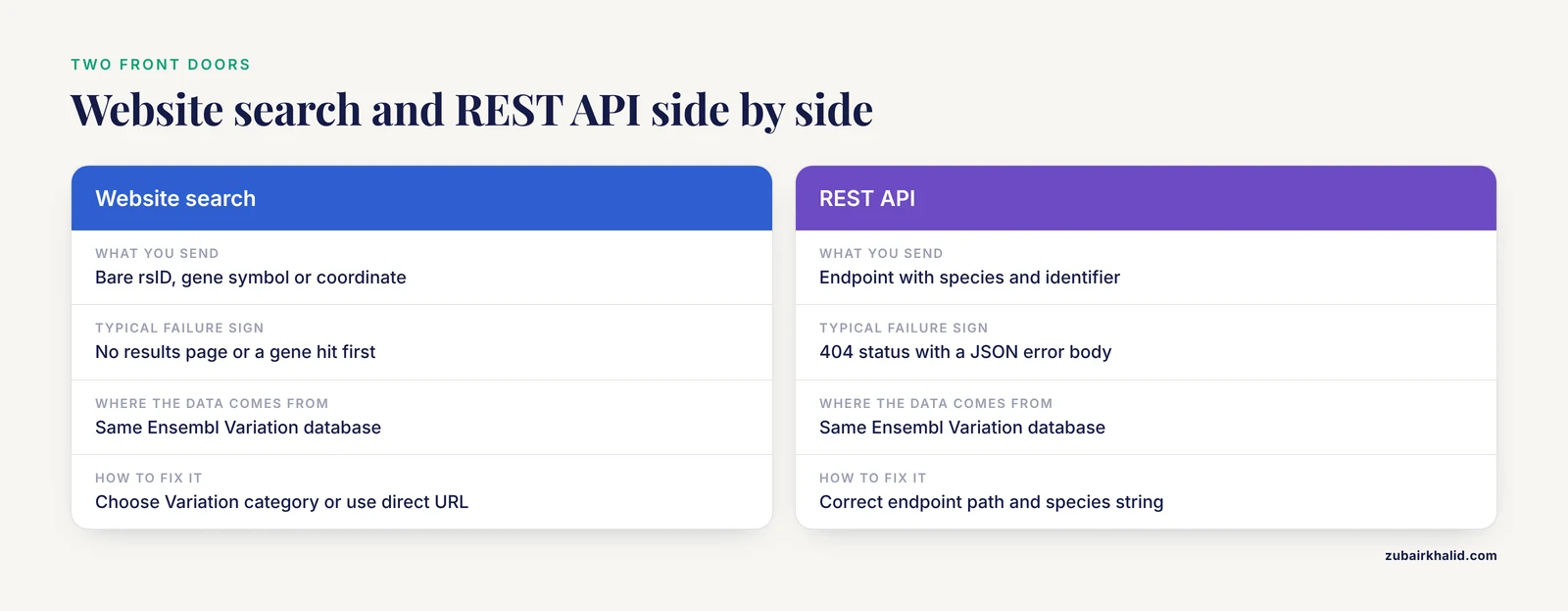
Readers who query Ensembl through the REST API face the same data issues plus a second layer of request-format issues. The REST API is the programming interface Ensembl provides for automated queries, and it returns variant records at endpoints of the form rest.ensembl.org/variation/species/identifier.
A request for a variant that exists will return a JSON record with the variant's location, alleles, and supporting evidence. A request for a variant that does not exist in that species returns a 404 status with a JSON error body. Common request errors include using the wrong species string, omitting the content-type header, forgetting to URL-encode special characters, and sending a coordinate where the endpoint expects an identifier (the coordinate lookup uses a different endpoint family).
A working example, using the widely available curl command-line tool:
curl -H "Content-Type: application/json" "https://rest.ensembl.org/variation/homo_sapiens/rs699?content-type=application/json"If this returns a variant record, the rsID is live in the current Ensembl release and your website search problem was routing. If it returns 404 while dbSNP shows the variant, apply the earlier steps, because the API and website read the same underlying data. A brief note for readers scripting these calls: validate your script on one identifier before looping over thousands, and watch your request rate, since Ensembl publishes fair-use limits for the public API and sustained rapid querying can lead to throttled responses.
10. Distinguishing "Variant Not Found" From "Variant Found, Annotation Empty"
A frequent source of confusion is the variant page that loads but appears empty. Ensembl variant pages display several independent data layers: allele frequency from population projects, regulatory consequence, phenotype and disease associations from imported sources, and links out to dbSNP and ClinVar (NCBI's clinical variant database). Each layer imports on its own schedule. A recently discovered variant can have a record with almost nothing on the page except its position and alleles, and a reader can misread that as a failed search.
The fix is diagnostic, not corrective: if the page loaded with a position and allele list, the search worked. The absence of frequencies or clinical annotations reflects what the source databases currently hold for that variant, and checking dbSNP and ClinVar directly will show you the same gaps from the source side.
Worked Examples
Concrete examples make the failure modes tangible. All three rsIDs used here are well-established variants that appear in standard human genetics references.
Example 1, a straightforward success. Search rs699 on the main Ensembl site. rs699 is a variant in the AGT gene (angiotensinogen) that has been studied for decades in blood pressure research. The search routes to the variation page, which shows the gene, the amino acid change, and population frequencies. Nothing special is needed. This is the baseline behavior you should expect for any long-established human rsID.
Example 2, assembly sensitivity. Take any rsID from a genetics paper published before 2016. Most human genetics papers from that era used GRCh37 coordinates. If you are on the GRCh37 archive site, the search may behave differently from the main site, because the archive holds a frozen release. The correct workflow is to confirm the rsID resolves on the main site, then use the archive only when you need the historical coordinate context that matches your paper.
Example 3, the coordinate fallback. If you have a variant with no rsID at all, from your own sequencing pipeline, search its coordinate. Type the chromosome and position into the search bar, or navigate through the Location view. Ensembl will show any imported variants at that exact site. If none exist, the reference sequence itself still loads, which lets you confirm the coordinate is meaningful before you investigate whether your variant caller produced a real signal.
Alternative Routes When Search Fails
Ensembl offers multiple paths to the same variant record. When the front-door search fails, these routes usually succeed because they bypass the search index entirely.
Direct URL construction. As shown in the diagnostic sequence, a URL that names the species, the Variation view, and the identifier loads the record directly. This is the single most reliable manual method and works even when the search index behaves oddly.
Coordinate search. Type the chromosome and position, or paste a coordinate range, into the search bar. Then open the Variation tab on the resulting Location view. Any imported variant at that position will be listed, with its rsID if it has one. This also answers the reverse question of how to convert a coordinate to an rsID.
Variant Effect Predictor (VEP). VEP is Ensembl's annotation tool, provided through the web interface at the Ensembl site or as a local command-line install. It accepts variants described by coordinate, by VCF-style input, or by rsID, and returns predicted consequences. If you have a coordinate, VEP will return the associated rsID when one exists, which makes it both an annotation tool and an ID-recovery tool. The VEP web form on the Ensembl site handles a modest number of variants per submission without any installation.
BioMart. BioMart is Ensembl's batch query interface, reachable from the main site. It retrieves large tables of genes, variants, and their attributes, filtered by region, gene, or identifier list. For readers with dozens to thousands of rsIDs, BioMart replaces one-at-a-time searching entirely.
The Ensembl REST API. Covered above, this is the automated equivalent of the direct URL and the right choice for scripted workflows.
dbSNP itself. When the question is really "does this rsID exist and what is its current status," NCBI dbSNP is the authoritative source, because it is where rsIDs originate. Check it first when Ensembl's answer is ambiguous.
A Compact Ensembl Genome Browser Tutorial for Variant Work
Readers searching for how to use Ensembl and for an ensembl genome browser tutorial usually want the variant-relevant subset, so here it is, end to end.
Starting a search. From ensembl.org, choose your species, then use the search bar. Acceptable inputs include rsIDs, gene symbols, and coordinates. After searching, the results page groups hits by type. Select the Variation hit for a variant.
Reading a variant page. The variant page has a left-hand menu of views. The key ones are:
- Overview and Location, which show the exact position, the alleles, and the genome assembly
- Genes and regulation, which lists overlapping genes and predicted regulatory consequence
- Population genetics, which shows allele frequencies from imported population projects where available
- Phenotypes and clinical significance, which links imported phenotype and clinical data
Navigating from variant to context. Every variant page links to its genomic Location view. From there, the Variation tab lists all variants in the visible region, which is how you discover neighboring variants and confirm that a specific rsID belongs to the region you are studying.
Exporting data. Location views offer export options for the sequence and for annotation tracks. Variant tables can be exported in common tabular formats. Use export rather than manual copying whenever you need more than a handful of records, because manual transcription is the main source of the stale-ID problem described earlier.
Checking the assembly at every step. The assembly name appears in the banner and in every coordinate display. Build the habit of glancing at it each time the page changes, because following an external link can land you on a different assembly without any dramatic visual cue.
Working With rsIDs in Bulk
Single searches are fine for a handful of variants. Real projects rarely involve a handful. When you need to check many rsIDs, one-at-a-time searching is slow and masks patterns, such as a whole batch of IDs coming from one stale source file.
The recommended approach: collect your rsIDs into a clean text file with one identifier per line, remove duplicates, then run them through VEP or BioMart in a single batch. VEP's web form accepts pasted lists for moderate-sized jobs. For larger jobs, the REST API or a local VEP installation handles thousands of variants per run. A short safety note on scripting: when you loop over an identifier file in the shell, always test the loop on a copy of the file first, quote variables to prevent partial filenames from being interpreted as commands, and never point cleanup commands such as recursive delete at paths constructed from loop variables. A second note applies to human data: variant lists derived from a patient or research participant are sensitive, so keep identifier files and API logs containing them within your approved data-handling environment rather than pasting them into public web forms, in line with the data-protection expectations that institutions and funders apply to human genomic data.
When the batch completes, reconcile the output against your input list. Every input ID that produced no output row is a candidate for the merged, withdrawn, or not-yet-imported categories above, and each one should be individually checked at dbSNP before you conclude it is wrong.
Prevention Practices
Most rsID search failures are preventable with four habits.
- Record the assembly with every variant. Store GRCh37 or GRCh38 (or the relevant species build) alongside every rsID in your notes and spreadsheets. This single field prevents the majority of mismatches.
- Prefer coordinates in pipelines. rsIDs are convenient for reading, but coordinates in a stated assembly are what pipelines and VEP consume reliably. Keep the rsID as a cross-reference, not as the primary key.
- Pull rsIDs from current dbSNP records. When harvesting variants from older literature, take two minutes to verify each rsID at dbSNP and capture the current number. Merged IDs caught at collection time never become search failures later.
- Re-verify periodically. Variant databases evolve. If a list of rsIDs was validated a year ago and begins failing, suspect merges and withdrawals first, since they accumulate continuously.
Common Mistakes and Limitations
These are the specific, practical errors that recur with Ensembl variant searching, along with the honest limits of the approach.
- Treating rsID absence as proof of variant absence. A failed search means Ensembl has no record under that number in that release for that species. It does not mean the variant is not real. The variant may be new, somatic, unsubmitted, or merged.
- Assuming coordinates are interchangeable between assemblies. GRCh37 and GRCh38 coordinates for the same variant generally differ, sometimes by thousands of bases near centromeres and telomeres. Never mix coordinates across assemblies in one analysis.
- Trusting an rsID's allele from memory. The reference and alternate alleles attached to an rsID can differ between sources because of strand conventions. Always read the alleles off the Ensembl or dbSNP page for the assembly you are using rather than relying on a remembered orientation.
- Copying rsIDs from secondary sources. Reviews and databases sometimes propagate transcription errors in rsIDs. Verify against dbSNP for anything you will cite or pipeline.
- Expecting identical annotations across browsers. Ensembl, NCBI, and UCSC import different datasets on different schedules. Divergent annotations between browsers are normal and usually reflect import timing rather than contradiction.
- Overloading the public API. Ensembl publishes fair-use limits for REST queries. Large jobs belong in a local VEP installation or in batch services, not in a tight unthrottled loop.
- Forgetting that the browser shows a snapshot. Ensembl releases are versioned precisely so results are reproducible. Note the release number when you do an analysis, and cite it, so your results remain interpretable when the live site moves on.
One limitation deserves its own statement. Ensembl search troubleshooting resolves data-access problems, not interpretation questions. Whether a specific variant matters for an individual patient, animal, or research subject requires qualified professional judgment on the full context, and no browser page substitutes for that.
Frequently Asked Questions
Why does Ensembl find my rsID on one assembly but not the other?
Because the two assemblies hold separate variation imports and separate coordinate systems. A variant may be present in the current GRCh38 release but resolve differently or not at all on the GRCh37 archive site, which is frozen at its release date. Check the assembly in the banner first whenever a search result surprises you.
Does a missing rsID mean the variant does not exist?
No. A missing rsID means Ensembl has no record under that identifier in the release and species you searched. The variant may never have been submitted to dbSNP, may be somatic, may have been merged under a new rsID, or may postdate the release you are using.
How do I convert a chromosomal coordinate to an rsID in Ensembl?
Search the coordinate directly in the Ensembl search bar, then open the Variation tab on the resulting Location view. Any imported variant at that position is listed with its rsID if one exists. The Variant Effect Predictor also returns the associated rsID when you submit a coordinate.
Can I search Ensembl by gene instead of rsID?
Yes. Search the gene symbol, open the Gene view, and use the Variation tab to see all variants in the gene region. This is often more informative than a single-variant search because it shows your rsID in the context of neighboring variants and their frequencies.
Why does my rsID show up in dbSNP but not in Ensembl?
The two most likely reasons are a merge or withdrawal at dbSNP that Ensembl has not yet reconciled, and release lag, meaning the variant entered dbSNP after the current Ensembl release was built. Check the status notice on the dbSNP page and compare its build date against the Ensembl release date.
What does it mean when Ensembl marks an rsID as merged or withdrawn?
Merged means dbSNP determined that your rsID describes the same variant as a different, surviving rsID, and the old number redirects. Withdrawn means the original submission was retracted, so there may be no valid current record. In both cases, the dbSNP page for your original ID states exactly what happened.
How do I check many rsIDs at once instead of one at a time?
Use a batch method. Paste your list into the Variant Effect Predictor web form for moderate jobs, use BioMart for table-style retrieval, or script calls against the Ensembl REST API for larger sets. Test your batch on a few known-good rsIDs before running the full list.
Does the Ensembl REST API give different results from the website search?
No. The API and the website read the same underlying Ensembl Variation database, so a genuine data gap appears in both. Differences you see between them come from request formatting, the wrong endpoint or species string, or search routing on the website, not from different data.